
1. Introduktion
This instruction manual provides essential information for the proper installation, operation, and maintenance of your Cooler Master DK9-7E52A-0L-GP CPU Cooler. Please read this manual thoroughly before installation to ensure correct usage and optimal performance.
The Cooler Master DK9-7E52A-0L-GP is designed to provide efficient cooling for CPUs with a thermal design power (TDP) of up to 65 watts, specifically compatible with AMD Socket AM2 and AM3 platforms. Its compact design makes it suitable for systems with height restrictions, such as MITX and MATX cases.
2. Sikkerhedsoplysninger
Overhold følgende sikkerhedsforanstaltninger under installation og drift:
- Sørg for, at dit computersystem er slukket og taget stikket ud af stikkontakten, før du starter installationen.
- Handle the CPU cooler and other components with care to prevent damage.
- Avoid touching the fan blades while the system is powered on.
- Keep the cooler away from liquids and excessive moisture.
- This product contains small parts; keep out of reach of children.
3. Pakkens indhold
Bekræft at alle varer er til stede i din pakke:
- Cooler Master DK9-7E52A-0L-GP CPU Cooler (Heatsink with integrated 80mm fan)
- Pre-applied thermal paste on the heatsink base.
If any components are missing or damaged, contact your retailer or Cooler Master support.
4. Opsætning og installation
Følg disse trin for at installere CPU-køleren:
- Forbered bundkortet: Ensure your motherboard is compatible with AMD Socket AM2 or AM3. If an old cooler is present, carefully remove it. Clean any existing thermal paste from the CPU surface using isopropyl alcohol and a lint-free cloth.
- Placering af køleren: Align the cooler's retention clips with the mounting brackets on your motherboard. The heatsink base, with pre-applied thermal paste, should be centered over the CPU.
- Fastgør køleren: Attach one side of the retention clip to the motherboard bracket. Apply firm, even pressure to the top of the cooler while pushing down the lever on the opposite side of the retention clip until it locks into place on the motherboard bracket. Ensure the cooler is securely seated and does not wobble.
- Tilslut blæseren: Locate the 3-pin fan header on your motherboard (typically labeled "CPU_FAN"). Connect the cooler's 3-pin power cable to this header.
- Endelig kontrol: Double-check all connections and ensure no cables are obstructing the fan blades or other components.
Refer to the image below for product dimensions, which may be helpful for clearance checks within your PC case.
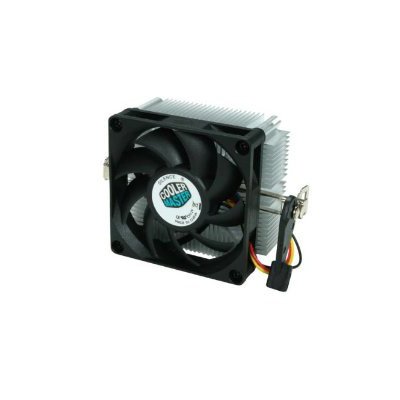
Image: Cooler Master DK9-7E52A-0L-GP CPU Cooler with indicated dimensions (3.03"L x 1.61"W x 2.68"H). This image illustrates the physical size of the cooler, including the fan and heatsink, and the mounting mechanism.
5. Betjeningsvejledning
Once installed, the Cooler Master DK9-7E52A-0L-GP operates automatically. The fan speed is typically controlled by the motherboard based on CPU temperature, ensuring optimal cooling performance while minimizing noise.
- Upon system startup, the fan should begin spinning.
- Monitor CPU temperatures using system monitoring software to ensure effective cooling.
- The cooler is designed for continuous operation within specified environmental conditions.
6. Vedligeholdelse
Regular maintenance helps ensure the longevity and performance of your CPU cooler:
- Fjernelse af støv: Periodically (e.g., every 3-6 months), power off and unplug your computer. Use compressed air to gently blow dust out of the heatsink fins and fan blades. Hold the fan blades to prevent them from spinning rapidly during cleaning, which can damage the fan motor.
- Termisk pasta: The pre-applied thermal paste is designed for long-term use. Reapplication is generally not necessary unless the cooler is removed and reinstalled. If reapplication is required, clean both the CPU and heatsink surfaces thoroughly before applying a new, thin, even layer of high-quality thermal paste.
7. Fejlfinding
Hvis du støder på problemer med din CPU-køler, kan du se følgende almindelige problemer og løsninger:
| Problem | Mulig årsag | Løsning |
|---|---|---|
| CPU-overophedning |
|
|
| Ventilatoren drejer ikke |
|
|
| Overdreven blæserstøj |
|
|
If problems persist after attempting these solutions, contact Cooler Master customer support or your retailer.
8. Specifikationer
| Modelnummer | DK9-7E52A-0L-GP |
| Mærke | Cooler Master |
| Kompatible stikkontakter | AMD Socket AM2/AM3 |
| Maks. Watttage (TDP) | 65 watt |
| Afkølingsmetode | Luft |
| Fan størrelse | 80mm (Slim) |
| Maksimal rotationshastighed | 3200 RPM |
| Støjniveau | 25.17 decibel |
| Strømstik type | 3-benet |
| Voltage | 12 volt |
| Produktmål (L x B x H) | 3.03 cm x 1.61 cm x 2.68 cm |
| Varens vægt | 3.2 ounce |
| Materiale | Metal, Plast |
| Certificeringer | RoHS, UL Certified |
9. Garanti og support
Cooler Master products are manufactured to high quality standards. For warranty information, technical support, or service inquiries, please visit the official Cooler Master webwebstedet eller kontakt din lokale forhandler.
Gem dit købsbevis for garantikrav.