
1. Introduktion
The Digipower DP-FHC12 is a versatile device combining a 37-in-1 card reader/writer with a 3-port USB 2.0 hub. This unit allows for high-speed data transfer between various memory card formats and your computer, as well as expanding your computer's USB connectivity. It is designed for compatibility with both Windows and Mac operating systems, offering a convenient solution for managing digital media and connecting USB peripherals.
2. Pakkens indhold
- Digipower DP-FHC12 Card Reader/Writer and USB Hub Unit
- USB -tilslutningskabel
- Brugervejledning (dette dokument)
3. Funktioner
- Built-in USB 2.0 3-Port Hub for connecting multiple USB devices.
- USB 2.0 transfer rate up to 480 Mbps for fast data exchange.
- Backward compatible with USB 1.1, supporting transfer rates up to 12 Mbps.
- Enables direct data copying between compatible memory cards without requiring intermediate storage.
- Facilitates uploading of photos and data from various media cards to a computer's hard drive.
- Compatible with Windows ME, Windows 2000, Windows XP, MAC OS 9.2.2, and MAC OS X operating systems.
- Supports a wide range of memory card formats including CF, MS, SD, Micro SD, and SM.
4. Produktet er slutview
The Digipower DP-FHC12 unit features multiple slots for various memory card types and three USB 2.0 ports for peripheral connectivity. Indicator lights typically show power status and data transfer activity.
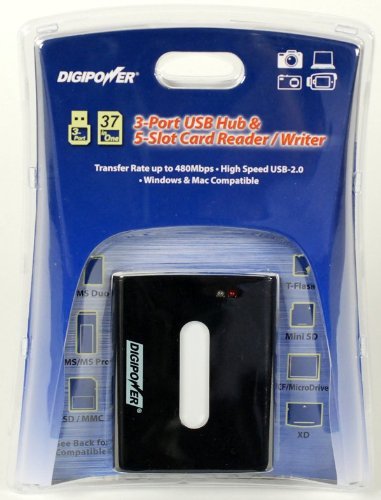
Figur 1: Front view of the Digipower DP-FHC12 unit in its retail packaging, highlighting the card reader slots and USB hub ports. This image shows the device's compact design and the various media types it supports, including MS/MS Pro, SD/MMC, T-Flash, Mini SD, CF/MicroDrive, and XD.
5. Opsætning
- Tilslut USB-kablet: Insert one end of the provided USB cable into the USB port on the Digipower DP-FHC12 unit.
- Tilslut til computer: Insert the other end of the USB cable into an available USB port on your computer.
- Driverinstallation (hvis nødvendigt): For most modern operating systems (Windows XP/Vista/7/8/10, Mac OS X and later), the device is plug-and-play and drivers will install automatically. If prompted, follow the on-screen instructions for driver installation.
- Strømindikator: Once connected, a power indicator light on the unit should illuminate, indicating it is ready for use.
6. Betjeningsvejledning
6.1 Brug af kortlæseren
- Indsæt hukommelseskort: Carefully insert your memory card into the corresponding slot on the Digipower DP-FHC12 unit. Ensure the card is inserted in the correct orientation to avoid damage.
- Adgangsdata: Your computer will detect the memory card as a removable drive. Navigate to 'My Computer' (Windows) or 'Finder' (Mac) to access the card's contents.
- Overfør data: Du kan nu kopiere files to or from the memory card as you would with any other drive.
- Sikker udskubning: Before removing the memory card, always safely eject it from your operating system to prevent data corruption. For Windows, right-click the drive icon and select 'Eject'. For Mac, drag the drive icon to the Trash or click the Eject button in Finder.
- Remove Memory Card: Når det er skubbet sikkert ud, skal du forsigtigt trække hukommelseskortet ud af dets slot.
6.2 Brug af USB-hub'en
- Tilslut USB-enhed: Plug your USB device (e.g., flash drive, mouse, keyboard) into one of the available USB ports on the Digipower DP-FHC12 unit.
- Enhedsgenkendelse: Your computer will recognize the connected USB device.
- Brug enhed: You can now use the connected USB device as normal.
- Afbryd sikker forbindelse: For storage devices, always safely eject them from your operating system before unplugging to prevent data loss.
7. Vedligeholdelse
- Rensning: Brug en blød, tør klud til at rengøre enhedens yderside. Brug ikke flydende rengøringsmidler eller opløsningsmidler.
- Opbevaring: Opbevar enheden et køligt, tørt sted væk fra direkte sollys og ekstreme temperaturer.
- Håndtering: Undgå at tabe enheden eller udsætte den for kraftige stød.
- Havnepleje: Keep the card slots and USB ports free from dust and debris.
8. Fejlfinding
| Problem | Mulig årsag | Løsning |
|---|---|---|
| Enhed ikke genkendt af computeren | Løs USB-forbindelse, defekt USB-port, driverproblem. | Ensure USB cable is securely connected. Try a different USB port on your computer. Restart your computer. Check device manager for driver status. |
| Hukommelseskort ikke fundet | Card inserted incorrectly, incompatible card format, damaged card. | Re-insert the card correctly. Verify the card type is supported by the reader. Try a different memory card. |
| Langsom dataoverførselshastighed | Connected to a USB 1.1 port, system resource issues. | Ensure the device is connected to a USB 2.0 port on your computer. Close unnecessary applications. |
| USB devices connected to hub are not working | Device requires more power than supplied by the hub, faulty USB device. | Connect high-power devices directly to your computer's USB port. Try connecting a different USB device to the hub. |
9. Specifikationer
- Model: DP-FHC12
- Forbindelse teknologi: USB
- USB standard: USB 2.0 (bagudkompatibel med USB 1.1)
- Dataoverførselshastighed: Up to 480 Mbps (USB 2.0), Up to 12 Mbps (USB 1.1)
- USB-porte: 3 x USB 2.0 Hub Ports
- Understøttede medietyper: CompactFlash (CF), Memory Stick (MS), SD Card, microSD, SmartMedia (SM)
- Kompatible operativsystemer: Windows ME, Windows 2000, Windows XP, MAC OS 9.2.2, MAC OS X
- Produktdimensioner: Approximately 21.6 x 16.5 x 5.1 cm (LxWxH)
- Varens vægt: Cirka 113 g
10. Garanti og support
This Digipower product is covered by a limited warranty. Please refer to the warranty card included with your purchase or visit the official Digipower website for detailed warranty terms and conditions. For technical support or service inquiries, please contact Digipower customer service through their official channels.