
1. Introduktion
This manual provides instructions for the setup, operation, and maintenance of your Bose MediaMate Computer Speakers. These speakers are designed to enhance the audio experience for your computer, whether for music, movies, or gaming. The compact design and upward-angled sound projection optimize audio delivery for desktop use, occupying minimal desk space.
2. Sikkerhedsoplysninger
Please read and follow all safety instructions before using this product to prevent electric shock, fire, or injury. Keep this manual for future reference.
- Udsæt ikke højttalerne for vand eller fugt.
- Do not place the speakers near heat sources such as radiators, heat registers, stoves, or other apparatus (including ampløftere), der producerer varme.
- Brug kun tilbehør/tilbehør specificeret af producenten.
- Træk stikket ud af dette apparat under tordenvejr, eller når det ikke skal bruges i længere perioder.
- Overlad al service til kvalificeret servicepersonale. Service er påkrævet, når apparatet er blevet beskadiget på nogen måde, såsom strømforsyningsledning eller stik er beskadiget, væske er blevet spildt, eller genstande er faldet ind i apparatet, apparatet har været udsat for regn eller fugt, ikke fungerer normalt , eller er blevet droppet.
3. Pakkens indhold
Bekræft at alle varer er til stede i din pakke:
- Bose MediaMate Computer Speakers (2 units)
- Strømadapter
- Audio Cable (3.5mm stereo jack)
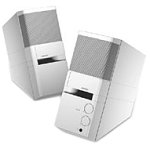
Image: The Bose MediaMate Computer Speakers in Gray. The image shows two compact speakers, one with visible volume and mix controls, and a headphone jack.
4. Opsætning
Follow these steps to set up your Bose MediaMate Computer Speakers:
- Placering: Place the speakers on a flat, stable surface on either side of your computer monitor. Ensure they are angled slightly upward towards your listening position for optimal sound.
- Tilslut lydkabel: Connect the 3.5mm audio cable from the back of the primary speaker (the one with controls) to the audio output jack on your computer.
- Tilslut strøm: Plug the power adapter into the power input on the primary speaker, then plug the adapter into a wall outlet.
- Tænd: Turn on the speakers using the volume knob. The power indicator light should illuminate.
5. Betjeningsvejledning
Once set up, operating your MediaMate speakers is straightforward:
- Lydstyrkekontrol: Use the large knob labeled "VOLUME" on the front of the primary speaker to adjust the overall sound level.
- Mix Control: The "MIX" knob allows you to blend audio from two different sources if you have a second device connected to the auxiliary input.
- Hovedtelefonstik: For private listening, plug your headphones into the headphone jack located on the front of the primary speaker. This will mute the speakers.
- Dobbelt indgange: The speakers feature dual inputs, allowing you to connect and mix two audio sources simultaneously. For example, you can connect your computer and a portable music player.
6. Vedligeholdelse
For at sikre dine højttaleres levetid og optimale ydeevne:
- Rensning: Use a soft, dry cloth to clean the exterior surfaces of the speakers. Do not use liquid cleaners or aerosols.
- Støv: Fjern regelmæssigt støv fra højttalergitrene for at forhindre ophobning, der kan påvirke lydkvaliteten.
- Opbevaring: Hvis højttalerne opbevares i en længere periode, skal de afbrydes fra strømmen og opbevares et køligt og tørt sted.
7. Fejlfinding
If you encounter issues with your Bose MediaMate speakers, refer to the following common problems and solutions:
| Problem | Mulig årsag | Løsning |
|---|---|---|
| Ingen lyd |
|
|
| Forvrænget lyd |
|
|
| Kun én højttaler virker |
|
|
8. Specifikationer
- Mærke: Bose
- Model: MediaMate
- Forbindelse: 3.5mm Audio Input, AC Power
- Lydudgang: Stereoanlæg
- Højttalertype: Multimedier
- Materiale: Metal
- Højttalerstørrelse: 6 Centimeters (Audio Driver)
- Varens vægt: 3 pund
- Farve: Grå
9. Garanti og support
Bose MediaMate Computer Speakers come with a limited warranty. For specific warranty details and duration, please refer to the warranty card included with your product or visit the official Bose webwebsted.
For technical support, product registration, or service inquiries, please contact Bose customer service:
- Telefon: 800-444-2673
- Webwebsted: www.bose.com
Please have your product model number (MediaMate) and purchase date available when contacting support.