
Zavedení
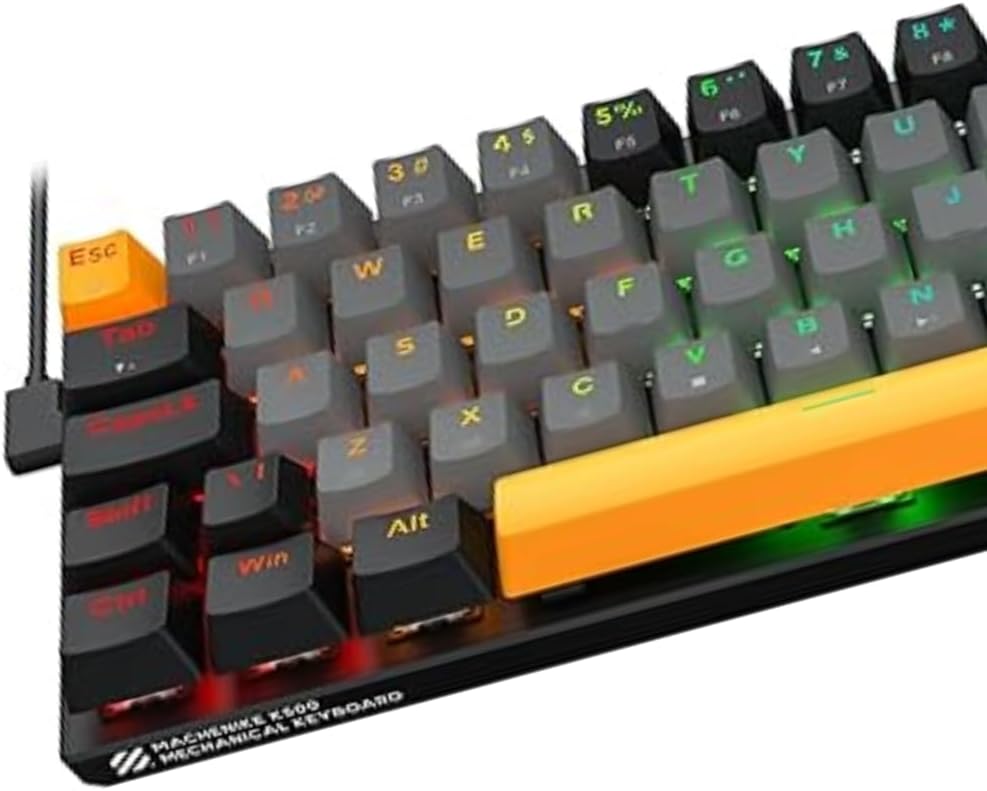
This manual provides instructions for the Machenike K500-B68 RGB Mechanical Gaming Keyboard. This compact 68-key keyboard features a durable aluminum top plate, Huano Red linear hot-swappable switches, and customizable RGB lighting. Designed for both gaming and daily use, it offers a responsive and customizable typing experience.

Nastavení
- Rozbalení: Opatrně vyjměte klávesnici a veškeré příslušenství z obalu.
- Spojení: Connect the keyboard's USB cable to an available USB port on your computer or gaming console. The keyboard is designed for wired operation.
- Instalace ovladače: The Machenike K500-B68 is a plug-and-play device. Your operating system (Windows, macOS, Linux) or gaming console should automatically detect and install the necessary drivers. No additional software installation is typically required for basic functionality.
- Umístění: Position the keyboard comfortably on your desk. The compact 68-key layout provides more space for mouse movement.
Návod k obsluze
Klíčové funkce
- The K500-B68 features a 68-key compact ABNT2 layout, including essential alphanumeric keys and function keys accessible via the Fn klíč.
- Function (Fn) Key Combinations: Many secondary functions, such as media control, volume adjustment, and lighting effects, are accessed by holding down the Fn key and pressing the corresponding key. Refer to the keycap legends for specific combinations.
Ovládání osvětlení RGB
The keyboard features customizable RGB backlighting with multiple effects. Use the following common Fn key combinations to adjust lighting:
- Fn + \|: Přepínání mezi různými režimy RGB osvětlení.
- Fn + ↑ / ↓: Upravte jas podsvícení.
- Fn + ← / →: Upravte rychlost nebo směr světelného efektu.
- Specific keys may also have dedicated lighting functions when combined with Fn.
Hot-Swap Switch Replacement
The K500-B68 supports 3-pin hot-swappable mechanical switches, allowing you to change switches without soldering. This enables customization of typing feel and sound.
- To Remove a Switch: Použijte dodaný nástroj pro vytahování spínačů. Jemně uchopte spínač shora a zdola a poté jej rovnoměrně zatáhněte nahoru, dokud se neoddělí od desky plošných spojů.
- To Install a Switch: Align the pins of the new 3-pin mechanical switch with the holes on the PCB. Press down firmly until the switch clicks into place. Ensure the pins are straight before insertion to avoid bending.

Údržba
- Generální úklid: Regularly clean the keyboard to prevent dust and debris buildup. Use a soft brush or compressed air to remove particles from between the keycaps.
- Čištění kláves: For deeper cleaning, keycaps can be removed using a keycap puller. Wash keycaps with mild soap and water, then ensure they are completely dry before reattaching. The Doubleshot ABS+PBT keycaps are designed for high durability and resistant legends.
- Čištění povrchu: Wipe the aluminum top plate with a soft, damp hadříkem. Nepoužívejte abrazivní čisticí prostředky ani agresivní chemikálie.
- Péče o kabely: Abyste předešli poškození, vyhněte se ostrým ohybům nebo nadměrnému tahání za kabel USB.
Odstraňování problémů
Klávesnice nereaguje
- Zkontrolujte připojení: Ensure the USB cable is securely plugged into both the keyboard and the computer/console. Try a different USB port.
- Restartovat zařízení: Restartujte počítač nebo herní konzoli.
- Test na jiném zařízení: Connect the keyboard to another computer to determine if the issue is with the keyboard or the original device.
Problémy s RGB osvětlením
- Zkontrolujte jas: Ensure the brightness is not set to minimum (Fn + ↑).
- Režimy cyklů: Try cycling through different lighting modes (Fn + \|) to see if the issue persists across all modes.
- Firmware: Zkontrolujte výrobce website for any available firmware updates that might resolve lighting issues.
Klíče se neregistrují
- Clean Key/Switch: Remove the keycap and inspect the switch for any debris. If hot-swapping, ensure the switch is fully seated and its pins are not bent.
- Testovací spínač: If you have spare switches, try replacing the problematic switch to see if it resolves the issue.
Specifikace
| Model | K500-B68 |
| Značka | Machenike |
| Typ připojení | Kabelové |
| Rozložení klávesnice | Compact (68 keys), ABNT2 |
| Typ přepínače | Huano Red (Linear), 3-pin Hot-swappable |
| Osvětlení | RGB (Multiple Effects) |
| Stavební materiál | Hliníková horní deska |
| Klíčenky | ABS+PBT Doubleshot, Laser Engraved |
| Akustika | 2-layer Internal Filling |
| Barva | Šedá a černá |
| Kompatibilní zařízení | Počítače, herní konzole |
Záruka a podpora
Informace o záruce
The Machenike K500-B68 RGB Mechanical Gaming Keyboard comes with a 1letá záruka výrobceTato záruka se vztahuje na vady materiálu a zpracování při běžném používání. Uschovejte si prosím doklad o koupi pro případ uplatnění záruky.
Zákaznická podpora
For technical assistance, warranty claims, or further inquiries, please contact Machenike customer support through their official website or the retailer where the product was purchased. Provide your product model (K500-B68) and a detailed description of the issue to facilitate support.


