
1. Konec produktuview
The G-Shock Casio GD010 digital watch is engineered for durability and functionality, designed to withstand demanding conditions while providing essential timekeeping features. This timepiece incorporates bio-based resin components and a CORDURA re/cor band, reflecting a commitment to environmental considerations.
This manual provides detailed instructions for setting up, operating, maintaining, and troubleshooting your GD010 watch.
Klíčové vlastnosti
- Shock Resistant Construction: Designed to endure impacts and vibrations.
- Struktura ochranného krytu z uhlíkového jádra: Enhances durability and protection for the internal module.
- Vodotěsnost 200 metrů: Suitable for swimming, snorkeling, and diving (non-SCUBA).
- Dlouhá výdrž baterie: Approximately 10 years on a CR2025 battery.
- Bio-based Resin Components: Case and bezel made with environmentally conscious materials.
- CORDURA re/cor Band: Durable strap made from recycled PET plastic fiber.
- Digitální displej: Clear and easy-to-read time and function information.
- Více funkcí: Includes alarm, chronograph (stopwatch), and timer.

Image 1.1: The G-Shock GD010 watch, showcasing its core features including shock resistance, Carbon Core Guard structure, and a 10-year battery life.
2. Začínáme: Nastavení
Funkce tlačítek
Your GD010 watch features several buttons for navigation and function control. Familiarize yourself with their locations and primary roles.

Obrázek 2.1: Boční strana view of the G-Shock GD010, illustrating the location of the control buttons.
- NASTAVENÍ (vlevo nahoře): Používá se pro vstup a výstup z režimů nastavení a pro potvrzení nastavení.
- REŽIM (dole vlevo): Cycles through the watch's various modes (Timekeeping, Stopwatch, Timer, Alarm).
- ZADNÍ STRANA (vpravo nahoře): Used to decrease values or move backward through options during setting.
- FORWARD / START (Bottom Right): Used to increase values or move forward through options during setting. Also used to start/stop stopwatch or timer.
- LIGHT (Center Bottom): Aktivuje podsvícení pro osvětlení.
Počáteční nastavení času a data
- V režimu měření času stiskněte a podržte tlačítko UPRAVIT button until the city code starts to flash, indicating the setting mode.
- Použijte ZVRÁTIT a VPŘED buttons to select your desired Home City Code. This will automatically set the correct time zone.
- Stiskněte tlačítko MODE button to cycle through the settings: DST (Daylight Saving Time) → 12/24-hour format → Seconds → Hour → Minute → Year → Month → Day.
- Pro každé nastavení použijte ZVRÁTIT a VPŘED tlačítka pro změnu hodnoty.
- Jakmile jsou všechna nastavení nakonfigurována, stiskněte tlačítko UPRAVIT tlačítko pro opuštění režimu nastavení.
3. Ovládání hodinek
The GD010 offers various modes for different functions. Press the MODE tlačítko pro jejich procházení.
Režim měření času
Toto je výchozí režim, který zobrazuje aktuální čas, den v týdnu a datum.
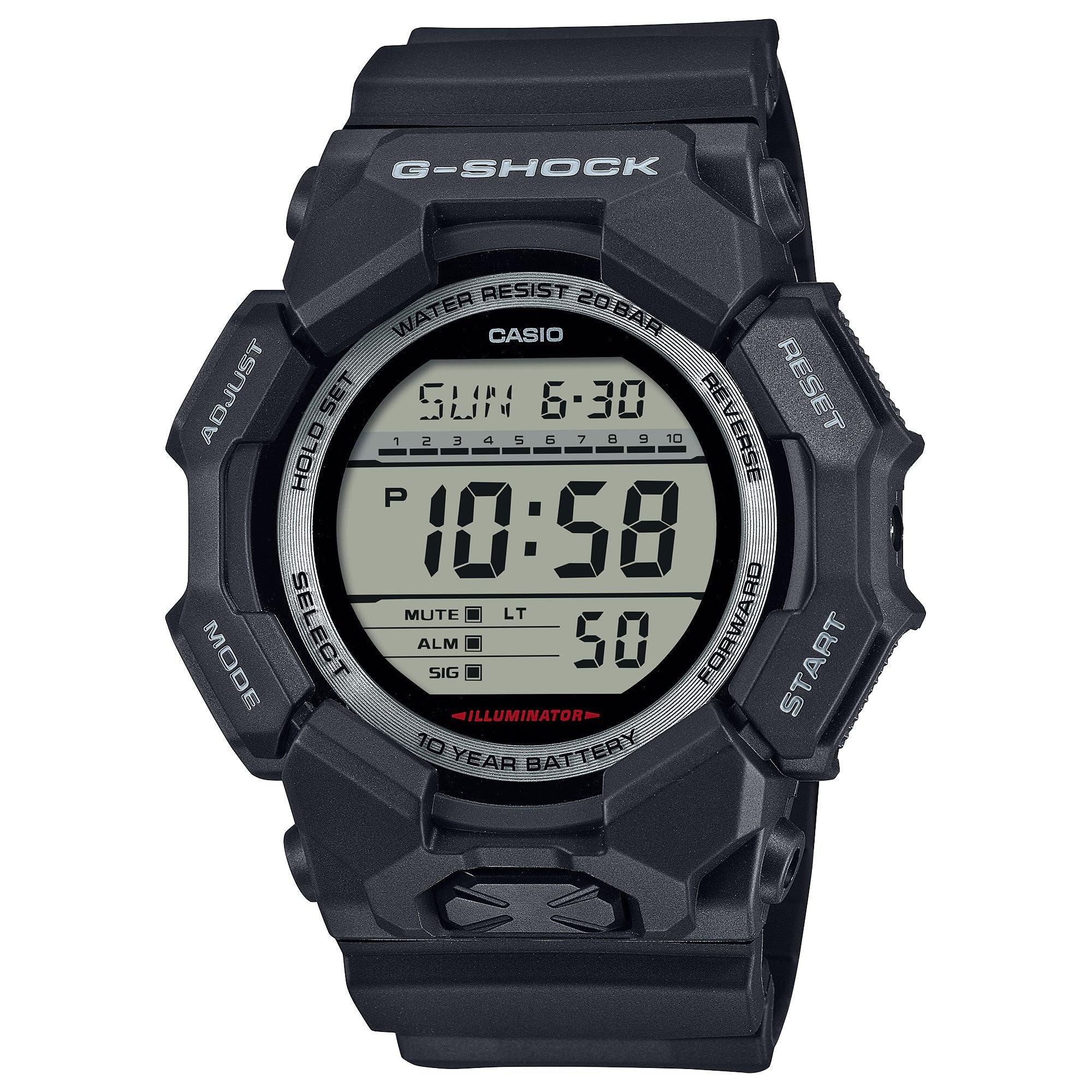
Image 3.1: The G-Shock GD010 watch face in Timekeeping Mode.
Používání stopek (chronografu)
- V režimu měření času stiskněte tlačítko MODE button until "STW" or "STOPWATCH" appears on the display.
- Stiskněte tlačítko FORWARD / START tlačítko pro spuštění stopek.
- Stiskněte tlačítko FORWARD / START znovu stiskněte tlačítko pro zastavení stopek.
- Chcete-li stopky vynulovat, stiskněte tlačítko ZVRÁTIT tlačítko, když jsou stopky zastaveny.
Nastavení odpočítávacího časovače
- V režimu měření času stiskněte tlačítko MODE button until "TMR" or "TIMER" appears.
- Stiskněte a podržte UPRAVIT button until the current timer setting starts to flash.
- Použijte MODE pro výběr nastavení hodin nebo minut.
- Použijte ZVRÁTIT a VPŘED tlačítky nastavte požadovaný čas odpočítávání.
- Stiskněte tlačítko UPRAVIT tlačítko pro opuštění režimu nastavení.
- Stiskněte tlačítko FORWARD / START button to start the countdown. An alarm will sound when the timer reaches zero.
Funkce alarmu
- V režimu měření času stiskněte tlačítko MODE tlačítko, dokud se nezobrazí „ALM“ nebo „ALARM“.
- Stiskněte a podržte UPRAVIT tlačítko , dokud nezačne blikat čas budíku.
- Použijte MODE pro výběr nastavení hodin nebo minut.
- Použijte ZVRÁTIT a VPŘED tlačítky nastavte požadovaný čas budíku.
- Stiskněte tlačítko UPRAVIT tlačítko pro opuštění režimu nastavení.
- Chcete-li zapnout/vypnout budík, stiskněte tlačítko FORWARD / START button while in Alarm Mode (without holding ADJUST).
Pokyny pro odolnost proti vodě
Your GD010 watch is rated for 200-meter water resistance. This means it is suitable for recreational diving (excluding saturation diving), swimming, snorkeling, and water sports.
- Do not operate buttons while the watch is submerged in water or wet.
- Avoid exposing the watch to hot water, steam, or extreme temperature changes, as this can compromise water resistance.
- After exposure to saltwater, rinse the watch thoroughly with fresh water and wipe it dry.
4. Péče a údržba
Obecná péče
- Hodinky pravidelně otírejte měkkým, suchým hadříkem, abyste odstranili nečistoty a vlhkost.
- Avoid exposing the watch to strong chemicals, solvents, or detergents, as these can damage the resin materials.
- Pokud hodinky nepoužíváte, skladujte je na chladném a suchém místě mimo dosah přímého slunečního záření a extrémních teplot.
- The watch's resin components and band are designed for durability, but prolonged exposure to UV light may cause discoloration over time.
Výměna baterie
The GD010 watch is equipped with a CR2025 battery, providing an approximate battery life of 10 years. When the display becomes dim or functions become erratic, it may be time for a battery replacement.
Battery replacement should ideally be performed by a qualified watch technician to ensure proper sealing and maintain water resistance. Attempting to replace the battery yourself may void the warranty and compromise the watch's water resistance.
Čištění
To clean your watch, use a soft cloth dampened with mild soap and water. Gently wipe the case and band. For stubborn dirt, a soft brush can be used. Rinse thoroughly with fresh water and dry completely with a soft cloth.
5. Průvodce odstraňováním problémů
If you encounter issues with your GD010 watch, refer to the following common problems and their solutions.
| Problém | Možná příčina | Řešení |
|---|---|---|
| Displej je prázdný nebo tmavý. | Slabá baterie. | Vyměňte baterii (CR2025). Poraďte se s profesionálním hodinářským technikem. |
| Čas je nesprávný. | Incorrect time zone or manual setting error. | Znovu upravte nastavení času a data, jak je popsáno v části 2. |
| Tlačítka nereagují. | Watch is wet, or internal module error. | Ensure the watch is dry. If the problem persists, a reset may be required (consult support), or professional service. |
| Alarm se nespustí. | Alarm is turned off or volume is too low (if adjustable). | Verify the alarm is set to ON in Alarm Mode. Check watch settings for alarm volume if applicable. |
If the problem persists after attempting these solutions, please contact G-Shock customer support for further assistance.
6. Specifikace produktu
| Název modelu | GD010 |
| Číslo modelu | GD010-1 |
| Case Size (L× W× H) | 54.9 × 51.9 × 16.1 mm |
| Hmotnost | 73 g (přibližně 2.57 oz) |
| Case and Bezel Material | Bio-based Carbon / Bio-based Resin |
| Typ materiálu pásku | Resin (CORDURA re/cor) |
| Konstrukce | Shock Resistant, Carbon Core Guard structure |
| Voděodolnost | Voděodolnost 200 metrů |
| Napájení | CR2025 (1 Lithium Metal battery, included) |
| Přibližná výdrž baterie | 10 roky |
| Krystal | Minerální sklo |
| Typ zobrazení | Digitální |
| Typ pohybu | Japonský křemen |
| Další funkce | Alarm, Chronograph, Timer |
| Typ spony | Přezka |
| Barva pásu | Černý |
| Barva číselníku | Černý |
7. Záruka a zákaznická podpora
Informace o záruce
Your G-Shock GD010 watch comes with a Omezená záruka. The terms and conditions of this warranty cover manufacturing defects under normal use. Please refer to the warranty card included with your purchase for specific details regarding coverage duration, exclusions, and how to make a claim. Keep your proof of purchase for warranty validation.
Kontaktování zákaznické podpory
For technical assistance, warranty service, or any other inquiries regarding your G-Shock GD010 watch, please contact G-Shock customer support.
- Visit the official G-Shock website for support contact information, FAQs, and service center locations.
- Have your watch model number (GD010-1) and proof of purchase ready when contacting support.