
Samsung Galaxy S26 Ultra
Samsung Galaxy S26 Ultra 5G uživatelská příručka
Model: Galaxy S26 Ultra
1. Konec produktuview
The Samsung Galaxy S26 Ultra 5G is a high-performance smartphone designed for advanced users, featuring a built-in privacy display, advanced AI capabilities, a 200MP camera system, and a powerful Snapdragon 8 Elite Gen 5 processor. This manual provides essential information for setting up, operating, and maintaining your device.
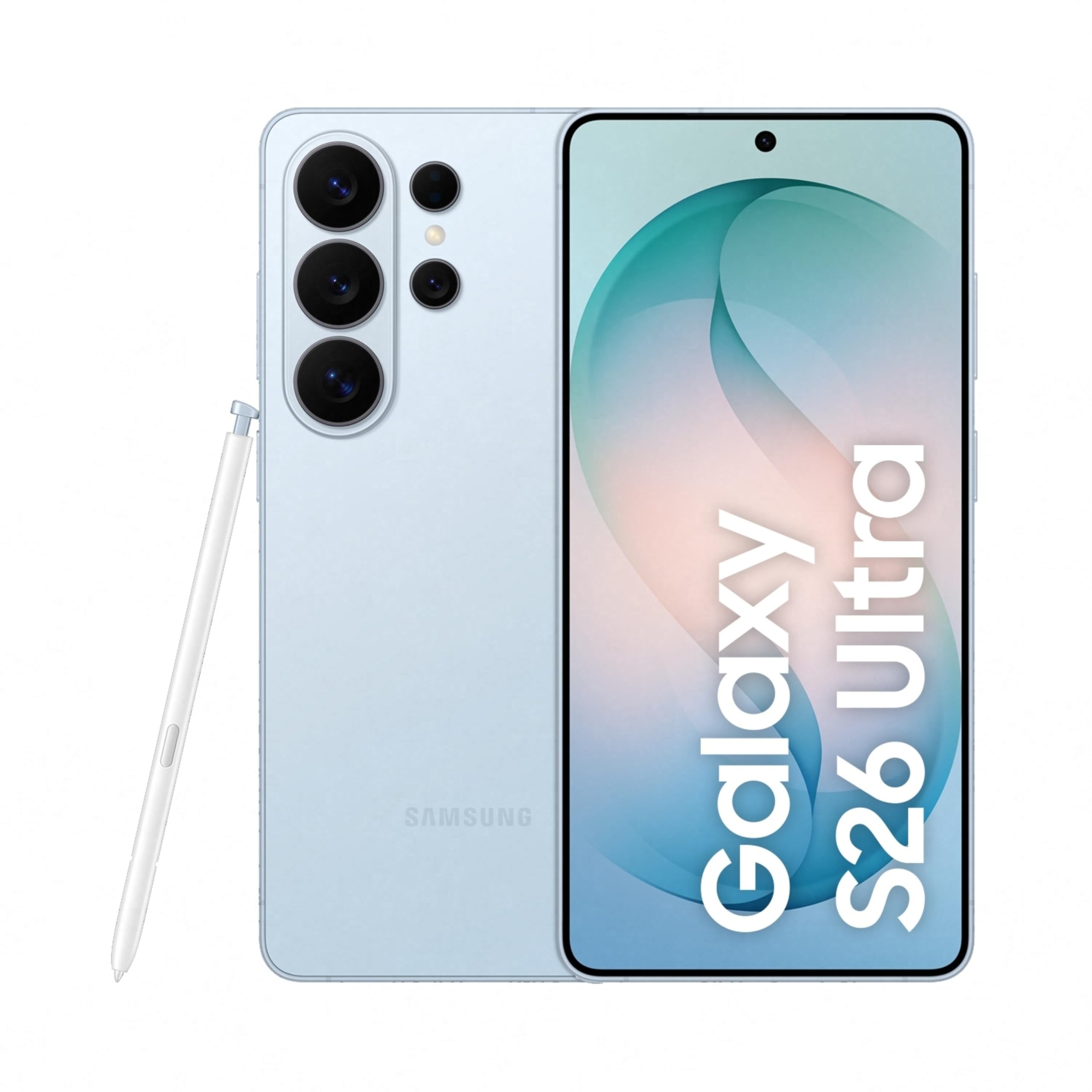
Image: Samsung Galaxy S26 Ultra 5G smartphone in Sky Blue, showcasinjeho elegantní design a modul fotoaparátu.
2. Počáteční nastavení
2.1. Co je v krabici
Your Samsung Galaxy S26 Ultra 5G package includes the following items:
- Smartphone (Samsung Galaxy S26 Ultra 5G)
- Data Cable (Type C to C)
- Kolík pro vysunutí SIM karty
- Rychlý průvodce
- S Pen
2.2. Vložení SIM karty
- Vyhledejte držák SIM karty na boku zařízení.
- Vložte kolík pro vysunutí SIM karty do malého otvoru vedle zásobníku, abyste jej otevřeli.
- Place your Nano SIM card(s) into the tray with the gold contacts facing down. The device supports Dual SIM.
- Jemně zatlačte zásobník zpět do slotu, dokud nezacvakne na místo.
2.3. Počáteční zapnutí a konfigurace
- Stiskněte a podržte tlačítko napájení, dokud se neobjeví logo Samsung.
- Postupujte podle pokynů na obrazovce a vyberte jazyk, připojte se k Wi-Fi a nastavte si účet Google.
- Configure biometric security features such as fingerprint recognition.
3. Obsluha vašeho zařízení
3.1. Základní navigace
The Galaxy S26 Ultra operates on Android 16 with One UI 8.5. Use the touchscreen with stylus support for navigation. Swipe gestures and on-screen buttons are standard for Android devices.

Image: Screenshot of the One UI 8.5 interface, showing various app icons and widgets.
3.2. Privacy Display
The Galaxy S26 Ultra features a built-in Privacy Display. When activated, the screen's pixels dynamically adjust to keep the display visible when viewed straight on, but appear dimmed when seen from the side. This feature helps protect your personal information in public places.
- To activate: Navigate to Nastavení and locate the Privacy Display options.
- Přizpůsobit viewability settings to suit your preferences.
- You can choose to hide the full screen from side view or activate it only for notifications or specific applications.

Image: A demonstration of the Privacy Display, showing how content is visible from the front but obscured from the side.
3.3. Funkce fotoaparátu
Zařízení je vybaveno všestranným kamerovým systémem:
- Zadní kamery: 200 MP Wide, 50 MP Ultra Wide, 50 MP Telephoto (5x Optical Zoom), 10 MP Telephoto (3x Optical Zoom).
- Přední kamera: 12 MP.
- Režimy natáčení: Dual Recording, Food, Hyperlapse, Night, Panorama, Photo, Portrait, Portrait Video, Pro, Pro Video, Single Take, Slow Motion, Video.
- Noční fotografie: Capture clear and detailed videos even in low-light environments.
- Horizontal Lock: Maintain a steady frame during video recording, even when moving.
- Space Zoom: Utilize 100x AI-powered Space Zoom for enhanced clarity at a distance.

Image: Diagram illustrating the camera specifications and lens capabilities of the Galaxy S26 Ultra.

Obrázek: Přample photos demonstrating the clarity and detail captured using the Nightography feature in low-light conditions.
3.4. Funkce umělé inteligence
The Galaxy S26 Ultra integrates advanced AI features to enhance user experience:
- Fotoasistent: Edit photos using simple prompts.
- Kreativní studio: Generate personalized stickers from photos with ease.
- Now Nudge: Receive intelligent, real-time suggestions and reduce steps in daily tasks.
- Nálezce: Quickly search for information on your home screen without opening specific apps.

Image: A phone screen displaying the Photo Assist feature, showing options to edit an image of a dog.

Image: A phone screen demonstrating the sticker generation feature, creating various stickers from a single photo of a dog.
4. Výkon a baterie
4.1. Processor and Cooling
The Galaxy S26 Ultra is powered by the Snapdragon 8 Elite Gen 5 processor, customized for Galaxy devices. It features an improved NPU, GPU, and CPU for smoother graphics and faster AI performance. A newly designed Vapor Chamber efficiently dissipates heat, ensuring sustained performance during demanding tasks like gaming.

Image: Diagram showing the NPU, GPU, and CPU components of the customized Snapdragon processor, highlighting performance improvements.
4.2. Životnost baterie a nabíjení
The device is equipped with a 5000 mAh battery, optimized for all-day use. It supports Super Fast Charging 3.0 (up to 60W) and Super Fast Wireless Charging (up to 25W). You can achieve up to 75% charge in approximately 30 minutes with Super Fast Charging 3.0.

Image: Graphic indicating that the device can charge up to 75% in approximately 30 minutes.
5. Údržba a péče
To ensure the longevity and optimal performance of your Galaxy S26 Ultra, follow these maintenance guidelines:
- Čištění: K čištění obrazovky a těla přístroje používejte měkký hadřík, který nepouští vlákna. Nepoužívejte abrazivní materiály ani agresivní chemikálie.
- Voděodolnost: The device is water-resistant. However, avoid intentional submersion in water or exposure to high-pressure water jets. Dry thoroughly if it gets wet.
- Aktualizace softwaru: Pravidelně kontrolujte a instalujte aktualizace softwaru, abyste mohli využívat nejnovější funkce, bezpečnostní záplaty a vylepšení výkonu.
- Péče o baterie: Vyhněte se extrémním teplotám. Pro optimální stav baterie se snažte udržovat nabití mezi 20 % a 80 %, pokud je to možné.
- Skladování: Pravidelně odstraňujte nepotřebné files and apps to maintain optimal storage and performance.
6. Odstraňování běžných problémů
Pokud se se zařízením setkáte s problémy, vyzkoušejte následující řešení:
- Zařízení nereaguje: Současně stiskněte a podržte tlačítko napájení a tlačítko snížení hlasitosti po dobu přibližně 7–10 sekund, abyste zařízení vynutili restart.
- Rychlé vybíjení baterie:
- Zkontrolujte v Nastavení spotřebu baterie a identifikujte aplikace s vysokou spotřebou energie.
- Snižte jas obrazovky nebo zapněte režim úspory energie.
- Zavřete nepoužívané aplikace běžící na pozadí.
- Problémy s připojením k síti:
- Zapnutí a vypnutí režimu Letadlo.
- Restartujte zařízení.
- Check your SIM card is properly inserted.
- Obnovení nastavení sítě v Nastavení > Obecná správa > Obnovit > Obnovit nastavení sítě.
- Pády nebo zamrzání aplikace:
- Vymažte mezipaměť a data aplikace v Nastavení > Aplikace > [Název aplikace] > Úložiště.
- Odinstalujte a znovu nainstalujte aplikaci.
- Ujistěte se, že je aplikace aktualizována na nejnovější verzi.
- Snímač otisků prstů nefunguje:
- Ujistěte se, že máte prst a senzor čisté a suché.
- Znovu zaregistrujte své otisky prstů v Nastavení > Biometrie a zabezpečení > Otisky prstů.
Pro podrobnější informace o řešení problémů nebo přetrvávajících problémech se obraťte na oficiální podporu společnosti Samsung. webnebo kontaktujte zákaznický servis.
7. Technické specifikace
| Funkce | Specifikace |
|---|---|
| Značka | Samsung |
| Model | Galaxy S26 Ultra |
| Operační systém | Android 16 |
| Procesor | Snapdragon 8 Elite Gen 5 (4.74 GHz) |
| BERAN | 12 GB |
| Kapacita úložiště | 256 GB |
| Zobrazit | 6.9 Inches AMOLED, 3120 x 1440 Resolution, 120Hz Refresh Rate, 499 PPI |
| Rozlišení zadní kamery | 200 MP, 50 MP, 50 MP, 10 MP |
| Rozlišení předního fotoaparátu | 12 MP |
| Kapacita baterie | 5000 miliamp hodiny |
| Nabíjení | Super Fast Charging 3.0 (up to 60W), Super Fast Wireless Charging (up to 25W) |
| Typ SIM karty | Duální Nano SIM karta |
| Konektivita | 5G, Bluetooth, NFC, USB Type C, Wi-Fi |
| Biometrické zabezpečení | Rozpoznávání otisků prstů |
| Voděodolnost | Vodě odolný |
| Rozměry | 8 x 78 x 164 milimetrů |
| Hmotnost | 214 gramů |
| Obsah krabice | Smartphone, Data Cable (Type C to C), SIM Ejection Pin, Quick Start Guide, S Pen |
8. Záruka a podpora
8.1. Informace o záruce
Your Samsung Galaxy S26 Ultra 5G comes with a 1-year manufacturer warranty for the device and 6 months for in-box accessories from the date of purchase. Please retain your proof of purchase for warranty claims.
8.2. Zákaznická podpora
For technical assistance, service, or warranty inquiries, please contact Samsung Customer Support:
- Výrobce: Samsung India Electronics Pvt ltd
- Adresa: 6. patro, DLF Centre, Sansad Marg, Nové Dillí - 110001, Indie
- E-mail: support.india@samsung.com
- Navštivte oficiální podporu Samsungu webweb s častými dotazy a dalšími zdroji.

Image: Samsung Knox Vault logo, representing the device's robust security features.
Ask a question about this manual
Ask about setup, troubleshooting, compatibility, parts, safety, or missing instructions. Manuals+ will review the question and use this page’s manual context to help answer it.