
1. Úvod
This manual provides essential information for the safe and efficient use of your HP 17.3 Inch FHD Business Laptop. Please read this guide thoroughly before operating your device to ensure optimal performance and longevity. This laptop is designed for business and everyday computing tasks, offering a large display, robust performance, and portability.
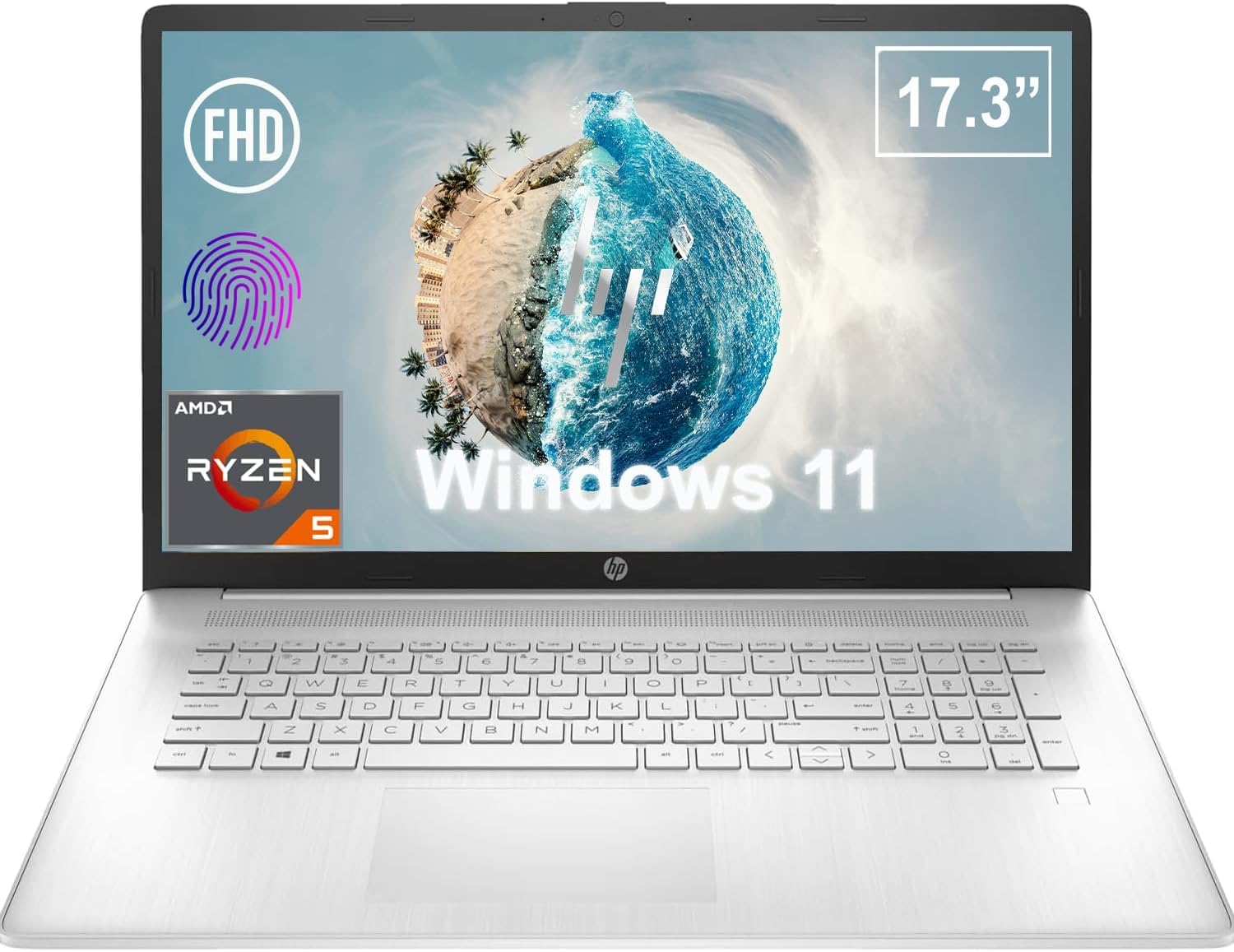
Obrázek 1.1: Přední strana view of the HP 17.3 Inch FHD Business Laptop, showcasinvelký displej a klávesnici.
2. Nastavení
2.1 Vybalení a úvodní kontrola
Opatrně vyjměte všechny součásti z obalu. Zkontrolujte, zda jsou přítomny následující položky:
- HP 17.3 Inch FHD Business Laptop
- Power Adapter (45 W Smart AC Power Adapter)
- Dokumentace (tato příručka, informace o záruce)
Inspect the laptop and accessories for any signs of damage. If any items are missing or damaged, contact your retailer or HP support immediately.
2.2 Připojení napájecího adaptéru
Before first use, ensure the laptop is fully charged. Connect the power adapter to the AC smart pin port on the side of the laptop and then plug the adapter into a power outlet.
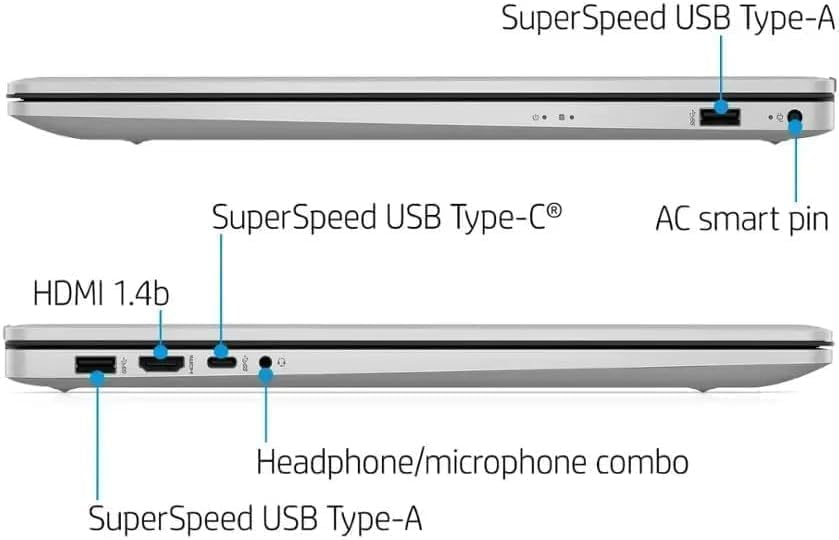
Obrázek 2.1: Strana view illustrating the location of the AC smart pin and other ports.
2.3 Počáteční zapnutí a nastavení systému Windows
Stisknutím tlačítka napájení zapněte notebook. Postupujte podle pokynů na obrazovce a dokončete proces instalace systému Windows 11 Home. To zahrnuje nastavení uživatelského účtu, síťového připojení a počátečních předvoleb.
3. Ovládání notebooku
3.1 Klávesnice a touchpad
The laptop features a full-size QWERTY keyboard with a 10-key number pad for efficient data entry. The integrated touchpad provides precise cursor control. Refer to the operating system's settings for customizing touchpad gestures and keyboard shortcuts.
3.2 Čtečka otisků prstů
For enhanced security and convenient login, utilize the integrated fingerprint reader. Set up your fingerprints through Windows Hello in the Windows 11 settings.
3.3 Webcam and Microphones
The HP True Vision 720p HD Camera and integrated dual array digital microphones are located at the top of the display. These are suitable for video conferencing and online communication.
3.4 Konektivita
- Wi-Fi: The laptop supports 802.11a/b/g/n/ac Wi-Fi for wireless internet access. Connect to available networks via the Windows network settings.
- Bluetooth: Bluetooth 5 allows for wireless connection to compatible devices such as headphones, mice, and keyboards. Enable and manage Bluetooth devices through Windows settings.
3.5 Ports and External Devices
Notebook je vybaven různými porty pro připojení externích zařízení:
- 1 x USB Type-C (5Gbps, Data Only): For connecting USB-C compatible devices and data transfer.
- 2 x USB Type-A (5Gbps): For connecting standard USB devices like external drives, mice, or keyboards.
- 1 x HDMI 1.4b: For connecting to external displays or projectors.
- 1 x Headphone/Microphone Combo: For connecting a headset with a single 3.5mm jack.
- 1 x AC Smart Pin: For connecting the power adapter.

Figure 3.1: Open view of the laptop, highlighting the keyboard and touchpad area.
3.6 Správa baterie
The laptop is powered by a 3-Cell, 41 Wh Li-ion battery, offering up to 8 hours and 30 minutes of video playback. Use the provided 45 W Smart AC Power Adapter for charging. HP Fast Charge technology allows for quicker charging times.
4. Údržba
4.1 Čištění notebooku
To maintain the laptop's appearance and functionality:
- Použijte měkký hadřík, který nepouští vlákna dampvodou nebo specializovaným čističem obrazovek.
- Na klávesnici a šasi používejte měkký, suchý hadřík. Nepoužívejte agresivní chemikálie ani abrazivní materiály.
- Před čištěním se ujistěte, že je notebook vypnutý a odpojený od sítě.
4.2 Aktualizace softwaru
Pravidelně aktualizujte operační systém Windows a ovladače, abyste zajistili optimální výkon, zabezpečení a kompatibilitu. Služba Windows Update je dostupná prostřednictvím nabídky Nastavení.
4.3 Security Software
The laptop comes preloaded with McAfee LiveSafe for security. Ensure this software is active and updated to protect against viruses and other threats.
5. Řešení problémů
Tato část se zabývá běžnými problémy, se kterými se můžete setkat u svého notebooku HP.
5.1 Problémy s napájením
- Notebook se nezapne: Ujistěte se, že je napájecí adaptér bezpečně připojen k notebooku i k funkční zásuvce. Ověřte, zda je baterie nabitá.
- Baterie se nenabíjí: Zkontrolujte napájecí adaptér a kabel, zda nejsou poškozené. Zkuste jinou zásuvku.
5.2 Problémy se zobrazením
- Žádný obraz na obrazovce: Připojte externí monitor a zkontrolujte, zda je problém s displejem notebooku. Restartujte notebook.
- Blikající nebo zkreslený obraz: Update graphics drivers. Adjust display resolution and refresh rate in Windows settings.
5.3 Problémy s připojením
- Nelze se připojit k Wi-Fi: Ensure Wi-Fi is enabled. Restart your router and the laptop. Check network settings for correct password and configuration.
- Zařízení Bluetooth se nespáruje: Ujistěte se, že je na obou zařízeních povoleno Bluetooth. Ujistěte se, že je zařízení v režimu párování a v dosahu.
V případě složitějších problémů se obraťte na podporu HP webnebo kontaktujte zákaznický servis.
6. Specifikace
| Funkce | Detail |
|---|---|
| Značka | HP |
| Název modelu | HP17 |
| Číslo modelu | i5-1135G7 |
| Velikost obrazovky | 17.3 palce |
| Typ zobrazení | IPS, Anti-Glare, LED |
| Rezoluce | 1920 1080 x XNUMX XNUMX (FHD) |
| Obnovovací frekvence | 60 Hz |
| Procesor | AMD Ryzen 5 5500U (6 Cores, 12 Threads, up to 4.0 GHz Max Boost Clock) |
| Grafika | Integrovaná grafika AMD Radeon |
| Paměť RAM | 32 GB DDR4-3200 MHz (Max 64 GB) |
| Skladování | 1TB PCIe NVMe M.2 SSD |
| Operační systém | Windows 11 Home, 64-bit, English |
| Bezdrátové připojení | Wi-Fi 802.11a/b/g/n/ac, Bluetooth 5 |
| Porty | 1x USB Type-C (5Gbps), 2x USB Type-A (5Gbps), 1x HDMI 1.4b, 1x Headphone/Microphone Combo, 1x AC Smart Pin |
| Webvačka | HP True Vision 720p HD Camera |
| Zvuk | Dual Speakers, Integrated Dual Array Digital Microphones |
| Baterie | 3-Cell, 41 Wh Li-ion (Up to 8.5 hours video playback) |
| Napájecí adaptér | 45 W Smart AC Power Adapter |
| Rozměry (Š x H x V) | 40.07 x 25.78 x 2.06 cm (14.14"L x 9.31"W x 0.78"Th) |
| Hmotnost | Začátek v 2.07 kg |
| Speciální funkce | Fingerprint Reader, Lightweight Design, HP Fast Charge |
7. Záruka a podpora
7.1 Informace o záruce
This HP laptop comes with a 1-year manufacturer's limited warranty. For detailed terms and conditions, please refer to the warranty documentation included with your product or visit the official HP support webmísto.
7.2 Zákaznická podpora
If you encounter issues that cannot be resolved using the troubleshooting steps in this manual, please contact HP customer support. You can find contact information and additional resources on the official HP webmísto:
- Podpora HP Webmísto: support.hp.com
- Obchod HP: Obchod HP na Amazonu