
Zavedení
This manual provides instructions for the Philips T2000 True Wireless Bluetooth Earbuds, model TAT2000BK/00. It covers essential information regarding product setup, operation, maintenance, and troubleshooting to ensure optimal performance and user experience. Please read this manual thoroughly before using your earbuds.
Co je v krabici

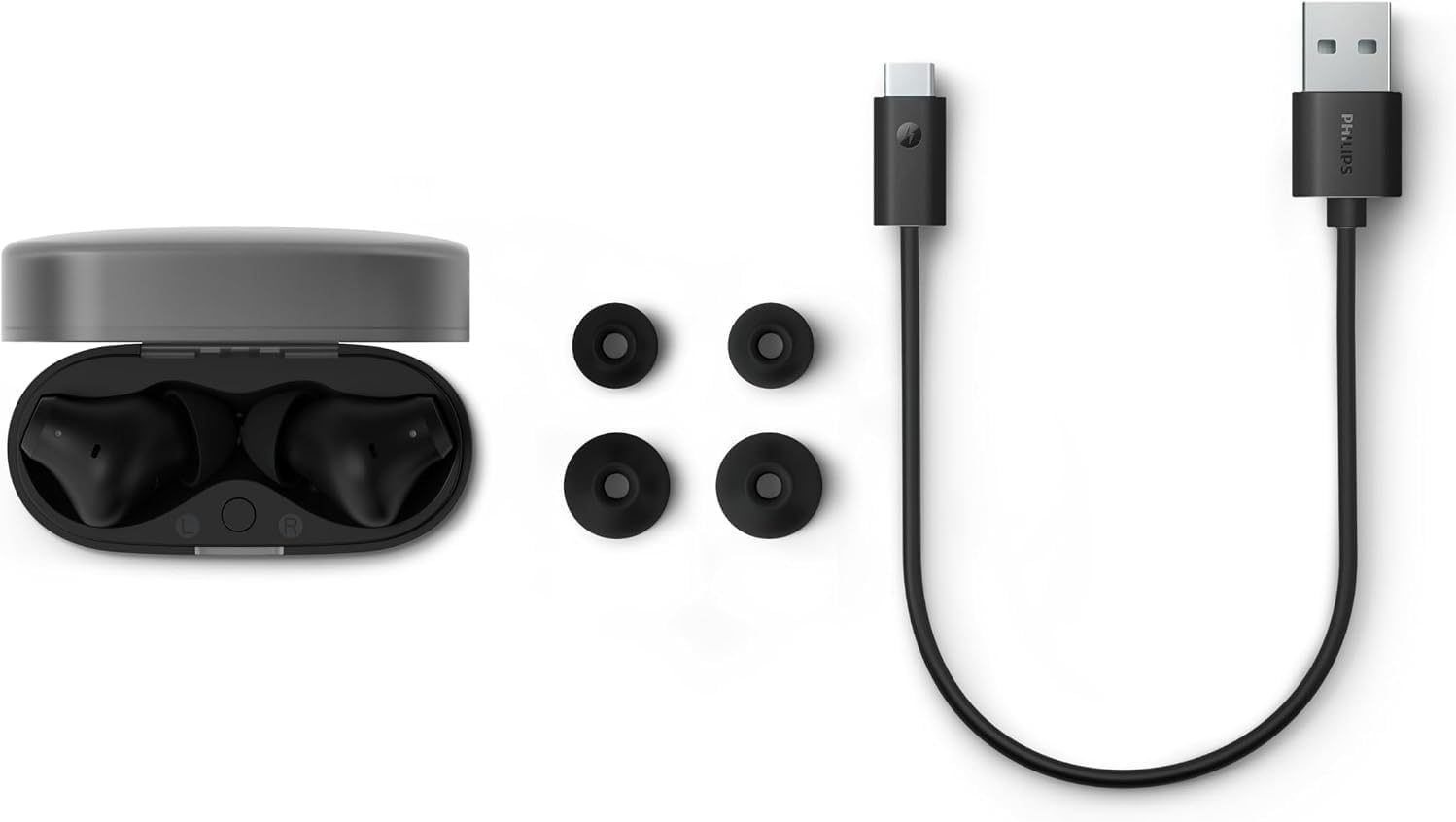
The Philips T2000 True Wireless Bluetooth Earbuds package includes the following items:
- Bezdrátová sluchátka Philips T2000 (levá a pravá)
- Bezdrátové nabíjecí pouzdro
- Nabíjecí kabel USB-C
- Uživatelská příručka (tento dokument)
- Různé velikosti ušních nástavců pro pohodlné nošení
This image displays the Philips T2000 earbuds within their charging case, alongside a USB-C charging cable and additional ear tips, illustrating all components included in the product packaging.
Nastavení
1. Nabíjení sluchátek a pouzdra

Before initial use, fully charge the earbuds and the charging case. Connect the supplied USB-C cable to the charging port on the back of the case and to a USB power source. The charging indicators on the case will show the charging status. A full charge provides approximately 7 hours of playtime for the earbuds, with an additional 25 hours available from the fully charged case. A 10-minute quick charge can provide up to 1 hour of music playback.
This image shows the back of the Philips T2000 charging case, highlighting the USB-C port for charging.
2. Spárování se zařízením Bluetooth

- Otevřete nabíjecí pouzdro. Sluchátka se automaticky přepnou do režimu párování, což bude signalizováno blikajícími světly.
- Na zařízení s podporou Bluetooth (chytrý telefon, tablet, notebook) přejděte do nastavení Bluetooth.
- Select "Philips T2000" from the list of available devices.
- Once connected, the earbuds will confirm pairing, and the indicator lights will change.
This image depicts the Philips T2000 charging case with its lid open, revealing the earbuds and their active indicator lights, signifying readiness for pairing.
3. Nošení sluchátek do uší
Insert the earbuds gently into your ears. Rotate them slightly to find a secure and comfortable fit. Experiment with the different sizes of ear tips provided to achieve the best seal for optimal sound quality and comfort. A proper fit is crucial for effective sound isolation and bass response.
This image shows a person wearing the Philips T2000 earbuds, illustrating how they sit in the ear for a secure and comfortable fit.
Ovládání sluchátek
Dotykové ovládání
The Philips T2000 earbuds feature touch-sensitive controls on each earbud for managing playback, calls, and voice assistant activation. Specific functions can be customized via the Philips Headphones App.
- Jedno klepnutí: Přehrát/Pozastavit hudbu, Přijmout/Ukončit hovor.
- Dvojité klepnutí (pravé sluchátko): Další skladba.
- Dvojité klepnutí (levé sluchátko): Předchozí skladba.
- Trojité klepnutí: Aktivujte hlasového asistenta.
- Stiskněte a podržte: Odmítnout hovor.
Uskutečňování a přijímání hovorů
The earbuds are equipped with 4 microphones and AI-enhanced noise reduction for clear call quality. Use the touch controls to manage calls as described above.
Vícebodové připojení
With Bluetooth 5.4 multipoint, you can connect your earbuds to two devices simultaneously. For example, you can be connected to your laptop for music and your phone for calls. The earbuds will intelligently switch audio sources as needed.
Aplikace Philips Headphones
Download the Philips Headphones App from your device's app store to unlock additional features and customization options. Within the app, you can:
- Adjust the equalizer (EQ) settings to personalize your sound.
- Přizpůsobte si funkce dotykového ovládání.
- Activate or deactivate Dynamic Bass Boost.
- Zkontrolujte stav nabití baterie.
- Aktualizujte firmware sluchátek.
Údržba
Čištění
Regularly clean your earbuds and charging case to maintain optimal performance and hygiene. Use a soft, dry, lint-free cloth to wipe the surfaces. For ear tips, remove them from the earbuds and clean with a mild soap solution if necessary, then rinse and dry thoroughly before reattaching. Do not use abrasive cleaners or solvents.
Skladování
Pokud sluchátka nepoužíváte, uchovávejte je v nabíjecím pouzdře, abyste je chránili před prachem, nečistotami a poškozením. Pouzdro skladujte na chladném a suchém místě mimo dosah přímého slunečního záření a extrémních teplot.
Voděodolnost (IPX4)
The Philips T2000 earbuds are rated IPX4, meaning they are resistant to splashes and sweat. This makes them suitable for workouts and outdoor use in light rain. They are not designed for submersion in water or exposure to pressurized water jets. Ensure the earbuds are dry before placing them back in the charging case to prevent damage.
Odstraňování problémů
If you encounter issues with your Philips T2000 earbuds, refer to the following common solutions:
| Problém | Řešení |
|---|---|
| Sluchátka se nezapínají. | Ensure the charging case and earbuds are fully charged. Place earbuds in the case, close, then reopen. |
| Nelze spárovat se zařízením. |
|
| Žádný zvuk nebo nízká hlasitost. |
|
| Jedno sluchátko nehraje žádný zvuk. | Place both earbuds back into the charging case, close the lid, wait a few seconds, then open the lid and try again. This often re-syncs them. |
| Kvalita hovoru je špatná. | Ensure microphones are not obstructed. Move to a quieter environment if possible. Check for strong Bluetooth connection. |
Specifikace
| Funkce | Detail |
|---|---|
| Číslo modelu | TAT2000BK/00 |
| Značka | PHILIPS |
| Umístění uší | V uchu |
| Form Factor | Skutečné bezdrátové |
| Kontrola hluku | Zvuková izolace |
| Typ zvukového ovladače | Dynamický měnič (6 mm) |
| Technologie připojení | Bezdrátové (Bluetooth) |
| Verze Bluetooth | 5.4 |
| Kontrolní metoda | Dotek |
| Výdrž baterie (sluchátka) | Až 7 hodin |
| Celková doba přehrávání (s pouzdrem) | Až 32 hodin |
| Rychlé nabíjení | 10 minut na 1 hodinu hraní |
| Voděodolnost | IPX4 (odolnost proti stříkající vodě a potu) |
| Mikrofony | 4 (with AI-enhanced noise reduction) |
| Speciální funkce | Dynamic Bass Boost, Bluetooth 5.4 Multipoint, Philips Headphones App support, Google Fast Pair, Microsoft Swift Pair |
| Nabíjecí port | USB-C |
| Hmotnost položky | 0.29 kg |
Záruka a podpora
The Philips T2000 True Wireless Bluetooth Earbuds come with a 1-letá záruka výrobce. This warranty covers defects in materials and workmanship under normal use. For warranty claims or technical support, please visit the official Philips Sound webnebo se obraťte na zákaznický servis společnosti Philips.
For additional support and product information, you may also visit the Obchod Philips na Amazonu.