
Zavedení
The Fender Mustang LTX50 is a versatile 50-watt modeling combo amplifier designed for guitarists seeking a wide range of authentic Fender tones and modern features. Equipped with a 12-inch Celestion G12P-80 speaker, it delivers dynamic sound suitable for practice, rehearsal, and performance. This amplifier offers 25 amp models and 25 effects, covering various musical styles from clean to high-gain. Its intuitive color display, onboard tuner, and 100 user preset slots provide easy customization and quick access to your preferred sounds. The Mustang LTX50 also features Bluetooth audio streaming for playing along with tracks and USB-C connectivity for direct recording and monitoring.
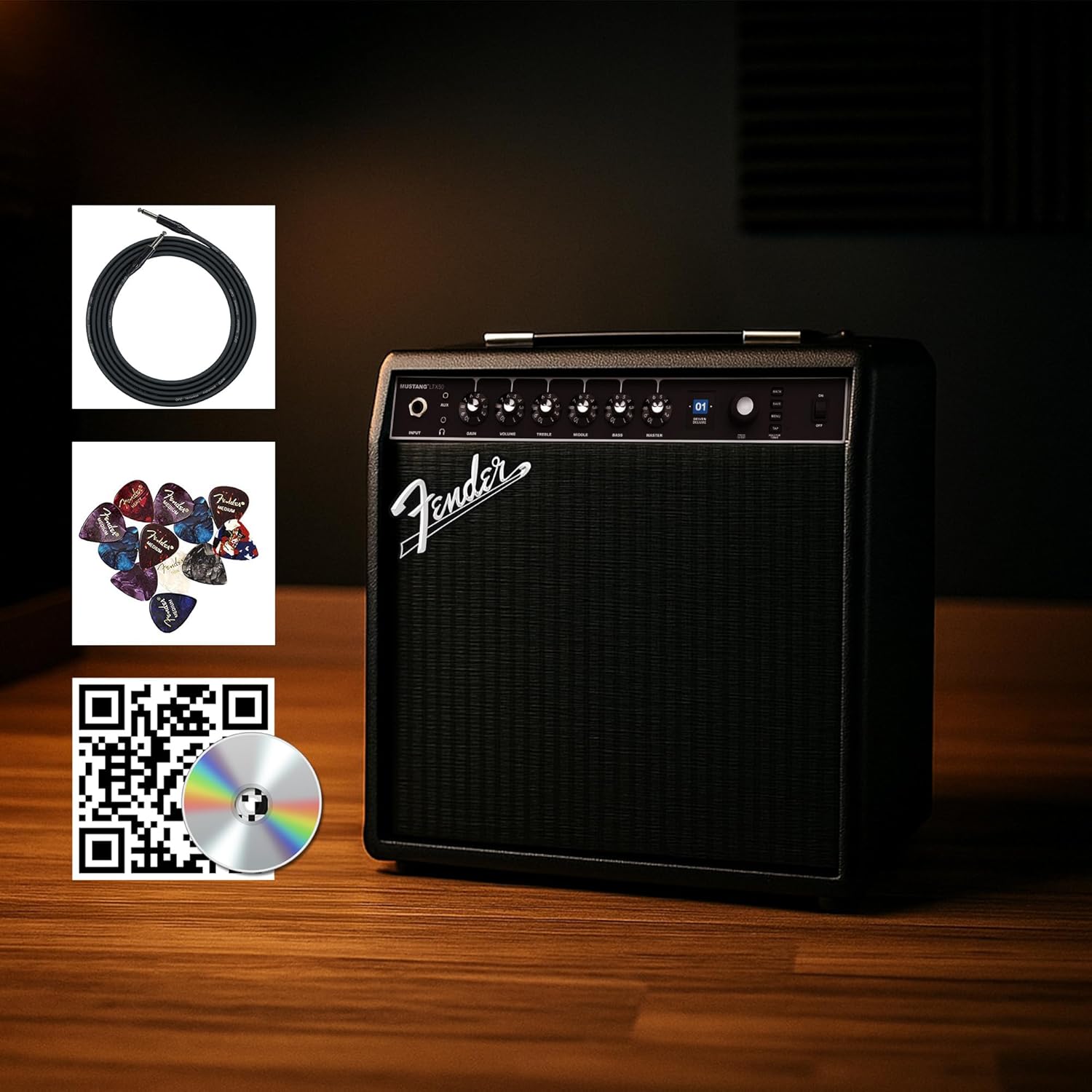
Figure 1: Fender Mustang LTX50 Guitar Combo Amplifier with included accessories.
Nastavení
1. Rozbalení a počáteční kontrola
- Opatrně vyjměte ampvyjměte záchranář a veškeré příslušenství z obalu.
- Zkontrolujte amplifier for any signs of damage that may have occurred during shipping.
- Confirm all included items are present: Mustang LTX50 amplifier, power cord, instrument cable, 12-pack guitar picks, and instructional DVD.
2. Připojení napájení
- Zajistěte ampVypínač zařízení Liferier je v poloze VYPNUTO.
- Connect the included power cord to the AC input on the rear panel of the ampživější.
- Zapojte druhý konec napájecího kabelu do uzemněné elektrické zásuvky.
3. Zapojení kytary
- Use the included instrument cable to connect your guitar to the VSTUP konektor na předním panelu ampživější.
4. Základní ovládací prvky Overview
Familiarize yourself with the front panel controls before powering on the ampživější.
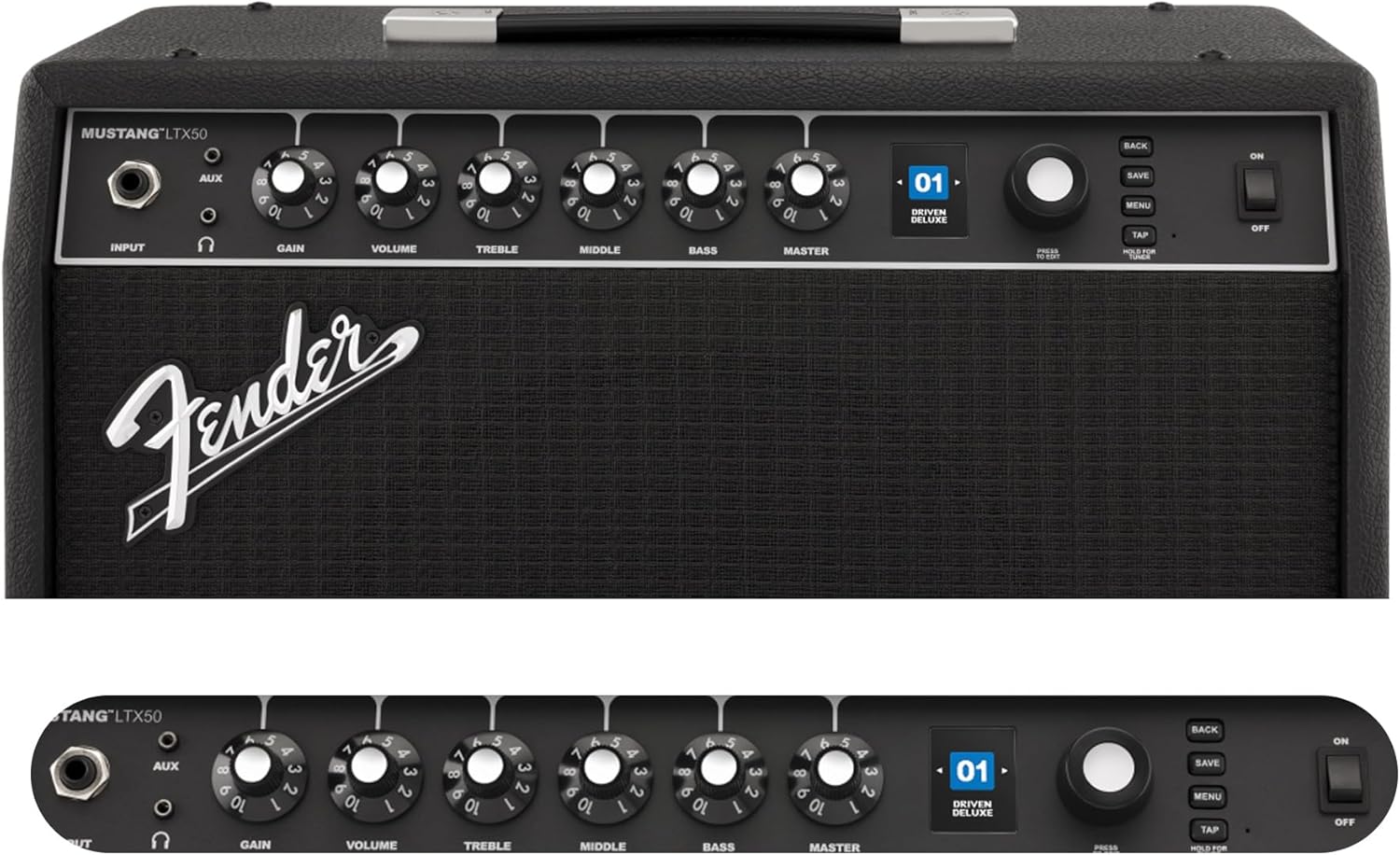
Figure 2: Front Panel Controls of the Mustang LTX50.
Návod k obsluze
1. Zapnutí/vypnutí
- To power on, ensure all volume controls are set to minimum, then flip the MOC přepněte do polohy ON.
- Chcete-li vypnout, otočte MOC přepněte do polohy OFF.
2. Navigace v předvolbách
- Použijte ENKODÉR knob (large rotary knob) to scroll through the 100 available presets (70 factory, 30 user).
- Stiskněte tlačítko ENKODÉR knob to select a preset.
- The color LCD displays the current preset number and name.
3. Seřizování Amp Modely a efekty
- Stiskněte tlačítko MENU tlačítko pro přístup k amplifier's settings.
- Navigate through options like AMP, STOMP, MOD, DELAY, REVERB using the ENKODÉR.
- Select an option and use the ENKODÉR to choose different amp models or effects.
- Adjust parameters for each effect using the smaller control knobs (GAIN, VOLUME, TREBLE, MIDDLE, BASS, MASTER) or by selecting parameters on the display.
- Stiskněte ULOŽIT to store your customized preset.
4. Použití vestavěného tuneru
- Stiskněte a podržte TAP button to activate the chromatic tuner.
- Play a single note on your guitar; the display will show the note and indicate if it is sharp, flat, or in tune.
- Press any button or play for a few seconds to exit tuner mode.
5. Fender Tone 3.0 App Control
- Download the Fender Tone 3.0 app from your device's app store (iOS/Android).
- Povolte na svém mobilním zařízení Bluetooth.
- Na ampzáchranář, stiskněte tlačítko MENU button, navigate to "Bluetooth," and select "Pair."
- Select "Mustang LTX50" from your device's Bluetooth settings to connect.
- Use the app to wirelessly create, edit, save, and share presets, and to manage your ampnastavení zvlhčovače.
6. Playing Along with Audio (Bluetooth)
- Once paired via Bluetooth, you can stream audio from your mobile device directly to the ampživější.
- Adjust the volume of the streamed audio from your mobile device.
- Alternatively, connect an external audio source to the AUX IN jack on the front panel using a 3.5mm stereo cable.
7. Recording via USB-C
- Connect a USB-C cable from the amplifier's USB-C port to your computer (Mac or PC).
- The amplifier functions as a bidirectional audio interface, allowing direct recording and monitoring.
- Refer to your Digital Audio Workstation (DAW) software's manual for specific setup instructions.
Údržba
1. Čištění
- Odpojte ampPřed čištěním vypněte vysavač ze zásuvky.
- K otření vnějších povrchů použijte měkký, suchý hadřík.
- Pro odolnou špínu je potřeba mírněamp Lze použít hadřík s jemným mýdlem a poté suchý hadřík.
- Nepoužívejte abrazivní čisticí prostředky, rozpouštědla nebo vosky, protože by mohly poškodit povrchovou úpravu.
2. Skladování
- Uložte ampUchovávejte na chladném a suchém místě mimo dosah přímého slunečního záření a extrémních teplot.
- Neskladujte v prostorách s vysokou vlhkostí.
- If storing for extended periods, cover the ampochranou před prachem.
3. Safety Warnings (Proposition 65)
This product may contain chemicals known to the State of California to cause cancer, birth defects, or other reproductive harm. For more information, visit www.P65Warnings.ca.gov.
Odstraňování problémů
Žádný zvuk
- Zajistěte amplifier is powered on and the power cord is securely connected.
- Check that your guitar is properly connected to the VSTUP zvedák.
- Ověřte, že ZVLÁDNOUT volume and individual preset volume controls are not set to zero.
- Test with a different instrument cable and guitar to rule out faulty equipment.
- If using headphones, ensure they are fully plugged into the headphone jack and that the main speaker is not muted.
Zkreslený nebo nežádoucí šum
- Check your guitar's volume and tone controls.
- Snižte ZÍSKAT nastavení na ampživější.
- Ensure your instrument cable is not damaged or poorly shielded.
- Zkuste jinou zásuvku, abyste vyloučili elektrické rušení.
- If using high-gain amp models, some distortion is inherent. Adjust settings accordingly.
Problémy s připojením Bluetooth
- Ensure Bluetooth is enabled on both your mobile device and the ampživější.
- Ujistěte se, že amplifier is in pairing mode (refer to "Fender Tone 3.0 App Control" section).
- Přesuňte své mobilní zařízení blíže k ampživější.
- Zkuste zařízení zrušit a znovu spárovat.
- Restartujte oba amplifier and your mobile device.
Amplifier Not Responding
- Cyklus napájení amplifier by turning it off, waiting 10 seconds, and turning it back on.
- If the issue persists, a factory reset may be necessary. Consult the Fender support website for instructions on performing a factory reset for the Mustang LTX50.
Specifikace
| Název modelu | MUSTANG LTX50 |
| Číslo modelu | 2311700000 |
| Značka | Blatník |
| Ampživější typ | Digitální modelování |
| Výkon | 50 wattů |
| Reproduktor | 1 x 12" Celestion G12P-80 |
| Amp Modelky | 25 |
| Efekty | 25 (distortion, overdrive, compression, modulation, reverb, delay, octave, etc.) |
| Předvolby | 70 factory + 100 user slots |
| Zobrazit | Color LCD with onboard chromatic tuner |
| Konektivita | Bluetooth audio, USB-C bidirectional audio |
| Výstupy | XLR line out, Headphone out |
| Podpora aplikací | Fender Tone 3.0 app (iOS/Android) |
| Materiál pouzdra | Kov |
| Rozměry položky (D x Š x V) | 22.3"H x 19.9"Š x 12.3"V |
| Hmotnost položky | 26.4 libry |
| UPC | 840262259088 |

Figure 3: Rear Panel Connections of the Mustang LTX50.
Informace o záruce
The Fender Mustang LTX50 Guitar Combo Ampzáchranář je zakryt 2letá omezená záruka. This warranty covers defects in materials and workmanship under normal use. For full terms and conditions, please refer to the warranty documentation included with your product or visit the official Fender webmísto.
Podpora
For further assistance, technical support, or service inquiries regarding your Fender Mustang LTX50 amplifier, please visit the official Fender support webmísto:
You may also find additional resources, FAQs, and software updates on the Fender webmísto.