
Zavedení
This manual provides essential information for setting up, operating, and maintaining your TCL 32S5K 32-inch HD QLED Google Smart TV. Please read this manual thoroughly before using your television to ensure safe and optimal performance. Keep this manual for future reference.
Bezpečnostní informace
Při používání tohoto televizoru vždy dodržujte základní bezpečnostní opatření, abyste snížili riziko požáru, úrazu elektrickým proudem a zranění. Nevystavujte televizor dešti ani vlhkosti. Neotevírejte kryt televizoru.asing; refer all servicing to qualified personnel. Ensure proper ventilation and avoid placing the TV near heat sources. Use only the power cord and accessories specified by the manufacturer.
Obsah balení
Ověřte, zda jsou v balení přítomny všechny položky:
- TCL 32S5K 32-inch HD QLED Google Smart TV
- Dálkové ovládání
- Napájecí kabel
- TV stolek (2 kusy) a šrouby
- Rychlý průvodce
- Záruční list
Nastavení
Fyzická instalace
Instalace stojanu: Place the TV screen-down on a soft, flat surface. Attach the two stand pieces to the designated slots on the bottom of the TV using the provided screws. Ensure the stand is securely fastened.
Montáž na stěnu: If wall-mounting, ensure you use a VESA-compatible wall mount (not included) and follow the wall mount manufacturer's instructions. Disconnect the power cord before mounting.
Připojovací zařízení
Connect your external devices to the appropriate ports on the TV. Refer to the image below for port locations and types.

Figure 1: Rear and Side Connectivity Ports. This image illustrates the various input and output ports available on the TCL 32S5K Smart TV, including USB 2.0, LAN, Antenna/Cable In, Digital Audio Out (Optical), HDMI 1, HDMI 2, and AV In adapter.
- HDMI Ports (1, 2): Připojte přehrávače Blu-ray, herní konzole, kabelové/satelitní přijímače nebo jiná zařízení s podporou HDMI.
- Port USB 2.0: Připojte paměťová zařízení USB pro přehrávání médií.
- LAN port: Připojte ethernetový kabel pro kabelové připojení k internetu.
- Anténní/kabelový vstup: Připojte anténu nebo kabelový televizní signál.
- Digitální audio výstup (optický): Connect to an external audio receiver or soundbar for digital audio.
- AV vstupní adaptér: Pro připojení starších zařízení s kompozitním video a stereo audio výstupy použijte dodaný adaptér.
Initial Power On and Google TV Setup
After connecting all necessary cables, plug the power cord into an electrical outlet. Press the power button on the remote control or on the TV. Follow the on-screen instructions to complete the initial setup, which includes selecting your language, connecting to a Wi-Fi network, and signing in to your Google account to access Google TV features.
Provozní
Funkce dálkového ovládání
The remote control allows you to navigate the Google TV interface, adjust volume, change channels, access apps, and control playback. Familiarize yourself with the button layout for easy operation.
Rozhraní Google TV
Google TV organizes your favorite movies, shows, and live TV from across your apps and subscriptions. Use the remote to browse recommendations, search for content, and manage your watch list. Access the Google Play Store to download additional applications.
Funkce připojení
- Wi-Fi: Connects your TV to your home wireless network for internet access and streaming.
- Bluetooth: Pair Bluetooth-enabled devices such as headphones or game controllers for a personalized experience.
- Googlecast (Chromecast built-in): Cast content from your compatible mobile devices or computer directly to your TV screen.
Nastavení obrazu a zvuku
Your TCL 32S5K TV features QLED technology, Full HD resolution, HDR10 support, and Dolby Audio for an enhanced viewing and listening experience. Adjust picture modes (e.g., Standard, Vivid, Movie) and sound modes (e.g., Standard, Music, Movie) through the TV settings menu to suit your preferences.

Figure 2: Image Quality Features. This image highlights the key display technologies of the TCL 32S5K Smart TV, including QLED for vibrant colors, FHD (Full High Definition) for clear resolution, and HDR10 for enhanced contrast and brightness.
Údržba
Čištění vašeho televizoru
Před čištěním vždy odpojte televizor ze zásuvky. K otření obrazovky a skříně použijte měkký, suchý hadřík. V případě odolných skvrn lehceampen the cloth with water or a mild, non-abrasive screen cleaner. Never spray cleaner directly onto the screen or allow liquids to enter the TV's openings.
Aktualizace softwaru
Your Google TV may receive automatic software updates. Ensure your TV is connected to the internet to receive these updates, which can improve performance and add new features. You can also manually check for updates in the TV's settings menu.
Odstraňování problémů
Pokud narazíte na problémy s televizorem, podívejte se na následující běžná řešení:
- Bez napájení: Zkontrolujte, zda je napájecí kabel bezpečně zapojený do televizoru i do elektrické zásuvky. Zkuste jinou zásuvku.
- Žádný obraz/špatný obraz: Ensure all cables are correctly connected. Check the input source. Adjust picture settings. If using an antenna, check signal strength.
- Žádný zvuk/Špatný zvuk: Check volume levels and mute settings. Ensure external audio devices are properly connected and selected as the audio output.
- Dálkové ovládání nefunguje: Vyměňte baterie. Ujistěte se, že mezi dálkovým ovladačem a infračerveným senzorem televizoru nejsou žádné překážky.
- Problémy s připojením k síti: Restart your router and modem. Reconnect to the Wi-Fi network in the TV settings. For wired connections, ensure the Ethernet cable is properly connected.
- Google TV Slow/Unresponsive: Restart the TV by unplugging it for a few minutes and plugging it back in. Clear cache for problematic apps in settings.
V případě přetrvávajících problémů se obraťte na podporu TCL. webnebo kontaktujte zákaznický servis.
Specifikace
Below are the technical specifications for the TCL 32S5K Smart TV:
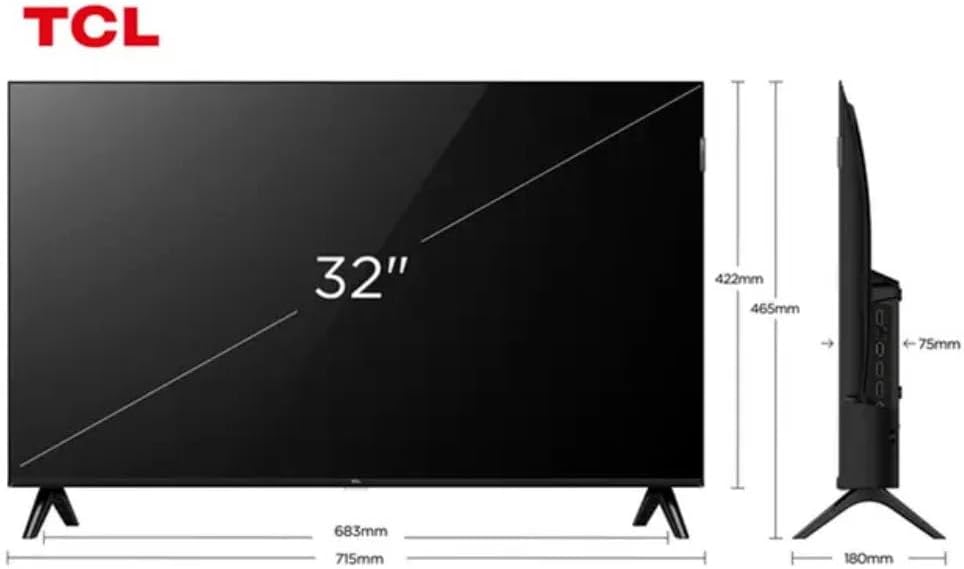
Figure 3: TV Dimensions. This image provides a detailed diagram of the TCL 32S5K Smart TV's physical dimensions, including screen size (32 inches), width (715mm), height (422mm without stand, 465mm with stand), and depth (75mm).
| Funkce | Popis |
|---|---|
| Název modelu | 32S5K |
| Velikost obrazovky | 32 palce |
| Technologie displeje | QLED |
| Rezoluce | 1080p (Full HD) |
| Obnovovací frekvence | 60 Hz |
| Konektivita | Bluetooth, Ethernet, HDMI, USB, Wi-Fi |
| Celkový počet portů HDMI | 2 |
| Speciální funkce | Integrated Speaker, Google TV, Googlecast Integrated, HDR10, Dolby Audio |
| Rozměry produktu (D x Š x V) | 7.6P x 71.6L x 42.3A centimeters (approx. 3 x 28.2 x 16.7 inches) |
| Výrobce | TCL |
| Země původu | Brazílie |
Záruka a podpora
Informace o záruce
The TCL 32S5K Smart TV comes with a 1letá záruka výrobce. This warranty covers defects in materials and workmanship under normal use. Please retain your proof of purchase for warranty claims. For specific terms and conditions, refer to the warranty card included in your package or visit the official TCL webmísto.
Zákaznická podpora
If you require technical assistance, have questions about your product, or need to initiate a warranty claim, please contact TCL customer support. You can typically find contact information on the TCL official webwebu nebo v dokumentaci k produktu.
Before contacting support, please have your TV model number (32S5K) and serial number ready, along with a detailed description of the issue.