
1. Úvod
This manual provides essential information for setting up, operating, and maintaining your DOOGEE Anywise W1 Smart Watch. Please read this manual thoroughly to ensure proper use and to fully utilize all features of your device.
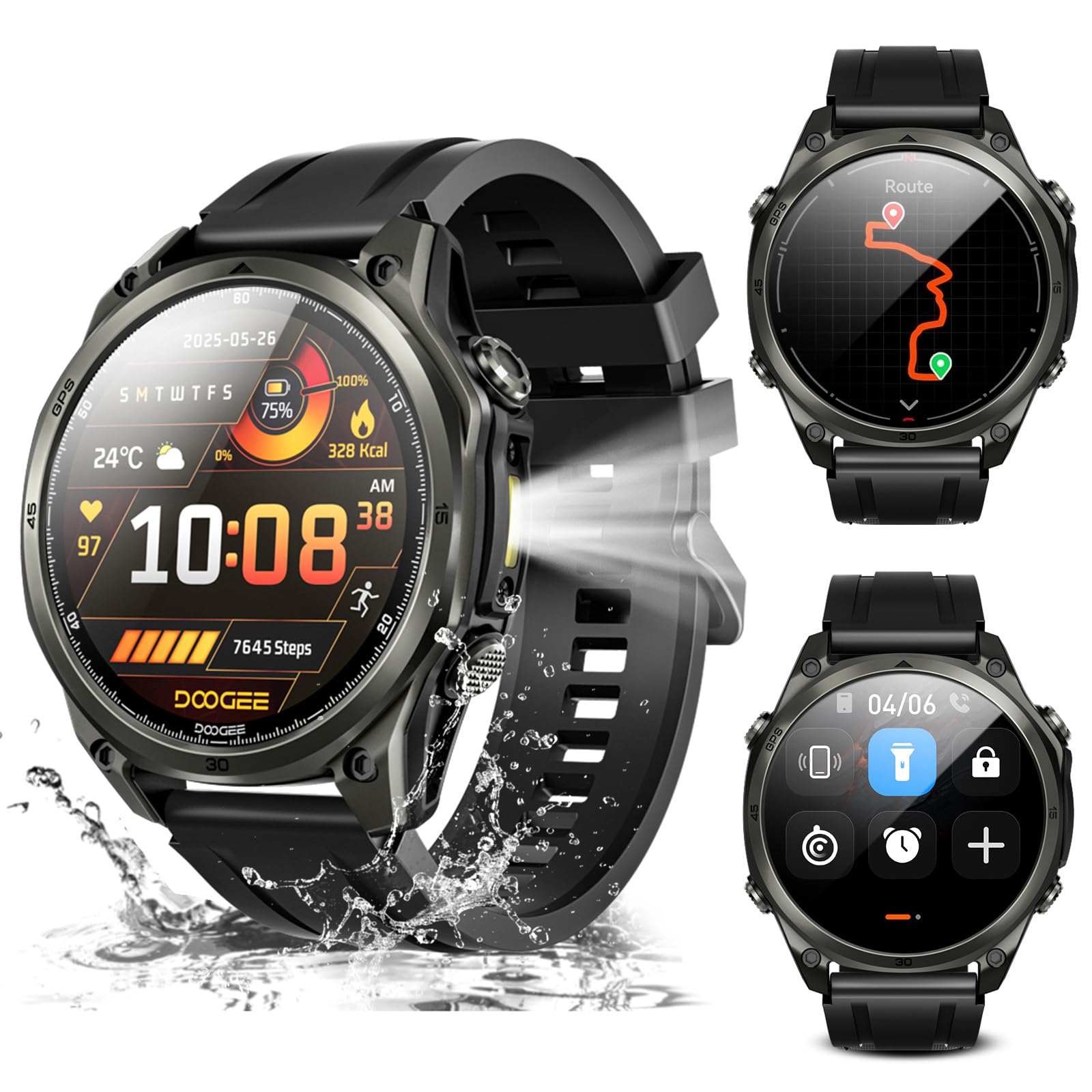
Obrázek: Overview of the DOOGEE Anywise W1 Smart Watch and its main features.
2. Obsah balení
Ověřte, zda jsou v balení produktu přítomny všechny položky:
- 1 X Anywise W1 Smartwatch
- 1 x magnetický nabíjecí kabel
- 2 X Watch Straps (1*Silicone Strap + 1*Braided Strap)
- 1 X Uživatelská příručka
- Návod k použití 1 X
- 1 X Service Card
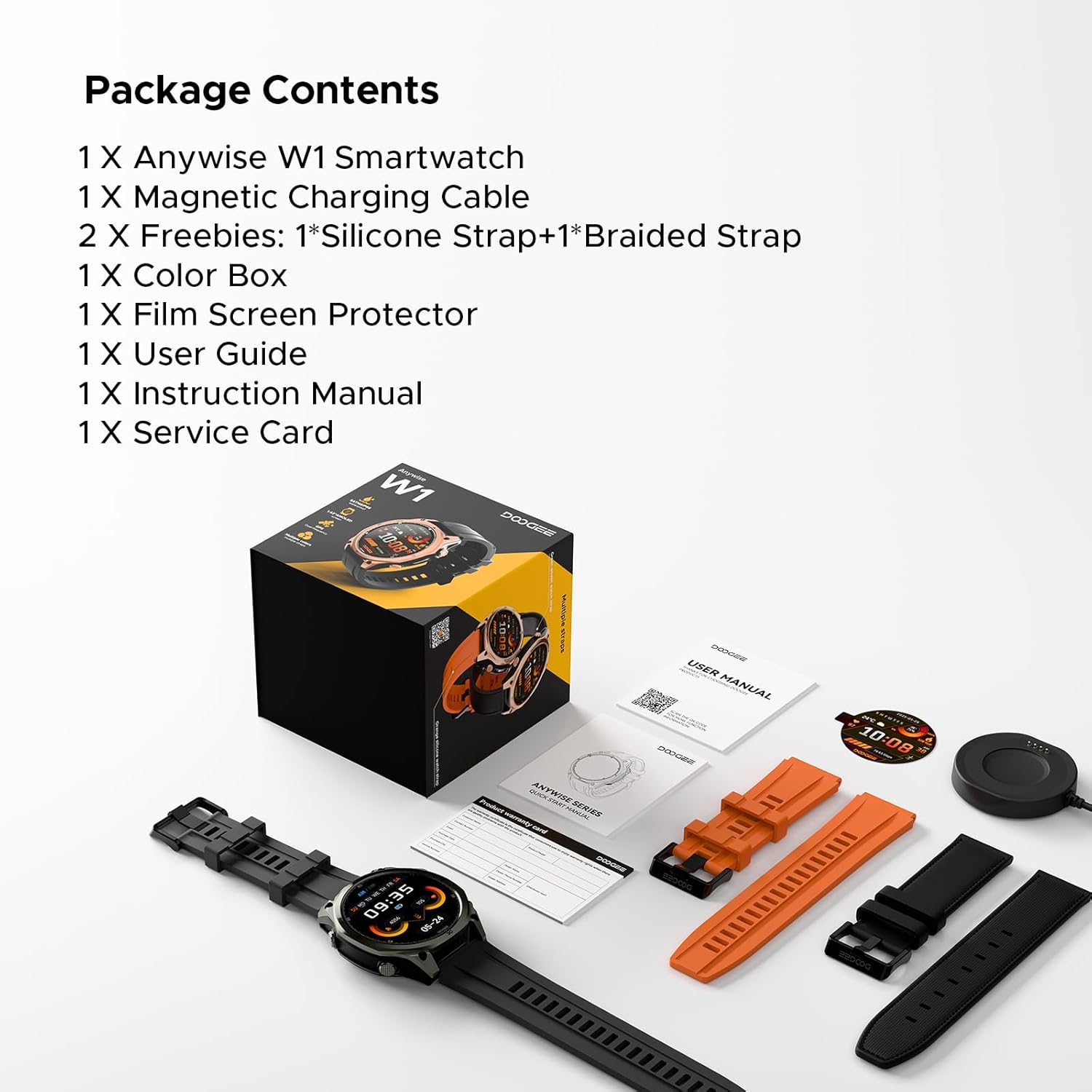
Image: The DOOGEE Anywise W1 Smart Watch and its accessories as found in the box.
3. Nastavení
3.1 Počáteční nabíjení
Before first use, fully charge your DOOGEE Anywise W1 Smart Watch. Connect the magnetic charging cable to the charging pins on the back of the watch and plug the USB-A end into a compatible power source. The watch display will indicate charging status.
Video: Demonstrates connecting the magnetic charging cable to the watch and a USB power source.
3.2 Instalace a párování aplikace
- Download the official DOOGEE Fit application from your smartphone's app store (compatible with Android and iPhone).
- Open the app and create an account or sign in.
- Follow the on-screen prompts to set up your personal profile (gender, height, weight, age, daily goals).
- Enable Bluetooth on your smartphone and allow the DOOGEE Fit app to access Bluetooth.
- In the app, select 'Add Device' and choose 'DOOGEE Anywise W1' from the list of available devices.
- Potvrďte požadavek na párování na smartphonu i hodinkách.
Video: Shows the process of setting up the DOOGEE Fit application on a smartphone and pairing it with the watch.
3.3 Výběr jazyka
After initial charging and pairing, you may need to select your preferred language on the watch. Tap the screen to navigate through language options and select 'English'.
4. Návod k obsluze
4.1 Zobrazení a navigace
The DOOGEE Anywise W1 features a 1.43-inch AMOLED high-definition touch screen, providing clear visibility in various conditions. Navigate the watch interface by swiping left, right, up, or down, and tapping to select options.

Image: The watch display showing a notification, highlighting its clarity.
4.2 Funkce GPS
The watch includes built-in Dual-Band GPS (L1+L5) with six-satellite support (GPS, GLONASS, Beidou, Galileo, QZSS, AGPS) for fast and accurate location tracking during outdoor activities.

Image: The watch displaying GPS navigation during a run.
4.3 Voděodolnost
The DOOGEE Anywise W1 has a 5ATM waterproof rating, making it suitable for swimming, showering, and use in various harsh environments.

Image: The watch being used in water, showcasinjeho voděodolnost.
4.4 Životnost baterie
Equipped with a 550mAh high-capacity battery, the watch offers up to 12 days of daily use and 40 hours of continuous GPS positioning.

Image: Visual representation of the watch's extended battery life.
4.5 sportovních režimů
The watch supports over 170 sports modes. Connect to the app to download more. It monitors critical data like workout heart rate, distance, speed, and calories in real-time.

Obrázek: Přamples of different sports modes available on the watch.
4.6 Monitorování zdraví
The watch provides comprehensive health monitoring, including real-time heart rate, sleep tracking, stress levels, and blood oxygen saturation. Access these metrics through the DOOGEE Fit app.
4.7 Communication & AI Features
- Bluetooth volání: Make and answer calls directly from the watch. Up to 100 contacts can be imported via the app.
- Hlasový asistent AI: Utilize AI functions for dialing, Q&A, and real-time translation (voice input to text display and voice announcements).
- Oznámení: The watch alerts you to incoming messages and calls. Note: The watch cannot reply to messages.
4.8 Další funkce
- LED svítilna: A 60 LM LED flashlight with 4 brightness levels.
- Kompas: Integrated compass function for outdoor navigation.
- Daily Tools: Music control, weather updates, stopwatch, alarm, camera control, SOS mode, and voice recording.
4.9 Změna ciferníků
Customize your watch's appearance by changing watch faces through the DOOGEE Fit app. Navigate to the watch face section in the app to browse and apply different styles.
4.10 Výměna řemínků hodinek
The watch comes with two interchangeable straps (silicone and braided). To change a strap, locate the small pin on the underside of the strap connection point, slide it to release, and then attach the new strap by aligning the pins and releasinVložte je do úchytů na hodinkách.
5. Údržba
To ensure the longevity and optimal performance of your DOOGEE Anywise W1 Smart Watch, follow these maintenance guidelines:
- Čištění: Pravidelně čistěte hodinky a řemínek měkkým hadříkemamp hadříkem. Vyhněte se agresivním chemikáliím nebo abrazivním materiálům.
- Sušení: After exposure to water, ensure the watch is completely dry before charging or using buttons.
- Skladování: Pokud hodinky nepoužíváte, skladujte je na chladném a suchém místě.
- Vyhněte se extrémním podmínkám: While rugged, prolonged exposure to extreme temperatures or direct sunlight can affect battery life and component integrity.
6. Řešení problémů
If you encounter issues with your DOOGEE Anywise W1 Smart Watch, refer to the following common solutions:
- Hodinky se nezapínají: Ujistěte se, že jsou hodinky plně nabité. Připojte je k nabíječce alespoň na 30 minut.
- Nelze spárovat se smartphonem: Check that Bluetooth is enabled on your phone and the watch. Ensure the watch is within range of your phone. Restart both devices and try pairing again.
- Nepřesné zdravotní údaje: Ujistěte se, že hodinky máte pevně na zápěstí, ne příliš těsně ani příliš volně. Vyčistěte senzory na zadní straně hodinek.
- GPS se nepřipojuje: Ujistěte se, že se nacházíte v otevřeném venkovním prostoru s volným view of the sky. Allow a few minutes for the watch to acquire a signal.
- Nezobrazují se oznámení: Check the notification settings in the DOOGEE Fit app and your smartphone's system settings to ensure permissions are granted.
For further assistance, consult the DOOGEE Fit app's help section or contact customer support.
7. Specifikace
| Funkce | Specifikace |
|---|---|
| Kapacita paměti | 35 GB |
| Standard bezdrátové komunikace | Bluetooth |
| Velikost obrazovky | 1.43 palce |
| Značka | DOOGEE |
| Barva | Černý |
| Typ materiálu pásku | Silicone, Braided |
| Podporovaná aplikace | Fitness Tracker, Sleep Monitor, Heart Rate Monitor, Pedometer, Blood Pressure Monitor, Multisport Tracker, Reminders, Calendar |
| Měřené metriky | Heart Rate Monitor, Sleep Duration, Stress Monitor, Blood Oxygen Monitor |
| Maximum Display Brightness | 800 Nit |
| Communication Feature | Bluetooth |
8. Záruka a podpora
For warranty information and customer support, please refer to the Service Card included in your package or visit the official DOOGEE website. You can also find additional resources and FAQs within the DOOGEE Fit application.