
Zavedení
This manual provides detailed instructions for the installation, operation, and maintenance of your VECHTEL 8 CORE 6G+128G Android 15 Car Radio. Please read this manual thoroughly before installation and use to ensure proper function and to prevent damage. Keep this manual for future reference.
Kompatibilita vozidel
This car radio is designed for specific vehicle models. It is compatible with:
- FIAT 500L modely vyrobené mezi 2013 a 2019.
The system features a plug-and-play wiring harness, eliminating the need for power cable modifications in compatible vehicles.

Image: Visual guide for checking dashboard compatibility. Shows examples of dashboards where the unit can and cannot be installed. If unsure, consult the seller with a photo of your car's central console.

Image: Comparison of a Fiat 500L dashboard before and after the VECHTEL car radio installation, demonstrating seamless integration.
Co je v krabici
Balíček produktu obsahuje následující komponenty:
- VECHTEL Android Car Radio Unit
- GPS anténa
- Externí mikrofon
- Zadní kamera
- Dekodér CANbusu
- Napájecí kabel
- RCA kabel
- USB kabel
- Vstupní kabel zadní kamery
- Adaptérová anténa
- Uživatelská příručka (tento dokument)

Obrázek: Overview of all included accessories and cables, such as the GPS antenna, external microphone, rear camera, Canbus, and various wiring harnesses.
Nastavení a instalace
Doporučuje se odborná instalace. Před zahájením instalace se ujistěte, že je vozidlo odpojeno od napájení.
Připojení vodičů
Refer to the wiring diagram for correct connections. The system uses a plug-and-play design for the main power harness.
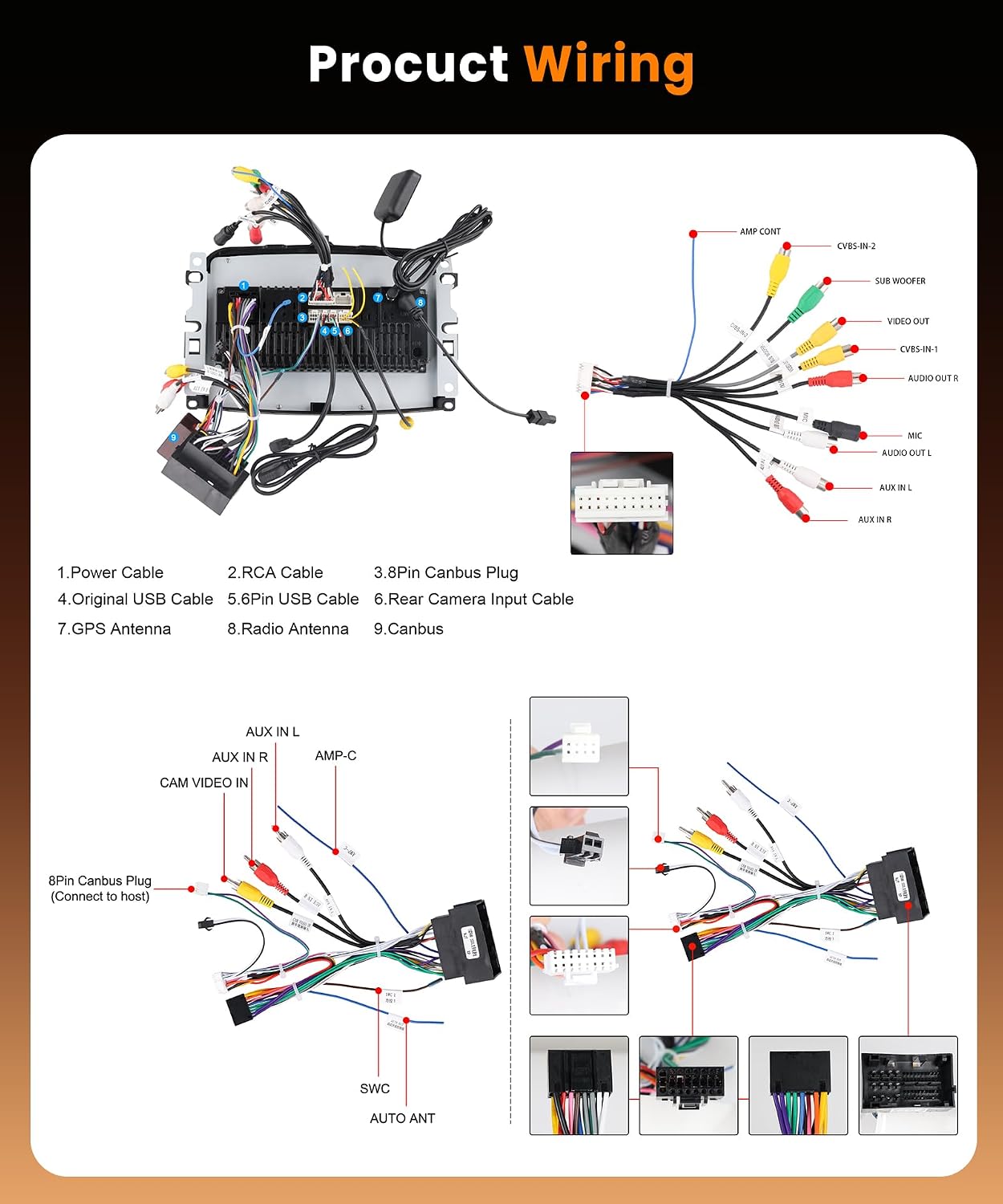
Image: Comprehensive wiring diagram illustrating connections for power, RCA, Canbus, USB, GPS antenna, radio antenna, and rear camera input. Each cable is numbered for easy identification.
- Napájecí kabel: Connect to the vehicle's main power harness.
- RCA kabel: Pro vstupní/výstupní připojení audio/video (např. externí amplifier, subwoofer, video output).
- 8pinový konektor CANbus: Connects to the vehicle's Canbus system for steering wheel controls and other vehicle data.
- Originální USB kabel: Connects to the vehicle's existing USB port if applicable.
- 6pinový USB kabel: Additional USB input for media or device charging.
- Vstupní kabel zadní kamery: Connects the rear camera to the unit.
- GPS anténa: Namontujte na místě s průhledným view oblohy pro optimální příjem signálu.
- Anténa rádia: Připojte anténu rádia vozidla.
- Canbus: Ensure the Canbus decoder is correctly connected to the main harness.
Zapojení zadní kamery
Pro připojení zadní kamery postupujte takto:

Image: Detailed diagram illustrating the connection points for the rear camera, including power, ground, and trigger wire connections to the car's reverse light circuit and the head unit.
- Red Cable (1 & 3): Connect to the positive (+) power supply of the car's reverse light.
- Černý kabel (2): Connect to the negative (-) ground of the car's reverse light power supply.
- Černý kabel (4): Connect this reverse trigger wire to the corresponding input on the car radio's power harness. This signals the unit to switch to the camera view při zařazení zpátečky.
Návod k obsluze
Základní operace
The unit features a 7-inch HD IPS touchscreen with an Android 15 operating system, an 8-core CPU, 6GB RAM, and 128GB ROM for smooth performance and app installation.

Image: Illustrates the high-speed operation capabilities of the unit, highlighting the Android 15 OS, 8-core processor, and memory specifications, alongside GPS and Wi-Fi functionalities.
Bezdrátové CarPlay a Android Auto
Connect your smartphone wirelessly to access navigation, music, calls, and more directly on the car radio screen. Supports advanced voice control via Siri or Google Assistant.

Image: Shows the CarPlay and Android Auto interfaces, demonstrating wireless and wired connection options, and voice command features like "Hey Siri, open the map" or "OK, open music."
GPS navigace a Wi-Fi
The unit includes a GPS module for both offline and online navigation. Connect to Wi-Fi or a mobile hotspot to download apps from the Play Store, stream videos, and use online navigation services.

Image: Depicts the GPS function showing a car navigating a city map and the Wi-Fi function displaying various app icons available for download and use.
Bluetooth 5.0
Utilize Bluetooth 5.0 for hands-free calling and wireless music streaming. Pair your device through the Bluetooth settings menu.

Image: Shows the Bluetooth interface with a call screen and music playback, indicating Bluetooth 5.0 connectivity for high-speed data transfer and stable connections.
FM/RDS rádio
Tune into your favorite FM radio stations. The RDS (Radio Data System) feature displays station information, song titles, and other data where available.

Image: Displays the FM/RDS radio interface with frequency tuning and preset options, alongside the Equalizer (EQ) function for audio customization.
Ovládání na volantu
The unit supports original steering wheel controls, allowing you to manage audio, calls, and other functions without taking your hands off the wheel. Configuration may be required in the settings menu.

Image: Shows the steering wheel control learning interface, allowing users to map vehicle steering wheel buttons to radio functions, next to a backup camera view.
Podpora zadní kamery
The system is compatible with the included Full HD rear camera, providing a clear view of the area behind your vehicle when reversing. The display automatically switches to the camera feed when reverse gear is engaged.
Zrcadlový odkaz
Mirror Link functionality allows you to display your smartphone's screen (Android or iOS) directly onto the car radio's display.

Image: Illustrates the Mirror Link feature, showing a smartphone screen mirrored onto the car radio display, compatible with both Android and iOS devices.
Funkce rozdělené obrazovky
The 7-inch HD IPS touchscreen supports split-screen mode, allowing you to run two applications simultaneously, such as navigation and music playback.
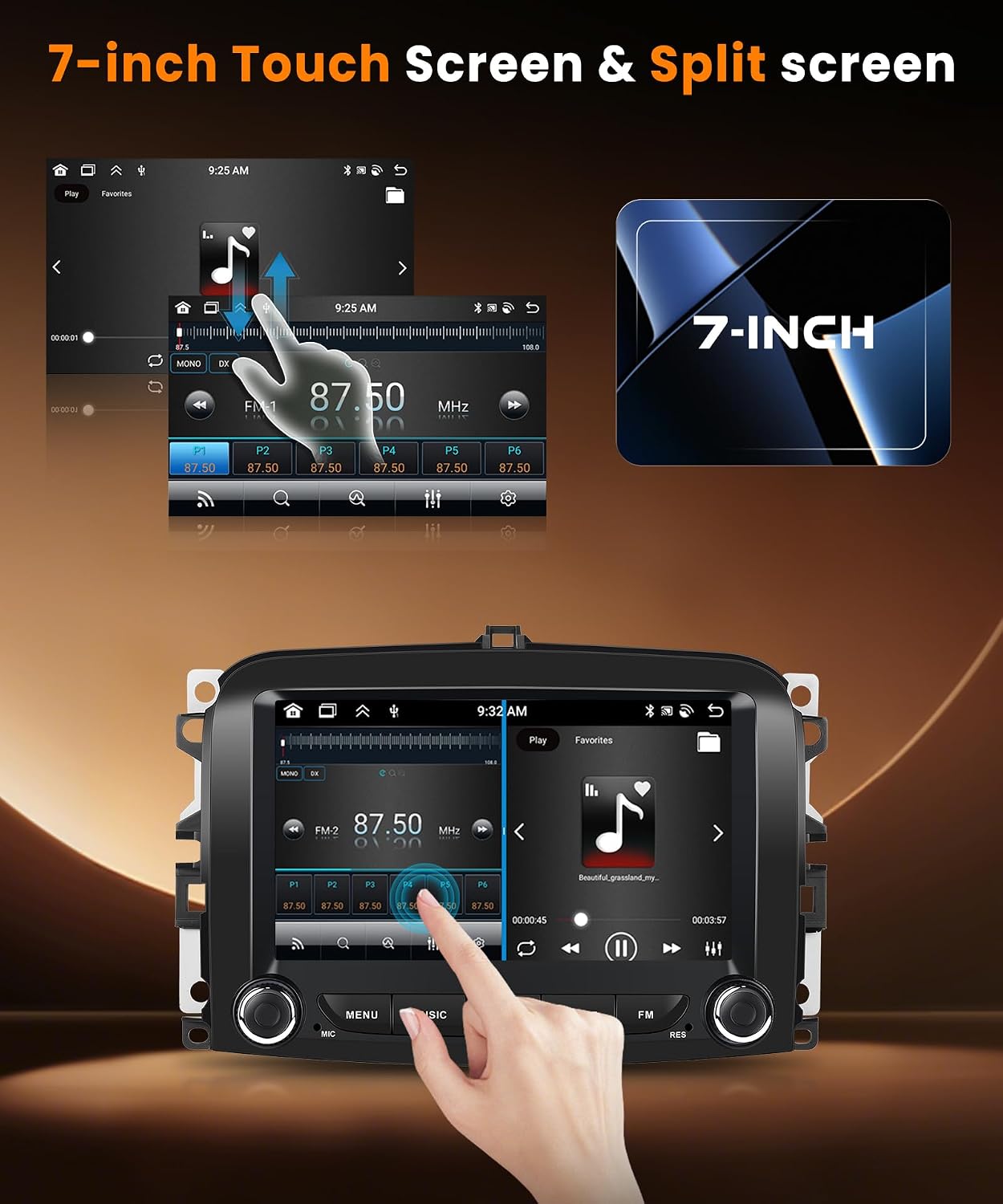
Image: Demonstrates the 7-inch HD IPS touchscreen with split-screen functionality, showing two applications running side-by-side, such as a music player and a web prohlížeč.
Nastavení ekvalizéru
Customize your audio experience with the built-in Equalizer (EQ) settings. Adjust various frequency bands to match your preferences.
Více šablon uživatelského rozhraní
Personalize your car radio's interface by choosing from multiple available UI themes.

Image: Shows a collage of different user interface themes available for the car radio, allowing for personalization of the display's appearance.
Údržba
- Čištění obrazovky: K čištění dotykové obrazovky používejte měkký hadřík, který nepouští vlákna. Nepoužívejte abrazivní čisticí prostředky ani rozpouštědla.
- Aktualizace softwaru: Pravidelně kontrolujte dostupnost aktualizací softwaru, abyste zajistili optimální výkon a přístup k novým funkcím. Aktualizace obvykle najdete v nastavení systému nebo na webových stránkách výrobce. webmísto.
- Obecná péče: Nevystavujte jednotku extrémním teplotám, delšímu přímému slunečnímu záření nebo nadměrné vlhkosti.
Odstraňování problémů
| Problém | Možná příčina | Řešení |
|---|---|---|
| Jednotka se nezapne. | Uvolněné připojení napájení, spálená pojistka, problém s autobaterií. | Zkontrolujte všechna připojení napájecích kabelů. Zkontrolujte pojistky vozidla. Ujistěte se, že je baterie vozidla nabitá. |
| Žádný zvuk. | Volume too low, mute activated, incorrect audio output settings, speaker wiring issue. | Zvyšte hlasitost. Zkontrolujte, zda je aktivní ztlumení zvuku. Ověřte nastavení zvukového výstupu. Zkontrolujte zapojení reproduktorů. |
| Signál GPS je slabý nebo nepřesný. | GPS anténa je nesprávně nainstalována nebo je zakryta. | Ujistěte se, že je anténa GPS namontována na volném a nerušeném místě (např. na palubní desce, pod čelním sklem). |
| CarPlay/Android Auto se nepřipojuje. | Bluetooth/Wi-Fi na telefonu vypnuté, nesprávné párování, problém se softwarem telefonu. | Ensure Bluetooth and Wi-Fi are enabled on your phone. Re-pair the device. Restart both phone and car radio. |
| Zadní kamera se nezobrazuje. | Incorrect wiring, camera malfunction, reverse trigger not detected. | Check camera power and video input connections. Verify the reverse trigger wire is correctly connected to the reverse light. |
| Radio and music play simultaneously (as per review). | Software glitch, incorrect audio routing. | Restart the unit. Check audio settings for simultaneous playback options. If issue persists, contact customer support. |
| Wi-Fi turns off by itself (as per review). | Software issue, power management setting. | Check Wi-Fi settings for any automatic shutdown options. Perform a factory reset if necessary. Contact customer support. |
Specifikace
| Funkce | Detail |
|---|---|
| Značka | VECHTEL |
| Operační systém | Android 15 |
| CPU | 8 jádro |
| BERAN | 6 GB |
| ROM (interní úložiště) | 128 GB |
| Velikost obrazovky | 7 palce |
| Typ zobrazení | HD IPS Touchscreen (1024*600 resolution) |
| Konektivita | Bluetooth 5.0, USB, Wi-Fi |
| Speciální funkce | Wireless CarPlay, Wireless Android Auto, GPS Navigation, Touchscreen, Built-in Bluetooth, Built-in Wi-Fi, Steering Wheel Control, Mirror Link, FM/RDS Radio, EQ Settings, Full HD Rear Camera Support, Split Screen, Multiple UI Themes |
| Kompatibilní zařízení | chytré telefony |
| Režim zvukového výstupu | Stereo |
| Konfigurace kanálů prostorového zvuku | 5.1 |
| Kódování videa | H.264, H.265/HEVC, MPEG-4 |
| Rozměry produktu (DxŠxV) | 5.2P x 22.7D x 14.9V cm (2.05H x 8.94Š x 5.87V palce) |
| Výstupní výkon (RMS) | 45 wattů |
| Maximální výstupní výkon | 180 wattů (4 kanály) |
| Podporované zvukové formáty | AVI, WAV, WMA |
Informace o záruce
Tento produkt je dodáván s a tříletá záruka from the date of purchase. The warranty covers manufacturing defects and malfunctions under normal use. Please retain your proof of purchase for warranty claims. The warranty does not cover damage caused by improper installation, misuse, accidents, or unauthorized modifications.
Zákaznická podpora
If you encounter any issues or have questions regarding your VECHTEL car radio, please contact our customer support team. You can reach us via the Amazon messaging system. When contacting support, please provide your order number and a detailed description of the issue.
For compatibility inquiries before purchase, please send us your car's model year and a photo of your central console via Amazon.