
1. Úvod
This manual provides comprehensive instructions for the VECHTEL Android 15 Car Radio, model 4 Core 4G+128G. This advanced multimedia system is designed to enhance your driving experience with features such as a 9-inch Incell HD touchscreen, wireless CarPlay and Android Auto, GPS navigation, Bluetooth, Wi-Fi, and FM/RDS radio. Please read this manual carefully before installation and operation to ensure proper use and to maximize the product's capabilities.
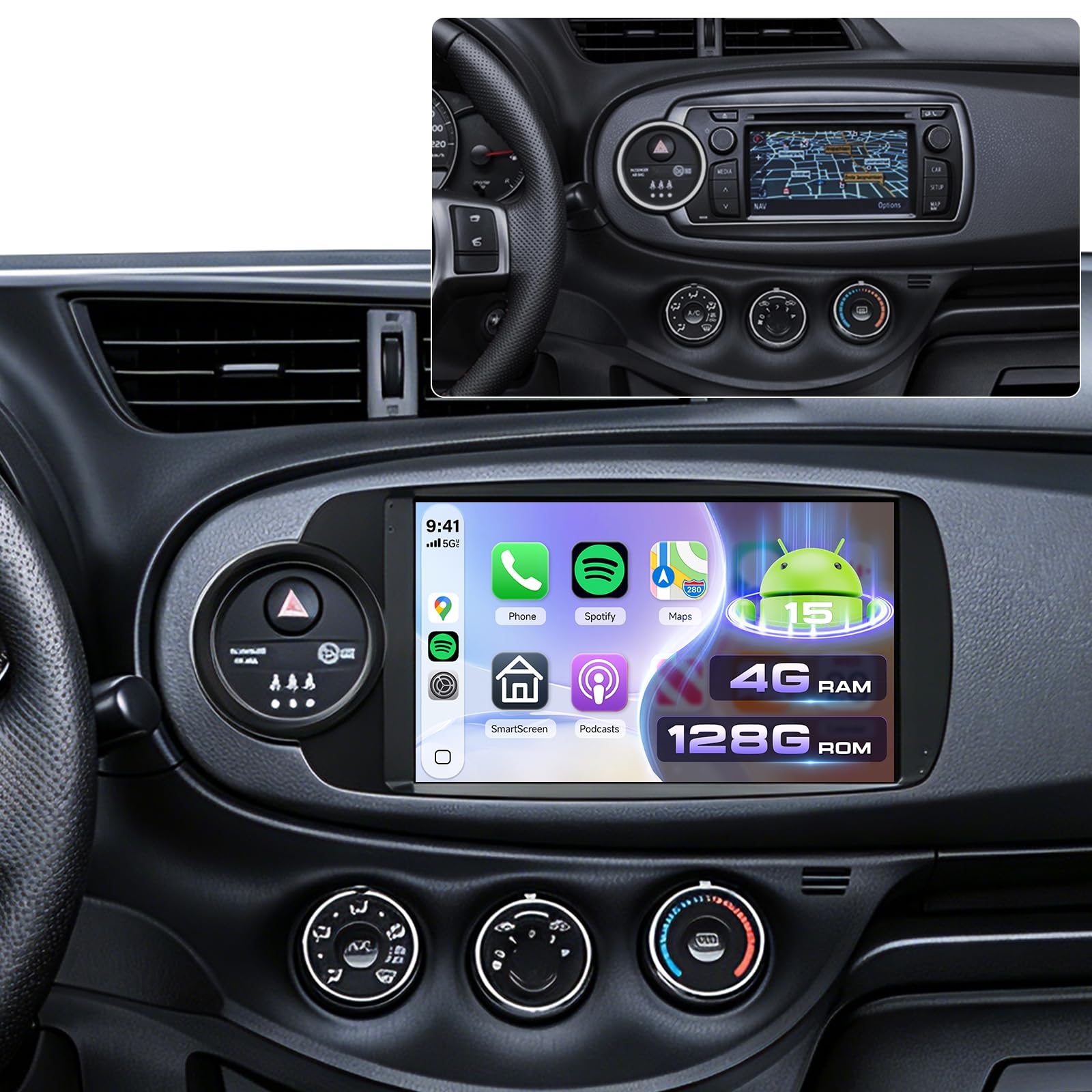
Image 1.1: VECHTEL Android 15 Car Radio main unit. This image shows the front view of the car radio with its 9-inch Incell HD touchscreen display.
2. Kompatibilita s vozidly
This car radio is specifically designed for Toyota Yaris models manufactured between 2012 and 2017. It is compatible with vehicles equipped with a silver climate knob ring as standard, including versions with a factory CD radio and small screen, as well as those with large touchscreens. This unit is not suitable for vehicles that do not have the silver climate knob ring.
Před nákupemasing or installing, verify your vehicle's model year and dashboard configuration. It is recommended to send a photo of your central dashboard to the seller for confirmation if unsure.
3. Bezpečnostní informace
- Doporučená profesionální instalace: Vzhledem ke složitosti automobilových elektrických systémů se důrazně doporučuje profesionální instalace, aby se zabránilo poškození jednotky nebo vašeho vozidla.
- Napájení: Connect the unit only to a 12V DC negative ground power supply.
- Zapojení: Ensure all wiring connections are secure and correctly matched to avoid short circuits or malfunctions. Refer to the wiring diagram provided with the product.
- Bezpečnost jízdy: Neovládejte složité funkce jednotky ani nesledujte videa během řízení. Vždy upřednostňujte bezpečnost silničního provozu.
- Teplota: Nevystavujte jednotku extrémním teplotám nebo přímému slunečnímu záření po delší dobu.
- Čištění: K čištění obrazovky a zařízení používejte měkký, suchý hadřík. Nepoužívejte abrazivní čisticí prostředky ani rozpouštědla.
4. Nastavení a instalace
This section provides general guidance for installation. Specific wiring diagrams and mounting instructions are typically included in a separate guide or with the product packaging. Always consult those specific documents for detailed steps.
4.1. Kontroly před instalací
- Odpojit baterii: Before starting any electrical work, disconnect the vehicle's negative battery terminal to prevent electrical shorts.
- Ověřte komponenty: Ensure all components listed in your product's packing list are present.
- Dashboard Removal: Carefully remove the existing car radio and dashboard trim panels according to your vehicle's service manual.
4.2. Připojení vodičů
Connect the wiring harness from the VECHTEL unit to your vehicle's wiring. Pay close attention to:
- Napájecí vodiče: Constant 12V (yellow), Accessory 12V (red), Ground (black).
- Dráty reproduktorů: Match positive and negative terminals for each speaker.
- Anténa: Připojte anténu rádia.
- GPS anténa: Namontujte anténu GPS na místo s volným view oblohy (např. palubní deska, prostor pod čelním sklem).
- USB porty: Route the USB extension cables to an accessible location.
- Vstup pro zadní kameru: Connect the rear camera video input and trigger wire if installing a camera.
- Ovládací kabely na volantu: Connect SWC wires if your vehicle supports them.
4.3. Montáž jednotky
Secure the VECHTEL unit into the dashboard opening using the provided mounting brackets and screws. Ensure it is firmly seated and does not obstruct any vehicle controls.
4.4. Počáteční zapnutí a konfigurace
- Znovu připojte baterii vozidla.
- Zapněte zapalování vozidla. Jednotka by se měla automaticky zapnout.
- Follow the on-screen prompts for initial setup, including language selection, time zone, and Wi-Fi connection.
- Test all functions: radio, Bluetooth, GPS, USB, and steering wheel controls.
5. Návod k obsluze
5.1. Touchscreen and Android 15 Interface
The unit features a responsive 9-inch Incell HD touchscreen. Navigate the Android 15 operating system by tapping, swiping, and pinching. The home screen provides access to frequently used applications and widgets. You can customize the home page display with optional layouts.
5.2. Bezdrátové CarPlay a Android Auto
This unit supports wireless connections for both Apple CarPlay and Android Auto, allowing seamless integration of your smartphone's features.
- Ujistěte se, že je na vašem smartphonu povoleno Bluetooth a Wi-Fi.
- On the car radio, open the "CarPlay" or "Android Auto" application.
- Follow the on-screen instructions to pair your phone via Bluetooth. Once paired, the system will automatically establish a Wi-Fi connection for CarPlay/Android Auto.
- You can now access navigation, music, calls, and messages directly from the car radio's screen, often with advanced voice control via Siri or Google Assistant.
5.3. GPS navigace
The integrated GPS module allows for both offline and online navigation.
- Offline mapy: Pre-installed maps or maps downloaded via Wi-Fi can be used without an internet connection. Access them through the designated "Navigation" app.
- Online mapy: Connect to Wi-Fi or a mobile hotspot to use online navigation applications (e.g., Google Maps, Waze) downloaded from the Play Store.
5.4. Připojení Bluetooth
Use Bluetooth for hands-free calling and audio streaming.
- Přejděte do aplikace „Bluetooth“ v autorádiu.
- Zapněte Bluetooth v telefonu a vyhledejte dostupná zařízení.
- Select the car radio's Bluetooth name (e.g., "VECHTEL Car Radio") from your phone's list and pair.
- Potvrďte párovací kód na obou zařízeních.
- Po připojení můžete bezdrátově uskutečňovat/přijímat hovory a přehrávat hudbu.
5.5. Wi-Fi and App Installation
Connect the unit to a Wi-Fi network or mobile hotspot to access the internet and download applications.
- Navigate to "Settings" > "Network & Internet" > "Wi-Fi".
- Vyberte požadovanou síť Wi-Fi a zadejte heslo.
- Once connected, open the "Play Store" app to download and install various applications (e.g., streaming services, utility apps).
5.6. Rádio FM/RDS
Access local radio stations with clear audio quality.
- Otevřete aplikaci „Rádio“.
- Pomocí funkce skenování můžete automaticky vyhledat a uložit dostupné stanice.
- Tune manually or select from your saved presets. RDS (Radio Data System) provides additional information like station name and traffic updates where available.
5.7. USB připojení
The unit includes dual USB ports for media playback and device charging.
- Connect USB drives containing audio or video files.
- Přístup files through the "File Manager" or a dedicated media player app.
5.8. Rear Camera Display
If a compatible rear camera is installed and connected, the display will automatically switch to the camera view když je vozidlo zařazeno na zpátečku.
5.9. Ovládací prvky na volantu (SWC)
The unit supports integration with your vehicle's existing steering wheel controls. Configuration may be required:
- Go to "Settings" > "Steering Wheel Controls" (or similar).
- Follow the on-screen instructions to map your vehicle's steering wheel buttons to the corresponding functions on the car radio.
5.10. Funkce rozdělené obrazovky
The split-screen feature allows you to run two applications simultaneously on the 9-inch display.
- Otevřete první aplikaci, kterou chcete použít.
- Press and hold the "Recent Apps" button (or swipe up from the bottom and hold, depending on Android version) to enter split-screen mode.
- Select the second application from the recent apps list or app drawer.
5.11. Nastavení ekvalizéru
Adjust audio output to your preference using the Equalizer (EQ) settings.
- Access the "EQ" or "Sound Settings" application.
- Choose from preset sound modes or manually adjust frequency bands to customize the audio profile.
6. Údržba
- Čištění obrazovky: Použijte měkký hadřík bez žmolků, lehceampened with water or a screen cleaner, to gently wipe the touchscreen. Avoid excessive pressure.
- Aktualizace softwaru: Periodically check for software updates via the unit's settings menu or the manufacturer's webwebu, aby byl zajištěn optimální výkon a přístup k novým funkcím.
- Obecná péče: Udržujte jednotku bez prachu a nečistot. Zabraňte rozlití tekutin na jednotku.
7. Řešení problémů
Tato část se zabývá běžnými problémy, se kterými se můžete setkat. V případě složitějších problémů kontaktujte zákaznickou podporu.
- Bez napájení:
- Check all power connections (12V constant, accessory, ground).
- Verify vehicle's fuse for the radio.
- Ensure the vehicle battery is connected and charged.
- Žádný zvuk:
- Check volume level and mute settings.
- Zkontrolujte připojení kabelů reproduktoru.
- Ujistěte se, že je vybrán správný zdroj zvuku.
- Ztráta/nepřesnost signálu GPS:
- Ujistěte se, že je anténa GPS správně připojena a má jasný signál. view z nebe.
- Přesuňte vozidlo na otevřené prostranství, dále od vysokých budov nebo hustého porostu.
- Problémy s připojením Bluetooth:
- Ensure Bluetooth is enabled on both the car radio and your phone.
- Smažte předchozí párování na obou zařízeních a zkuste spárování znovu.
- Restartujte obě zařízení.
- CarPlay/Android Auto se nepřipojuje:
- Ověřte, zda jsou v telefonu aktivní Wi-Fi a Bluetooth.
- Ujistěte se, že máte aktuální operační systém telefonu.
- Check app permissions for CarPlay/Android Auto on your phone.
8. Specifikace
| Značka | VECHTEL |
| Model | 4jádrový 4G+128G |
| Operační systém | Android 15 |
| BERAN | 4 GB |
| ROM (interní úložiště) | 128 GB |
| Velikost obrazovky | 9 inches Incell HD Touchscreen |
| Technologie připojení | Bluetooth, USB, Wi-Fi |
| Speciální funkce | Integrated Bluetooth, Wireless CarPlay, Wireless Android Auto, GPS Navigation, Touchscreen, Integrated Wi-Fi |
| Režim zvukového výstupu | Stereo |
| Konfigurace kanálů prostorového zvuku | 4.1 |
| Kódování videa | H.264, H.265/HEVC |
| Rozměry produktu | 6.4 H x 19.9 Š x 11.6 V cm |
| Výstupní výkon | 45 wattů |
| Počet kanálů | 4 |
9. Záruka a podpora
For warranty information, please refer to the documentation included with your product or contact the retailer where the product was purchased. VECHTEL provides customer support for technical assistance and troubleshooting.
If you encounter issues not covered in this manual, or require further assistance, please contact VECHTEL customer service through the platform of purchase or visit the official VECHTEL store page for contact details.
Online podpora: Visit the VECHTEL Store on Amazon