
1. Konec produktuview
The POWLSOJX Micro Grid-Tie Inverter UDM-GS is designed for efficient energy conversion from solar photovoltaic (PV) modules and battery storage systems to the AC grid. It features multiple connection modes, APP control, and high-performance Maximum Power Point Tracking (MPPT) to optimize energy harvesting.
Klíčové vlastnosti
- Compatible with mainstream PV modules and 36V/48V batteries.
- Supports 6 flexible connection modes for versatile operation, including simultaneous inverting and battery storage.
- Built-in MPPT for optimized solar panel energy harvesting and increased power generation.
- Integrated WiFi for remote monitoring and mobile application control, displaying real-time voltage, current, and power generation data.
- Durable full aluminum alloy casing for efficient heat dissipation, lightweight design, and IP65 waterproof rating for outdoor use.
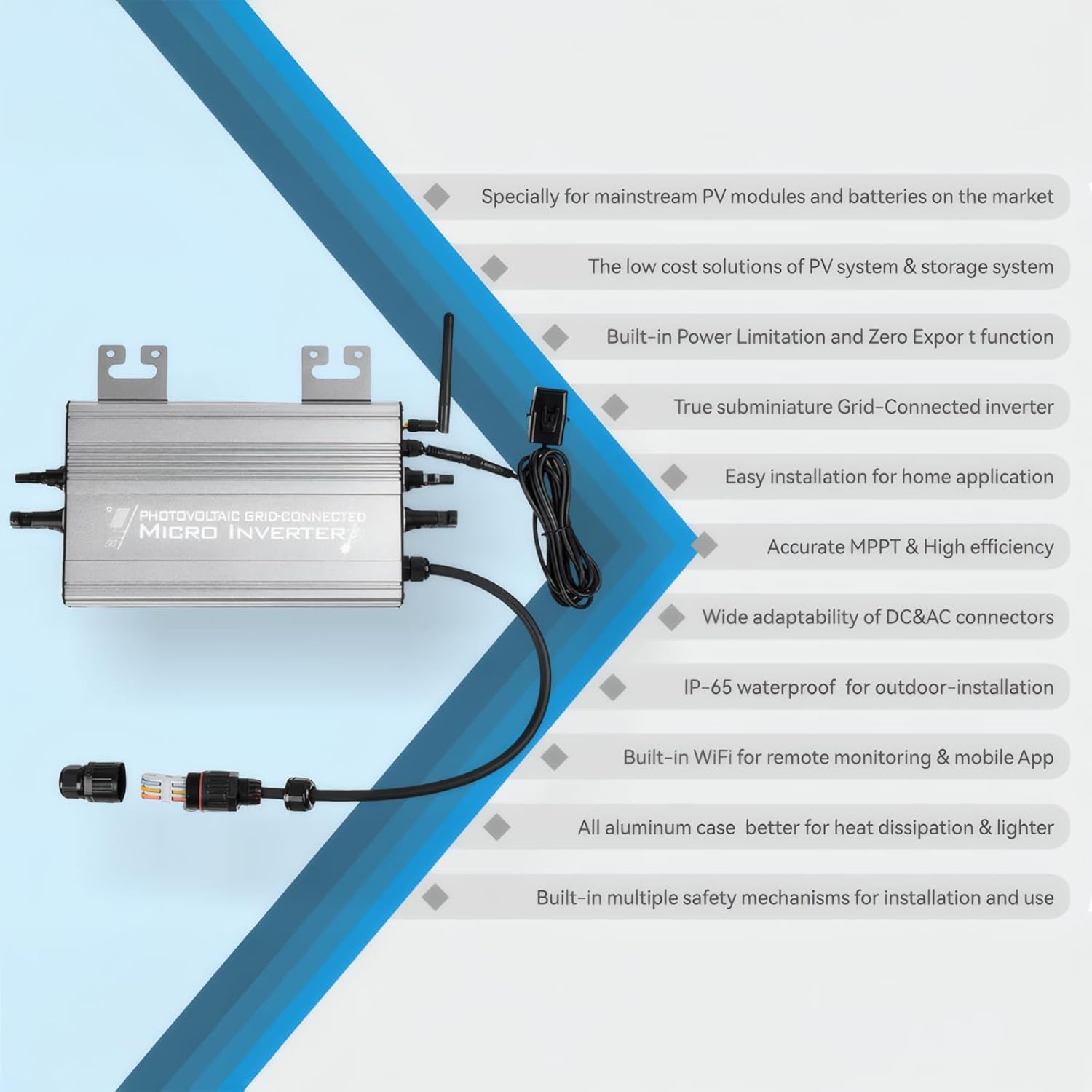
Figure 1: Micro Grid-Tie Inverter highlighting key features such as compatibility, low cost solution, power limitation, easy installation, MPPT, wide connector adaptability, IP65 waterproof, built-in WiFi, aluminum case, and multiple safety mechanisms.

Figure 2: The inverter features an all-aluminum alloy case, designed for superior heat dissipation, making it stronger and lighter.

Figure 3: The inverter includes a built-in 2.4G WiFi function for easy remote monitoring and control via a mobile application, providing real-time data and timing regulation.
2. Instalace a připojení
Bezpečnostní opatření
- Ensure all connections are secure and correct before powering on the inverter.
- Do not connect positive and negative DC input terminals in reverse.
- Ověřte, že vstupní objemtage and power of the solar panel or battery do not exceed the specified range for the inverter.
- When connecting to the public grid, ensure the outlet switch is turned on.
- Installation should be performed by qualified personnel to prevent electrical shock.
Identifikace součásti

Figure 4: Details of the AC Quick Connector, showing easy and fast wiring suitable for various cables, a buckle handle design for quick wiring, and IP68 waterproof rating for protection against rain and wind.

Figure 5: The inverter uses standard DC input connectors (MC4 type), which are universal, user-friendly, and designed to withstand greater current for enhanced safety.
General Connection Steps
Refer to the following video for a visual guide on connecting the micro inverter. Ensure all connections are made correctly and securely.
Video 1: This video demonstrates the basic connection process for a micro grid-tie inverter, including connecting solar panels, battery, and AC output to the grid. It also shows the inverter's operation and display.
Connection Diagrams for Operating Modes
The UDM-GS Microinverter supports six working modes, allowing flexible configuration with PV modules, batteries, or both. These modes include options for Zero Export (consuming generated electricity internally) and On-Grid (exporting surplus electricity to the grid).

Obrázek 6: Přesview of the six working modes: Storage Mode (Zero Export, On-Grid), PV Mode (Zero Export, On-Grid), and Battery Mode (Zero Export, On-Grid). This diagram illustrates the wide applicability of the inverter for various power generation and storage setups.
Mode 1: Storage Zero Export Mode

Figure 7: Connection for Storage Zero Export Mode, utilizing a 36V/48V battery and PV modules (VOC<60VDC). The system prioritizes internal consumption, preventing electricity export to the grid. Battery connection cables and AC plug cable need to be purchased separately.
Mode 2: Storage On-Grid Mode

Figure 8: Connection for Storage On-Grid Mode, integrating a 36V/48V battery and PV modules (VOC<60VDC) with the home grid. This mode allows for both internal consumption and export of surplus power. Battery connection cables and AC plug cable need to be purchased separately.
Mode 3: PV Zero Export Mode

Figure 9: Connection for PV Zero Export Mode, using two PV panels (VOC<60VDC). Generated power is primarily used for internal loads, with no export to the grid. The AC plug cable needs to be purchased separately.
Mode 4: PV On-Grid Mode

Figure 10: Connection for PV On-Grid Mode, using two PV panels (VOC<60VDC) connected to the home grid. This setup allows for both powering home appliances and exporting excess solar energy to the grid. The AC plug cable needs to be purchased separately.
Mode 5: Battery Zero Export Mode

Figure 11: Connection for Battery Zero Export Mode, utilizing a 36V/48V battery. Power from the battery is used for internal consumption only, with no export to the grid. Battery connection cables and AC plug cable need to be purchased separately.
Mode 6: Battery On-Grid Mode

Figure 12: Connection for Battery On-Grid Mode, using a 36V/48V battery connected to the home grid. This mode allows the battery to power home appliances and potentially export excess power to the grid. Battery connection cables and AC plug cable need to be purchased separately.
3. Obsluha měniče
Monitorování a kontrola
The inverter features a built-in WiFi module for remote monitoring and control via a dedicated mobile application. This allows users to view real-time operational data and adjust settings.
- Data v reálném čase: Monitor svtage, current, real-time power generation, and total power generation.
- Úprava nastavení: Configure operating parameters and modes through the app interface.
MPPT Functionality
The integrated MPPT (Maximum Power Point Tracking) technology ensures that the solar panels operate at their peak power output, maximizing energy yield throughout the day, even under varying light conditions.
4. Údržba
To ensure optimal performance and longevity of your POWLSOJX Micro Grid-Tie Inverter, regular maintenance is recommended:
- Čištění: Periodically clean the exterior of the inverter, especially the cooling fins, to prevent dust and debris buildup that could hinder heat dissipation. Use a soft, dry cloth.
- Inspekce: Regularly check all electrical connections for tightness and signs of corrosion or damage. Ensure cables are not frayed or exposed.
- Ochrana životního prostředí: The inverter has an IP65 waterproof rating, making it suitable for outdoor installation. However, avoid direct exposure to extreme weather conditions if possible, and ensure proper ventilation around the unit.
- Aktualizace firmwaru: Check for any available firmware updates via the mobile application to ensure the inverter operates with the latest features and optimizations.
5. Řešení problémů
If you encounter issues with your POWLSOJX Micro Grid-Tie Inverter, consider the following general troubleshooting steps:
- Žádný výkon: Verify that DC input from PV panels or battery is within the specified voltage range. Check all AC and DC connections for proper seating and continuity. Ensure the AC grid connection is active.
- Nízký výstupní výkon: Check for shading on PV panels. Ensure PV panels are clean. Verify that the inverter's operating mode is correctly configured for your setup.
- Kontrolky: Consult the manual for the meaning of different indicator light patterns, which can signal specific operational states or faults.
- Problémy s připojením aplikace: Ensure your WiFi network is active and the inverter is within range. Restart the inverter and your mobile device.
- Přehřívání: Ensure the inverter is installed in a well-ventilated area and that its cooling fins are not obstructed.
V případě přetrvávajících problémů si přečtěte podrobnou část s řešením problémů v kompletní příručce k produktu nebo kontaktujte zákaznickou podporu.
6. Technické specifikace
Below are the technical specifications for the POWLSOJX Micro Grid-Tie Inverter UDM-GS (1250W):

Figure 13: Detailed parameter table for the Micro Inverter UDM1250-GS, including input data, output data, efficiency, protection functions, and physical characteristics.

Figure 14: The inverter features an ultra-wide input voltage design of 20VDC~60VDC, compatible with PV modules (VOC<60VDC) and 36VDC or 48VDC batteries.
| Funkce | Hodnota |
|---|---|
| Rozměry produktu | 9.5 x 7.5 x 1.7 palce (24.13 x 19.05 x 4.32 cm) |
| Hmotnost položky | 4.4 libry (2 kg) |
| Číslo modelu položky | 1250W |
| Zdroj napájení | Solární a bateriové napájení |
| Max PV Panel Input | 2 * 750Wp |
| Recommended Battery Voltage | 36V or 48V (24V can work, but not recommended) |
| Max DC Open Circuit Voltage (VOC) | 60V DC |
| Startup Voltage | 20V DC |
| Přesnost sledování MPPT | 99 % |
| Rated Output Power (PV Mode) | 1200 Wp |
| Rated Output Power (Battery Mode) | 720 Wp |
| Jmenovitý svtage/Range (VAC) | 180-265VAC (208VAC, 220VAC, 240VAC) |
| Vodotěsná třída | IP65 |
| Režim chlazení | Natural Convection - No Fans |
| Komunikace | WiFi / Frequency: 2.4 GHz Standards: IEEE 802.11/b/g/n |
7. Záruka a podpora
POWLSOJX provides an after-sales guarantee for its products. In the event of a product fault, the process typically involves:
- Determining the cause of the product fault.
- Providing free replacement parts if applicable.
- Replacing the product if necessary.
- Contacting POWLSOJX technical support for assistance.
For detailed warranty terms and to initiate a support request, please refer to the warranty card included with your product or visit the official POWLSOJX webmísto.