
Zavedení
This manual provides comprehensive instructions for the setup, operation, maintenance, and troubleshooting of your T-Wolf T60 Wired 60% Mechanical Keyboard. Please read this manual carefully before using the product to ensure proper function and longevity.
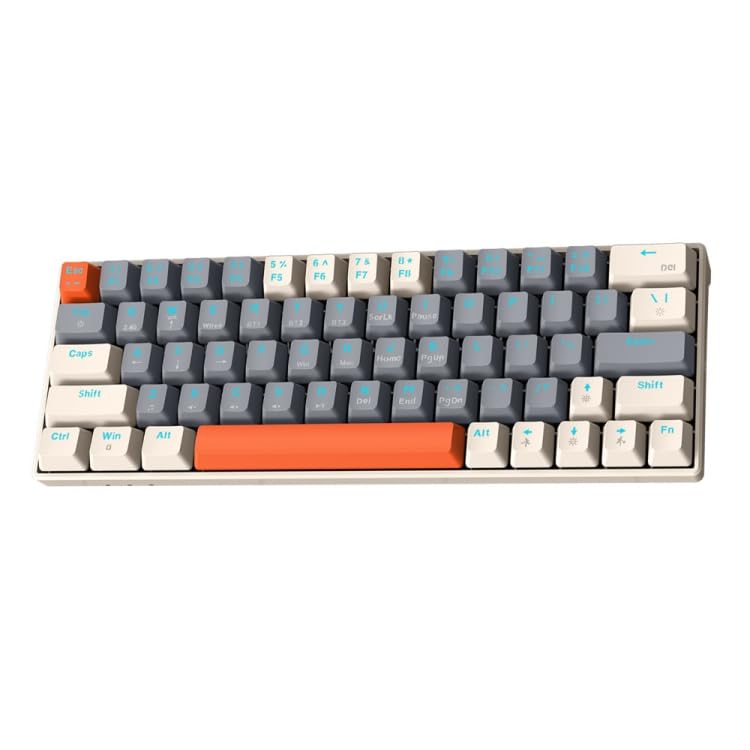
Image: T-Wolf T60 Wired 60% Mechanical Keyboard. This image displays the compact design of the keyboard, highlighting its 63-key layout and wired connectivity.
Nastavení
- Rozbalení: Carefully remove the keyboard and all included accessories from the packaging. Verify that all components are present: T-Wolf T60 keyboard and USB-C to USB cable.
- Připojení klávesnice:
- Vyhledejte port USB-C na klávesnici.
- Insert the USB-C end of the provided cable into the keyboard's USB-C port.
- Insert the USB-A end of the cable into an available USB 2.0 port on your computer (PC, desktop, or laptop).
- Instalace ovladače: The T-Wolf T60 keyboard is plug-and-play. Your operating system should automatically detect and install the necessary drivers. No manual driver installation is typically required.
- Počáteční test: Open a text editor or word processor and type to confirm the keyboard is functioning correctly.
Operace
The T-Wolf T60 is a 60% mechanical keyboard with 63 keys, designed for efficient typing and gaming. It features RGB backlighting and multi-key anti-ghosting.
- Základní funkce kláves: All standard alphanumeric and symbol keys function as expected. Due to the compact 60% layout, some functions (like F-keys, arrow keys, and navigation keys) are accessed via a Function (Fn) key combination. Refer to the keyboard's keycap legends for specific Fn key combinations.
- RGB podsvícení: Klávesnice má přizpůsobitelné RGB podsvícení.
- To cycle through different lighting modes, use the designated Fn key combination (e.g., Fn + \ or Fn + P).
- To adjust brightness, use the designated Fn key combination (e.g., Fn + Up/Down arrow keys, if available via Fn layer).
- To change lighting speed, use the designated Fn key combination (e.g., Fn + Left/Right arrow keys, if available via Fn layer).
- Multi-Key Anti-Ghosting: This feature ensures that multiple simultaneous key presses are registered accurately, which is beneficial for fast-paced gaming and complex commands.
Údržba
Proper maintenance helps extend the lifespan of your keyboard.
- Čištění:
- Před čištěním odpojte klávesnici od počítače.
- K odstranění prachu a nečistot z prostoru mezi klávesami použijte nádobku se stlačeným vzduchem.
- Otřete klávesy a povrch klávesnice měkkým, lehce suchým hadříkem.amp, hadřík, který nepouští vlákna. Zabraňte nadměrné vlhkosti.
- Do not use harsh chemicals, abrasive cleaners, or solvents, as these can damage the keyboard's finish and keycap legends.
- Skladování: Pokud klávesnici delší dobu nepoužíváte, skladujte ji v čistém a suchém prostředí mimo dosah přímého slunečního záření a extrémních teplot.
- Péče o kabely: Avoid bending or twisting the USB-C cable excessively to prevent internal damage.
Odstraňování problémů
If you encounter issues with your T-Wolf T60 keyboard, refer to the following common solutions:
- Klávesnice nereaguje:
- Ujistěte se, že je kabel USB-C bezpečně připojen ke klávesnici i k počítači.
- Zkuste připojit klávesnici k jinému USB portu na počítači.
- Test the keyboard on another computer to determine if the issue is with the keyboard or the original computer's setup.
- Restartujte počítač.
- RGB Backlighting Not Working or Incorrect:
- Ujistěte se, že je klávesnice správně připojena a napájena.
- Try cycling through the RGB modes using the Fn key combinations mentioned in the Operation section.
- Check if the brightness is set to maximum.
- Klávesy se neregistrují nebo se píší dvakrát:
- Klávesnici důkladně očistěte stlačeným vzduchem, zejména kolem postižených kláves.
- Ujistěte se, že pod klávesami nejsou žádné nečistoty.
- Pokud problém přetrvává, může to znamenat chybu hardwaru.
Specifikace
| Funkce | Detail |
|---|---|
| Značka | T-WOLF |
| Model | T60 |
| Technologie připojení | USB-C (kabelový) |
| Kompatibilní zařízení | PC, desktop, laptop |
| Popis klávesnice | Herní, mechanické |
| Počet klíčů | 63 |
| Speciální funkce | RGB Backlighting, Multi-Key Anti-Ghosting |
| Materiál | Plast |
| Rozložení klávesnice | QWERTY |
Záruka a podpora
Informace o záruce a technickou podporu naleznete v dokumentaci dodané s vaším nákupem nebo se obraťte přímo na prodejce/výrobce. Uschovejte si doklad o koupi pro případné reklamace.
Výrobce: T-Wolf


