
Uživatelská příručka k bezdrátovému hernímu headsetu SKAPENDY VK84 2.4 GHz
Model: VK84 | Brand: SKAPENDY
1. Úvod
This manual provides detailed instructions for the SKAPENDY VK84 2.4GHz Wireless Gaming Headset. It covers product features, setup, operation, maintenance, and troubleshooting to ensure optimal performance and user experience. Please read this manual thoroughly before using the headset.
2. Obsah balení
Ověřte, zda jsou v balení přítomny všechny níže uvedené položky:
- SKAPENDY VK84 Wireless Gaming Headset
- 2.4GHz USB dongle
- Nabíjecí kabel USB-C
- Uživatelská příručka (tento dokument)
3. Konec produktuview
The SKAPENDY VK84 headset features a modern design with comfortable ear cushions and intuitive controls. It offers dual connectivity modes (2.4GHz wireless and Bluetooth) for versatile use across various platforms.

Image: The SKAPENDY VK84 Wireless Gaming Headset in white with its accompanying USB dongle.
Video: Overview of the VK84 2.4GHz Wireless Gaming Headset, demonstrating its features and components.
Pohodlí a design
The headset is designed for extended wear with breathable trans-protein skin ear cushions that dissipate heat, ensuring comfort during long gaming sessions. The adjustable headband provides a secure and comfortable fit for various head sizes.

Image: Close-up of the soft, breathable ear cushions designed for comfort.
4. Nastavení a připojení
4.1 Počáteční nabíjení
Before first use, fully charge the headset using the provided USB-C charging cable. A full charge takes approximately 2.5 hours and provides up to 50 hours of playtime. A voice alert will notify you when the battery level drops below 10%.

Image: Visual representation of the headset's 50+ hour battery life.
4.2 2.4GHz Dongle Mode
This mode offers ultra-low latency (less than 20ms) for a seamless gaming experience. It is compatible with PC, PS4, PS5, Switch (audio only), Mac, and other devices with a USB port.
- Insert the 2.4GHz USB dongle into an available USB port on your device.
- Power on the headset. It will automatically connect to the dongle.
- Ujistěte se, že jsou v nastavení systému vybrána sluchátka jako vstupní/výstupní zvukové zařízení.

Image: The 2.4GHz USB dongle, highlighting its ultra-low latency capability.
4.3 Režim Bluetooth
Bluetooth mode is suitable for mobile phones, tablets, iPads, and other smart devices. Note that the microphone is not supported when connected to the Nintendo Switch via Bluetooth.
- Power on the headset and switch to Bluetooth mode (refer to Section 5.1 for controls).
- On your device, enable Bluetooth and search for "SKAPENDY VK84".
- Vyberte sluchátka, která chcete spárovat.

Image: A user enjoying media on a smartphone with the headset connected via Bluetooth.
4.4 Přepínání mezi režimy
To switch between 2.4GHz dongle mode and Bluetooth mode, press and hold the microphone button for two seconds. The headset will indicate the current mode.

Image: A diagram illustrating the compatibility of dongle mode (PS5, PS4, PC, Mac, Switch) and Bluetooth mode (Phone, PC, Mac, Switch).
Important Compatibility Note: The SKAPENDY VK84 headset is NOT compatible with Xbox consoles in either 2.4GHz or Bluetooth modes.
5. Návod k obsluze
5.1 Ovládání náhlavní soupravy
Sluchátka jsou vybavena multifunkčními tlačítky pro snadné ovládání:
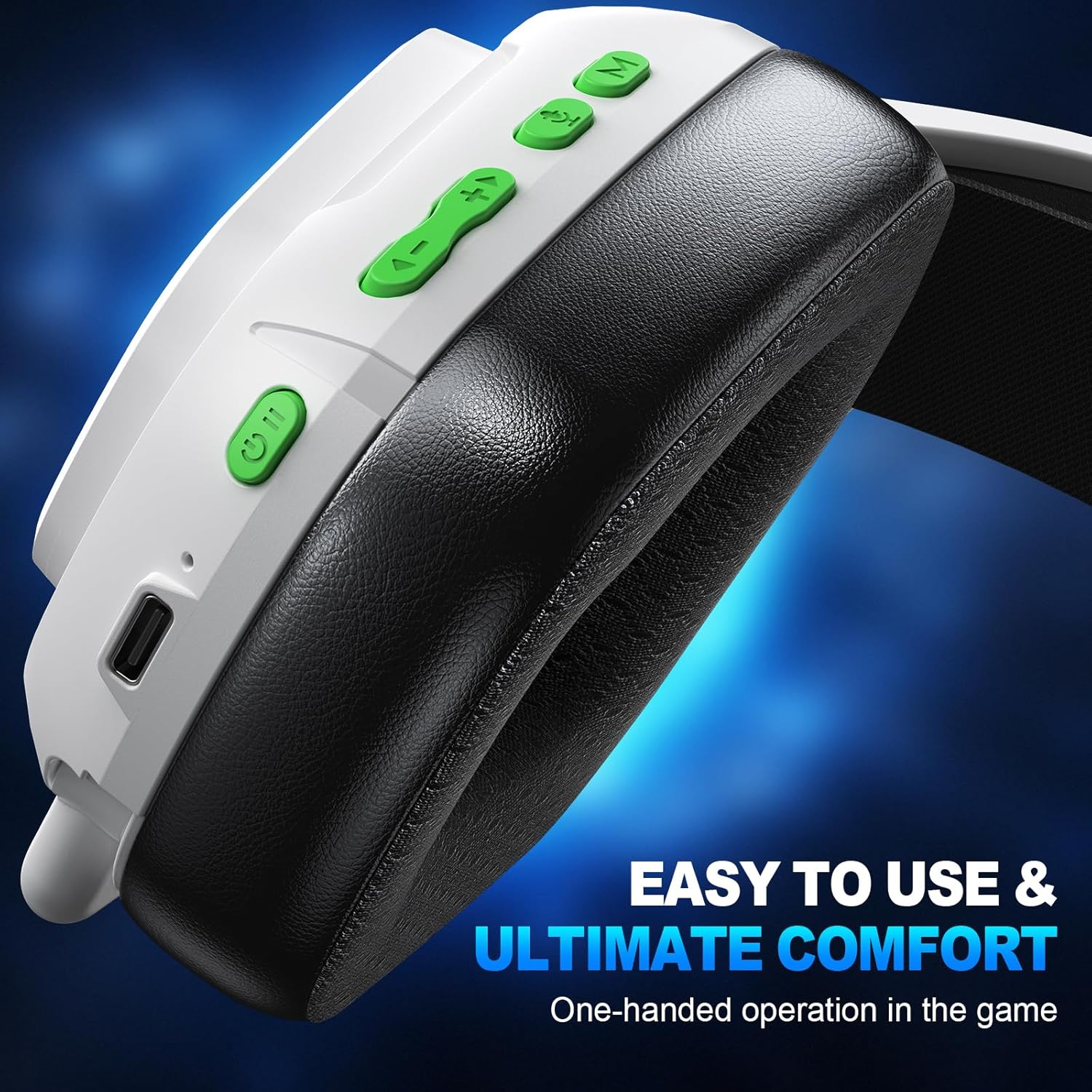
Obrázek: Detailní záběr view of the control buttons located on the headset's earcup.
| Funkce | Akce |
|---|---|
| Zapnout | Dlouze stiskněte 3 s |
| Vypnout | Dlouze stiskněte 4 s |
| Přehrát/Pozastavit | Klikněte |
| Přijměte hovor / zavěste | Klikněte |
| Odmítnout hovor | Dlouze stiskněte 2 s |
| Opakujte poslední hovor | Dvojitá kliknutí |
| Snížit hlasitost | Klikněte |
| Předchozí stopa | Dlouze stiskněte 2 s |
| Zvýšení hlasitosti | Klikněte |
| Další stopa | Dlouze stiskněte 2 s |
| Zapnutí/vypnutí mikrofonu | Klikněte |
| BT <-> 2.4G Mode Switch | Dlouze stiskněte 2 s |
| Připojení Bluetooth | Dlouze stiskněte 3 s |
| Game mode <-> Music mode | Klikněte |
| Vymazat Bluetooth Matching | Dlouze stiskněte 6 s |
5.2 Použití mikrofonu
The headset features an Environmental Noise Cancellation (ENC) microphone, designed to reduce ambient noise by up to 95% for clear communication with teammates or during calls.

Image: A gamer using the headset, illustrating the ENC microphone's ability to cancel noise for clear calls.
5.3 Zvukový zážitek
Equipped with 50mm drivers and 2.4G lossless wireless technology, the headset delivers stereo 3D surround sound. This provides precise audio positioning, allowing you to hear subtle in-game cues like footsteps and explosions, enhancing your immersive experience.

Image: A visual demonstrating the 3D stereo sound and the internal components of the 50mm drive unit.
6. Údržba
6.1 Čištění
To maintain hygiene and prolong the life of your headset, regularly wipe the ear cushions and headband with a soft, dry cloth. For deeper cleaning, a slightly damp cloth with mild soap can be used, ensuring no moisture enters the speaker grilles or control buttons. Allow to air dry completely before next use.
6.2 Péče o baterii
To maximize battery lifespan, avoid fully discharging the headset frequently. Charge the headset when the low battery alert is given. Store the headset in a cool, dry place when not in use for extended periods.
7. Řešení problémů
If you encounter issues with your headset, please refer to the following common solutions:
- Žádný zvuk/přerušovaný zvuk:
Ensure the headset is powered on and fully charged. Check that the correct audio output device is selected in your computer/console settings. For 2.4GHz mode, ensure the dongle is securely plugged in. For Bluetooth mode, ensure the headset is paired and within range. Try re-pairing the headset. - Mikrofon nefunguje:
Verify the microphone is not muted (check the headset control button). Ensure the headset is selected as the input device in your system settings. For Switch in Bluetooth mode, note that the microphone is not supported. - Cannot Connect:
Ensure the headset is in the correct pairing mode (2.4GHz or Bluetooth). Try restarting both the headset and the device you are trying to connect to. Clear previous Bluetooth pairings on your device and the headset (long press 6s on the 'M' button) and attempt to pair again. - Sluchátka se nenabíjejí:
Ensure the USB-C cable is properly connected to both the headset and a power source. Try a different USB-C cable or power adapter.
Pokud tyto kroky váš problém nevyřeší, kontaktujte prosím zákaznickou podporu.
8. Specifikace
| Funkce | Detail |
|---|---|
| Název modelu | VK84 |
| Značka | SKAPENDY |
| Technologie připojení | Wireless (2.4GHz, Bluetooth) |
| Kontrola hluku | Passive Noise Cancellation (ENC Microphone) |
| Umístění uší | Přes ucho |
| Form Factor | Přes ucho |
| Impedance | 32 ohmů |
| Životnost baterie | Až 50 hodin |
| Doba nabíjení | Přibližně 2.5 hodiny (přes USB-C) |
| Rozměry produktu | 7.48 x 3.54 x 5.51 palce |
| Hmotnost položky | 12 unce |
| UPC | 657381061283 |
9. Záruka a podpora
The SKAPENDY VK84 Wireless Gaming Headset comes with a standard manufacturer's warranty. For detailed warranty information, product support, or technical assistance, please refer to the contact information provided on the product packaging or the official SKAPENDY webstránky. Uschovejte si prosím doklad o koupi pro případ reklamace.