
1. Úvod
The T-WOLF G520 is a high-performance wired gaming mouse designed for precision and comfort. It features a USB2.0 wired connection, 7 customizable buttons, and dynamic RGB lighting. This manual provides essential information for setting up, operating, and maintaining your G520 gaming mouse.
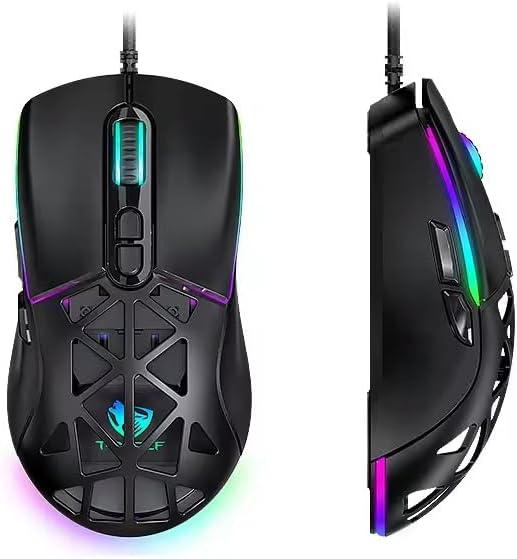
Figure 1: T-WOLF G520 Gaming Mouse (Front and Side View)
2. Vlastnosti produktu
- Spojení: Wired USB2.0 for stable and responsive performance.
- Typ senzoru: Optical sensor for accurate tracking.
- Nastavení DPI: Adjustable DPI from 800 to 12800 (800 / 1600 / 3200 / 4800 / 6400 / 12800).
- Míra hlasování: 1000Hz for rapid response times.
- tlačítka: 7 programmable buttons (Left, Right, Middle, Forward, Back, DPI+, DPI-).
- RGB osvětlení: 13 dynamic RGB lighting modes.
- Trvanlivost: 10 million click lifespan for micro switches.
- Kabel: 1.5m braided cable for enhanced durability and tangle resistance.
- Design: Lightweight honeycomb structure and ergonomic shape for comfortable grip and ventilation.
- Přizpůsobení: Magnetic interchangeable back cover.

Obrázek 2: Klíčové vlastnostiview
3. Obsah balení
- T-WOLF G520 Gaming Mouse Unit
- Interchangeable Magnetic Back Covers (2 types)

Figure 3: G520 Mouse with Interchangeable Back Covers
4. Pokyny k nastavení
- Connect the USB connector of the T-WOLF G520 gaming mouse to an available USB 2.0 port on your computer.
- The mouse is Plug & Play compatible and does not require additional drivers for basic functionality. Your operating system will automatically detect and install the necessary drivers.
- Once detected, the mouse will be ready for use.
5. Návod k obsluze
5.1 Funkce tlačítek
The T-WOLF G520 mouse features 7 buttons with the following default functions:
- Levé tlačítko: Primární funkce kliknutí.
- Pravé tlačítko: Funkce sekundárního kliknutí (kontextová nabídka).
- Prostřední tlačítko / Rolovací kolečko: Scroll up/down, click for universal scroll or other functions.
- Tlačítko vpřed: Naviguje vpřed web prohlížeče popř file průzkumníci.
- Tlačítko Zpět: Naviguje zpět web prohlížeče popř file průzkumníci.
- Tlačítko DPI+: Zvyšuje citlivost DPI.
- Tlačítko DPI: Snižuje citlivost DPI.
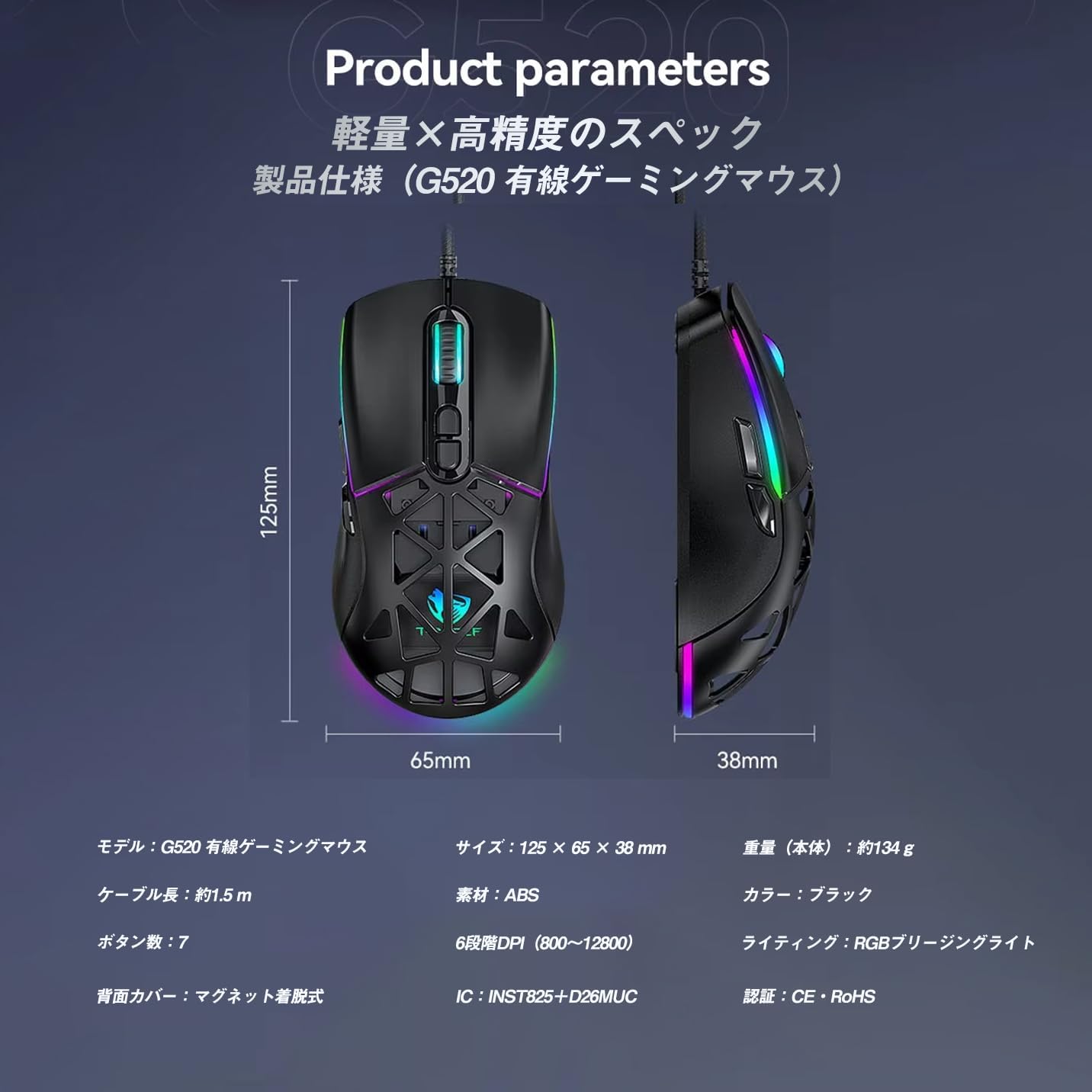
Figure 4: G520 Button Layout
5.2 Nastavení DPI
The mouse supports 6 adjustable DPI levels. To change the DPI, press the DPI+ or DPI- buttons located on the top of the mouse. Each press will cycle through the available DPI settings: 800, 1600, 3200, 4800, 6400, and 12800.

Obrázek 5: Úrovně nastavení DPI
5.3 Ovládání RGB osvětlení
The T-WOLF G520 features 13 RGB lighting modes. To change the RGB lighting mode, press and hold the Tlačítko Zpět a Tlačítko DPI simultaneously for approximately 3 seconds. Repeat this action to cycle through the different lighting effects.
5.4 Magnetic Back Cover
The mouse comes with two types of magnetic back covers that can be easily interchanged. To remove a cover, gently lift it from the back of the mouse. To attach a cover, align it with the mouse body and allow the magnets to secure it in place.

Figure 6: Magnetic Back Cover Exchange
6. Údržba
- Čištění: K čištění myši použijte měkký, suchý hadřík. V případě odolných nečistot použijte lehceamp Lze použít hadřík, abyste zajistili, že se do myši nedostane žádná tekutina.
- Vyhněte se tekutinám: Neponořujte myš do vody ani ji nevystavujte nadměrné vlhkosti.
- Skladování: Myš skladujte na chladném a suchém místě mimo dosah přímého slunečního záření a extrémních teplot.
- Péče o kabely: Avoid bending or twisting the braided cable excessively to prevent damage.
7. Řešení problémů
- Myš nereaguje:
- Ujistěte se, že je kabel USB bezpečně připojen k portu USB počítače.
- Zkuste připojit myš k jinému USB portu.
- Restartujte počítač.
- DPI se nemění:
- Ensure you are pressing the correct DPI+ or DPI- buttons.
- The mouse cycles through 6 fixed DPI levels; there is no software adjustment.
- RGB Lighting Not Working/Changing:
- Ujistěte se, že je myš správně připojena.
- Stiskněte a podržte Tlačítko Zpět a Tlačítko DPI simultaneously for 3 seconds to cycle through modes.
- Problémy se sledováním:
- Vyčistěte optický senzor na spodní straně myši.
- Používejte myš na čistém, rovnoměrném povrchu nebo na podložce pod myš.
8. Specifikace
| Funkce | Specifikace |
|---|---|
| Model | G520 |
| Typ připojení | Kabelové USB 2.0 |
| Typ snímače | Optický |
| Nastavení DPI | 800/1600/3200/4800/6400/12800 |
| Míra hlasování | 1000 Hz |
| Počet tlačítek | 7 |
| Délka kabelu | 1.5m (Braided) |
| Rozměry (D׊×V) | 124 × 65 × 40 mm |
| Hmotnost | Přibl. 132 g |
| Provozní svtage/Aktuální | 5V / 150mA |
| Osvětlení | RGB (13 Modes) |
| Materiál | Plast (ABS) |
| Kompatibilní OS | Windows 10, Windows 11, Mac OS, Linux (OS standard, no driver required) |

Figure 7: Product Specifications Diagram
9. Záruka a podpora
This product is covered by a standard manufacturer's warranty. Please refer to your purchase documentation for specific warranty terms and conditions. For technical support or warranty claims, please contact the retailer or the manufacturer's customer service.

