
1. Úvod
Thank you for choosing the THOMSON WS902DUO Cosy Bookshelf Speakers. These active stereo speakers deliver a powerful 150W audio experience with deep bass from two 10 cm woofers. They offer versatile connectivity options including Bluetooth 5.3, Optical, HDMI (ARC), RCA, and USB playback. The included remote control and side panel adjustments provide precise control over your audio. Please read this manual carefully before use to ensure proper operation and to maximize your listening experience.

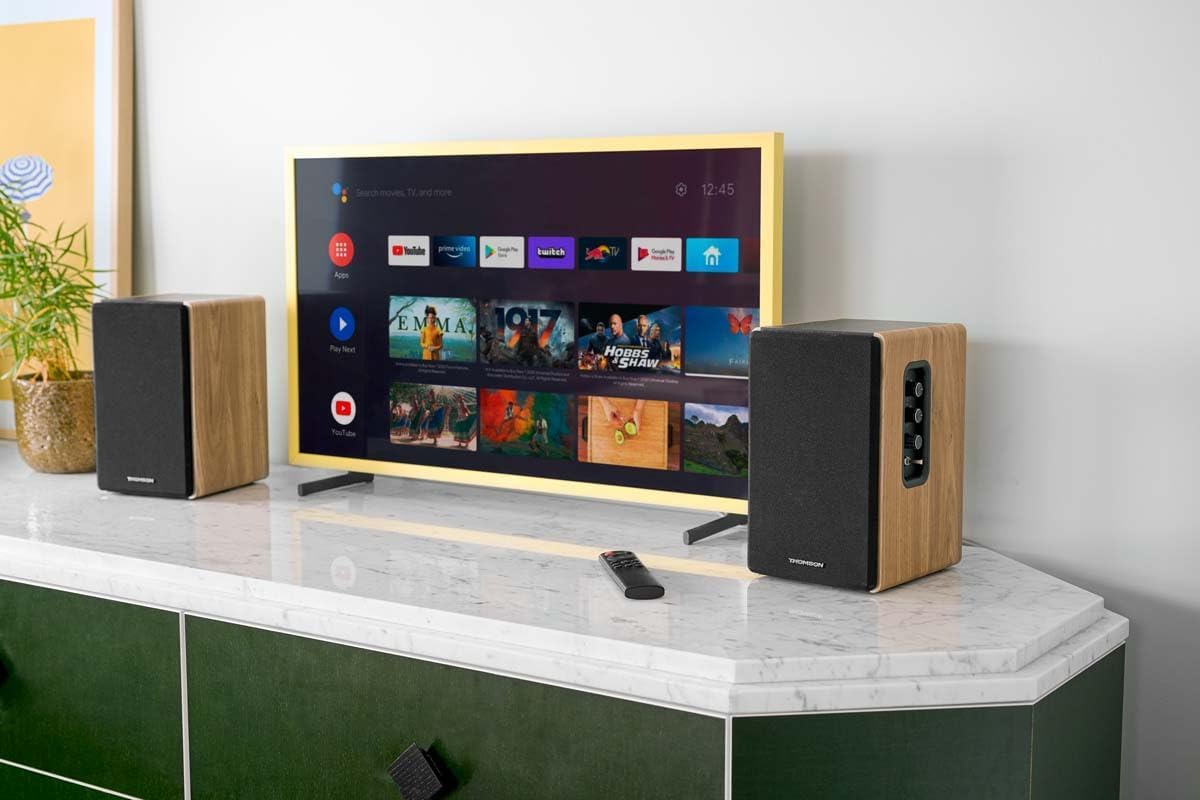
Image 1.1: THOMSON WS902DUO Bookshelf Speakers in a living space, showcasing their elegant wood finish.
2. Důležité bezpečnostní pokyny
- Před použitím výrobku si pečlivě přečtěte tyto pokyny.
- Uschovejte si tyto pokyny pro budoucí použití.
- Dbejte všech varování na výrobku a v návodu k obsluze.
- Dodržujte všechny pokyny.
- Nepoužívejte toto zařízení v blízkosti vody.
- Čistěte pouze suchým hadříkem.
- Nezakrývejte žádné větrací otvory. Nainstalujte v souladu s pokyny výrobce.
- Neinstalujte v blízkosti zdrojů tepla, jako jsou radiátory, tepelné regulátory, kamna nebo jiná zařízení (včetně amplifikátory), které produkují teplo.
- Nepodceňujte bezpečnostní účel polarizované nebo uzemněné zástrčky. Polarizovaná zástrčka má dvě čepele, přičemž jedna je širší než druhá. Zástrčka zemnícího typu má dvě čepele a třetí zemnící kolík. Široká čepel nebo třetí hrot jsou určeny pro vaši bezpečnost. Pokud dodaná zástrčka nepasuje do vaší zásuvky, požádejte elektrikáře o výměnu zastaralé zásuvky.
- Chraňte napájecí kabel před šlapáním nebo přiskřípnutím, zejména u zástrček, zásuvek a v místě, kde vychází z přístroje.
- Používejte pouze nástavce/příslušenství určené výrobcem.
- Používejte pouze s vozíkem, stojanem, stativem, držákem nebo stolem určeným výrobcem nebo prodávaným se zařízením. Při používání vozíku buďte opatrní při přemísťování kombinace vozíku/přístroje, abyste se nezranili při převrácení.
- Odpojte toto zařízení během bouřky s blesky nebo když se delší dobu nepoužívá.
- Veškeré opravy svěřte kvalifikovanému servisnímu personálu. Servis je nutný, pokud bylo zařízení jakýmkoli způsobem poškozeno, například je poškozen napájecí kabel nebo zástrčka, pokud do zařízení vnikla tekutina nebo do něj spadly předměty, zařízení bylo vystaveno dešti nebo vlhkosti, nefunguje normálně. , nebo byla vypuštěna.
3. Obsah balení
Zkontrolujte prosím, zda jsou ve vašem balení obsaženy všechny níže uvedené položky:
- THOMSON WS902DUO Bookshelf Speakers (2 units)
- Dálkové ovládání
- Napájecí kabel
- Kabel pro připojení reproduktoru
- 3.5mm Jack to RCA Adapter Cable
- Uživatelská příručka (tento dokument)

Image 3.1: Packaging of the THOMSON WS902DUO Bookshelf Speakers.
4. Konec produktuview
4.1. Side Control Panel (Active Speaker)
The active speaker features a side control panel for easy access to essential functions.

Image 4.1: Side control panel.
- Ovládání basů: Upravuje nízkofrekvenční výstup.
- Ovládání výšek: Upravuje vysokofrekvenční výstup.
- Ovládání hlasitosti: Upravuje celkovou hlasitost zvuku.
- Vypínač: Zapíná nebo vypíná reproduktory.
- LED indikátor: Shows the current status or selected input.
4.2. Zadní panel (aktivní reproduktor)
The rear panel of the active speaker provides all necessary input and output connections.
Obrázek 4.2: Připojení na zadním panelu.
- Optický vstup: For connecting digital audio sources like TVs, game consoles, or Blu-ray players.
- Aux vstup (RCA): For connecting analog audio sources such as turntables, CD players, or PCs. A 3.5mm jack adapter is provided.
- TV Audio (HDMI ARC): For connecting to a TV's HDMI ARC port, allowing TV remote control of the speaker volume.
- USB přehrávání: Pro přehrávání MP3 filepřímo z USB flash disku.
- Sub Out: For connecting an external active subwoofer for enhanced bass.
- Výstup reproduktoru: Připojuje se k pasivnímu reproduktoru.
- Příkon: Připojuje se k hlavnímu zdroji napájení.
4.3. Dálkové ovládání
The remote control provides convenient access to all speaker functions from a distance.

Image 4.3: Remote control.
- Vypínač: Zapíná/vypíná reproduktory.
- Tlačítko ztlumení: Ztlumí/zapne zvuk.
- Hlasitost +/-: Nastavuje úroveň hlasitosti.
- Playback Controls (Play/Pause, Skip): Pro přehrávání z USB.
- Source Selection Buttons (OPT, BT, ARC, USB, LINE): Vybere zdroj audio vstupu.
- EQ Mode Buttons (MOVIE, MUSIC, DIALOG): Selects preset equalization modes.
5. Nastavení
5.1. Umístění reproduktoru
Place the speakers on a stable, flat surface such as a bookshelf, desk, or speaker stands. For optimal stereo imaging, position the speakers equidistant from your listening position and at ear level. Ensure there is adequate space around the speakers for ventilation.
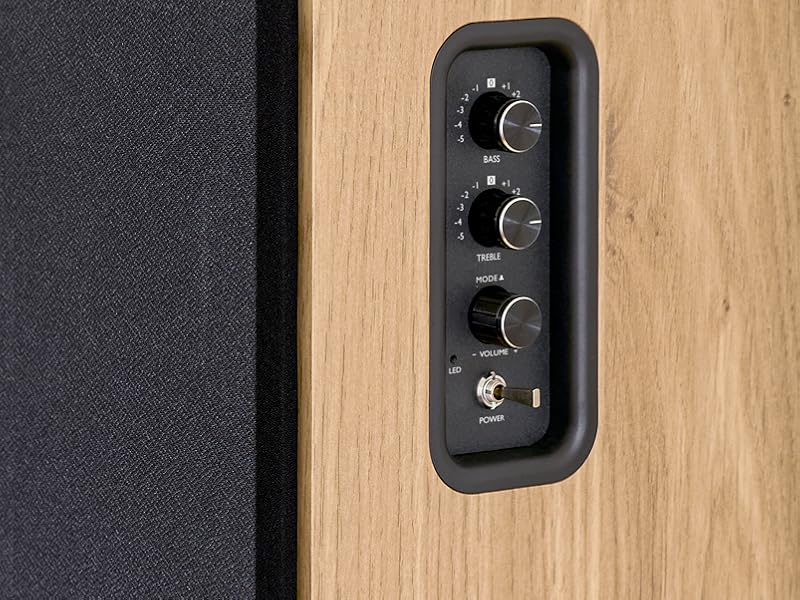
Image 5.1: Recommended speaker placement on a desk.
5.2. Připojení reproduktorů
- Identify the active speaker (with controls and inputs) and the passive speaker.
- Connect the included speaker cable from the speaker output terminals on the active speaker to the input terminals on the passive speaker. Ensure correct polarity (+ to + and - to -).
5.3. Připojení zdrojů zvuku
Connect your desired audio sources to the active speaker using the appropriate cables.
- Optický vstup: Use an optical cable to connect your TV, game console, or Blu-ray player to the OPTICAL IN port.
- Vstup HDMI (ARC): Use an HDMI cable to connect your TV's HDMI ARC port to the TV AUDIO (HDMI) port on the speaker. This allows your TV remote to control the speaker volume.
- Vstup RCA (AUX): Use an RCA cable (or the provided 3.5mm jack to RCA adapter) to connect devices like a turntable, CD player, or PC to the AUX IN (RCA) ports.
- Vstup USB: Vložte USB flash disk obsahující MP3 files into the USB PLAY port.

Image 5.2: Speakers connected to a television via HDMI ARC.
5.4. Párování Bluetooth
- Ujistěte se, že jsou reproduktory zapnuté.
- Press the 'BT' button on the remote control or the side panel to select Bluetooth input. The LED indicator will flash, indicating pairing mode.
- Na smartphonu, tabletu nebo počítači povolte Bluetooth a vyhledejte dostupná zařízení.
- Select "THOMSON WS902DUO" from the list of devices.
- Once paired, the LED indicator will stop flashing and remain solid. You can now stream audio wirelessly.
5.5. Subwoofer Connection (Optional)
If you wish to enhance bass further, connect an active subwoofer to the 'Sub Out' port on the rear panel of the active speaker using an RCA cable.
6. Návod k obsluze
6.1. Zapnutí/vypnutí
Use the power switch on the side control panel or the power button on the remote control to turn the speakers on or off.
6.2. Výběr zdroje
Press the corresponding source button on the remote control (OPT, BT, ARC, USB, LINE) to switch between connected audio inputs. The LED indicator will change to reflect the selected source.
6.3. Ovládání hlasitosti
Adjust the volume using the 'Volume' knob on the side control panel or the 'VOL+/-' buttons on the remote control.
6.4. Nastavení zvuku
Fine-tune the sound to your preference:
- Basy/výšky: Use the 'Bass' and 'Treble' knobs on the side control panel to adjust the low and high frequencies.
- Režimy EQ: Press the 'MOVIE', 'MUSIC', or 'DIALOG' buttons on the remote control to select preset equalization settings optimized for different content types.
6.5. Přehrávání z USB
When a USB flash drive with MP3 files is inserted and USB source is selected, the speakers will automatically begin playing. Use the playback control buttons on the remote control (Play/Pause, Skip) to manage your music.
6.6. Provoz Bluetooth
After successful pairing (see Section 5.4), you can stream audio from your Bluetooth device. Use your device's controls or the speaker's remote control for playback and volume adjustments.
7. Údržba
Správná údržba zajistí dlouhou životnost a výkon vašich reproduktorů.
- Čištění: Wipe the speaker surfaces with a soft, dry cloth. Do not use liquid cleaners or abrasive materials.
- Větrání: Ujistěte se, že ventilační otvory nejsou zablokovány, aby nedošlo k přehřátí.
- Skladování: Pokud budete reproduktory skladovat delší dobu, odpojte je ze zásuvky a uložte je na chladném a suchém místě.
- Vyhněte se vlhkosti: Keep the speakers away from water and high humidity.
8. Řešení problémů
Pokud narazíte na nějaké problémy, přečtěte si následujícího průvodce odstraňováním problémů:
| Problém | Možná příčina | Řešení |
|---|---|---|
| Žádná síla | Power cable not connected; Power switch off; Wall outlet not working. | Ensure power cable is securely connected. Turn on the power switch. Test the wall outlet with another device. |
| Žádný zvuk | Incorrect input source selected; Volume too low; Mute function active; Audio cable not connected properly. | Select the correct input source. Increase volume. Press Mute button on remote. Check all audio cable connections. |
| Párování Bluetooth se nezdařilo | Speakers not in pairing mode; Device too far; Bluetooth disabled on source device. | Ensure speakers are in Bluetooth pairing mode (flashing LED). Move device closer to speakers. Enable Bluetooth on your source device. |
| Přehrávání z USB nefunguje | USB drive not formatted correctly; Files not MP3; USB drive not inserted properly. | Ensure USB drive is FAT32 formatted. Verify files are in MP3 format. Re-insert USB drive firmly. |
| Zkreslení zvuku | Volume too high; Source audio quality poor; Bass/Treble settings too extreme. | Lower the volume. Test with a different audio source. Adjust Bass and Treble controls. |
9. Specifikace
| Funkce | Specifikace |
|---|---|
| Značka | THOMSON |
| Číslo modelu | WS902DUO |
| Maximální výstupní výkon reproduktoru | 150 wattů |
| Frekvenční odezva | 60 Hz |
| Technologie připojení | Bluetooth, HDMI (ARC), Optický, RCA, USB |
| Verze Bluetooth | 5.3 |
| Režim zvukového výstupu | Stereo (2.0 kanálů) |
| Vstupní objemtage | 230 voltů (AC) |
| Typ montáže | Policový držák |
| Typ reproduktoru | Multimedia Bookshelf |
| Speciální funkce | Stereo Pairing, USB Port, Sub-Out, Remote Control, EQ Modes |
| Doporučená použití | Smartphone, Tablet, PC, TV, Game Console, DVD Player, Turntable |
| Barva | Přírodní povrchová úprava dřeva |
| Kontrolní metoda | Remote Control, Side Panel Knobs |
| Velikost wooferu | 10 centimetrů |
| Rozměry (V x Š x H) | 28 cm x 24 cm x 47 cm (přibližně, na reproduktor) |
| Hmotnost | 5048 Grams (total for pair) |
| Počet položek | 2 |
| Země původu | Čína |
10. Informace o záruce
This THOMSON WS902DUO product comes with a 1letá omezená záruka od data nákupu. Tato záruka se vztahuje na výrobní vady a vady zpracování při běžném používání. Nevztahuje se na škody způsobené nesprávným použitím, nehodami, neoprávněnými úpravami nebo běžným opotřebením. Uschovejte si prosím doklad o koupi pro případ uplatnění záruky.
11. Zákaznická podpora
For technical assistance, warranty claims, or any questions regarding your THOMSON WS902DUO speakers, please contact your retailer or visit the official THOMSON support website. Please have your model number (WS902DUO) and proof of purchase ready when contacting support.
Online podpora: www.thomsonconsumer.com (Please check for regional support contacts)