
GameSir GameSir-G7 Pro
Uživatelská příručka k drátovému ovladači GameSir G7 Pro
Model: GameSir-G7 Pro | Brand: GameSir
Zavedení
The GameSir G7 Pro is a versatile gaming controller designed for seamless compatibility across multiple platforms, including Xbox Series X|S, Xbox One, PC, and Android devices. It features advanced technologies such as Mag-Res TMR sticks and Hall Effect analog triggers for precise and durable performance. This manual provides detailed instructions for setting up, operating, maintaining, and troubleshooting your G7 Pro controller.
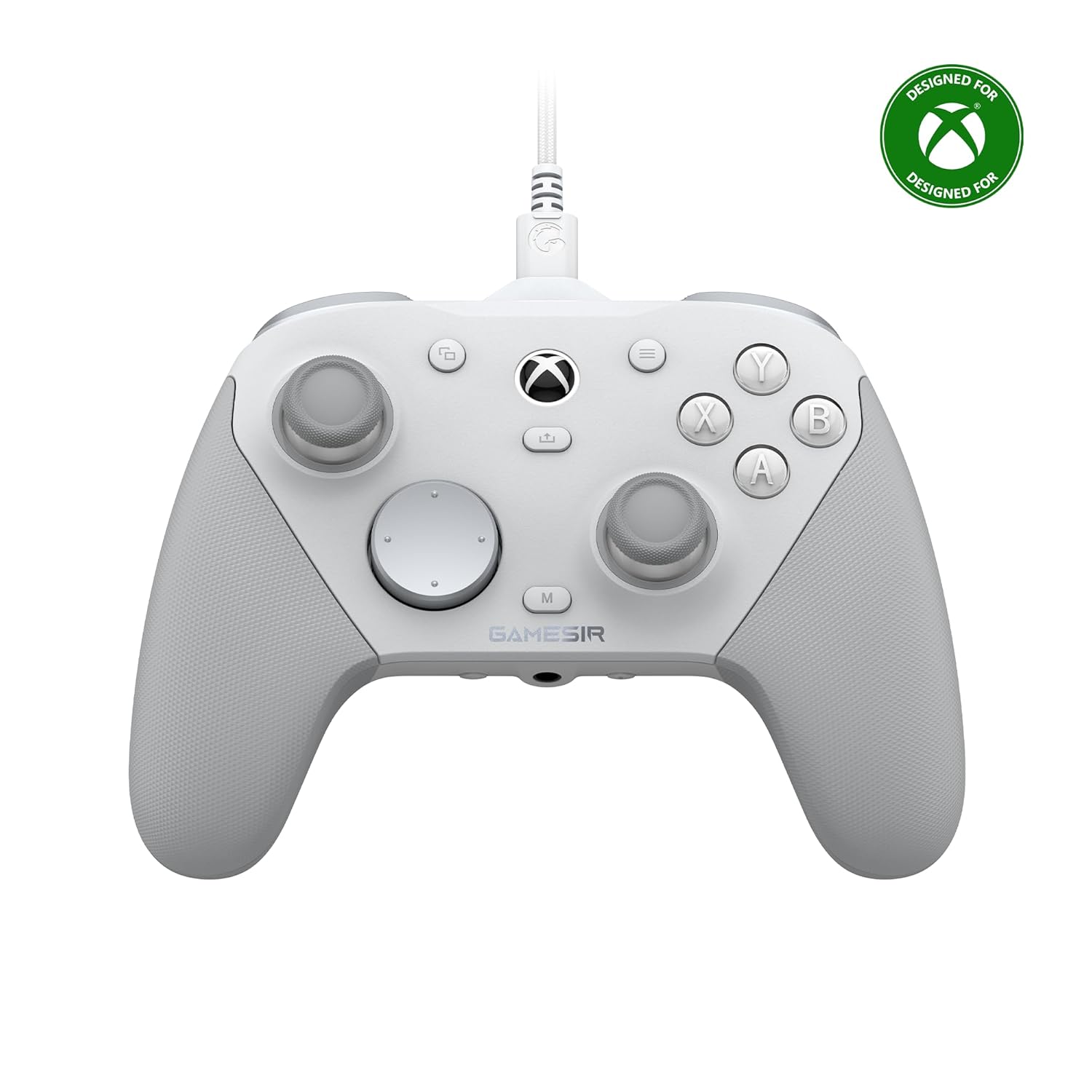
Obrázek: Přední strana view of the GameSir G7 Pro Wired Controller in white, with the Xbox logo and GameSir branding visible.
Nastavení
Konektivita
The G7 Pro offers three primary connection modes:
- Kabelové připojení: For Xbox Series X|S and Xbox One, connect the controller directly using the provided USB-C to USB-A cable.
- Bezdrátové připojení 2.4G: For PC, use the included 2.4GHz wireless dongle.
- Připojení Bluetooth: For Android devices, connect via Bluetooth.
Effortlessly switch between modes using the convenient physical mode switch located on the back of the controller.

Image: Diagram illustrating the GameSir G7 Pro's tri-mode connectivity options: wired for Xbox, 2.4GHz wireless and wired for PC, and Bluetooth for Android.
Nabíjení
The G7 Pro includes a Smart Auto Start-Stop Charging Station and a built-in 1200mAh battery. To charge, simply place the controller on the station. Charging will begin automatically. Remove the controller from the station to resume gameplay.

Obrázek: Detail view of the GameSir G7 Pro controller showing its 1200mAh rechargeable battery and the Smart Auto Start-Stop Charging Station.
Návod k obsluze
TMR Sticks
The GameSir G7 Pro features Mag-Res TMR sticks, which combine the durability of Hall Effect technology with the linear precision of traditional potentiometer sticks. This design ensures stable polling rates, smooth movement, and eliminates stick drift, providing a reliable gaming experience with low power consumption.

Obrázek: Podrobný view of a GameSir Mag-Res TMR stick, highlighting its internal components and specifications like 1000Hz polling rate, 5M-cycles lifespan, 12-bit ADC chip, and 4096-level resolution.
Analogové spouštěče Hallova jevu
Experience unmatched smoothness and linear input with the precision-tuned Hall Effect analog triggers. These triggers provide accurate control for various in-game actions. Additionally, the controller features clicky Micro Switch trigger stops, allowing users to quickly switch between full analog range and a shorter, faster digital input based on their gaming preferences.

Image: Close-up of the GameSir G7 Pro's Hall Effect analog triggers, showing the mechanism for both smooth analog input and clicky Micro Switch trigger stops.
1000Hz Polling Rate on PC
For PC gaming, the G7 Pro supports an ultra-responsive 1000Hz polling rate. This high polling rate is available through both wired and 2.4G wireless connections, ensuring instantaneous input registration, minimal lag, and optimized performance for competitive gameplay.

Image: A person playing a racing game on a laptop using the GameSir G7 Pro controller, illustrating the 1000Hz polling rate feature on PC.
GameSir Nexus App
The G7 Pro is compatible with the upgraded GameSir Nexus app, which provides extensive customization options. This app allows you to adjust gyro settings, fine-tune stick curves, and map buttons to mouse functions, offering deeper control and personalization for your gaming experience.
PC Gyro Aiming & 4 Extra Buttons
A built-in gyroscope (PC-only) allows for precise and intuitive aiming by mapping to sticks, buttons, or mouse movements. The controller also features four customizable buttons (L5/R5 bumpers and two lockable back buttons) that can be programmed for macros or quick actions, enhancing your gameplay efficiency.
Customizable Faceplate and D-pads
The G7 Pro features a magnetic, detachable faceplate that can be customized. The package includes extra D-pads, allowing you to swap them to suit your ergonomic and tactile preferences.

Image: Contents of the GameSir G7 Pro package, including the controller, extra D-pads, cable retainer, 2.4GHz wireless dongle, Smart Auto Start-Stop Charging Station, and a 3m Type-C cable.
Zvukový konektor 3.5mm
The controller is equipped with a 3.5mm audio jack, supporting audio output for both wired and 2.4G wireless connections, allowing for convenient headset use during gameplay.
Údržba
To ensure the longevity and optimal performance of your GameSir G7 Pro controller, follow these maintenance guidelines:
- Čištění: Ovladač pravidelně otírejte měkkým, suchým hadříkem. V případě odolné nečistoty lehceampOtřete hadřík vodou nebo jemným čisticím roztokem. Vyhněte se agresivním chemikáliím nebo abrazivním materiálům.
- Skladování: Store the controller in a cool, dry place away from direct sunlight, extreme temperatures, and humidity. When not in use, placing it on its charging station can help keep it organized and charged.
- Péče o kabely: Handle the USB-C cable with care. Avoid sharp bends or excessive pulling that could damage the cable or connectors.
- Péče o baterie: While the controller has a smart charging station, avoid completely draining the battery frequently to prolong its lifespan.
Odstraňování problémů
If you encounter issues with your GameSir G7 Pro controller, refer to the following common troubleshooting steps:
- Ovladač se nepřipojuje:
- Ensure the mode switch on the back of the controller is set to the correct platform (Xbox, PC 2.4G, or Android Bluetooth).
- Pro kabelové připojení zkuste jiný USB port nebo kabel.
- For 2.4G wireless, ensure the dongle is securely plugged into your PC and try a different USB port.
- For Bluetooth, ensure Bluetooth is enabled on your Android device and the controller is in pairing mode. Remove previous pairings and try re-pairing.
- Buttons/Sticks Unresponsive or Drifting:
- Ujistěte se, že je ovladač plně nabitý.
- Connect the controller to the GameSir Nexus App on PC to check for firmware updates and calibrate sticks/triggers if necessary.
- Vyčistěte okolí tlačítek a páček, abyste odstranili veškeré nečistoty.
- Audio Issues (3.5mm Jack):
- Ujistěte se, že jsou vaše sluchátka zcela zapojena do 3.5mm jacku.
- Check audio settings on your console/PC/Android device to ensure the controller's audio output is selected.
- Try a different headset to rule out a headset issue.
- Problémy s nabíjením:
- Ensure the controller is correctly seated on the charging station.
- Verify the charging station is receiving power.
- Try charging the controller directly with the USB-C cable.
If issues persist, please contact GameSir customer support for further assistance.
Specifikace
| Funkce | Detail |
|---|---|
| Číslo modelu | GameSir-G7 Pro |
| Konektivita | Kabelové (USB-C), bezdrátové 2.4G, Bluetooth |
| Kompatibilita | Xbox Series X|S, Xbox One, Windows, Android |
| Tyčinky | GameSir Mag-Res TMR tyčinky |
| Spouštěče | Hall Effect Analog Triggers with Micro Switch Trigger Stops |
| Polling Rate (PC) | 1000 Hz (kabelové a bezdrátové 2.4 G) |
| Baterie | 1200mAh Rechargeable (included) |
| Rozměry | 4.06 x 2.28 x 5.98 palce |
| Hmotnost | 1.1 libry |
| Audio Jack | 3.5mm (Wired & 2.4G supported) |
| Extra tlačítka | 4 customizable (L5/R5 bumpers + lockable back buttons) |
Záruka a podpora
For detailed warranty information and customer support, please refer to the official GameSir website or the documentation included with your product. You can also contact GameSir customer service directly for technical assistance or inquiries regarding your G7 Pro controller.
Oficiální GameSir Webmísto: www.gamesir.hk
Související dokumenty - GameSir-G7 Pro
 |
Ovladač GameSir T7: Funkce, specifikace a pokyny Podrobné informace o ovladači GameSir T7, včetně jeho Hallových páček a triggerů, dunivých motorů, ergonomického designu, konektivity a technických specifikací. Naučte se, jak se připojit, ovládat hlasitost, ztlumit mikrofon a kalibrovat ovladač. Zahrnuje srovnání s dalšími modely GameSir. |
 |
Ovladač GameSir Super Nova - Uživatelská příručka a funkce Podrobné informace o ovladači GameSir Super Nova, včetně jeho funkcí, technických specifikací, možností připojení, kalibrace a řešení problémů. |
 |
Herní ovladač GameSir-T4k: Uživatelská příručka a průvodce nastavením Podrobný návod k použití pro transparentní PC ovladač GameSir-T4k. Seznamte se s jeho funkcemi, rozložením zařízení, způsoby připojení k PC, Nintendo Switch a Android TV Boxu, přizpůsobením tlačítek, funkcí Turbo a kalibrací. Obsahuje Hallovy páčky a analogové spouštěče. |
 |
Uživatelská příručka k drátovému ovladači GameSir-G7 – Nastavení a funkce Komplexní uživatelská příručka pro drátový ovladač GameSir-G7 s podrobným popisem obsahu balení, rozložení zařízení, ovládání hlasitosti, nastavení tlačítka zpět, kalibrace joysticku a přizpůsobení pomocí softwaru GameSir Nexus pro Xbox a PC. |
 |
GameSir G7 Pro Tri-Mode Wireless Controller for Xbox, PC, Android | Enhanced Esports Features Discover the GameSir G7 Pro Tri-Mode controller, featuring Mag-Res TMR sticks, Hall Effect triggers, 1000Hz polling rate, and customizable faceplates for an unparalleled esports gaming experience on Xbox, PC, and Android. |
 |
GameSir G7 Pro Tri-Mode Controller User Manual Comprehensive user manual for the GameSir G7 Pro Tri-Mode controller, including setup instructions for Windows, Android, and Xbox, volume control, button mapping, and calibration procedures. |
Ask a question about this manual
Ask about setup, troubleshooting, compatibility, parts, safety, or missing instructions. Manuals+ will review the question and use this page’s manual context to help answer it.