
Zavedení
Thank you for choosing the Philips Solar Security Light. This manual provides essential information for the safe and efficient operation of your solar-powered, wall-mounted flood light with PIR motion sensor. Please read these instructions carefully before installation and use, and retain them for future reference.
Bezpečnostní informace
- Ujistěte se, že montážní povrch je stabilní a unese hmotnost svítidla.
- Nepokoušejte se produkt rozebírat ani upravovat. Mohlo by dojít ke zrušení záruky a k ohrožení bezpečnosti.
- Udržujte solární panel čistý, abyste zajistili optimální výkon nabíjení.
- Avoid looking directly into the light source when it is active, as it may cause eye strain.
- Výrobek a jeho součásti na konci jeho životnosti zlikvidujte zodpovědně v souladu s místními předpisy.
Obsah balení
Před instalací ověřte, zda jsou všechny komponenty přítomny:
- Philips Solar Security Light (1 unit)
- Dálkové ovládání (1 jednotka)
- Montážní konzola (1 kus)
- Šrouby (2 jednotky)
- Wall Plugs (2 units)
Konec produktuview
The Philips Solar Security Light is an outdoor, solar-powered flood light designed for enhanced security and illumination. It features a PIR motion sensor, high-brightness LEDs, and multiple lighting modes.

Obrázek: Overview of the Philips Solar Security Light, highlighting its durable design with a solar panel, three LED light heads, and an integrated motion sensor.
Klíčové vlastnosti:
- Vysoký jas: 800 lumens with 6500K cool daylight color temperature.
- PIR Motion Sensor: Detects motion up to 49.2 feet with a 180-degree detection angle.
- 3 režimy osvětlení: Customizable illumination settings for various needs.
- Solární napájení: Equipped with an upgraded polycrystalline solar panel and a 2000 mAh high-capacity battery for efficient charging and extended use.
- Odolný vůči povětrnostním vlivům: IP65 rated for resistance against heavy rain, humidity, and extreme temperatures.
- Dálkové ovládání: Allows convenient adjustment of light modes without manual interaction.
Nastavení a instalace
The Philips Solar Security Light is designed for easy wall-mounted installation with no wiring required. It comes pre-assembled.
Kroky instalace:
- Vyberte umístění: Select an outdoor location that receives direct sunlight for most of the day to ensure optimal charging of the solar panel. The light should be mounted on a wall.
- Označte vrtné body: Hold the mounting bracket against the desired wall location and mark the positions for the two screws.
- Vrtací otvory: Drill two holes at the marked points. Insert the wall plugs into the drilled holes.
- Připevněte montážní držák: Připevněte montážní držák ke zdi pomocí dodaných šroubů.
- Upevněte světlo: Slide the solar security light onto the mounting bracket until it clicks securely into place.
- Nastavení světelných hlavic a senzoru: Adjust the three light heads and the PIR motion sensor to cover the desired area. The motion sensor has an adjustable angle of 180 degrees.
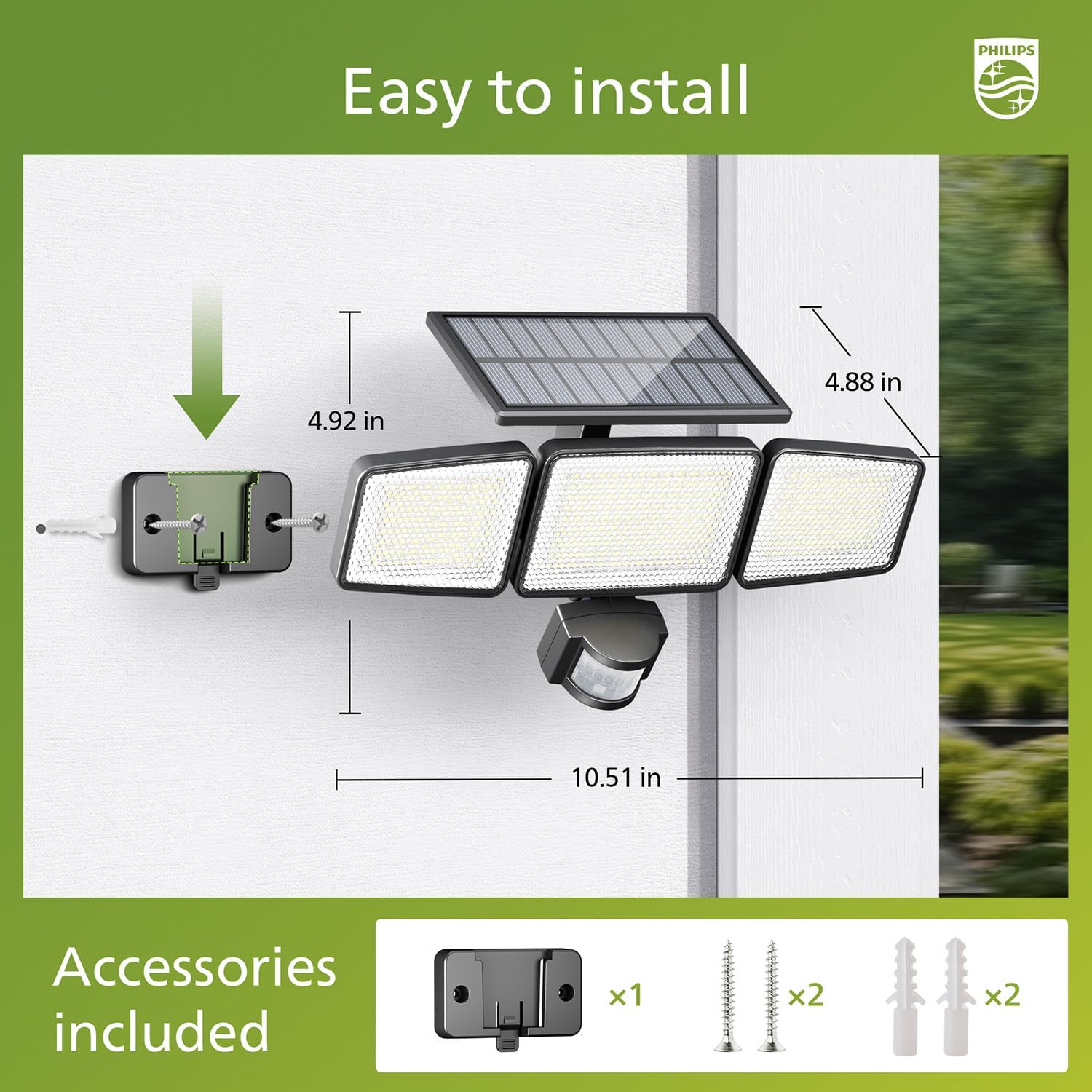
Image: Visual guide for installing the Philips Solar Security Light, including dimensions and the accessories provided for wall mounting.
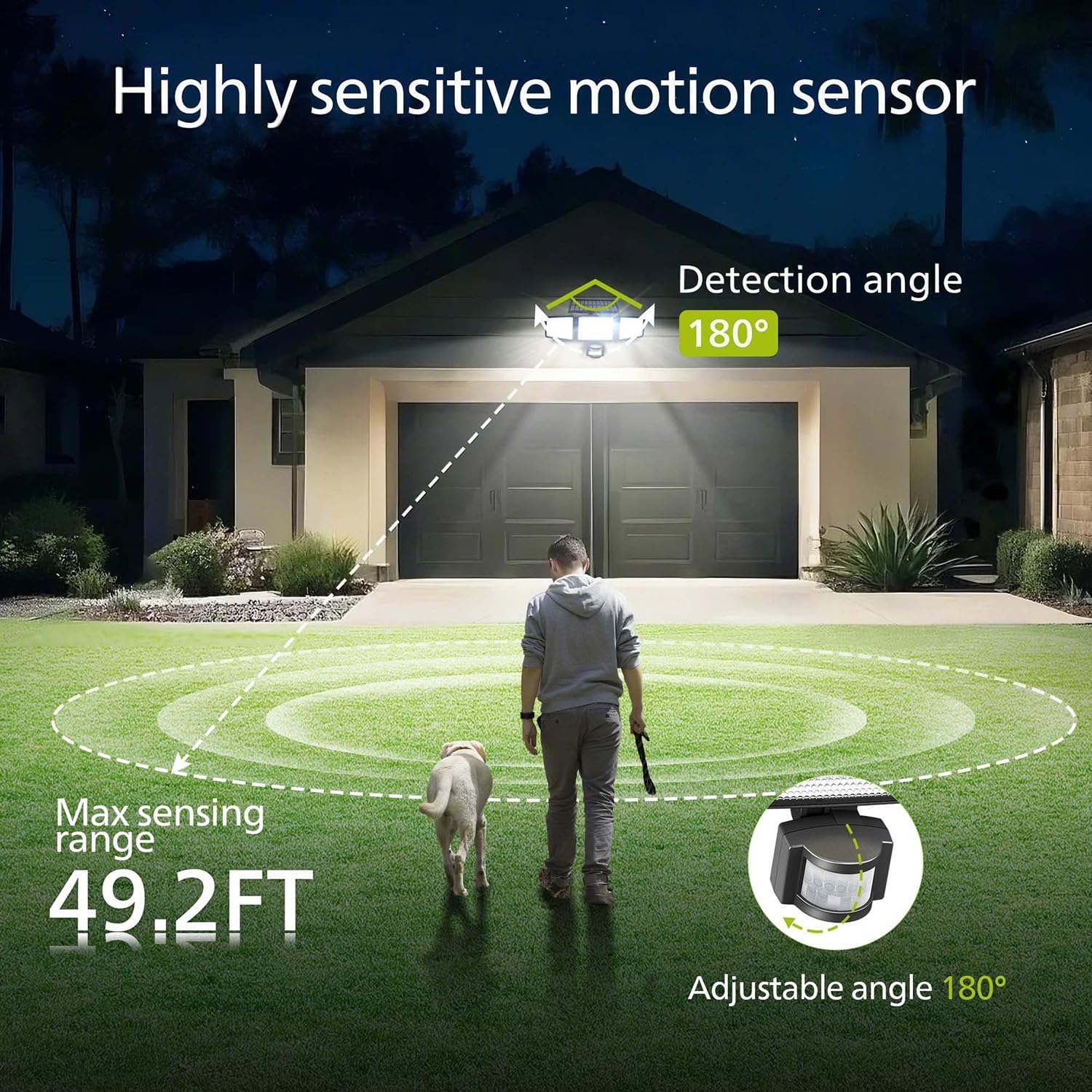
Image: Illustration of the motion sensor's coverage, showing a 180-degree detection angle and a maximum sensing range of 49.2 feet.
Návod k obsluze
The Philips Solar Security Light features three distinct lighting modes, controllable via the included remote control.
Režimy osvětlení:
- Režim senzoru: The light remains off until motion is detected. Upon detection, it illuminates at 100% brightness (800 lumens) for approximately 25 seconds, then turns off.
- Režim ztlumení: The light stays on continuously at a low brightness of 10% (80 lumens) throughout the night.
- Režim stmívání + senzoru: The light stays on continuously at a very low brightness of 2-3% (16-24 lumens). When motion is detected, it brightens to 100% (800 lumens) for approximately 25 seconds, then returns to the dim state.

Image: Detailed explanation of the three operational modes, showing how the light behaves in Sensor, Dim, and Dim + Sensor modes based on motion detection and ambient light.
Use the remote control to switch between these modes as needed. Ensure the remote control has a clear line of sight to the light fixture for proper function.
Údržba
Regular maintenance ensures optimal performance and longevity of your Philips Solar Security Light.
- Čištění solárních panelů: Solární panel pravidelně otírejte měkkým hadříkemamp hadříkem odstraňte prach, nečistoty nebo úlomky. Čistý solární panel zajišťuje maximální absorpci slunečního záření a účinnost nabíjení.
- Čištění příslušenství: Clean the light fixture with a soft, dry cloth. Avoid using abrasive cleaners or solvents that could damage the finish or electronic components.
- Baterie: The integrated high-capacity 2000 mAh battery is designed for long-term use. No user maintenance or replacement is required for the battery.
- Odolnost vůči počasí: The IP65 rating ensures the light is protected against dust and water jets. However, avoid submerging the unit in water.

Image: Focus on the high-quality solar panel, illustrating its role in providing power for 8-10 hours of operation and its 1800mAh high-capacity battery.
Odstraňování problémů
Pokud se setkáte s problémy se solárním bezpečnostním světlem Philips, podívejte se na následující běžné problémy a jejich řešení:
- Světlo se v noci nerozsvítí:
- Ensure the solar panel is receiving adequate direct sunlight during the day.
- Check if the light is in the correct operating mode (e.g., not in 'off' state if the remote has an off button).
- Ověřte, zda je baterie dálkového ovladače funkční.
- Světlo je tlumené nebo svítí jen krátkou dobu:
- The solar panel may not be fully charged. Ensure it is clean and exposed to direct sunlight for at least 6-8 hours.
- Ambient temperature can affect battery performance; extreme cold may reduce operating time.
- Pohybový senzor nedetekuje pohyb:
- Ujistěte se, že je čočka senzoru čistá a ničím nerušená.
- Verify the light is in a motion-activated mode (Sensor Mode or Dim + Sensor Mode).
- Adjust the angle of the motion sensor to cover the desired detection area.
If problems persist, please contact Philips customer support for further assistance.
Specifikace
| Funkce | Specifikace |
|---|---|
| Značka | PHILIPS |
| Model | 929004621403 |
| Barva | Černý |
| Materiál | Hliník |
| Forma svítidla | Světlomet |
| Vnitřní/venkovní použití | Venkovní |
| Zdroj napájení | Solární napájení |
| Kontrolní metoda | Vzdálený |
| Světelný zdroj | LED |
| Počet světelných zdrojů | 4 |
| svtage | 3.7 voltů DC |
| Světlá barva | Studená bílá (6500K) |
| Jas | 800 lumenů (max.) |
| Úroveň odolnosti proti vodě | IP65 Vodotěsný |
| Typ montáže | Držák na zeď |
| Kapacita baterie | 2000 XNUMX mAh |
| Úhel snímání | 180 stupňů |
| Rozsah snímání | Až 49.2 stop |

Image: A comparison table highlighting key specifications of the Philips solar security light, such as brightness, lighting modes, battery capacity, and waterproof rating.
Záruka a podpora
Informace o záruce a zákaznické podpoře získáte od oficiálního zástupce společnosti Philips. webnebo kontaktujte jejich zákaznický servis. Uschovejte si účtenku jako doklad o koupi.
Pro další pomoc navštivte: www.philips.com/support


