
Zavedení
This manual provides essential information for setting up, operating, maintaining, and troubleshooting your MSI Aegis ZS2 Gaming Desktop PC. Please read this guide thoroughly before using your new system to ensure optimal performance and longevity.
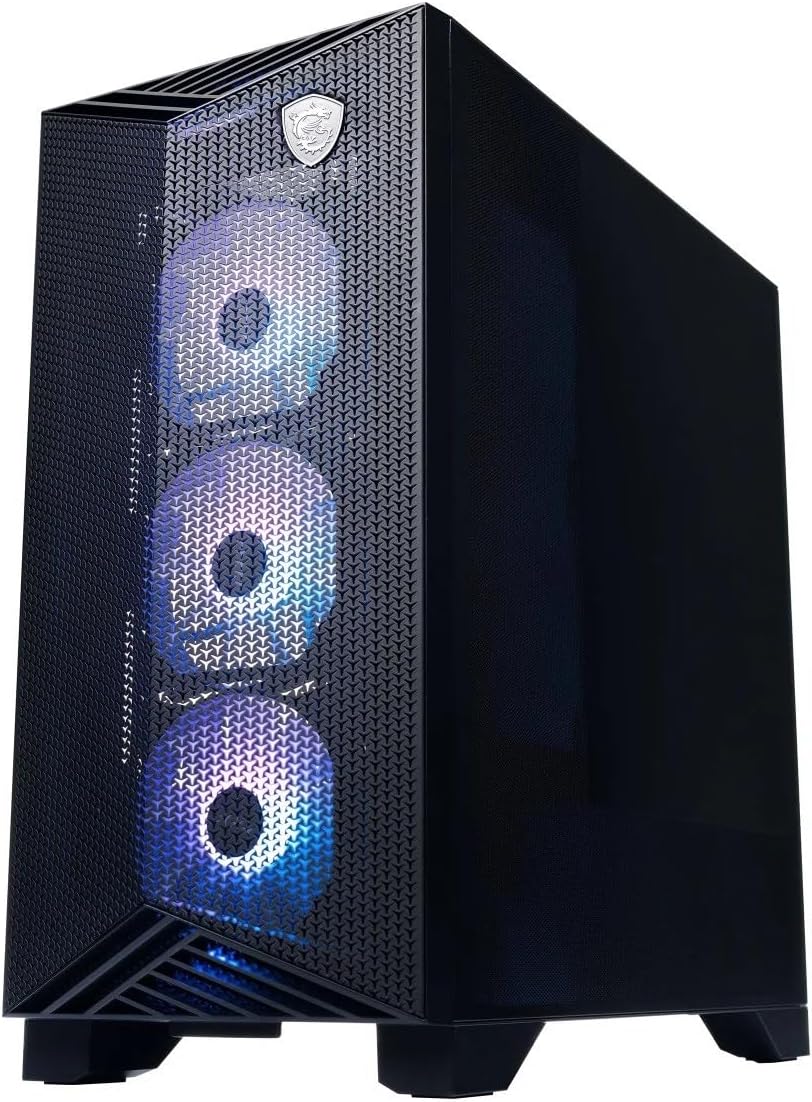
Obrázek: Přední strana view of the MSI Aegis ZS2 Gaming Desktop PC, showcasing its design and illuminated front fans.
Obsah balení
Ověřte, zda jsou všechny níže uvedené položky součástí balení vašeho produktu. Pokud některé položky chybí nebo jsou poškozené, obraťte se na prodejce.
- MSI Aegis ZS2 Gaming Desktop PC
- MSI Gaming Keyboard
- MSI Gaming Mouse
- Napájecí kabel
- Wi-Fi antény (2x)
- Stručný průvodce / Dokumentace

Image: Included accessories: MSI Gaming Keyboard, MSI Gaming Mouse, power cable, and two Wi-Fi antennas.
Nastavení
Follow these steps to set up your MSI Aegis ZS2 Gaming Desktop PC.
- Rozbalte počítač: Carefully remove the PC and all accessories from the packaging. Remove any protective films or internal foam inserts from the PC chassis.
- Instalace Wi-Fi antén: Locate the two antenna connectors on the rear I/O panel. Screw the provided Wi-Fi antennas onto these connectors. Ensure they are securely fastened for optimal wireless performance.
- Připojení periferií:
- Monitor: Connect your monitor to the NVIDIA GeForce RTX 5080 graphics card's display outputs (HDMI or DisplayPort) on the rear of the PC.
- Klávesnice a myš: Connect the MSI Gaming Keyboard and Mouse to any available USB ports on the rear or front of the PC.
- Další USB zařízení: Connect any other USB devices (e.g., external hard drives, headsets) as needed.
- Připojte napájení: Plug the power cable into the power supply unit (PSU) on the rear of the PC, then plug the other end into a grounded electrical outlet.
- Zapnutí: Press the power button located on the top front panel of the PC. The system will boot up, and you will be guided through the initial Windows 11 Home setup process.

Image: Rear I/O panel of the MSI Aegis ZS2, highlighting display outputs, USB ports, and Wi-Fi antenna connectors.

Image: Close-up of the top front panel, showing USB 3.2 Gen 1 Type-A, USB 3.2 Gen 1 Type-C, audio jacks, and the power button.
Ovládání počítače
Your MSI Aegis ZS2 comes pre-installed with Windows 11 Home, offering a user-friendly interface for gaming and productivity.
Přední panel přesview
- Vypínač: Located on the top panel, used to turn the PC on or off.
- USB 3.2 Gen 1 Type-A (5 Gbps): Pro připojení standardních USB zařízení.
- USB 3.2 Gen 1 Type-C (5 Gbps): Oboustranný konektor pro moderní zařízení s USB-C.
- Mic-in Jack: Pro připojení mikrofonu.
- Headphone-out Jack: Pro připojení sluchátek nebo reproduktorů.
Přes zadní panelview
- Video Ports (NVIDIA GeForce RTX 5080): 1x HDMI-out, 3x DisplayPort-out for connecting multiple monitors.
- Porty USB 2.0 (4x): For connecting peripherals like keyboards, mice, or printers.
- USB 3.2 Gen 1 Type-A (5 Gbps) (2x): For faster data transfer with compatible devices.
- USB 3.2 Gen 2 Type-A (10 Gbps) (2x): Pro vysokorychlostní přenos dat.
- LAN Port (Realtek 8111H 1 Gigabit LAN): Pro kabelové síťové připojení.
- Wi-Fi 7 Antennas: Pro bezdrátové síťové připojení.
- Audio konektory: For connecting speakers, headphones, or microphones.
Údržba
Pravidelná údržba pomáhá zajistit dlouhou životnost a optimální výkon vašeho počítače.
- Čištění:
- Periodically clean dust from the exterior of the chassis using a soft, dry cloth.
- Use compressed air to clear dust from fan vents and internal components (e.g., GPU, CPU cooler fins) at least every 3-6 months. Ensure the PC is powered off and unplugged before cleaning.
- Aktualizace softwaru:
- Keep your Windows 11 Home operating system updated through Windows Update.
- Regularly update graphics drivers (NVIDIA GeForce) and motherboard drivers from the MSI webwebu, aby byla zajištěna kompatibilita a výkon.
- Chlazení kapalinou: The 360mm liquid cooler is a closed-loop system and generally requires no maintenance. However, ensure adequate airflow around the PC to prevent overheating.

Obrázek: Boční view of the MSI Aegis ZS2, showing the internal layout including the liquid cooler and graphics card, useful for understanding airflow and cleaning access.
Odstraňování problémů
Tato část se zabývá běžnými problémy, se kterými se můžete setkat.
- Počítač se nezapne:
- Ujistěte se, že je napájecí kabel bezpečně připojen k počítači i k elektrické zásuvce.
- Verify the power switch on the PSU (located on the rear of the PC) is in the 'ON' position.
- Zkuste jinou zásuvku.
- Žádný displej na monitoru:
- Check that the monitor's power cable is connected and the monitor is turned on.
- Ensure the video cable (HDMI/DisplayPort) is securely connected to both the graphics card on the PC and the monitor.
- Ověřte, zda je vstupní zdroj monitoru správně nastaven.
- Žádné internetové připojení:
- Kabelové: Check the Ethernet cable connection to the LAN port and your router/modem.
- Bezdrátový: Ensure Wi-Fi antennas are properly installed. Check Wi-Fi settings in Windows 11 and confirm you are connected to the correct network. Restart your router/modem if necessary.
- Problémy s výkonem systému:
- Ujistěte se, že všechny ovladače (zejména ovladače grafické karty) jsou aktuální.
- Zkontrolujte pomocí Správce úloh (Ctrl+Shift+Esc) aplikace na pozadí, které spotřebovávají nadměrné množství zdrojů.
- Ujistěte se, že počítač má dostatečné větrání a nepřehřívá se.
Specifikace
Detailed technical specifications for the MSI Aegis ZS2 Gaming Desktop PC.
| Komponent | Specifikace |
|---|---|
| Operační systém | Windows 11 Home (64bitový) |
| CPU | AMD Ryzen 9 9900X (12-Core, 5.6 GHz) |
| Základní deska | PRO B650-VC WIFI III |
| Chladič CPU | 360mm kapalinový chladič |
| Graphics Card (VGA) | NVIDIA GeForce RTX 5080 16GB GDDR6 |
| Paměť (RAM) | 32 GB RAM DDR5 6000 MHz |
| Skladování | 2TB M.2 NVMe SSD |
| LAN | Realtek 8111H 1 Gigabit LAN |
| Bezdrátová komunikace | Wi-Fi 7, Bluetooth 5.3 |
| Zvuk | 1x Mic-in, 1x Headphone-out (Front) |
| Video porty | 1x HDMI-out, 3x DP-out |
| USB na přední straně | 1x USB 3.2 Gen 1 Type A (5 Gbps), 1x USB 3.2 Gen 1 Type C (5 Gbps) |
| USB Rear | 4x USB 2.0, 2x USB 3.2 Gen1 Type A (5 Gbps), 2x USB 3.2 Gen2 Type A (10 Gbps) |
| Napájení | 850W (80+ Gold Efficiency) |
| Barva | Černý |
| Rozměry (V x Š x H) | 19.4'' x 9.1'' x 19'' |
| Hmotnost | 36.9 liber |
Záruka a podpora
For warranty information and technical support, please refer to the documentation included with your PC or visit the official MSI webwebu. Obvykle tam najdete zdroje podpory, ovladače ke stažení a kontaktní informace na zákaznický servis.
Oficiální MSI Webmísto: www.msi.com