
TABWEE T80
TABWEE T80 10-inch Android Tablet User Manual
Model: T80
1. Úvod
Thank you for choosing the TABWEE T80 10-inch Android Tablet. This manual provides essential information for setting up, operating, and maintaining your device. Please read it thoroughly before use to ensure optimal performance and safety.
The TABWEE T80 is a versatile Wi-Fi tablet featuring the latest Android 15 operating system with integrated AI capabilities. It boasts a vibrant 10.5-inch Incell IPS display, ample storage with 12GB RAM and 64GB ROM (expandable up to 2TB), and a long-lasting 6000mAh battery. With GMS certification, dual-band Wi-Fi, Bluetooth 5.0, and GPS, it is designed for both productivity and entertainment.
2. Bezpečnostní informace
- Nevystavujte zařízení extrémním teplotám, přímému slunečnímu záření nebo vysoké vlhkosti.
- Zabraňte pádu tabletu na zem nebo jeho vystavení silným nárazům.
- Používejte pouze dodanou nabíječku a příslušenství.
- Nepokoušejte se zařízení sami rozebírat nebo opravovat. Požádejte o pomoc zákaznickou podporu.
- Keep the tablet away from children and pets to prevent damage or injury.
3. Obsah balení
Zkontrolujte prosím balení, zda neobsahuje následující položky:
- TABWEE T80 Tablet
- AC adaptér
- Kabel USB typu C
- Uživatelská příručka
4. Konec produktuview
Familiarize yourself with the components of your TABWEE T80 tablet.

Obrázek 4.1: Přední a zadní strana view of the TABWEE T80 tablet, highlighting its sleek design and rear camera module.
Fyzické komponenty:
- 10.5-inch Incell IPS Display: High-definition screen for vivid visuals.
- Přední fotoaparát (2MP): Nachází se na horním rámečku pro videohovory a selfie.
- Zadní fotoaparát (5MP): Nachází se na zadní straně pro pořizování fotografií a videí.
- Vypínač: On the side, used to turn the tablet on/off or wake/sleep the screen.
- Tlačítka hlasitosti: On the side, to adjust audio volume.
- Port USB Type-C: Pro nabíjení a přenos dat.
- 3.5mm konektor pro sluchátka: Pro připojení kabelových sluchátek nebo externích reproduktorů.
- Slot pro microSD kartu: For storage expansion up to 2TB.
- Duální reproduktory: Located on the bottom edge for enhanced audio experience.
5. Nastavení
5.1 Počáteční nabíjení
Before first use, fully charge your tablet. Connect the USB Type-C cable to the tablet's charging port and the AC adapter to a power outlet. The battery indicator on the screen will show charging status.
5.2 Zapnutí/vypnutí
- Zapnutí: Press and hold the Power button until the TABWEE logo appears.
- Vypnutí: Stiskněte a podržte tlačítko Napájení, dokud se nezobrazí nabídka možností napájení, poté vyberte „Vypnout“.
- Spánek/probuzení: Krátce stiskněte tlačítko Napájení.
5.3 Wi-Fi připojení
Pro připojení k internetu:
- Přejít na Nastavení > Síť a internet > Wi-Fi.
- Zapněte Wi-Fi. Tablet vyhledá dostupné sítě.
- Vyberte požadovanou síť ze seznamu.
- Pokud se zobrazí výzva, zadejte heslo a poté klepněte na Připojit.
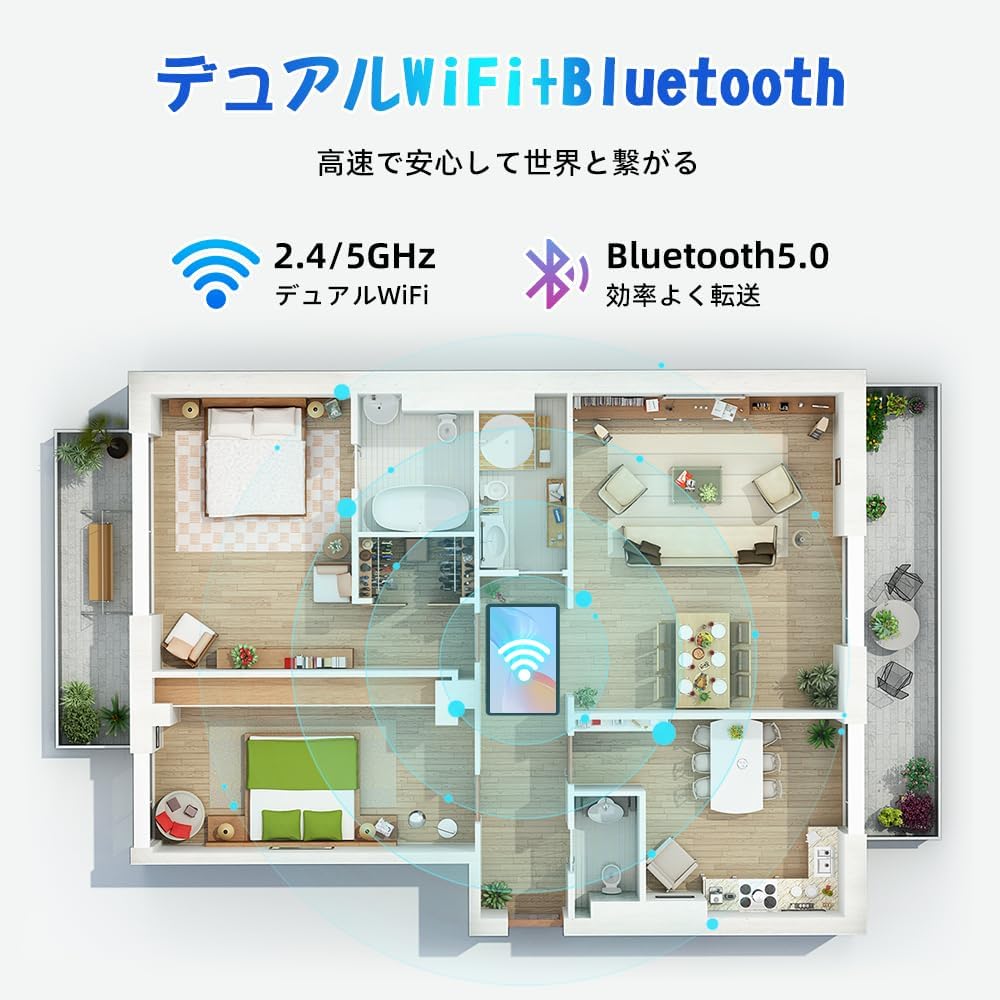
Figure 5.1: Diagram illustrating the tablet's dual-band 2.4G/5G Wi-Fi and Bluetooth 5.0 connectivity, ensuring fast and reliable connections throughout your home or office.
5.4 Nastavení účtu Google
As a GMS certified device, you can access Google Play Store and other Google services. During initial setup, you will be prompted to sign in with your Google account or create a new one. This is essential for downloading apps and syncing data.
5.5 Instalace karty MicroSD
Rozšíření úložiště až na 2 TB:
- Na boku tabletu vyhledejte slot pro kartu MicroSD.
- Insert the MicroSD card into the slot with the gold contacts facing down until it clicks into place.
- You may be prompted to format the card for use with the tablet.

Figure 5.2: Visual representation of the tablet's 12GB RAM and 64GB ROM, with support for up to 2TB MicroSD card expansion, allowing for vast storage of photos, videos, and music.
6. Návod k obsluze
6.1 Funkce Androidu 15
Your tablet runs on Android 15, offering an intuitive and enhanced user experience with improved security, customization, and AI capabilities.

Obrázek 6.1: Přesview of Android 15 features, including enhanced security and privacy, expanded customization options, improved AI functions, and new gesture controls for a smoother operation.
6.2 Displej a Viewrežimy
The 10.5-inch Incell IPS display provides vibrant colors and wide viewing angles. Optimize your viewing experience and reduce eye strain with various display modes:

Figure 6.2: The 10.5-inch Incell IPS display offers a 1280x800 resolution and a 16:10 aspect ratio for a wide and efficient viewzkušenosti.

Figure 6.3: The tablet supports 1080P Full HD content, providing an immersive visual experience for movies and dramas from platforms like YouTube, Prime Video, Hulu, and HBO.

Obrázek 6.4: Vizuální examples of different screen modes: Night mode for reduced blue light, Dark mode for eye comfort in low light, and Reader mode for a black-and-white paper-like display.
- Noční režim: Snižuje emise modrého světla pro pohodlné viewing in low light conditions. Access via Quick Settings or Display settings.
- Tmavý režim: Changes the system UI and supported apps to a dark theme, reducing eye strain and saving battery on OLED screens. Access via Display settings.
- Režim čtečky: Optimizes the display for reading, often by converting to grayscale and adjusting contrast. Access via Display settings or specific reading apps.
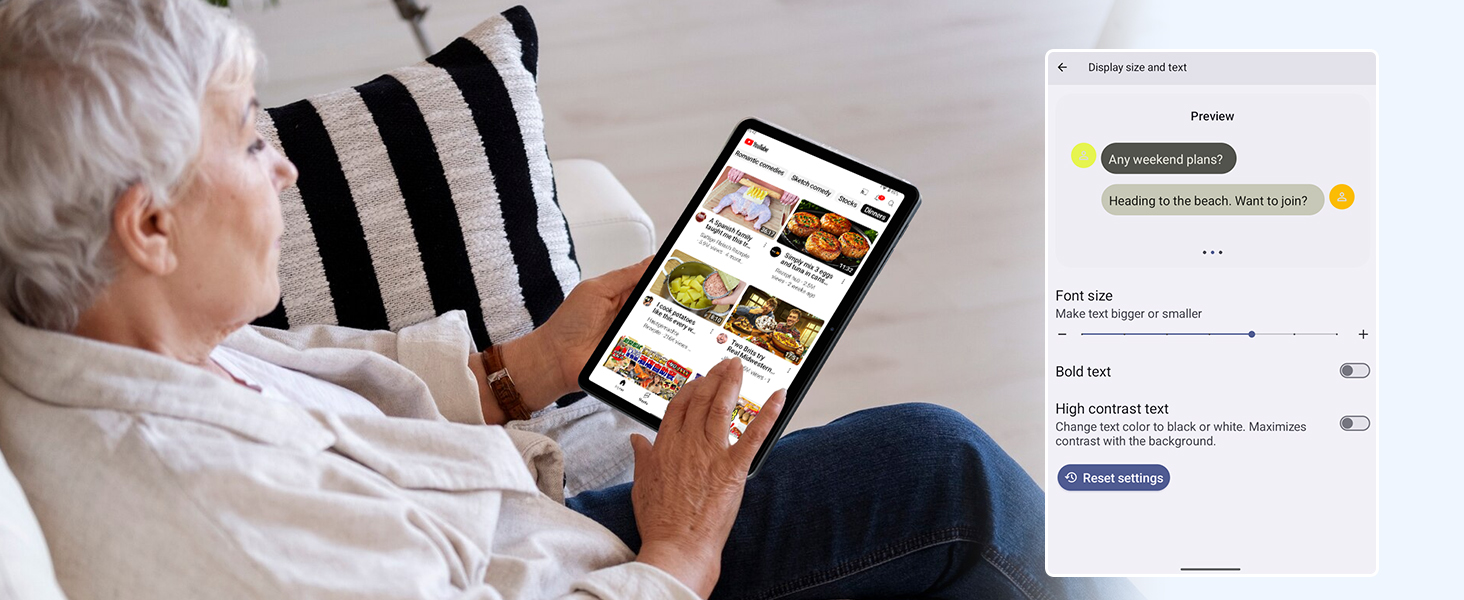
Figure 6.5: Screenshot showing display settings for adjusting text size and bold text, allowing users to customize readability.
6.3 Výkon
The TABWEE T80 is powered by a Unisoc T310 processor, ensuring smooth operation for daily tasks and multimedia consumption.
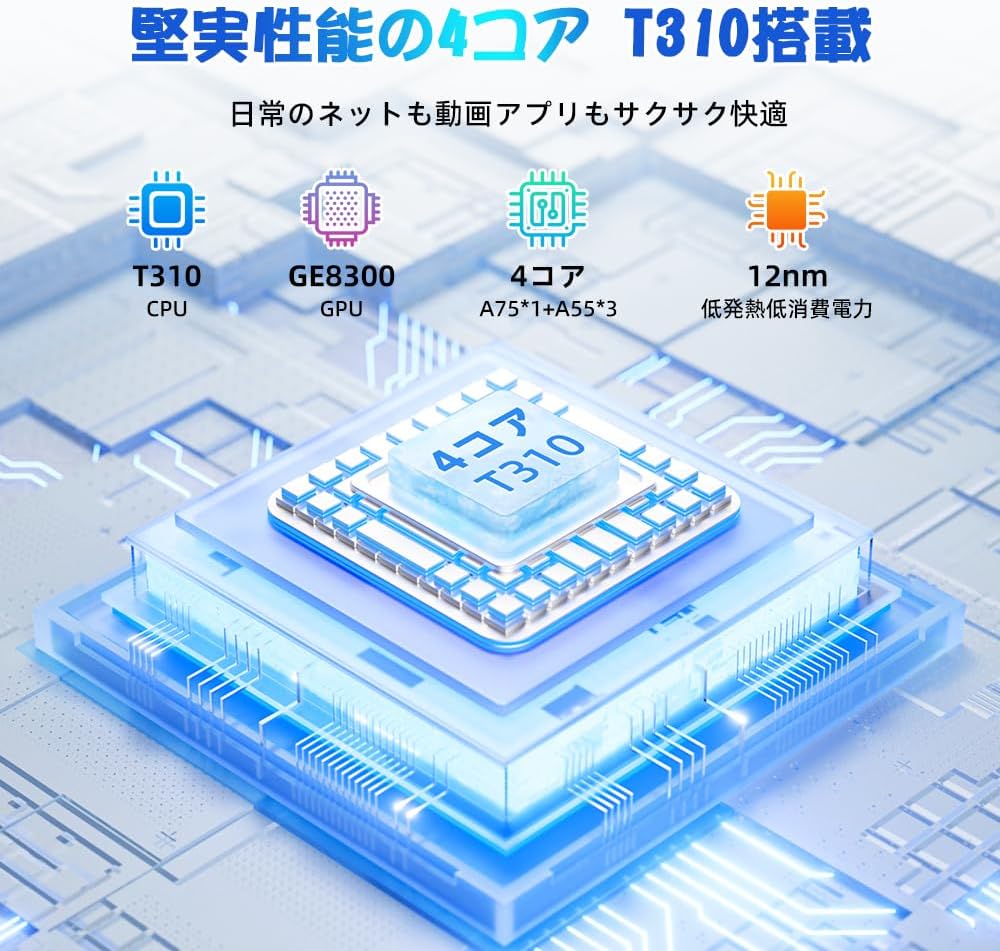
Figure 6.6: Diagram illustrating the T310 quad-core CPU architecture, featuring A75 and A55 cores, designed for efficient performance and low power consumption.

Figure 6.7: Comparison showing the Unisoc T310 processor's improved speed (up to 2.0 GHz) and lower power consumption compared to previous generation products.
6.4 Multitasking a rozdělená obrazovka
For enhanced productivity, the tablet supports split-screen mode, allowing you to run two applications side-by-side.

Figure 6.8: Demonstration of the split-screen feature, allowing users to comfortably multitask by viewing two applications simultaneously, such as reading an e-book while checking messages.
- To activate split screen: Open an app, then swipe up slightly from the bottom and hold to reveal recent apps. Drag one app to the top or bottom of the screen, then select another app for the remaining space.
6.5 AI Features (Gemini AI)
Leverage the power of Gemini AI for enhanced productivity and convenience.

Figure 6.9: Visuals demonstrating Gemini AI 2.0 capabilities, including AI text-to-image generation, AI voice response, AI smart control, AI real-time conversation, and AI full-screen smart assistance.
Gemini AI can assist with real-time translation, smart text suggestions, and optimizing performance based on your usage habits. Explore AI-enhanced multi-tasking for learning, office work, and entertainment.
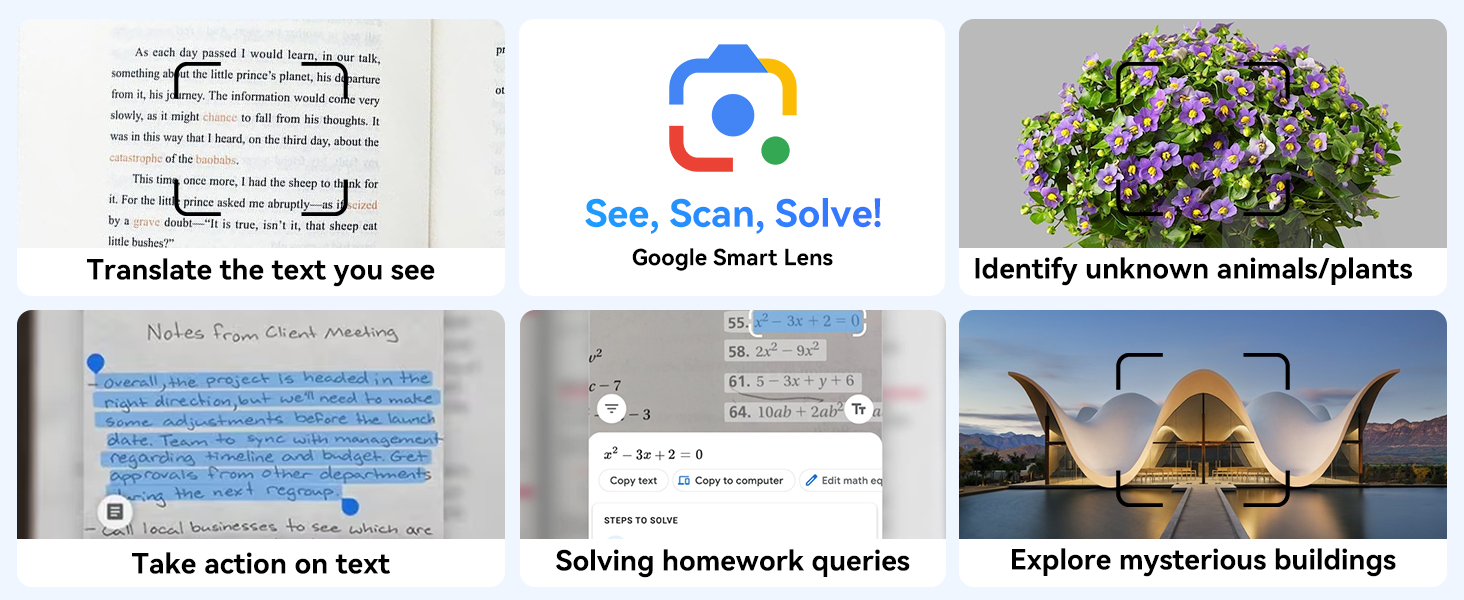
Obrázek 6.10: Přamples of Google Smart Lens functions: translating text, identifying unknown objects/plants, taking action on text, solving homework queries, and exploring mysterious buildings.
6.6 Parental Controls (Kids Mode)
The tablet includes parental control features to ensure a safe environment for children.

Figure 6.11: Icons representing parental control features: usage time limits, break time settings, app usage restrictions, and content restrictions, all designed to protect children.
You can set time limits, restrict app access, and filter content. Navigate to Nastavení > Digitální rovnováha a rodičovská kontrola to configure these features.
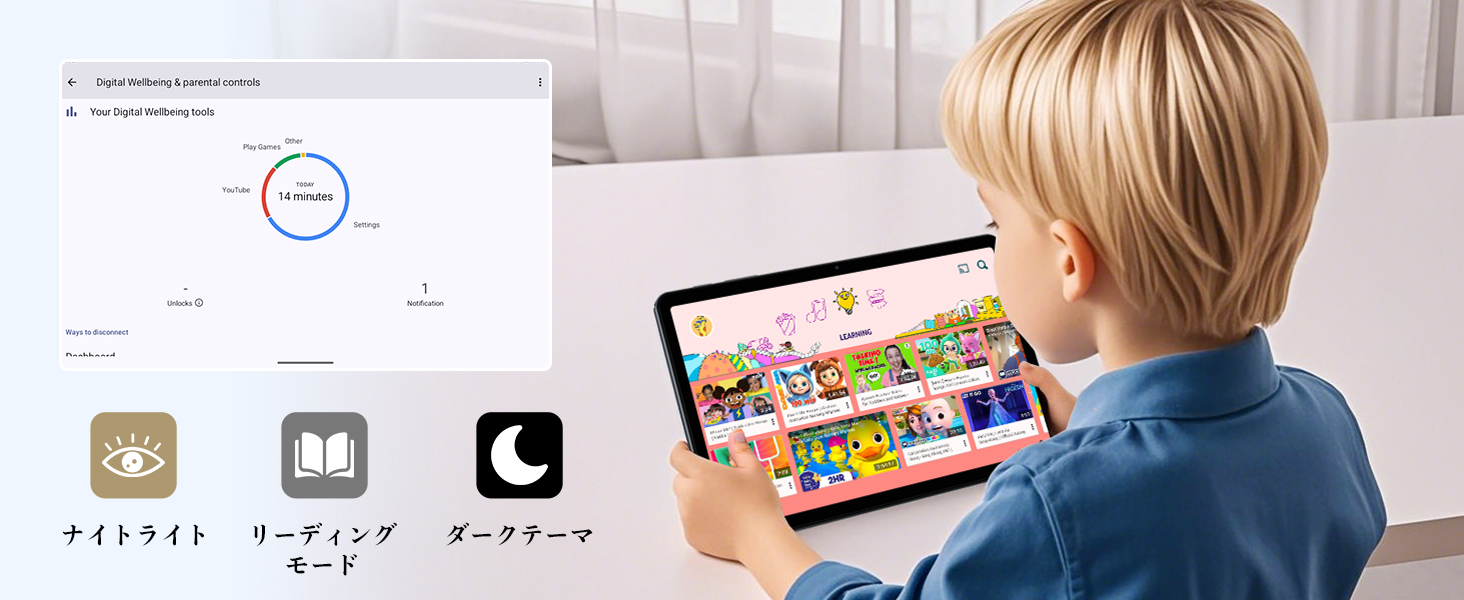
Figure 6.12: Screenshot of the Digital Wellbeing and parental controls interface, showing usage statistics and options for managing screen time and app access for children.
6.7 Bezdrátová projekce
Mirror your tablet's screen to a compatible TV or monitor wirelessly.
- Ensure your TV/monitor supports wireless display (e.g., Miracast, Chromecast built-in).
- Na tabletu přejděte na Nastavení > Připojená zařízení > Předvolby připojení > Obsazení.
- Select your display device from the list to begin mirroring.
6.8 Použití kamery
Tablet je vybaven 2MP předním fotoaparátem a 5MP zadním fotoaparátem.

Figure 6.13: Illustration of the tablet's 2-megapixel front camera and 5-megapixel rear camera, capable of autofocus for clear photos and video calls.
Open the Camera app to take photos or record videos. Tap the shutter button to capture an image or the record button to start/stop video recording. You can switch between front and rear cameras using the camera switch icon.
6.9 zvuk
The tablet features dual speakers for an immersive audio experience and a 3.5mm headphone jack for private listening.

Figure 6.14: Diagram showing the location of the two powerful speakers on the TABWEE T80, providing a deep and immersive audio experience.
Adjust volume using the physical volume buttons on the side of the tablet or through the on-screen volume slider.
6.10 GPS navigace
The integrated GPS system allows for accurate location tracking and navigation. Use pre-installed map applications or download your preferred navigation app from the Google Play Store.
7. Údržba
7.1 Čištění
Use a soft, lint-free cloth to clean the screen and body of the tablet. Do not use abrasive cleaners or solvents, as they may damage the surface.
7.2 Aktualizace softwaru
Regularly check for system updates to ensure your tablet has the latest features and security patches. Go to Nastavení > Systém > Aktualizace systému.
7.3 Péče o baterii
Chcete -li prodloužit životnost baterie:
- Vyhněte se častému úplnému vybíjení baterie.
- Nenechávejte tablet nabíjet delší dobu po jeho plném nabití.
- Pokud tabletu delší dobu nepoužíváte, skladujte ji na chladném a suchém místě.

Figure 7.1: Battery life estimates for the 6000mAh battery: 5 hours of web browsing, 4 hours of video playback, 4 hours of gaming, 21 hours of music, and 648 hours of standby time, supported by AI power-saving algorithms.
8. Řešení problémů
| Problém | Možná příčina | Řešení |
|---|---|---|
| Tablet se nezapne. | Slabá baterie; havárie systému. | Nabíjejte tablet alespoň 30 minut. Stiskněte a podržte tlačítko napájení po dobu 10–15 sekund pro vynucení restartu. |
| Nelze se připojit k Wi-Fi. | Incorrect password; router issue; out of range. | Ověřte heslo Wi-Fi. Restartujte router. Přesuňte se blíže k routeru Wi-Fi. |
| Aplikace jsou pomalé nebo padají. | Příliš mnoho spuštěných aplikací; málo úložiště. | Close background apps. Clear app cache. Free up storage space. |
| Obrazovka nereaguje. | Dočasná softwarová závada. | Vynuťte restart tabletu podržením tlačítka napájení. |
9. Specifikace
| Funkce | Detail |
|---|---|
| Značka | TABWEE |
| Název modelu | T80 Tablet Tabwee |
| Operační systém | Android 15 (GMS Certified) |
| Velikost displeje | 10.5 inches Incell IPS |
| Rozlišení displeje | 1280x800 pixelů |
| Značka CPU | Unisoc |
| Rychlost CPU | 2 GHz |
| Značka grafické karty | ARM Mali-G57 |
| BERAN | 12GB (4GB+8GB expansion) |
| Interní úložiště | 64 GB |
| Rozšiřitelné úložiště | Až 2 TB přes kartu MicroSD |
| Kapacita baterie | 6000mAh lithium-iontová polymerová baterie |
| Přední kamera | 2 MP |
| Zadní kamera | 5 MP |
| Konektivita | 2.4G/5G Wi-Fi (802.11ac), Bluetooth 5.0, GPS |
| Porty | USB typu C, 3.5mm konektor pro sluchátka |
| Rozměry | 32.79 x 19.9 x 4.1 cm |
| Hmotnost | 910 g |
10. Záruka a podpora
Your TABWEE T80 tablet comes with a 2letá záruka výrobce.
If you encounter any issues with your product, please contact us via email. We strive to respond promptly to ensure your satisfaction.
Jak kontaktovat podporu:
- Through your Amazon account: Go to Historie objednávek > Select the relevant order > Click Kontaktovat prodejce.
- Through the product page: On the product page, click on the seller's name (TABWEE Official Store) below the "Add to Cart" button, then click "Ask a question" on the top right.
Support hours: 9:00 AM - 6:00 PM (excluding holidays). We will reply as soon as possible.

Figure 10.1: Image representing customer support availability for assistance.
Ask a question about this manual
Ask about setup, troubleshooting, compatibility, parts, safety, or missing instructions. Manuals+ will review the question and use this page’s manual context to help answer it.