
1. Konec produktuview
The XUMO Stream Box Remote is designed to provide effortless navigation and control for your XUMO streaming experience. It offers quick access to channels, shows, and applications, enhancing your entertainment system.

Obrázek 1.1: Přední strana view of the XUMO Stream Box Remote, showcasing its button layout including power, input, volume, navigation, and dedicated app buttons.
Klíčové vlastnosti:
- Univerzální kompatibilita: Designed to work seamlessly with a range of smart TVs, allowing control of both your TV and streaming services.
- Long-Range Performance: Provides reliable connection and performance across the room.
- Sleek, Ergonomic Design: Crafted for comfort, lightweight, and fits comfortably in hand.
2. Průvodce nastavením
2.1 Vložení baterií
The XUMO Stream Box Remote requires 2 AAA baterie for operation. Follow these steps to insert them correctly:
- Najděte kryt prostoru pro baterie na zadní straně dálkového ovladače.
- Posuňte kryt dolů nebo stiskněte západku (pokud je k dispozici) a otevřete přihrádku.
- Vložte dvě baterie typu AAA a ujistěte se, že kladný (+) a záporný (-) pól jsou zarovnány se značkami uvnitř přihrádky.
- Zavřete kryt prostoru pro baterie jeho zasunutím zpět na místo, dokud bezpečně nezacvakne.

Obrázek 2.1: Přední a zadní strana view of the XUMO Stream Box Remote. The back view illustrates the location of the battery compartment.
2.2 Initial Pairing/Connection
In most cases, the XUMO Stream Box Remote is designed to connect automatically with your XUMO Stream Box or compatible smart TV upon battery insertion. If the remote does not respond immediately, follow these general steps:
- Ensure your XUMO Stream Box or TV is powered on.
- Namiřte dálkový ovladač směrem k zařízení.
- Press any button (e.g., the Home button or Power button) to initiate the connection.
- If the remote still does not respond, navigate to your TV's or Stream Box's settings menu (using an existing remote or on-device controls) and look for a 'Remote Control' or 'Bluetooth Devices' section to manually pair the new remote. Some users have reported success by pressing various buttons randomly around the center of the remote until a setup message appears on screen.
3. Návod k obsluze
3.1 Funkce tlačítek
Familiarize yourself with the various buttons on your XUMO Stream Box Remote:
- Vypínač: Zapne nebo vypne připojené zařízení.
- Vstupní tlačítko: Cyklicky přepíná dostupné vstupní zdroje (HDMI 1, HDMI 2 atd.).
- Zvýšení/Snížení hlasitosti: Nastavuje hlasitost zvuku.
- Tlačítko ztlumení: Ztlumí nebo zapne zvuk.
- Navigační podložka (kruhová): Used to move up, down, left, and right within menus and content.
- OK/Select Button (Center of Navigation Pad): Potvrzuje výběr.
- Tlačítko Zpět: Vrátí se na předchozí obrazovku nebo nabídku.
- Tlačítko Domů: Returns to the main home screen of your XUMO Stream Box.
- Dedicated App Buttons (Netflix, Peacock, Prime Video, Xumo): Poskytuje přímý přístup k těmto streamovacím aplikacím.
- Numerická klávesnice (0-9): Used for direct channel entry or other numerical inputs.
- Voice Control Button (Microphone Icon): Aktivuje hlasové příkazy pro vyhledávání a ovládání.
3.2 Základní navigace
To navigate menus and select content:
- Použijte Navigační podložka to move the cursor or highlight items on the screen.
- Stiskněte tlačítko Tlačítko OK/Vybrat to open an app, select a movie, or confirm an action.
- Stiskněte tlačítko Tlačítko Zpět to go back one step in the menu hierarchy.
- Stiskněte tlačítko Tlačítko Domů to return to the main XUMO home screen at any time.
3.3 Hlasové ovládání
To use voice commands:
- Stiskněte a podržte Tlačítko hlasového ovládání (ikona mikrofonu).
- Mluvte jasně do mikrofonu dálkového ovladače.
- Po domluvení tlačítko uvolněte.
Examples of voice commands include: "Open Netflix," "Hledat action movies," "Go to channel 5," or "Turn up the volume."
4. Údržba
4.1 Čištění dálkového ovladače
Pro zachování vzhledu a funkčnosti dálkového ovladače:
- Otřete dálkový ovladač měkkým, suchým hadříkem.
- Pro odolnou špínu lehceampnavlhčete hadřík vodou nebo jemným neabrazivním čisticím prostředkem.
- Do not use harsh chemicals or abrasive materials, as they may damage the remote's surface or internal components.
4.2 Výměna baterie
Replace the batteries when the remote's response becomes sluggish or it stops functioning. Refer to Section 2.1 for detailed instructions on inserting batteries.
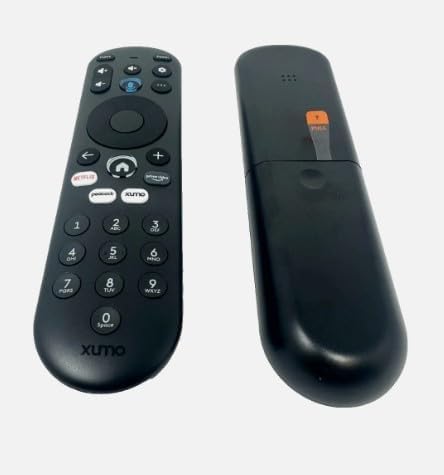
Obrázek 4.1: Boční strana view of the XUMO Stream Box Remote, illustrating its ergonomic design.
5. Řešení problémů
If you encounter issues with your XUMO Stream Box Remote, try the following troubleshooting steps:
| Problém | Možná příčina | Řešení |
|---|---|---|
| Dálkový ovladač nereaguje | Dead or incorrectly inserted batteries; remote out of range; obstructed signal. | Replace batteries, ensuring correct polarity. Move closer to the device. Remove any objects blocking the line of sight between the remote and the device. |
| Remote not pairing/connecting | Initial pairing failed; interference. | Ensure the device is on. Try pressing various buttons on the remote to initiate connection. If necessary, manually pair through your TV/Stream Box settings (e.g., Bluetooth devices). |
| Limited functionality (e.g., only power works) | Partial pairing; device-specific settings. | Ensure the remote is fully paired. Check your TV/Stream Box settings for remote control options or universal remote setup. Some TVs may require manual power-on before the remote can control other functions. |
6. Specifikace produktu
| Specifikace | Detail |
|---|---|
| Rozměry produktu | 7 x 2.5 x 7 palce |
| Hmotnost položky | 4 unce |
| Číslo modelu | *Remote. SCXI11BEI |
| Jsou vyžadovány baterie | 2 baterie AAA (nejsou součástí balení) |
| Kompatibilní zařízení | Streaming Device (XUMO Stream Box, compatible Smart TVs) |
| Maximální počet podporovaných zařízení | 2 |
| Barva | ČERNÝ |
| Speciální funkce | Lehký |
| Výrobce | XUMO |
| Značka | Obecný |
7. Záruka a podpora
This product is manufactured by XUMO and sold under the Generic brand. For specific warranty information, please refer to the retailer or the original purchase documentation. For technical support or further assistance, please contact the seller or refer to the support resources provided with your XUMO Stream Box.
Please note that while this remote is designed for broad compatibility, specific features and pairing methods may vary slightly depending on your XUMO Stream Box model or connected smart TV.