
1. Úvod
Thank you for choosing the HOU iPad Keyboard Case. This manual provides detailed instructions for setting up, operating, and maintaining your new keyboard case. Designed for enhanced productivity and protection, this accessory transforms your iPad into a versatile workstation.
2. Kompatibilita
This keyboard case is designed to be compatible with specific iPad models. Please verify your iPad's model number to ensure proper fit and functionality.
Jak zkontrolovat model iPadu:
- Přejít na Nastavení na vašem iPadu.
- Klepněte na Generál, pak O.
- Vyhledejte Číslo modelu. It typically starts with 'A' followed by four digits (e.g., A2602).
- Alternatively, the model number is printed in tiny text on the back case of your iPad.
Kompatibilní modely iPadu:
- iPad 9th Generation 10.2 inch 2021 (Model Numbers: A2602/A2603/A2604/A2605)
- iPad 8th Generation 10.2 inch 2020 (Model Numbers: A2270/A2428/A2429/A2430)
- iPad 7th Generation 10.2 inch 2019 (Model Numbers: A2200/A2197/A2198)
- iPad Air 3 (10.5 inch)
- iPad Pro 10.5 inch 2017

3. Klíčové vlastnosti
The HOU iPad Keyboard Case offers a range of features designed to enhance your iPad experience:
- Silent & Responsive Typing: Equipped with premium silicone-coated scissor switches for quiet, comfortable, and efficient typing.
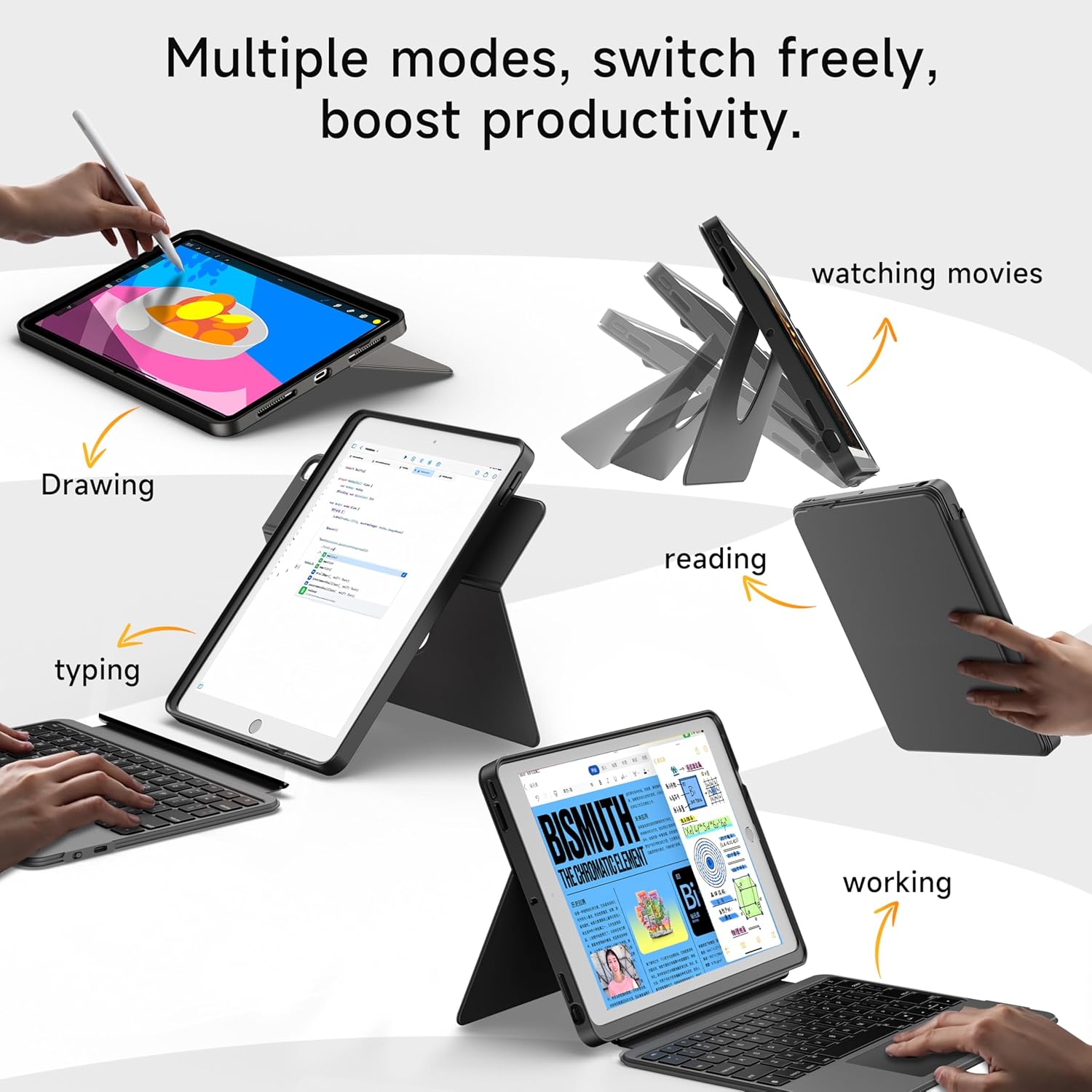
- Magnetic Detachable Design: The keyboard can be easily detached from the case, allowing for flexible use in tablet mode or laptop mode.
- 360° Rotating Stand with Adjustable Angles: Provides versatile viewing angles, supporting both portrait and landscape orientations for various activities like reading, watching, or presenting.
- 7-Color Backlit Keyboard: Features adjustable 7-color backlighting for typing in low-light conditions, with customizable brightness levels.
- Military-Grade Protection: The shockproof silicone case offers 360° protection against drops and spills.
- Secure Apple Pencil Storage: Includes an elastic strap to securely hold your Apple Pencil.
- Integrovaný touchpad: A large multi-touch touchpad supports iOS gestures for precise navigation.
- Dlouhá výdrž baterie: The keyboard features a 500mAh battery, providing up to 50 hours of use with backlighting off, or 4-6 hours with backlighting on.

4. Pokyny k nastavení
4.1. Nabíjení klávesnice
Before first use, ensure the keyboard is fully charged.
- Vyhledejte nabíjecí port USB-C na boku klávesnice.
- Connect the provided USB-C cable to the keyboard and a compatible power adapter (not included).
- The LED indicator will turn red during charging and turn off when fully charged. A 2-hour charge provides weeks of use.

4.2. Párování Bluetooth
Follow these steps to connect your keyboard to your iPad via Bluetooth:
- Ensure the keyboard is charged and turn it on using the power switch.
- Na iPadu přejděte na Nastavení > Bluetooth.
- Stiskněte a podržte FN + CONTROL + R keys on the keyboard for 3 seconds to enter pairing mode. The Bluetooth indicator light on the keyboard will flash.
- On your iPad, select "HOU Keyboard" from the list of available devices.
- Once paired, the Bluetooth indicator light on the keyboard will turn off.
5. Návod k obsluze
5.1. Používání klávesnice
The keyboard provides a full QWERTY layout with dedicated iOS command keys for efficient workflow.
- Klávesové zkratky: Access one-tap shortcuts for screen brightness, media playback, volume control, Lock, Home, and Emoji functions.
- psaní: Enjoy a comfortable and quiet typing experience for documents, emails, and more.

5.2. Nastavení podsvícení
The keyboard features 7-color backlighting with adjustable brightness.
- Změnit barvu: Stiskněte FN + Light Bulb icon to cycle through the 7 available colors.
- Upravit jas: Stiskněte FN + šipka nahoru or FN + šipka dolů to increase or decrease backlight brightness.
5.3. Používání touchpadu
The large multi-touch touchpad supports various iOS gestures for intuitive navigation:
- Klepnutí jedním prstem: Klikněte/Vyberte.
- Two Fingers Swipe: Scroll up/down/left/right.
- Three Fingers Swipe Up: Přejděte na domovskou obrazovku.
- Three Fingers Swipe Down: View Řídicí centrum.
- Sevření/roztažení prstů: Přiblížit/oddálit.
5.4. Utilizing the 360° Rotating Stand
Integrovaný stojan umožňuje flexibilní viewmožnosti:
- Režim na šířku: Ideal for watching videos, presentations, or typing.
- Režim Portrét: Perfect for reading documents, browsing social media, or video calls.
- Nastavitelný sklon: Tilt the screen from 90° (typing) to 170° (movie nights) for optimal comfort.


6. Údržba
To ensure the longevity and optimal performance of your HOU iPad Keyboard Case, follow these maintenance guidelines:
- Čištění: Použijte měkký, damp hadříkem otírejte vnější část pouzdra a klávesnice. Nepoužívejte agresivní chemikálie ani abrazivní materiály.
- Skladování: When not in use, keep the keyboard case closed to protect the screen and keyboard. Store in a cool, dry place away from extreme temperatures.
- Vyhněte se tekutinám: While the case offers some protection, avoid direct exposure to liquids to prevent damage to the electronic components.
7. Řešení problémů
If you encounter any issues with your HOU iPad Keyboard Case, refer to the following common solutions:
- Klávesnice se nepřipojuje přes Bluetooth:
- Ujistěte se, že je klávesnice plně nabitá a zapnutá.
- Turn off and on your iPad's Bluetooth, then try pairing again.
- Make sure your iPad's operating system is iOS 15.3 or later.
- Klávesnice nereaguje:
- Zkontrolujte stav baterie klávesnice. V případě potřeby ji dobijte.
- Znovu připojte připojení Bluetooth.
- Nefunguje podsvícení:
- Ujistěte se, že je klávesnice zapnutá.
- Stiskněte FN + Light Bulb icon to activate or change backlight settings.
- Touchpad Lag or Unresponsiveness:
- Ujistěte se, že baterie klávesnice není kriticky vybitá.
- Restart the Bluetooth connection on your iPad.
8. Specifikace produktu
| Funkce | Detail |
|---|---|
| Značka | HOU |
| Číslo modelu | B0DTKBTV4H |
| Kompatibilní zařízení | iPad 9th/8th/7th Gen 10.2", iPad Air 3, iPad Pro 10.5" 2017 |
| Technologie připojení | Bluetooth |
| Popis klávesnice | Ergonomic, Ultra-Silent Keys, X-shaped high-rebound keys |
| Speciální funkce | Backlit (7-Color), Detachable Case, Hotkeys and Media Keys, Portable, Trackpad, 360° Rotating Stand, Apple Pencil Holder |
| Kapacita baterie | 500 mAh (lithium) |
| Životnost baterie | Up to 50 hours (backlight off), 4-6 hours (backlight on) |
| Nabíjecí port | USB-C |
| Materiál | Silicone (Shockproof, Military-Grade Protection) |
| Hmotnost položky | 1.34 libry (cca 608 g) |
| Zahrnuté komponenty | Keyboard, Case, USB-C Charging Cable |
9. Záruka a zákaznická podpora
Your HOU iPad Keyboard Case is backed by a comprehensive warranty and dedicated customer support.
- 1letá záruka na výměnu: Enjoy peace of mind with a 1-year replacement warranty covering manufacturing defects.
- 30denní politika vrácení peněz: If you are not completely satisfied with your purchase, you may return it within 30 days for a full refund.
- Zákaznická podpora 24/7: For any questions, concerns, or assistance, please contact our customer support team available 24 hours a day, 7 days a week.