
1. Úvod
This manual provides detailed instructions for the FREEWOLF M68 60% Wireless Gaming Keyboard. Please read this manual carefully before using the product to ensure proper operation and longevity.

Figure 1: FREEWOLF M68 Wireless Gaming Keyboard (Shimmer color variant)
2. Konec produktuview
Klíčové vlastnosti:
- Třírežimové připojení: Supports wired (USB-C), 2.4GHz wireless, and Bluetooth 5.0 connections.
- Kompatibilita s více zařízeními: Connects to Windows, Mac, Linux, PC, Laptop, iPad, iOS, and Android devices.
- Kompaktní rozvržení 60 %: Features 67 keys, optimizing desktop space.
- PBT klávesy: Durable Polybutylene Terephthalate keycaps with clear legends.
- Rainbow LED Backlighting: Offers constant and breathing modes with adjustable brightness and speed.
- Baterie s dlouhou výdrží: Built-in 2000mAH battery provides extended usage.
- Ergonomický design: Double leg braces allow for three adjustable typing angles.
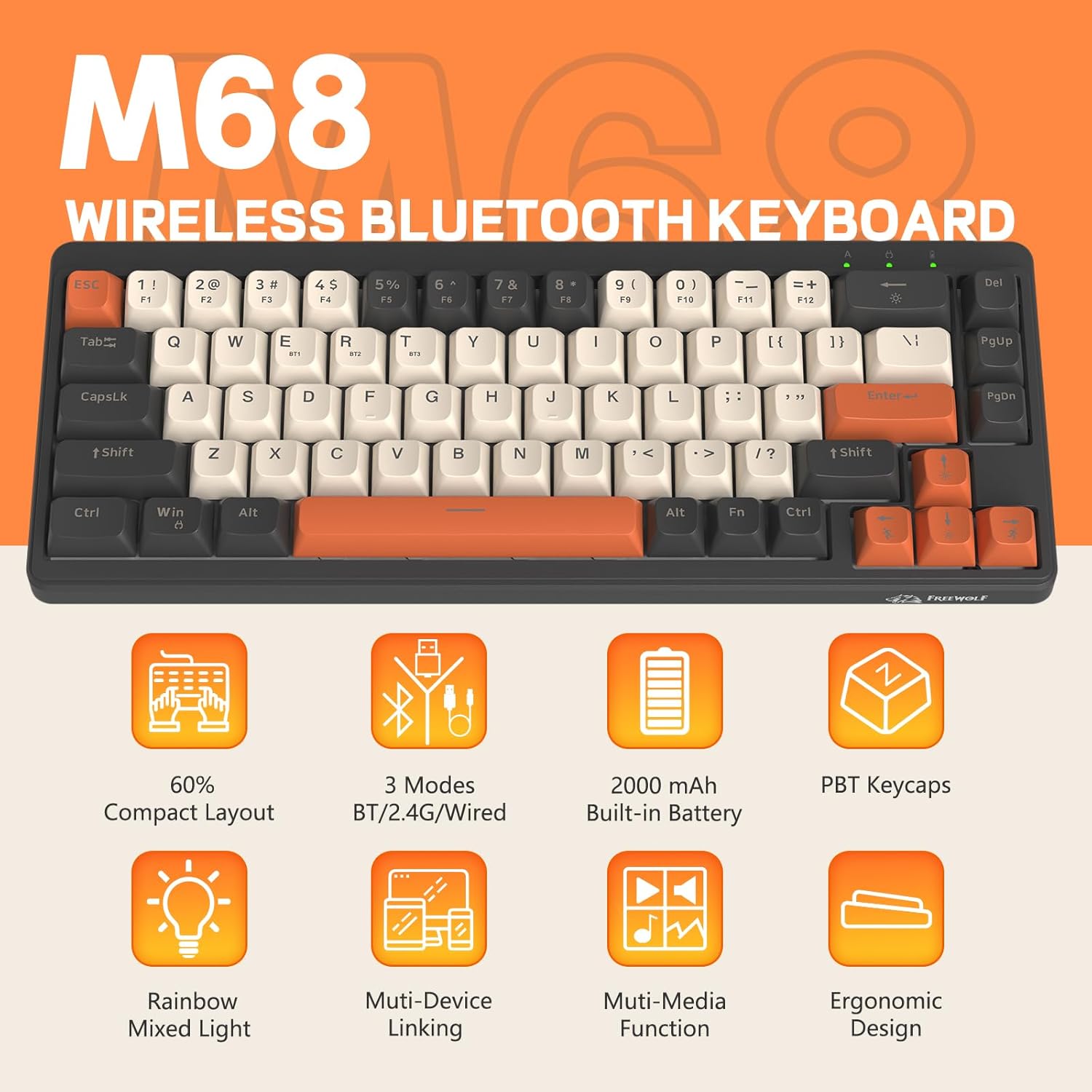
Obrázek 2: Přesview of FREEWOLF M68 key features.
3. Nastavení a připojení
3.1. Tri-Mode Connection Overview
The M68 keyboard supports three connection methods: wired via USB-C, 2.4GHz wireless via a USB receiver, and Bluetooth 5.0. You can switch between these modes using the dedicated switch on the keyboard.

Obrázek 3: Detailní view of the 3-mode connection options.
3.2. Kabelové připojení
- Vyhledejte port USB-C na klávesnici.
- Connect the provided USB-C cable to the keyboard and the other end to your computer's USB port.
- Ensure the mode switch on the keyboard is set to the wired (USB) position.
- Klávesnice bude automaticky rozpoznána vaším systémem.
3.3. Bezdrátové připojení 2.4 GHz
- Locate the 2.4GHz USB receiver (often stored in a compartment on the keyboard).
- Zapojte USB přijímač do volného USB portu na vašem počítači.
- Set the mode switch on the keyboard to the 2.4GHz wireless position.
- Klávesnice by se měla připojit automaticky. Pokud ne, stiskněte FN + R. pro zahájení párování.
3.4. Připojení Bluetooth
The M68 can connect to up to three Bluetooth devices simultaneously.
- Nastavte přepínač režimů na klávesnici do polohy Bluetooth.
- To enter pairing mode for a specific channel (BT1, BT2, or BT3), press and hold FN+Q (pro BT1), FN + W (pro BT2), nebo FN + E (for BT3) until the corresponding indicator light flashes rapidly.
- On your device (PC, laptop, tablet, phone), open Bluetooth settings and search for "FREEWOLF M68".
- Vyberte klávesnici pro spárování. Po připojení se kontrolka rozsvítí nepřerušovaně.
- Chcete-li přepínat mezi spárovanými zařízeními Bluetooth, stiskněte FN + Q/W/E krátce.
4. Provoz
4.1. Ovládání podsvícení
The M68 features customizable rainbow LED backlighting.
- FN + Backspace: Toggle backlight on/off or switch between constant and breathing modes.
- FN + šipka doleva: Snižte rychlost podsvícení.
- FN + šipka vpravo: Zvyšte rychlost podsvícení.
- FN + šipka nahoru: Zvyšte jas podsvícení.
- FN + šipka dolů: Snižte jas podsvícení.

Figure 4: Backlight adjustment key combinations.
4.2. Ergonomické nastavení
The keyboard includes double leg braces on the back to adjust the typing angle for comfort.
- Flip the keyboard over to access the leg braces.
- Adjust the two-stage leg braces to achieve your preferred typing angle (flat, one stage, or two stages).

Figure 5: Ergonomic angle adjustments.
4.3. Správa baterií
The keyboard has a built-in 2000mAH rechargeable battery.
- Nabíjení: Connect the keyboard via the USB-C cable to a power source (computer USB port or wall adapter). The charging indicator will show status.
- Životnost baterie: Up to 60 hours with backlight on, and up to 200 hours with backlight off.
- Šetření energie: The keyboard will enter sleep mode after a period of inactivity to conserve battery. Press any key to wake it up.

Figure 6: Battery capacity information.
5. Údržba
- Čištění: Use a soft, dry cloth to clean the keyboard surface. For keycaps, you may use a slightly damp hadříkem. Zabraňte nadměrné vlhkosti.
- Demontáž krytky kláves: If necessary, use a keycap puller to carefully remove PBT keycaps for deeper cleaning or replacement.
- Skladování: Klávesnici skladujte na chladném a suchém místě mimo dosah přímého slunečního záření a extrémních teplot.
- Vyhněte se tekutinám: Do not expose the keyboard to liquids to prevent damage to internal components.
6. Řešení problémů
| Problém | Možná příčina | Řešení |
|---|---|---|
| Klávesnice nereaguje (kabelová) | Volné připojení kabelu, nesprávný režim. | Ensure USB-C cable is securely connected. Check if the mode switch is set to wired. Try a different USB port. |
| Keyboard not responding (2.4GHz) | USB receiver not connected, incorrect mode, pairing issue. | Ensure USB receiver is plugged in. Set mode switch to 2.4GHz. Re-pair by pressing FN + R.. Try a different USB port for the receiver. |
| Klávesnice nereaguje (Bluetooth) | Not paired, incorrect mode, device Bluetooth off. | Ensure device Bluetooth is on. Set mode switch to Bluetooth. Enter pairing mode (FN + Q/W/E) and re-pair. Forget the device on your system and re-pair. |
| Podsvícení nefunguje nebo je zaseknuto | Backlight off, low battery, software glitch. | Stiskněte FN+Backspace to toggle. Charge the keyboard. Try resetting the keyboard (refer to advanced functions if available, or disconnect/reconnect). |
| Klávesy se neregistrují nebo se píší dvakrát | Dust/debris under keycap, switch issue. | Carefully remove keycap and clean. If issue persists, contact support. |
7. Specifikace
| Model | M68 |
| Značka | SVOBODNÝ VLK |
| Konektivita | Wired (USB-C), 2.4GHz Wireless, Bluetooth 5.0 |
| Rozložení klíče | 60 % (67 kláves) |
| Materiál krytky klíče | PBT (polybutylen tereftalát) |
| Podsvícení | Rainbow LED (RGB) |
| Kapacita baterie | 2000 mAH |
| Kompatibilní zařízení | Laptop, PC, Tablet (Windows, Mac, Linux, iOS, Android) |
| Rozměry produktu | 32.51 x 12.5 x 3.99 cm |
| Hmotnost | 600 g |
| Speciální funkce | Ergonomic (adjustable angles), Backlit |
8. Záruka a podpora
For warranty information, technical support, or customer service inquiries, please refer to the contact information provided with your purchase or visit the official FREEWOLF webmísto.
Uschovejte si prosím doklad o koupi pro případné reklamace.