
Zavedení
Welcome to the DOOGEE Blade10 Power user manual. This guide provides essential information for setting up, operating, maintaining, and troubleshooting your new rugged smartphone. The Blade10 Power is designed for durability and high performance, featuring a large battery, advanced camera, and robust protection against environmental elements.
Co je v krabici
Carefully unpack your DOOGEE Blade10 Power and ensure all items are present:
- 1 x DOOGEE Blade10 Power Smartphone
- 1 x kabel USB Type-C
- 1 x napájecí adaptér
- 1 x Předem nanesená ochranná fólie na displej
- 1 x Thickened Screen Protector Film
- 1 x balení
- 1 x Uživatelská příručka (tento dokument)

Image: Package contents for the DOOGEE Blade10 Power.
Nastavení
1. Instalace SIM karty a TF karty
The DOOGEE Blade10 Power supports dual SIM cards and one TF (microSD) card for expanded storage. Locate the SIM card tray on the side of the device. Use the provided SIM ejector tool to open the tray. Insert your Nano-SIM cards and TF card into the designated slots as shown in the diagram. Ensure the tray is securely closed to maintain water and dust resistance.
2. Počáteční nabíjení a zapnutí
Before first use, fully charge your device using the provided USB Type-C cable and power adapter. Connect the adapter to a power outlet and the cable to the phone's USB-C port. The charging indicator will show the charging status. Once charged, press and hold the Power button (usually on the side) until the DOOGEE logo appears to power on the device.
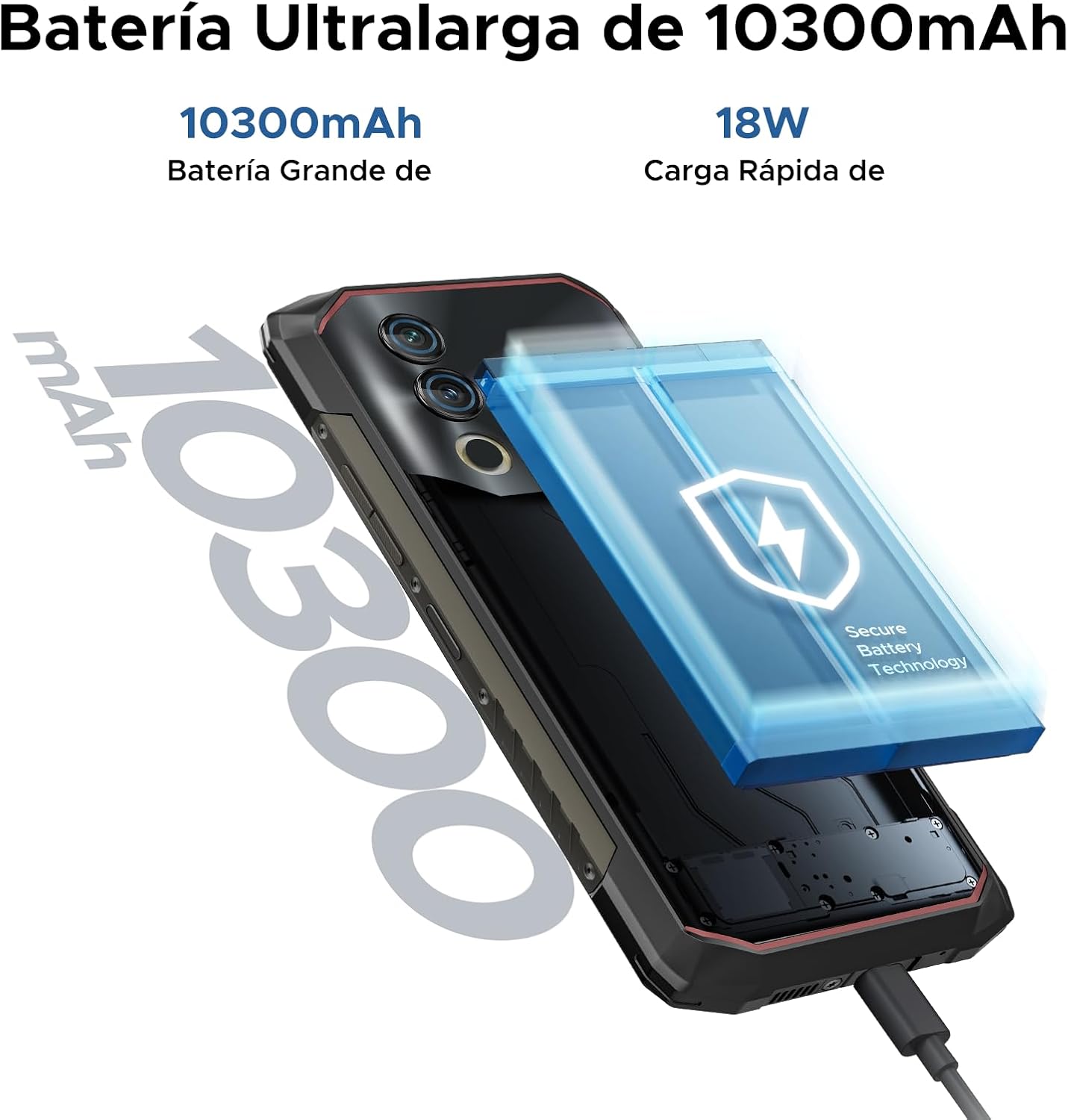
Image: The 10300mAh battery and 18W fast charging feature of the Blade10 Power.
Návod k obsluze
Základní navigace
Your DOOGEE Blade10 Power runs on Android 14, offering an intuitive user experience. Use gestures for navigation: swipe up from the bottom for the app drawer, swipe down from the top for notifications and quick settings, and tap icons to open applications.
Security Features: Fingerprint and Face ID
For enhanced security and quick access, set up Fingerprint Recognition and Face ID. The fingerprint sensor is located on the side of the device. Navigate to Nastavení > Zabezpečení > Odemknutí otiskem prstu or Odemknutí obličejem to register your biometrics. The device offers ultra-fast unlocking in approximately 0.19 seconds.

Image: Facial Recognition and Side Fingerprint Sensor.
Funkce NFC
The integrated NFC (Near Field Communication) allows for quick and secure mobile payments with Google Pay and easy data transfer with compatible devices. Enable NFC in Nastavení > Připojená zařízení > NFC.
Precise Navigation
The device supports multiple global navigation satellite systems including GPS, Glonass, Galileo, and Beidou, ensuring accurate positioning for navigation and location-based services.
Customizable Button and Gesture Control
Utilize the customizable button for quick access to frequently used functions or apps. Explore Smart Gesture Controls in settings for additional convenient interactions.
Režim v rukavicích
For users who need to operate the phone while wearing gloves, the Glove Mode feature ensures precise recognition of finger movements, providing a fluid and uninterrupted user experience. Activate this mode in Settings > Smart Assistant > Glove Mode.

Image: Glove Mode in action, allowing touch interaction while wearing gloves.
Vlastnosti fotoaparátu
The DOOGEE Blade10 Power is equipped with a 50MP AI main camera and an 8MP front camera, designed to capture clear and vibrant images and videos.
Zadní kamera
The 50MP main camera, enhanced with AI, delivers high-resolution photos with rich detail and accurate colors. It supports various modes including HDR and Panorama for diverse photographic scenarios. Rear flashes provide illumination in low-light conditions.
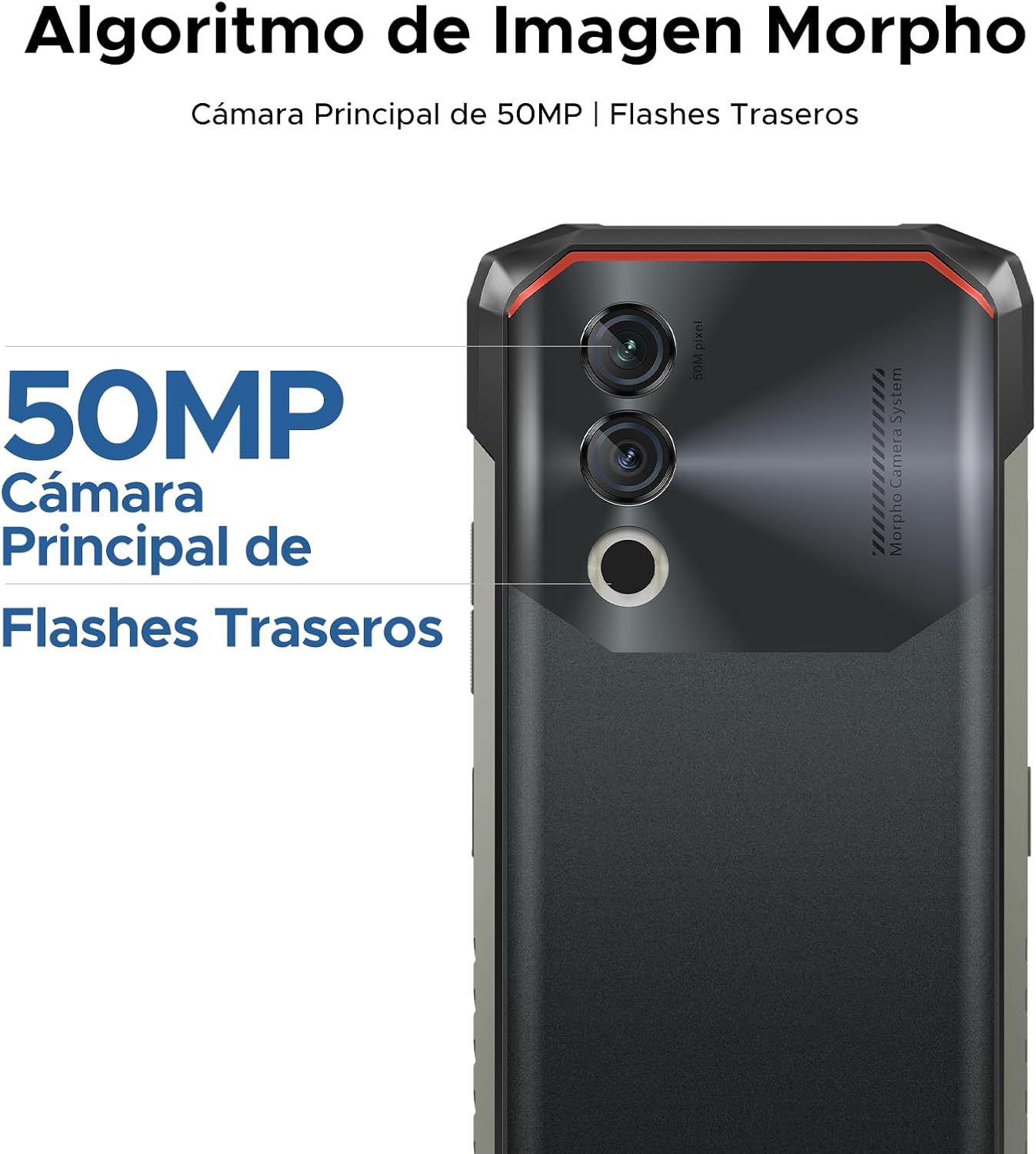
Image: 50MP Main Camera and Rear Flashes.
Přední kamera
The 8MP front camera is ideal for selfies and video calls, capturing clear images.

Obrázek: Přamples of photos taken with the 8MP Ultra Sharp Front Camera.
Režimy fotografování
Prozkoumejte různé fotografické režimy a vylepšete své snímky:
- Panorama: Capture wide landscapes.
- Režim Portrét: Vytvářejte profesionálně vypadající fotografie s rozmazaným pozadím.
- Pro režim: Manuální ovládání nastavení fotoaparátu pro pokročilé uživatele.
- Režim HDR: Improve dynamic range in challenging lighting conditions.

Image: Photography modes: Panorama, Portrait, Pro, and HDR.
Nahrávání videa
Record videos in 1080P at 30 frames per second, ensuring smooth and detailed footage.
Funkce displeje
The DOOGEE Blade10 Power features a 6.6-inch HD+ IPS display for a clear and immersive visual experience.
- Velikost: 6.6palcový plnýview Zobrazit
- Rezoluce: 720*1612 HD+
- Obnovovací frekvence: 90 Hz pro plynulé rolování a hraní her
- Barvy: 16.7 milionů barev
- Jas: 380cd/m² for visibility in various lighting conditions
- Kontrastní poměr: 1500:1
- Poměr obrazovky k tělu: 84 %

Image: 6.6-inch Ultra Sharp Notch-less Screen with 90Hz refresh rate.
Podpora Widevine L1
With Widevine L1 certification, you can enjoy high-quality streaming content from platforms like Netflix and Amazon Prime Video in full HD resolution, without restrictions.

Image: Real 90Hz Smoothness and Widevine L1 Support.
Výkon a úložiště
The Blade10 Power is engineered for smooth performance and ample skladovací kapacity.
Procesor
Powered by an Octa-Core T615 processor, the device offers improved performance for multitasking and gaming. This processor provides a 19% improvement in single-core CPU performance, 5% in multi-core CPU performance, and 35% in GPU performance.

Image: Powerful Octa-core T615 Processor.
RAM a úložiště
The phone features up to 24GB of RAM (6GB physical + 18GB expanded virtual RAM) and 256GB of internal storage. This ample memory ensures smooth operation across multiple applications. Storage can be further expanded up to 2TB using a TF (microSD) card, allowing you to store a vast amount of photos, videos, and files.
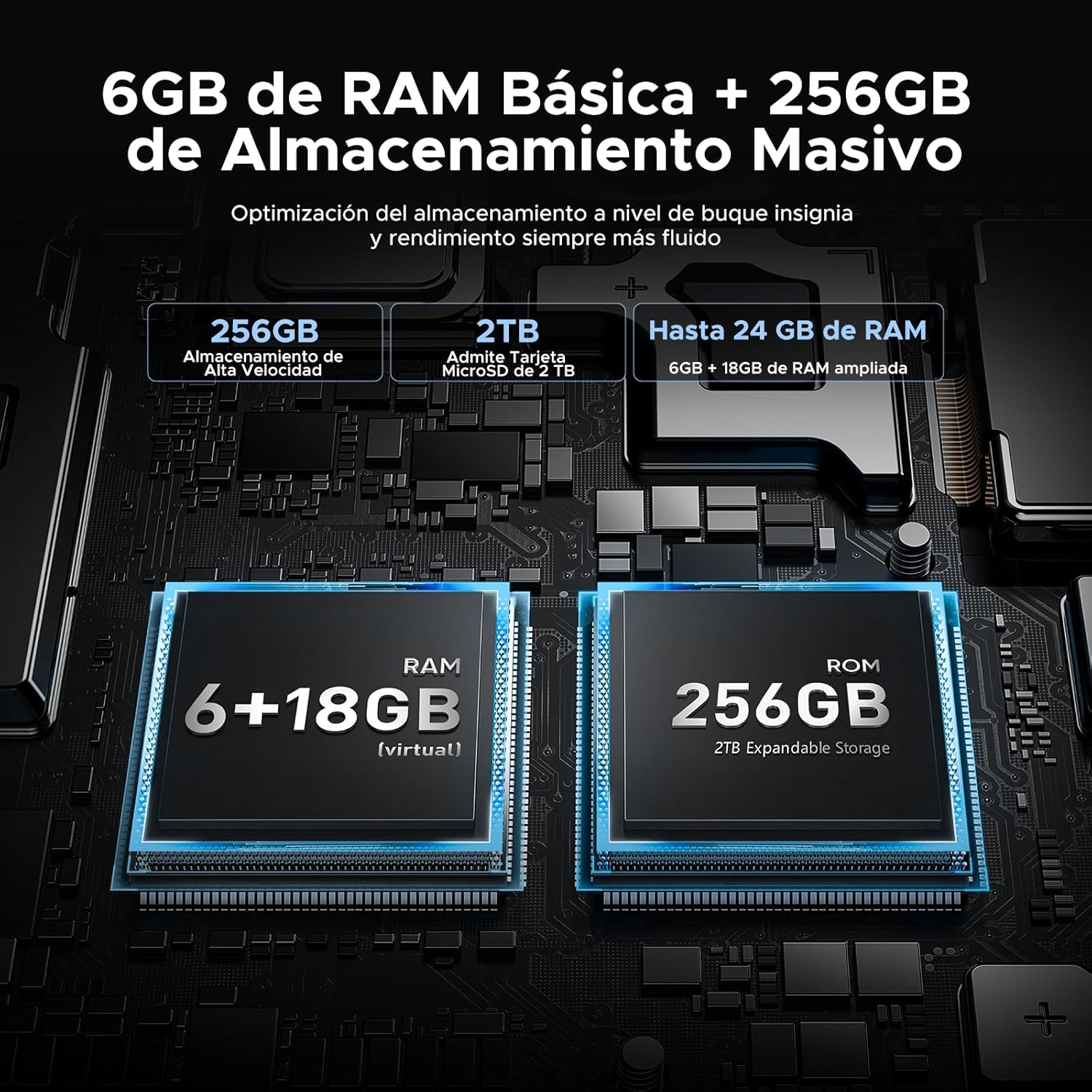
Image: 24GB RAM + 256GB Massive Storage with 2TB Expansion.
Trvanlivost a ochrana
The DOOGEE Blade10 Power is built to withstand harsh environments, featuring IP68/IP69K and MIL-STD-810H certifications.
- IP68: Water and dust resistant, capable of immersion in water up to 1.5 meters for 30 minutes.
- IP69K: Odolné vůči vysokotlakým a teplotním vodním paprskům.
- MIL-STD-810H: Military-grade durability against drops, shocks, and extreme temperatures. Withstands drops from up to 1.5 meters.
Its 360° comprehensive protection ensures reliable performance even in challenging outdoor or work environments.

Image: IP68, IP69K, and MIL-STD-810H certifications for drop, dust, and water resistance.
Robustní konstrukce
The phone's construction includes a high-resistance cover, aviation-grade titanium alloy, aviation-grade alloy material, TPU protection, and a composite board, all contributing to its exceptional durability.

Obrázek: Podrobný view of the phone's layered construction for enhanced durability.
Funkce Androidu 14
The DOOGEE Blade10 Power runs on the latest Android 14 operating system, offering enhanced stability, fluidity, and overall performance compared to previous versions.
- Režim ostření: Helps you concentrate by pausing distracting apps.
- Super schránka: Advanced clipboard features for managing copied content.
- Lift to Wake: Automatically wakes the screen when you lift the phone.
- Duální systémový režim: Provozujte dvě oddělená prostředí pro práci a osobní použití.
- Screen Enhancement: Optimized display settings for better viewIng.
- Pocket Mode: Prevents accidental touches when the phone is in your pocket.
- Screen Sensors: Improved sensor management for various functionalities.
- Kontrola soukromí: Enhanced privacy settings to manage app permissions and data access.
- Rozdělená obrazovka: Multitask efficiently by using two apps simultaneously.

Image: More Information About Android 14 features.
Údržba
To ensure the longevity and optimal performance of your DOOGEE Blade10 Power, follow these maintenance guidelines:
- Čištění: Pravidelně otírejte obrazovku a tělo měkkým hadříkemamp hadříkem. Na odolnou špínu použijte jemný mýdlový roztok. Před nabíjením nebo připojením příslušenství se ujistěte, že jsou všechny porty suché.
- Vystavení vodě: While the phone is waterproof, avoid prolonged immersion in saltwater or chlorinated water. If exposed, rinse with fresh water and dry thoroughly. Ensure all port covers are sealed before water exposure.
- Teplota: Avoid exposing the phone to extreme temperatures (very hot or very cold) for extended periods, as this can affect battery life and internal components.
- Aktualizace softwaru: Keep your phone's software updated to the latest version to benefit from performance improvements, security patches, and new features. Check for updates in Nastavení > Systém > Aktualizace systému.
- Péče o baterie: Vyhněte se častému úplnému vybíjení baterie. Pro optimální stav baterie se snažte udržovat nabití mezi 20 % a 80 %.
Odstraňování problémů
If you encounter issues with your DOOGEE Blade10 Power, refer to the following common troubleshooting steps:
Zařízení se nezapíná
- Ujistěte se, že je baterie nabitá. Připojte telefon k nabíječce alespoň na 30 minut.
- Stiskněte a podržte tlačítko napájení po dobu 10–15 sekund pro vynucení restartu.
Obrazovka nereaguje
- Restartujte zařízení podržením tlačítka napájení.
- Pokud je obrazovka fyzicky poškozená, kontaktujte zákaznickou podporu.
Poor Call Quality / Low Speaker Volume
- Check the volume settings during a call.
- Ensure the speaker and microphone are not obstructed by dirt or debris. Clean gently if necessary.
- Test with headphones to determine if the issue is with the phone's speaker/mic or the network.
Aplikace padá nebo zamrzávají
- Zavřete a znovu otevřete problematickou aplikaci.
- Vymažte mezipaměť a data aplikace v Nastavení > Aplikace > [Název aplikace] > Úložiště > Vymazat mezipaměť/Vymazat data.
- Ujistěte se, že je aplikace aktualizována na nejnovější verzi.
- Pokud problém přetrvává, odinstalujte a znovu nainstalujte aplikaci.
Network Connectivity Issues (Wi-Fi/Mobile Data)
- Vypněte a zapněte Wi-Fi nebo mobilní data.
- Restartujte router, pokud máte problémy s Wi-Fi.
- Zkontrolujte vloženou SIM kartu a ujistěte se, že je u vašeho operátora aktivní.
- Obnovení nastavení sítě v Nastavení > Systém > Možnosti resetování > Obnovit Wi-Fi, mobilní připojení a Bluetooth.
Obnovení továrního nastavení (poslední možnost)
If other troubleshooting steps fail, you may consider a factory reset. This will erase all data on your phone, so ensure you back up important information first. Go to Nastavení > Systém > Možnosti resetování > Vymazat všechna data (obnovení továrního nastavení).
Specifikace
Below are the detailed technical specifications for the DOOGEE Blade10 Power smartphone:
| Funkce | Specifikace |
|---|---|
| Číslo modelu | Blade 10 Power |
| Rozměry | 17.85 x 8.31 x 1.79 cm |
| Hmotnost | 560 g |
| Operační systém | Android 14 |
| Procesor | Octa-Core T615 (1.8 GHz) |
| BERAN | 24 GB (6 GB fyzického + 18 GB virtuálního) |
| Interní úložiště | 256 GB |
| Rozšiřitelné úložiště | Až 2 TB (TF karta) |
| Velikost displeje | 6.6 palce |
| Typ zobrazení | HD+ IPS |
| Rozlišení displeje | 720 x 1612 pixelů |
| Obnovovací frekvence | 90 Hz |
| Hlavní fotoaparát | 50 MP |
| Přední kamera | 8 MP |
| Nahrávání videa | 1080p @ 30 snímků za sekundu |
| Kapacita baterie | 10300 mAh (Li-Ion) |
| Nabíjení | 18W Fast Charging, USB Type-C, OTG Support |
| Network Technology | 4G LTE |
| Sloty pro SIM karty | Duální SIM |
| Konektivita | NFC, GPS (Glonass, Galileo, Beidou) |
| Zabezpečení | Face ID, Side Fingerprint Sensor |
| Trvanlivost | IP68, IP69K, MIL-STD-810H (voděodolný, prachotěsný, nárazuvzdorný) |
Záruka a podpora
Společnost DOOGEE se zavázala k poskytování kvalitních produktů a spokojenosti zákazníků.
- 30denní záruka vrácení peněz: Pokud nejste s nákupem spokojeni, můžete mít nárok na vrácení peněz do 30 dnů.
- 2letá omezená záruka: Your DOOGEE Blade10 Power comes with a 2-year limited warranty covering manufacturing defects. Please retain your proof of purchase.
- Nepřetržitá online podpora: For any technical assistance or inquiries, DOOGEE offers 24/7 online support. Please visit the official DOOGEE webweb s kontaktními informacemi a zdroji podpory.

Image: After-sales Support details.
Oficiální videa produktů
Nebyla nalezena žádná relevantní oficiální produktová videa od prodejce pro vložení do této příručky.