
Wacom PTK670K0A
Wacom Intuos Pro Medium User Manual
Model: PTK670K0A
Zavedení
This manual provides comprehensive instructions for setting up, operating, and maintaining your Wacom Intuos Pro Medium Bluetooth Professional Graphic Drawing Tablet. Designed for creative professionals, this 2025 Edition tablet offers advanced features for digital art, photo editing, and design.
For optimal performance, please read this manual thoroughly before using your device.
Co je v krabici
Upon unboxing your Wacom Intuos Pro Medium, ensure all the following components are present:
- Wacom Intuos Pro Medium tablet
- Wacom Pro Pen 3
- Pen stand with replacement nibs
- USB-C to USB-A charging/connection cable
- Adaptér USB-A na USB-C
- Quick start guide & regulation sheet

Image: All items included in the Wacom Intuos Pro Medium package, laid out clearly.
Klíčové vlastnosti
The Wacom Intuos Pro Medium offers a range of features designed to enhance your creative workflow:
- Wacom Pro Pen 3: Experience unparalleled precision with 8192 pressure levels and ±60° tilt recognition. The pen is customizable with different grips and weight balance for personalized comfort.
- Všestranná konektivita: Connect seamlessly via Bluetooth 5.3 for wireless freedom or USB-C for a stable wired connection.
- Ultra-Slim and Durable Design: Featuring an ultra-slim profile (4-7 mm thickness) and a durable magnesium build, the tablet is both portable and robust.
- Prodloužená životnost baterie: Enjoy up to 16 hours of continuous use on a single charge, ensuring long creative sessions without interruption.
- Přizpůsobitelné ovládací prvky: Utilize the customizable dials and ExpressKeys™ for quick access to your favorite shortcuts, streamlining your workflow.

Obrázek: Podrobný view of the Wacom Pro Pen 3, illustrating its modular design with interchangeable grips and internal weights for user customization.

Image: A close-up of a hand interacting with the customizable dials and ExpressKeys on the Wacom Intuos Pro tablet, designed for quick shortcuts.
Nastavení
Follow these steps to set up your Wacom Intuos Pro Medium tablet:
- Rozbalte zařízení: Opatrně vyjměte všechny součásti z obalu.
- Připojení k napájení: Connect the USB-C to USB-A cable to the tablet and a power source (e.g., computer USB port or wall adapter). Ensure the tablet is charged before first use.
- Nainstalujte ovladače: Visit the official Wacom webweb (wacom.com/start/intuospro) to download and install the latest drivers for your operating system (Mac or Windows). Restart your computer after installation if prompted.
- Vyberte způsob připojení:
- USB připojení: Keep the USB-C cable connected to your computer.
- Připojení Bluetooth:
- Ujistěte se, že je v počítači povoleno rozhraní Bluetooth.
- On the tablet, slide the USB/Bluetooth selector switch to one of the Bluetooth positions (BT1 or BT2).
- Follow the pairing instructions provided in your operating system's Bluetooth settings.
- Přizpůsobit nastavení: Open the Wacom Desktop Center application (installed with the drivers) to customize pen settings, ExpressKeys, and Touch Ring functions to suit your preferences.

Image: An illustration detailing the USB and dual Bluetooth connectivity options available on the Wacom Intuos Pro tablet, allowing seamless switching between devices.
Návod k obsluze
The Wacom Intuos Pro Medium is designed for intuitive use. Here are basic operating guidelines:
- Using the Pro Pen 3: Hold the pen like a regular pencil. The pen tip acts as your mouse cursor. Pressing the pen tip to the tablet surface registers a click.
- Tlačítka pera: The buttons on the side of the Pro Pen 3 can be customized for various functions (e.g., right-click, scroll, undo). Configure these in the Wacom Desktop Center.
- ExpressKeys ™: The physical buttons located on the tablet's top edge (or side, depending on orientation) are programmable shortcuts. Assign frequently used commands or keystrokes to these keys for efficiency.
- Touch Ring/Dials: The circular dials provide quick control over functions like brush size, zoom, or canvas rotation. Rotate the dial to adjust, and press the center button to cycle through assigned functions.
- Pracovní oblast: The active drawing area of the tablet corresponds to your monitor screen. Movement on the tablet translates directly to cursor movement on the screen.
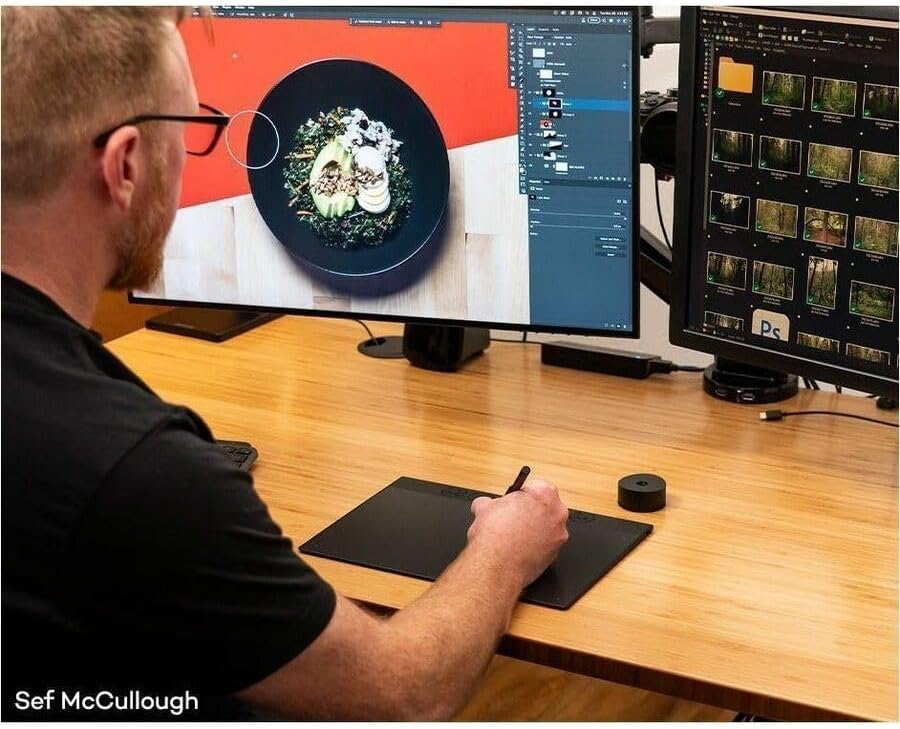
Image: A user demonstrating the Wacom Intuos Pro tablet in action, performing image editing tasks on a dual-monitor setup, showcasing its integration into a professional workflow.
Video: An official Wacom video demonstrating image editing techniques using the Intuos Pro tablet, highlighting its precision and efficiency for digital artists and retouchers.
Údržba
Proper care and maintenance will extend the life of your Wacom Intuos Pro Medium:
- Čištění: Use a soft, lint-free cloth to gently wipe the tablet surface and pen. For stubborn marks, slightly damphadřík vodou. Vyhněte se agresivním chemikáliím nebo abrazivním materiálům.
- Nibs Replacement: The Pro Pen 3 nibs will wear down over time. Replace them when they become too short or sharp to maintain optimal drawing feel. Spare nibs are stored in the pen stand.
- Skladování: When not in use, store the tablet and pen in a safe place to prevent scratches or damage. Consider a protective sleeve for travel.
- Péče o baterie: For optimal battery longevity, avoid fully discharging the tablet frequently. Charge it regularly, especially if storing for extended periods.
Odstraňování problémů
If you encounter issues with your Wacom Intuos Pro Medium, try the following solutions:
| Problém | Možné řešení |
|---|---|
| Pen is not responding. |
|
| Problémy s připojením Bluetooth. |
|
| Tablet not recognized by software. |
|
| ExpressKeys or Dials not working. |
|
Specifikace
| Funkce | Detail |
|---|---|
| Rozměry produktu | 11.46 x 8.11 x 0.04 palce |
| Hmotnost položky | 14.6 unce |
| Číslo modelu | PTK670K0A |
| Baterie | 1 lithium-polymerová baterie (součástí balení) |
| Technologie připojení | Bluetooth 5.3, USB-C |
| Citlivost na tlak | 8192 úrovní |
| Rozpoznání náklonu | ±60° |
| Kompatibilita operačního systému | Windows, Mac |
| Speciální funkce | Ergonomic, Ultra-slim profile (4–7 mm) |
| Výrobce | Wacom Technology Co |
Záruka a podpora
Wacom products are designed for reliability and performance. For detailed warranty information specific to your region, please refer to the regulation sheet included in your product packaging or visit the official Wacom support webmísto.
For technical assistance, driver downloads, FAQs, and community forums, please visit the Wacom Support page:
Additionally, consider available protection plans for extended coverage, such as the 2-Year or 4-Year Protection Plans, or the Complete Protect plan for comprehensive coverage, as offered by various retailers.
Ask a question about this manual
Ask about setup, troubleshooting, compatibility, parts, safety, or missing instructions. Manuals+ will review the question and use this page’s manual context to help answer it.