
1. Úvod
This manual provides comprehensive instructions for the installation, operation, and maintenance of your VECHTEL 9-inch Android 13 Car Stereo. This unit is designed to enhance your driving experience with advanced features such as wireless CarPlay, Android Auto, GPS navigation, Wi-Fi connectivity, Bluetooth, and support for a rear camera. Please read this manual thoroughly before installation and use to ensure proper functionality and safety.
2. Obsah balení
Ověřte, zda jsou v balení obsaženy všechny níže uvedené položky:
- 1 x Car Stereo Unit
- 1 x napájecí kabel
- 1x zadní View Fotoaparát
- 1x GPS anténa
- 1 x vstupní kabel zadní kamery
- 1 x RCA kabel
- 2 x USB kabely
- 1 x Návod k použití
- 1 x Rádiová anténa
- 1 x mikrofon
- 1 x Canbus Decoder (if applicable for your vehicle)

Image: Contents of the VECHTEL car stereo package, including the main unit, rear camera, and various cables.
3. Compatible Car Models
This car stereo is designed for specific Volkswagen, Seat, and Skoda models. Please ensure your vehicle is listed below and verify the shape of your original car stereo and center console before installation.

Image: A list of compatible car models for the VECHTEL car stereo, including various VW, Seat, and Skoda models.
Volkswagen (VW)
- Golf 5, Golf 6
- Passat (B6, B7, CC, NMS, TSI, V6, Variant)
- Magotan (Variant, V6)
- Jetta, Sagitar
- Caddy
- EOS
- T5 (Multzvan)
- Tiguan, Tiguan GP
- Touran
- Pólo
- R36 Variant
- Scirocco
- Sharan
- Sportline
- Brouk
- Bora
Sedadlo
- Altea (from 05/2004)
- Toledo (from 12/2004)
- Leon (from 09/2005)
- Altea XL, Alhambra (from 04/2007)
Škoda
- Fabia Limousine (02/2007 - 2012)
- Fabia Combi (04/2007 - 2012)
- Praktik (04/2007 - 2012)
- Roomster (04/2006 - 2012)
- Octavia Combi (06/2004 - Facelift)
Důležitá poznámka: Compatibility depends on the specific year and model of your car, as well as the shape of your original car stereo and center console. If you are unsure, please consult customer service with your car's model, year, and a photo of your center console.

Image: Visual guide showing examples of compatible (green checkmark) and incompatible (red X) car stereo slots in various car dashboards.
4. Nastavení a instalace
Doporučuje se odborná instalace. Před zahájením instalace se ujistěte, že je vozidlo odpojeno od napájení.
4.1 Kontrola před instalací
- Ověřte, zda je přítomen veškerý obsah balení.
- Confirm compatibility with your car model and dashboard configuration.
- If your car has a 52-pin connector, contact customer service for assistance before proceeding. The package includes 36 and 40-pin connectors.
4.2 Zapojení kabeláže
Connect the provided cables according to your vehicle's wiring diagram. The unit supports a plug-and-play connection for compatible models.
- Napájecí kabel: Připojte k napájecímu kabeláži vozidla.
- GPS anténa: Namontujte na místě s průhledným view oblohy pro optimální příjem signálu.
- Anténa rádia: Connect for FM/RDS radio functionality.
- Zadní kamera: Connect the rear camera input cable to the unit and install the camera at the rear of the vehicle.
- USB kabely: Connect the two USB cables for external device connectivity.
- RCA kabel: Use for audio/video output connections, including subwoofer output.
- Mikrofon: Pro lepší kvalitu hovoru připojte externí mikrofon.
- Dekodér CANbusu: If your vehicle requires a Canbus decoder for steering wheel controls or other vehicle data integration, connect it as per the vehicle's specific instructions.

Obrázek: Podrobný view of the wiring harness and connectors for the VECHTEL car stereo, including the 52-pin connector note.
4.3 Montáž jednotky
Carefully insert the car stereo into the dashboard opening, ensuring all cables are properly routed and secured. Fasten the unit using the appropriate mounting brackets and screws.
5. Návod k obsluze
Your VECHTEL car stereo runs on Android 13 and features a 9-inch HD touchscreen for intuitive control.
5.1 Bezdrátové CarPlay a Android Auto
Connect your smartphone wirelessly via Bluetooth or wired via USB to access CarPlay or Android Auto. This allows for seamless integration of navigation, music, calls, and voice control (Siri/Google Assistant).
- Bezdrátové připojení: Enable Bluetooth on your phone and pair it with the car stereo. Follow the on-screen prompts to activate CarPlay or Android Auto.
- Kabelové připojení: Connect your phone to one of the USB ports using a compatible USB cable.
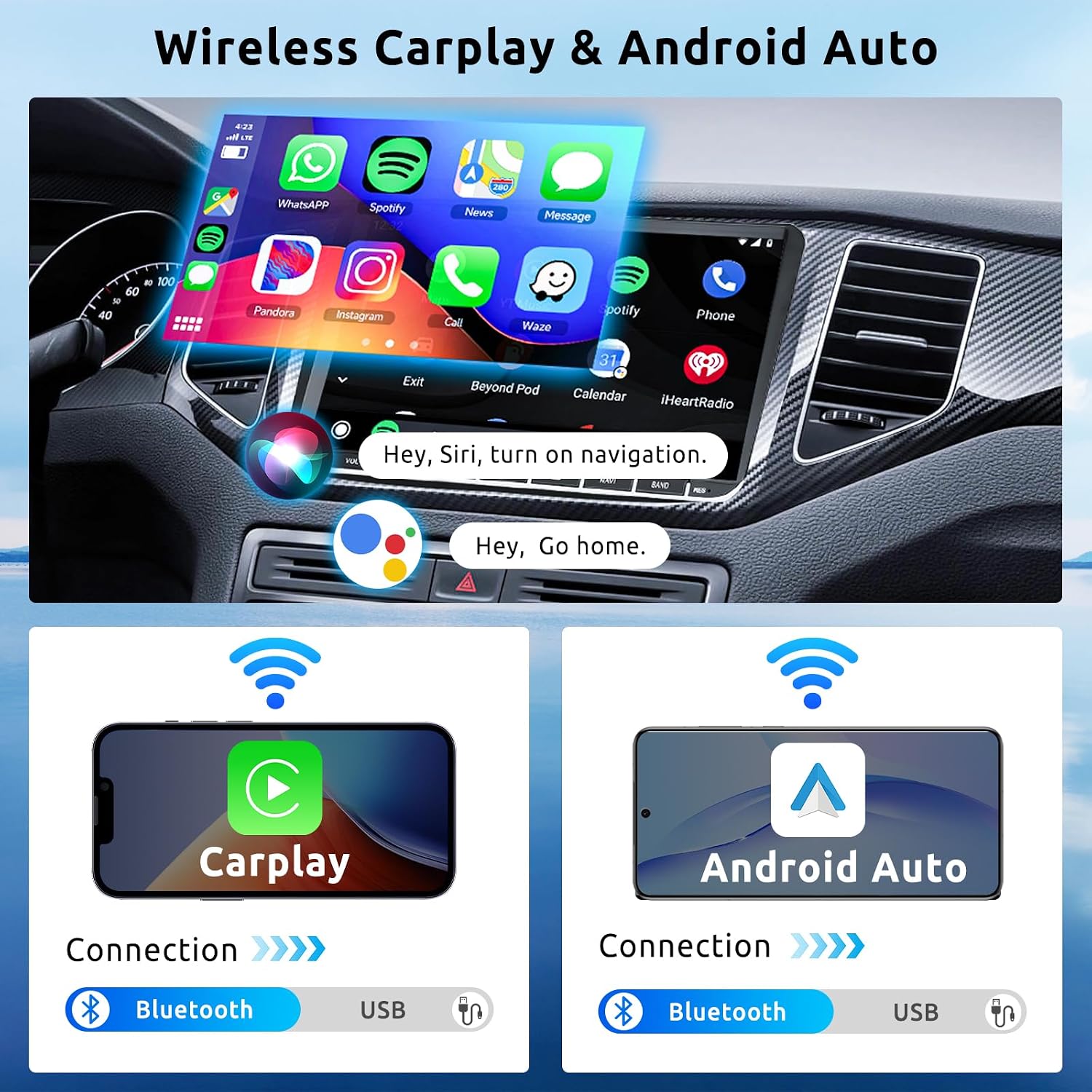
Image: The car stereo display showing the CarPlay interface with various app icons, and diagrams illustrating wireless and wired connections for CarPlay and Android Auto via Bluetooth and USB.
5.2 GPS navigace
The unit includes a built-in GPS module. You can use pre-installed offline maps or download online maps via Wi-Fi.
- Offline mapy: Získejte přístup k přednačteným mapám bez připojení k internetu.
- Online mapy: Connect to Wi-Fi to use real-time navigation services and traffic updates.

Image: Screenshots demonstrating online and offline GPS navigation on the car stereo, showing map interfaces and route details.
5.3 Připojení k Wi-Fi
Connect the car stereo to a Wi-Fi network or your phone's hotspot to access online features.
- Instalace aplikace: Stáhněte a nainstalujte aplikace z Obchodu Google Play.
- Online video: Stream videos from platforms like YouTube.
- Online navigace: Utilize real-time map services.

Image: Displays showing online map usage, online video streaming (YouTube, Netflix, TikTok), and various app icons accessible via Wi-Fi connection.
5.4 Funkce Bluetooth
Spárujte telefon přes Bluetooth pro handsfree volání a streamování hudby.
- Hands-free hovory: Make and receive calls directly from the car stereo. Synchronize your phonebook for easy access to contacts.
- Streamování hudby: Přehrávejte zvuk z telefonu přes reproduktory auta.
5.5 FM/RDS rádio
Tune into FM radio stations. The RDS (Radio Data System) feature displays station information where available.
- Přednastavené stanice: Uložte si až 18 oblíbených stanic pro rychlý přístup.
5.6 Podpora zadní kamery
Při couvání se displej automaticky přepne na zadní kameru. view, což poskytuje jasný obraz pro bezpečné parkování a manévrování.
- The included camera offers HD resolution, waterproof design, night vision, and a wide-angle view.
5.7 Ovládání na volantu (SWC)
If your vehicle supports it and the Canbus decoder is correctly installed, you can control basic functions of the car stereo (e.g., volume, track skipping) directly from your steering wheel buttons.
5.8 Zrcadlový odkaz
Mirror Link allows you to display your smartphone's screen content directly onto the car stereo's display.
5.9 Funkce rozdělené obrazovky
The 9-inch touchscreen supports split-screen mode, allowing you to run two applications simultaneously (e.g., navigation and music player).

Image: A collage showing various features: HD rear camera view, steering wheel control interface, FM/RDS radio display, and Bluetooth call interface.
6. Specifikace
| Značka | VECHTEL |
| Číslo modelu | 7b2555ed-a449-4467-b7d2-e0d4d6e070b9 |
| Operační systém | Android 13 |
| BERAN | 2 GB |
| ROM | 64 GB |
| Velikost obrazovky | 9 palce |
| Typ zobrazení | HD dotykový displej |
| Technologie připojení | Bluetooth, USB, Wi-Fi |
| Speciální funkce | Built-in Bluetooth, Wireless CarPlay, Wireless Android Auto, GPS Navigation, Built-in Wi-Fi, Touchscreen |
| Kompatibilní zařízení | Smartphone |
| Režim zvukového výstupu | Stereo |
| Konfigurace kanálů prostorového zvuku | 5.1 |
| Výstupní výkon | 180 wattů (4*45 W) |
| Kontrolní metoda | Touch, Wireless Control |
| Formát digitálních médií | AIFF, AVI, MP3 audio, MPEG, WAV, MKV, RMVB, MP4, MDV |
| Rozměry (D x Š x V) | 21.4 x 13.3 x 5.5 cm |
| Země původu | Čína |
7. Řešení problémů
Tato část se zabývá běžnými problémy, se kterými se můžete setkat. V případě problémů, které zde nejsou uvedeny, se obraťte na zákaznickou podporu.
7.1 No Power / Unit Not Turning On
- Zkontrolujte všechna napájecí připojení, zda jsou bezpečná.
- Verify the vehicle's fuse for the car stereo is intact.
- Ujistěte se, že je zapnuté zapalování vozu.
7.2 Žádný zvuk nebo zkreslený zvuk
- Zkontrolujte připojení kabelů reproduktorů.
- Adjust the volume level on the unit and ensure it is not muted.
- Ověřte, zda jsou správně nakonfigurována nastavení zvuku (ekvalizér, vyvážení, fader).
- If using Bluetooth audio, ensure the phone's volume is also up.
- Uživatel review mentioned sound cutting out at certain volumes: If sound cuts out at high volumes, reduce the volume. This could indicate an impedance mismatch or power supply issue. Consult a professional installer if the problem persists.
7.3 Problémy s odpojením Bluetooth
- Ensure your phone is within range and Bluetooth is enabled.
- Delete the device pairing from both the car stereo and your phone, then re-pair.
- Restart both the car stereo and your phone.
- Zkontrolujte, zda nedochází k rušení jinými bezdrátovými zařízeními.
7.4 GPS Signal Loss or Inaccuracy
- Ujistěte se, že je anténa GPS bezpečně připojena a namontována na místě s volným view oblohy, daleko od překážek.
- Zkontrolujte nastavení GPS v zařízení.
- Aktualizujte mapová data, pokud jsou k dispozici.
7.5 Nezobrazuje se obraz ze zadní kamery
- Verify the rear camera and its input cable are correctly connected to the unit.
- Ensure the camera's power supply is correctly wired (usually to the reverse light circuit).
- Check the camera settings in the car stereo menu.
- Uživatel review mentioned inability to connect rear camera: Double-check all wiring connections, especially the trigger wire that signals the unit to switch to camera view when reversing. If issues persist, contact support.
7.6 Incompatible Wiring Harness or Fit
- If the provided harness does not match your vehicle's connectors or the unit does not fit your dashboard, do not force installation.
- Contact customer service immediately with your car's model, year, and photos of your original car stereo and connectors.
8. Údržba
8.1 Čištění obrazovky
Dotykovou obrazovku jemně otřete měkkým hadříkem, který nepouští vlákna. V případě odolných šmouh lehceampOtřete hadřík vodou nebo čisticím prostředkem vhodným pro obrazovky. Vyhněte se abrazivním materiálům nebo agresivním chemikáliím.
8.2 Aktualizace softwaru
Periodically check for software updates via the system settings menu (requires Wi-Fi connection). Keeping your system updated ensures optimal performance and access to new features.
8.3 Obecná péče
- Nevystavujte jednotku extrémním teplotám nebo přímému slunečnímu záření po delší dobu.
- Nevylévejte tekutiny na jednotku.
- Zajistěte řádné větrání kolem jednotky, abyste zabránili přehřátí.
9. Záruka a podpora
9.1 Informace o záruce
This VECHTEL car stereo comes with a tříletá záruka od data nákupu. Tato záruka se vztahuje na výrobní vady a poruchy při běžném používání. Nevztahuje se na škody způsobené nesprávnou instalací, zneužitím, nehodami nebo neoprávněnými úpravami.
9.2 Zákaznická podpora
For technical assistance, warranty claims, or any questions regarding your product, please contact VECHTEL customer support. When contacting support, please provide your product model number (7b2555ed-a449-4467-b7d2-e0d4d6e070b9) and a detailed description of the issue.
You can typically find contact information for VECHTEL through the retailer where you purchased the product or on the official VECHTEL webmísto.

Image: A graphic illustrating steps to contact VECHTEL customer support, emphasizing 24/7 technical support.