
1. Introduction
This manual provides detailed instructions for the setup, operation, maintenance, and troubleshooting of your Lamzu Atlantis Mini Champion Edition Wireless Gaming Mouse. Please read this manual thoroughly to ensure proper use and to maximize the performance of your device.
2. Package Contents
Verify that all items are present in the package:
- Lamzu Atlantis Mini Champion Edition Wireless Gaming Mouse
- Wireless USB Receiver
- USB-C Charging Cable
- User Manual (this document)
3. Product Overview
The Lamzu Atlantis Mini Champion Edition is an ultra-lightweight wireless gaming mouse designed for high-performance gaming. It features an optical switch, a 30,000 DPI PAW3950 sensor, and a Nordic 52840 MCU for responsive and precise control.
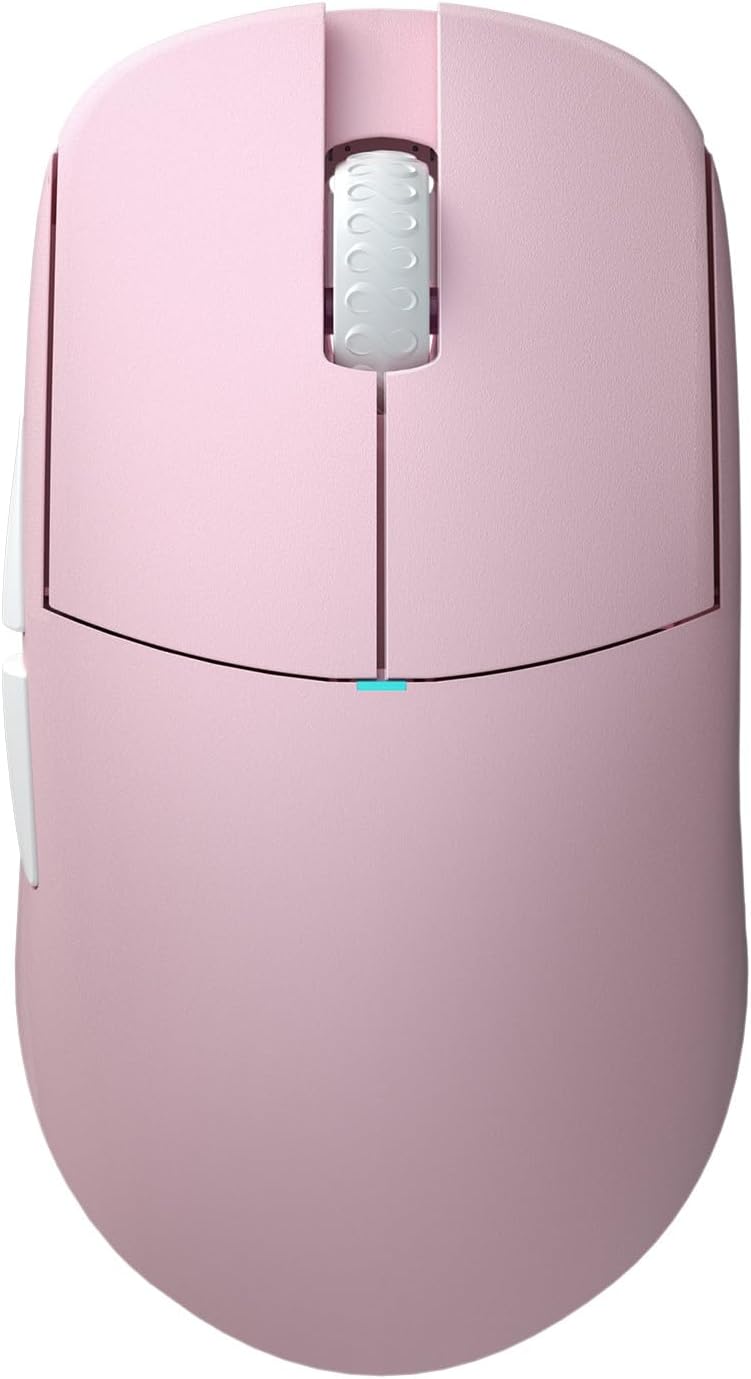
Figure 3.1: Top view of the Lamzu Atlantis Mini Champion Edition Wireless Gaming Mouse, showcasing its symmetrical design and main buttons.

Figure 3.2: Bottom view of the mouse, revealing the transparent chassis, sensor, and PTFE feet.

Figure 3.3: Diagram illustrating the various buttons and their functions: Left Click, Right Click, Scroll Wheel, Forward Button, Back Button, On/Off Switch, and DPI Button.
4. Setup
4.1 Wireless Connection (2.4G)
- Locate the Wireless USB Receiver in the package.
- Plug the USB receiver into an available USB port on your computer.
- Turn on the mouse using the On/Off switch located on the bottom of the mouse.
- The mouse should automatically connect to the receiver. If not, press the pairing button (if available, refer to specific product details) or try re-plugging the receiver.
4.2 Wired Connection
- Connect the USB-C end of the charging cable to the mouse.
- Connect the USB-A end of the charging cable to an available USB port on your computer.
- The mouse will function in wired mode and charge simultaneously.

Figure 4.1: The mouse supports both wired (USB-C) and 2.4G wireless connectivity.
5. Operating Instructions
5.1 Basic Functions
- Left Click: Primary action button.
- Right Click: Secondary action button.
- Scroll Wheel: Scroll up/down, and click for middle-button functionality.
- Forward/Back Buttons: Located on the side, typically used for navigation in web browsers or in-game commands.
5.2 DPI Adjustment
The mouse features a dedicated DPI button, usually located on the bottom or top of the mouse, to cycle through preset DPI (Dots Per Inch) sensitivity levels. Refer to the software section for custom DPI settings.
5.3 Software Customization
For advanced customization, including button remapping, macro creation, and precise DPI adjustments, download the official Lamzu software from the Lamzu website. The software allows you to personalize your mouse settings to suit your preferences.

Figure 5.1: Example of the Lamzu customization software interface, showing options for button assignment and performance settings.
5.4 Grip Styles
The symmetrical design of the Atlantis Mini is suitable for various grip styles, particularly optimized for claw grip due to its broad back and curved top, which helps prevent finger cramps.

Figure 5.2: Visual representation of common mouse grip styles: Palm Grip, Claw Grip, and Fingertip Grip.
6. Charging and Battery
The Lamzu Atlantis Mini Champion Edition is equipped with a rechargeable Lithium Ion battery. To charge the mouse, connect it to your computer using the provided USB-C cable. The mouse can be used while charging in wired mode. An indicator light on the mouse will typically show charging status (e.g., solid light for charging, off or different color for fully charged).
7. Maintenance
7.1 Cleaning
- Ensure the mouse is turned off and disconnected from the computer before cleaning.
- Use a soft, lint-free cloth lightly dampened with water or a mild cleaning solution to wipe the surface of the mouse.
- Avoid using harsh chemicals, abrasive cleaners, or solvents.
- Use a can of compressed air to clear dust and debris from crevices and around the scroll wheel.
7.2 Storage
Store the mouse in a cool, dry place away from direct sunlight and extreme temperatures. When not in use for extended periods, ensure the mouse is fully charged before storage to maintain battery health.
8. Troubleshooting
If you encounter issues with your mouse, refer to the table below for common problems and solutions.
| Problem | Possible Cause | Solution |
|---|---|---|
| Mouse not responding (wireless) | Low battery, receiver disconnected, pairing issue | Charge the mouse, ensure receiver is securely plugged in, try re-pairing. |
| Mouse not responding (wired) | Cable not connected properly, faulty USB port | Check cable connection, try a different USB port. |
| Cursor erratic or jumpy | Dirty sensor, unsuitable surface | Clean the optical sensor, use a clean mouse pad or suitable surface. |
| Buttons not clicking or double-clicking | Software issue, physical obstruction | Update mouse firmware/software, check for physical debris. |
| Poor wireless range or lag | Interference, receiver too far | Move receiver closer to mouse, reduce interference from other wireless devices. |
9. Specifications
Detailed technical specifications for the Lamzu Atlantis Mini Champion Edition Wireless Gaming Mouse:
| Feature | Specification |
|---|---|
| Model | Lamzu Atlantis Mini Champion Edition |
| Connectivity | 2.4G Wireless, USB Wired (Type-C) |
| Sensor | Pixart PAW 3950 Optical Sensor |
| DPI Range | Up to 30,000 DPI |
| IPS | 750 IPS |
| Polling Rate | Up to 8K Hz (with 8K Dongle, sold separately) |
| MCU | Nordic 52840 |
| Switches | Optical Switches (70 million click lifespan) |
| Encoder | Lamzu Dust-Proof Encoder |
| Weight | Approximately 51 grams |
| Dimensions | 4.61 x 2.48 x 0.04 inches (117 x 63 x 37 mm, approx.) |
| Battery | 1 Lithium Ion battery (included) |

Figure 9.1: Dimensional diagram of the mouse, indicating length, width, and height measurements.
10. Safety Information
To prevent damage to the device or injury to yourself, please observe the following safety precautions:
- Do not disassemble or attempt to repair the device yourself.
- Keep the device away from water, moisture, and extreme temperatures.
- Avoid dropping or subjecting the device to strong impacts.
- Dispose of batteries according to local regulations.
11. Warranty and Support
Lamzu is committed to providing high-quality products. For warranty information, technical support, or service inquiries, please visit the official Lamzu website or contact their customer support. Keep your proof of purchase for warranty claims.
Visit the Lamzu Store on Amazon for more information and products.
