
T-Wolf GG-G530
Uživatelská příručka k herní myši T-Wolf RoboCop Competitive Gaming Mouse GG-G530
Model: GG-G530
Zavedení
This manual provides essential information for the setup, operation, and maintenance of your T-Wolf RoboCop Competitive Gaming Mouse GG-G530. Please read this manual thoroughly before using the product to ensure optimal performance and longevity.
Obsah balení
- 1 x T-Wolf RoboCop Competitive Gaming Mouse GG-G530
- 1 x Uživatelská příručka (tento dokument)
Vlastnosti produktu
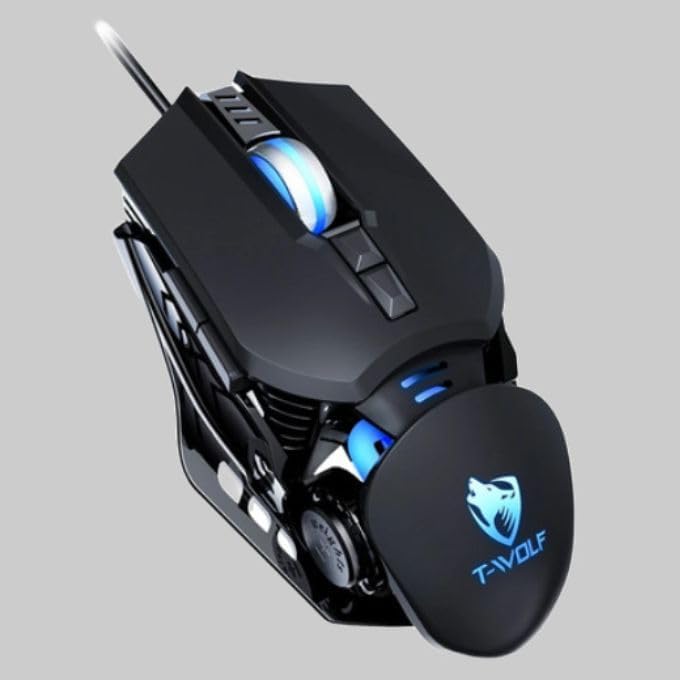
The T-Wolf RoboCop Competitive Gaming Mouse GG-G530 is designed for precision and comfort, suitable for both gaming and office use. Key features include:
- Optical Engine Design: Ensures stable operation and high sensitivity.
- Mechanical Armored Modeling: Distinctive and robust design.
- Symmetrical DIY Counterweight: Allows for adaptable weight adjustment.
- 7 Tlačítka: Includes left click, right click, scroll wheel, DPI switcher, and additional programmable buttons.
- Inteligentní konektivita: Plug-and-play functionality with automatic driver installation.
- Nastavitelné DPI: Four levels of sensitivity (1200/2400/3200/6400 DPI) for precise control.
- Ergonomický design: Provides comfortable use for extended periods without fatigue.
- Four-Color Light Effect: Dynamic lighting for visual appeal.
- Kabelové připojení: Reliable USB interface with a 150cm cable.
- Kompatibilita systému: Podporuje operační systémy Windows a Mac.
Nastavení
- Připojte myš: Insert the USB connector of the T-Wolf RoboCop Gaming Mouse into an available USB port on your computer.
- Automatická instalace ovladačů: The operating system will automatically detect the mouse and install the necessary drivers. This process typically takes a few moments. No manual driver installation is required.
- Připraven k použití: Po instalaci ovladačů je myš připravena k okamžitému použití.
Návod k obsluze
The T-Wolf RoboCop Gaming Mouse features 7 buttons for various functions. Familiarize yourself with their basic operations:
- Levé tlačítko myši: Primární výběr a interakce.
- Kliknutí pravým tlačítkem: Accesses contextual menus and secondary functions.
- Rolovací kolečko: Prochází dokumenty a web stránky. Může také fungovat jako prostřední tlačítko.
- DPI Switcher Button: Upravuje citlivost myši (DPI).
- Další tlačítka: The remaining buttons can be assigned specific functions through your operating system's mouse settings or compatible third-party software (note: no macro programming is natively supported by the mouse hardware).

Úprava DPI
The mouse features an adjustable DPI (Dots Per Inch) setting, allowing you to change the cursor sensitivity on the fly. This is particularly useful for different tasks, such as precise aiming in games or fast navigation in general use.
- Vyhledejte DPI Switcher Button, typically positioned behind the scroll wheel.
- Press the DPI Switcher Button to cycle through the available DPI settings: 1200 DPI, 2400 DPI, 3200 DPI, and 6400 DPI.
- Each press will change the sensitivity, allowing you to find the setting that best suits your current activity.

Údržba
To ensure the longevity and optimal performance of your T-Wolf RoboCop Gaming Mouse, follow these simple maintenance guidelines:
- Čištění: K otření povrchu myši použijte měkký, suchý hadřík. V případě odolné nečistoty lehceampOtřete hadřík vodou nebo jemným čisticím roztokem. Vyhněte se agresivním chemikáliím nebo abrazivním materiálům.
- Optický senzor: Periodically clean the optical sensor on the underside of the mouse with a cotton swab to prevent dust buildup, which can affect tracking performance.
- Péče o kabely: Abyste předešli vnitřnímu poškození, vyhněte se ostrému ohýbání nebo tahání kabelu USB.
- Skladování: Pokud myš nepoužíváte, skladujte ji v čistém a suchém prostředí mimo dosah extrémních teplot.
Odstraňování problémů
If you encounter issues with your T-Wolf RoboCop Gaming Mouse, refer to the following common solutions:
- Myš nereaguje:
- Ujistěte se, že je kabel USB bezpečně zapojený do funkčního portu USB v počítači.
- Zkuste zapojit myš do jiného USB portu.
- Restartujte počítač.
- Pohyb kurzoru je nepravidelný nebo skokatý:
- Vyčistěte optický senzor na spodní straně myši.
- Ujistěte se, že myš používáte na čistém, nereflexním a rovnoměrném povrchu. Doporučuje se použití podložek pod myš.
- Nastavení DPI nefunguje:
- Ensure you are pressing the correct DPI switcher button.
- The mouse cycles through fixed DPI settings; there is no visual indicator on the mouse itself for the current DPI level, only the change in cursor speed.
- Nefunkční tlačítka:
- Check your operating system's mouse settings to ensure buttons are enabled and configured correctly.
- Test the mouse on another computer to rule out a software or system issue.
Specifikace
| Model | GG-G530 |
| Materiál | ABS + Electroplating |
| Sledovací systém | Optický |
| Spojení | Kabelové |
| Délka kabelu | 150 cm |
| Typ rozhraní | USB |
| Nastavení DPI | 1200 / 2400 3200 / 6400 XNUMX / XNUMX XNUMX (nastavitelné) |
| Počet tlačítek | 7 |
| Životnost | Approximately three years |
| Pracovní metoda | Fotoelektrické |
| Světelný efekt | Four-color cycling |
| Velikost položky | 130 x 80 x 35 mm |
| Hmotnost položky | 160 g |
| Podporované systémy | Windows, Mac |
Záruka a podpora
Your T-Wolf RoboCop Competitive Gaming Mouse GG-G530 comes with a 6měsíční záruka výrobce od data nákupu.
This warranty covers defects in materials and workmanship under normal use. It does not cover damage caused by accident, misuse, abuse, unauthorized modification, or external causes such as liquid damage.
For warranty claims or technical support, please contact your retailer or the point of purchase. Please retain your proof of purchase for warranty validation.

Ask a question about this manual
Ask about setup, troubleshooting, compatibility, parts, safety, or missing instructions. Manuals+ will review the question and use this page’s manual context to help answer it.