
YanLan G7
YanLan G7 Wired Gaming Mouse User Manual
Model: G7 | Brand: YanLan
Zavedení
Thank you for choosing the YanLan G7 Wired Gaming Mouse. This high-performance mouse is designed for precision and comfort, featuring 7 programmable buttons, adjustable DPI settings, and vibrant RGB LED lighting. This manual will guide you through the setup, operation, and maintenance of your new gaming mouse.

Image: The YanLan G7 Wired Gaming Mouse, showcasing its ergonomic design and colorful RGB lighting from a top-down perspective.
1. Nastavení
The YanLan G7 Wired Gaming Mouse is a plug-and-play device, requiring no additional drivers for basic functionality. Follow these simple steps to get started:
- Připojte kabel USB: Vyhledejte volný USB port na vašem počítači (stolním počítači nebo notebooku).
- Zapojte myš: Insert the USB connector of the G7 mouse into the USB port.
- Rozpoznávání systému: Your operating system (Windows, Mac OS) will automatically detect and install the necessary generic drivers. This process usually takes a few seconds.
- Připraven k použití: Once recognized, the mouse's LED lighting will illuminate, and it will be ready for immediate use.

Image: The YanLan G7 Wired Gaming Mouse connected to a laptop, illustrating its design with a metal panel and galvanized wings.
2. Návod k obsluze
2.1 Funkce tlačítek
The G7 mouse features 7 buttons for enhanced control and customization:
- Levé tlačítko myši: Standardní funkce primárního kliknutí.
- Kliknutí pravým tlačítkem: Standardní funkce sekundárního kliknutí.
- Rolovací kolečko (kliknutí prostředním tlačítkem): Pro akce rolování a kliknutí prostředním tlačítkem myši.
- Tlačítko pro nastavení DPI: Cycles through DPI settings (see section 2.2).
- Tlačítko vpřed: Obvykle se používá pro navigaci vpřed v web prohlížeče popř file průzkumníci.
- Tlačítko Zpět: Obvykle se používá pro navigaci zpět v web prohlížeče popř file průzkumníci.
- Seventh Button: This button's specific function may vary or be programmable depending on software, if available. Default is often a double-click or macro key.
2.2 Nastavení DPI
The G7 mouse allows you to adjust its sensitivity (DPI - Dots Per Inch) on the fly. This is useful for different tasks, such as precise aiming in games or fast navigation across multiple monitors.
- Úrovně DPI: The mouse supports four adjustable DPI levels: 1200, 1800, 2400, and 3600 DPI.
- Jak upravit: Stiskněte příslušné tlačítko Tlačítko pro úpravu DPI (usually located behind the scroll wheel) to cycle through the available DPI settings. Each press will switch to the next DPI level.
- Vizuální indikátor: The RGB lighting may change color or pattern to indicate the current DPI setting, though this is not explicitly stated, it is a common feature.
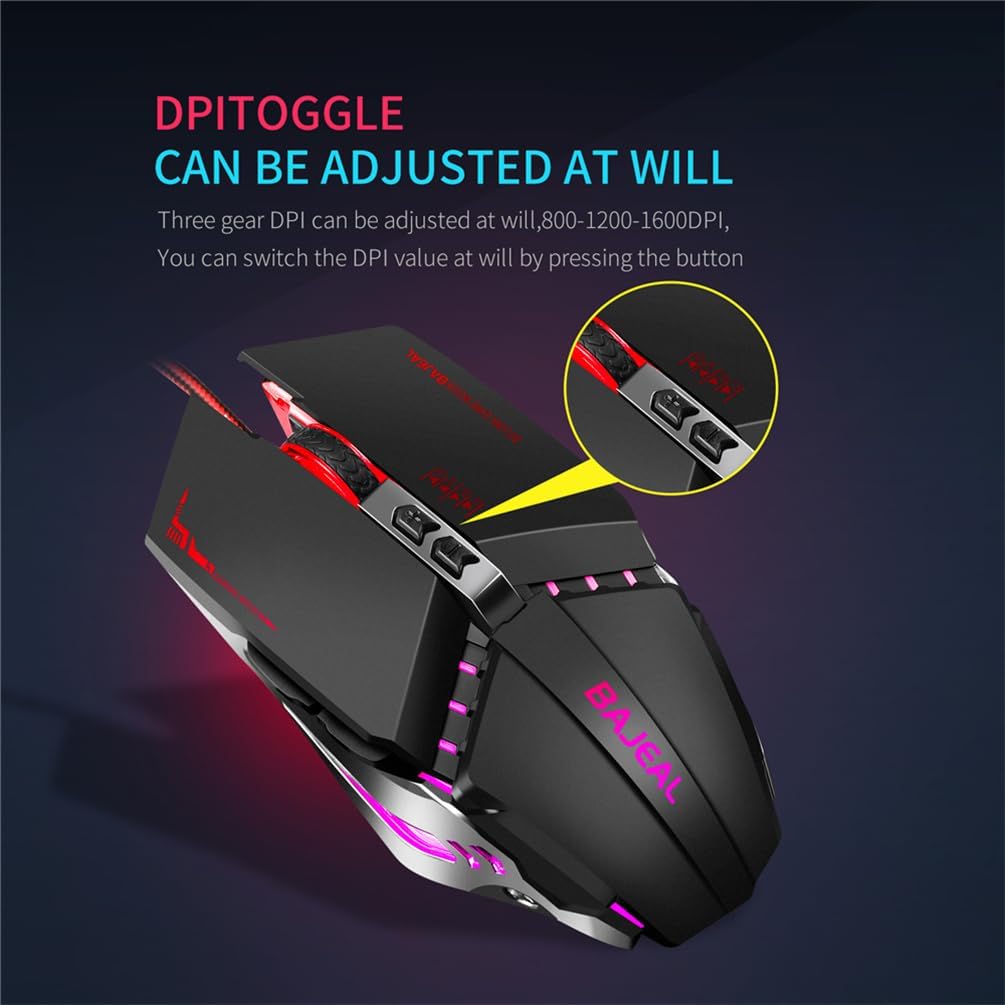
Obrázek: Detailní záběr view of the YanLan G7 Wired Gaming Mouse highlighting the DPI toggle button. Note: The image text indicates 800-1200-1600 DPI, while the product description specifies 1200-1800-2400-3600 DPI.
2.3 RGB LED osvětlení
The G7 mouse features dynamic RGB LED lighting, enhancing its aesthetic appeal. The lighting effects are typically pre-programmed and cycle automatically. There are no user-adjustable settings for the RGB lighting directly on the mouse.
3. Údržba
To ensure the longevity and optimal performance of your YanLan G7 mouse, follow these simple maintenance guidelines:
- Čištění povrchu: Use a soft, dry, lint-free cloth to wipe the exterior of the mouse. For stubborn dirt, slightly damphadřík vodou. Nepoužívejte agresivní chemikálie ani abrazivní čisticí prostředky.
- Cleaning the Optical Sensor: Periodically inspect the optical sensor on the underside of the mouse for dust or debris. Use a cotton swab or compressed air to gently clean the sensor area.
- Péče o kabely: Avoid sharply bending or twisting the USB cable. Store the mouse in a way that prevents the cable from being crimped or damaged.
- Vyhněte se tekutinám: Do not expose the mouse to liquids. If liquid spills on the mouse, immediately disconnect it from your computer and allow it to dry completely before reconnecting.
4. Řešení problémů
If you encounter any issues with your YanLan G7 mouse, refer to the following common problems and solutions:
| Problém | Možné řešení |
|---|---|
| Myš nereaguje. |
|
| Pohyb kurzoru je nepravidelný nebo trhaný. |
|
| Tlačítka nefungují správně. |
|
| RGB osvětlení nefunguje. |
|
5. Specifikace
| Model | G7 |
| Značka | YanLan |
| Nastavení DPI | 1200/1800/2400/3600 DPI |
| Počet tlačítek | 7 |
| Typ připojení | Kabelové USB |
| Délka kabelu | 1.5 metrů |
| Hmotnost produktu | 140 gramů |
| Barva | Černý |
| Rozměry (D x Š x V) | 130 mm x 76 mm x 42 mm |
| Kompatibilní systémy | Windows XP, Vista, 7, 8, 10, ME, 2000, Mac OS (or latest versions) |
| Speciální funkce | RGB LED Lighting, Ergonomic Design, Durable Micro-switch, Optical Tracking |
6. Záruka a podpora
Information regarding product warranty and customer support is not provided in the available product details. Please refer to your purchase documentation or contact the retailer for specific warranty terms and support options.
Ask a question about this manual
Ask about setup, troubleshooting, compatibility, parts, safety, or missing instructions. Manuals+ will review the question and use this page’s manual context to help answer it.