
Zavedení
This manual provides detailed instructions for the setup, operation, and maintenance of your MageGee SKY 87 75% Mechanical Gaming Keyboard. Designed for both gaming and office use, this compact 87-key keyboard features tactile brown switches, ice blue LED backlighting, and broad compatibility.
1. Nastavení
1.1 Obsah balení
- MageGee SKY 87 Mechanical Gaming Keyboard
- USB-A Cable (Wired Connection)
- Keycap Puller (for maintenance)
1.2 Připojení klávesnice
The MageGee SKY 87 keyboard uses a wired USB-A connection. To connect:
- Plug the USB-A cable into the USB port on the keyboard.
- Connect the other end of the USB-A cable to an available USB port on your computer (PC, Mac, or laptop).
- Klávesnice je plug-and-play a váš operační systém by ji měl automaticky rozpoznat.
2. Návod k obsluze
2.1 Ovládání podsvícení
The keyboard features ice blue LED backlighting with multiple modes and adjustable settings.
- Change Backlighting Mode: Stiskněte Fn + PrtSc to cycle through 20 preset ice blue backlighting modes.
- Upravit jas: Stiskněte Fn + ↑ (Up Arrow) pro zvýšení jasu a Fn + ↓ (Down Arrow) ke snížení jasu.
- Nastavení rychlosti proudění: Stiskněte Fn + - to decrease flowing speed, and Fn + = to increase flowing speed (for dynamic modes).

Image: The MageGee SKY 87 keyboard showcasing its vibrant ice blue LED backlighting and customizable light effects.
2.2 Tactile Brown Switches
The keyboard is equipped with tactile brown switches, offering a balanced typing experience with a noticeable bump without a loud click, suitable for both typing and gaming.

Obrázek: Detailní záběr view of the keyboard demonstrating the tactile brown switches and a keycap puller for easy removal.
2.3 Ergonomic Design and Side Lighting
The keyboard features stepped keycaps and a two-stage adjustable stand for ergonomic comfort. Additionally, an ice blue LED light strip on the bottom provides enhanced visual effects.

Image: The keyboard highlighting its distinctive ice blue side lighting, which enhances the aesthetic in low-light conditions.

Image: An illustration detailing the two-step adjustable keyboard feet, allowing users to set the keyboard at high or low angles for personalized comfort.
2.4 Compact TKL Layout (87 Keys)
The 75% Tenkeyless (TKL) design provides a compact footprint with 87 keys, including independent arrow keys, saving desk space while retaining essential functionality.
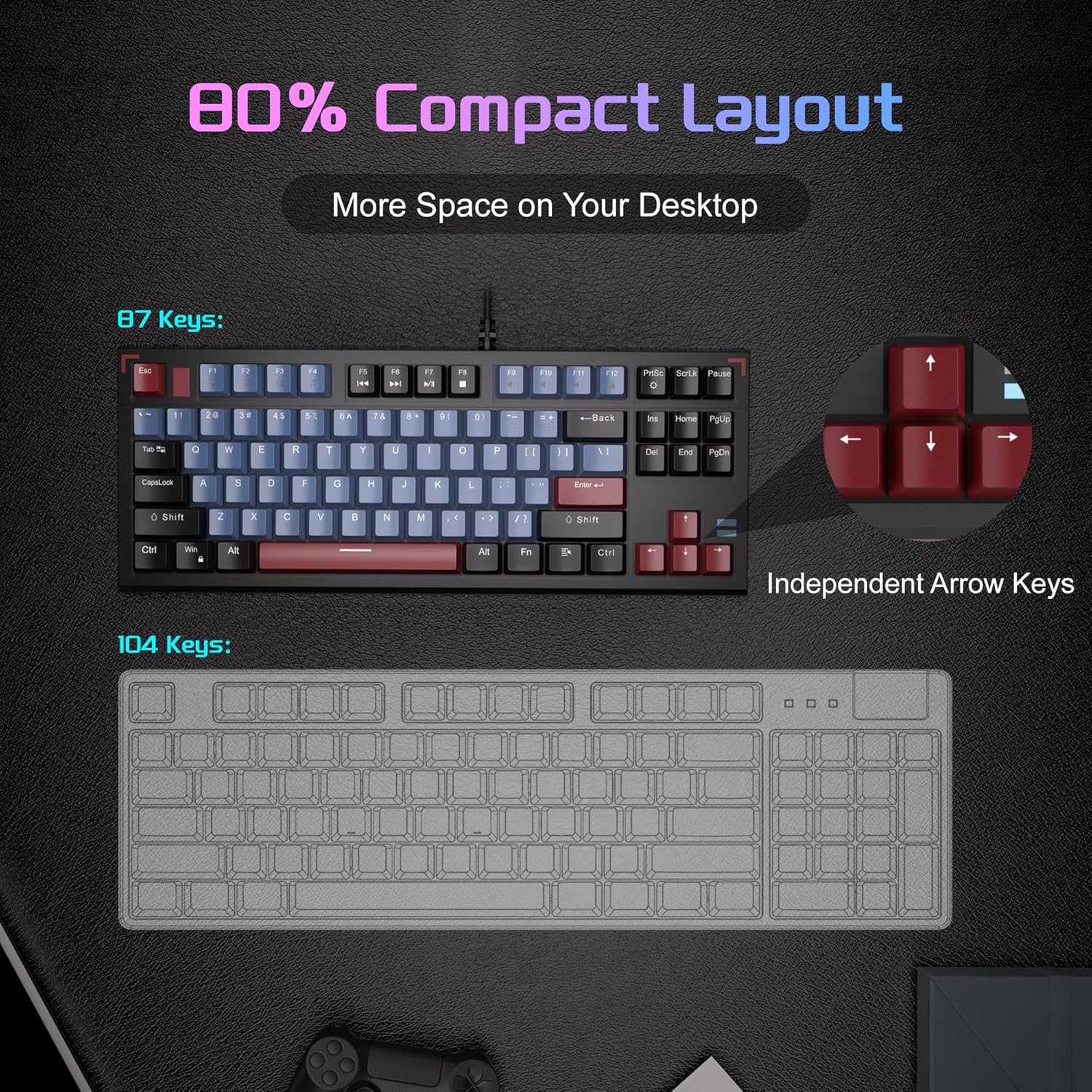
Image: A visual comparison illustrating the compact 87-key layout of the MageGee SKY 87 keyboard next to a standard 104-key keyboard, emphasizing space-saving benefits.
2.5 N-Key Rollover (Anti-Ghosting)
The keyboard supports 100% N-key rollover, meaning all keys can be pressed simultaneously without conflict, ensuring every keystroke is registered accurately during intense gaming or fast typing.

Image: A diagram showing how multiple key presses are registered simultaneously without ghosting, highlighting the N-key rollover feature.
2.6 Multimediální zkratky
Access various multimedia functions using the Fn key in combination with the F-keys.
| Function Key Combination | Popis |
|---|---|
| Fn + F1 | Můj počítač |
| Fn + F2 | Hledat |
| Fn + F3 | Kalkulačka |
| Fn + F4 | Přehrávač médií |
| Fn + F5 | Předchozí stopa |
| Fn + F6 | Další stopa |
| Fn + F7 | Přehrát/Pozastavit |
| Fn + F8 | Zastávka |
| Fn + F9 | Ztlumit |
| Fn + F10 | Snížit hlasitost |
| Fn + F11 | Zvýšení hlasitosti |
| Fn + F12 | Uzamknout obrazovku |

Image: The keyboard layout highlighting the F-keys and their corresponding multimedia functions when used with the Fn key.
3. Údržba
3.1 Čištění klávesnice
To ensure optimal performance and longevity, regular cleaning is recommended.
- Před čištěním odpojte klávesnici od počítače.
- Pomocí měkkého kartáče nebo stlačeného vzduchu odstraňte prach a nečistoty z prostoru mezi klávesami.
- V případě odolných nečistot jemně otřete klávesy a povrch klávesnice lehceamp, hadřík, který nepouští vlákna. Zabraňte nadměrné vlhkosti.
- Nepoužívejte drsné chemikálie ani abrazivní čisticí prostředky.
3.2 Demontáž a výměna krytky kláves
The included keycap puller can be used to remove and replace keycaps for cleaning or customization.
- Jemně připevněte stahovák kláves ke klávese, kterou chcete odstranit.
- Pull straight up with even pressure until the keycap detaches from the switch.
- Chcete-li klávesu nasadit zpět, zarovnejte ji s dříkem spínače a pevně ji zatlačte, dokud nezacvakne.

Image: The keyboard with some keycaps removed, illustrating the possibility of customization or deep cleaning.
4. Řešení problémů
If you encounter issues with your MageGee SKY 87 keyboard, refer to the following common solutions:
- Klávesnice nereaguje:
- Ujistěte se, že je kabel USB bezpečně připojen k klávesnici i k počítači.
- Zkuste zapojit klávesnici do jiného USB portu na počítači.
- Restartujte počítač.
- Podsvícení nefunguje nebo je nesprávné:
- Check if the brightness is set too low (Fn + ↑/↓).
- Cycle through lighting modes using Fn + PrtSc.
- Nefunkční konkrétní klávesy:
- Remove the keycap and check for any obstructions or debris around the switch.
- Pokud problém přetrvává, kontaktujte zákaznickou podporu.
5. Specifikace
| Funkce | Detail |
|---|---|
| Značka | MageGee |
| Číslo modelu | NEBE 87 |
| Technologie připojení | USB-A (kabelové) |
| Popis klávesnice | Mechanické |
| Typ přepínače | Tactile Brown Switches |
| Počet klíčů | 87 |
| Rozložení klávesnice | QWERTY |
| Podsvícení | Ledově modrá LED (jednobarevná) |
| Speciální funkce | Backlit, Ergonomic, Multimedia Keys, Portable |
| Kompatibilní zařízení | Laptop, PC (Windows, Mac) |
| Rozměry produktu (D x Š x V) | 14.37 cm x 5.51 cm x 1.69 cm |
| Materiál | Akrylonitrilbutadienstyren (ABS) |
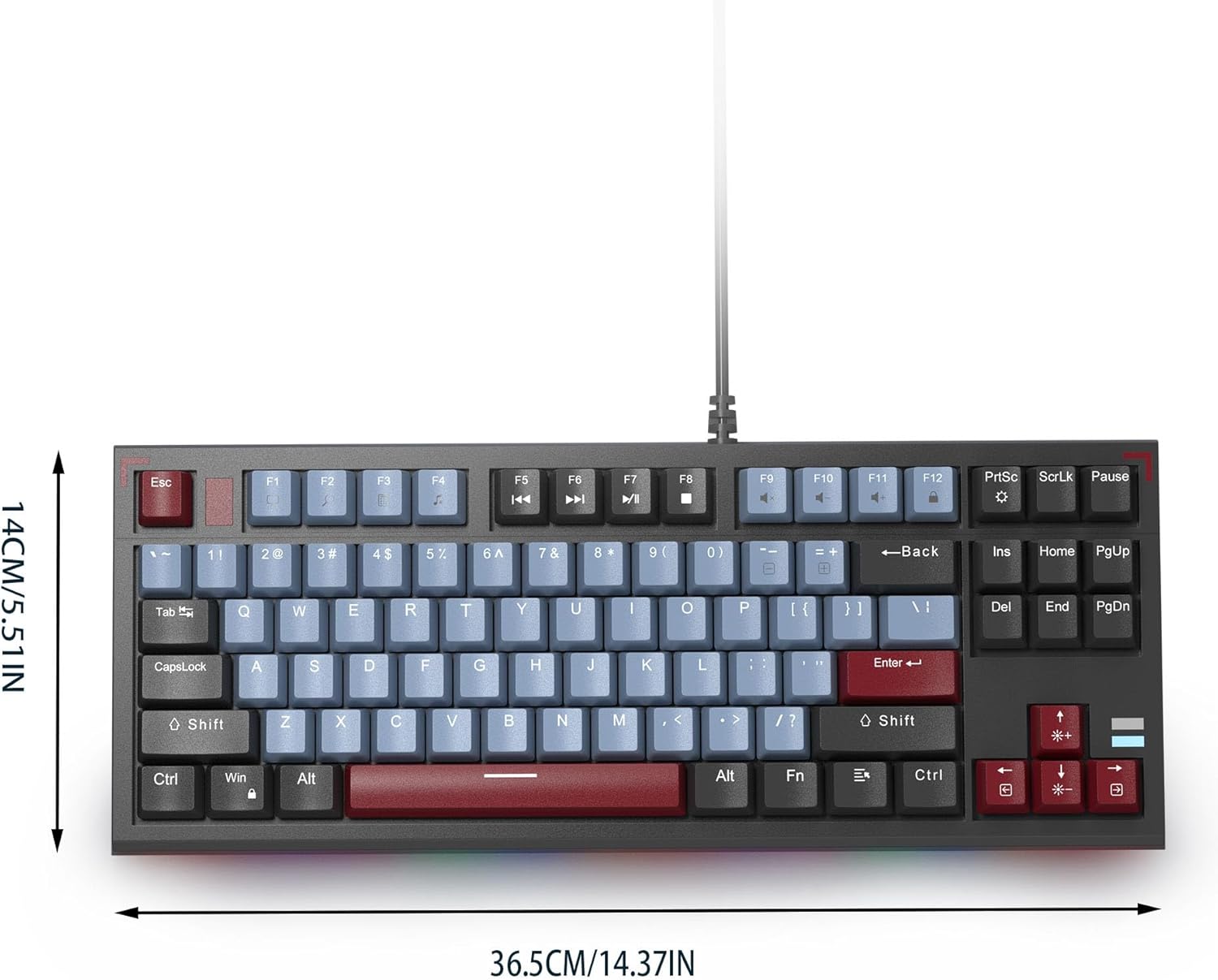
Image: The MageGee SKY 87 keyboard with its physical dimensions clearly indicated.
6. Záruka a podpora
Informace o záruce a technickou podporu získáte na oficiálních stránkách společnosti MageGee. webnebo se obraťte přímo na jejich zákaznický servis. Uschovejte si doklad o koupi pro případ reklamace.