
1. Úvod
Thank you for choosing the TECLAST Mini PC N15. This compact and powerful mini computer is designed for a wide range of applications, from home entertainment and office tasks to creative work and light gaming. Featuring an Intel N5095 processor, 16GB DDR4 RAM, and a 512GB PCI-e 3.0 SSD, it offers efficient performance in a small form factor. This manual provides essential information for setting up, operating, maintaining, and troubleshooting your device.
2. Obsah balení
Please verify that all items listed below are included in your package. If any items are missing or damaged, please contact TECLAST customer support.
- 1x TECLAST N15 Mini PC
- 1x Uživatelská příručka
- 1x HDMI kabel
- 1x držák VESA
- 1x napájecí adaptér
- 1x napájecí kabel

Image: Package contents of the TECLAST N15 Mini PC.
3. Konec produktuview
3.1. Klíčové vlastnosti
- Procesor: Intel N5095 (4 Cores, 4 Threads, up to 2.9GHz Turbo Frequency)
- Grafika: Grafika Intel UHD
- Paměť: 16GB DDR4 RAM
- Skladování: 512GB PCI-e 3.0 SSD
- Konektivita: Dual 2.5GbE RJ45 Ethernet, Wi-Fi (2.4G+5G ac), Bluetooth 4.2
- Video výstup: Supports up to three 4K displays (HDMI, DisplayPort, Full-Function Type-C)
- Porty: Multiple USB 3.2, USB 2.0, Full-Function Type-C, DisplayPort, HDMI, COM Port, Micro SD Card Reader, Headphone Output, Microphone Input
- Design: Compact (0.53L volume, 400g weight), Aluminum Body, VESA Mountable

Image: Intel N5095 Processor specifications and architecture.
3.2. Porty a rozhraní
The TECLAST N15 Mini PC offers a comprehensive set of ports for versatile connectivity:
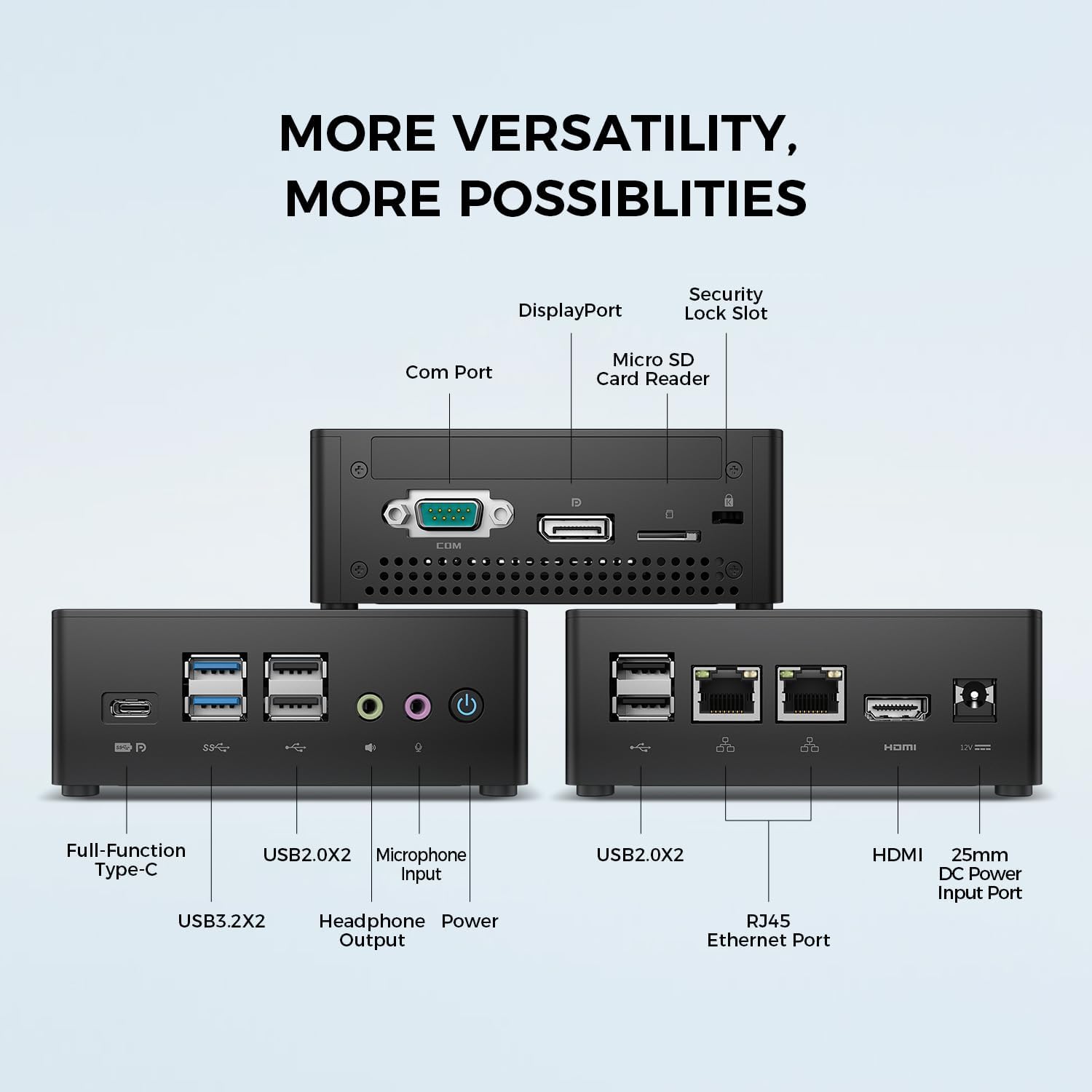
Obrázek: Podrobný view of the TECLAST N15 Mini PC's front, side, and rear ports.
- Přední panel: Full-Function Type-C (supports charging, data, video, audio), 2x USB 3.2, 2x USB 2.0, Headphone Output, Microphone Input, Power Button.
- Boční panel: COM Port, DisplayPort, Micro SD Card Reader, Security Lock Slot.
- Zadní panel: 2x USB 2.0, 2x RJ45 Ethernet Ports (2.5GbE), HDMI, DC Power Input.

Image: Dual 2.5GbE RJ45 Ethernet Ports for high-speed networking.
3.3. Chladicí systém
The N15 Mini PC is designed for efficient heat dissipation to ensure stable and quiet operation. It features a 15W TDP, nickel-plated heat pipe, and a turbo fan, providing over 16000mm² of heat dissipation area.

Image: Internal cooling system design for quiet and efficient operation.
3.4. Kompaktní design
With a compact volume of approximately 0.53L and a weight of 400g, the N15 Mini PC is highly portable and can be easily integrated into any workspace. Its aluminum body ensures durability.

Image: Compact size and lightweight design of the Mini PC.
4. Pokyny k nastavení
4.1. Připojení periferií
- Připojení monitoru: Use the provided HDMI cable to connect your monitor to the HDMI port on the Mini PC. Alternatively, use a DisplayPort cable or a Full-Function Type-C cable for compatible monitors.
- Připojení klávesnice a myši: Zapojte klávesnici a myš USB do libovolného volného portu USB na Mini PC.
- Připojení k síti (volitelné): For a wired connection, connect an Ethernet cable from your router or modem to one of the RJ45 ports on the Mini PC. For wireless, ensure your Wi-Fi network is available during initial setup.
- Připojte napájení: Connect the power adapter to the DC Power Input port on the Mini PC, then plug the power cable into a wall outlet.
4.2. Zapnutí a počáteční nastavení
- Stiskněte tlačítko napájení na přední straně Mini PC.
- The system will boot up. If it's the first time, it will guide you through the Windows operating system setup process. Follow the on-screen instructions to configure language, region, network, and user accounts.
- Ujistěte se, že jsou nainstalovány všechny ovladače. Služba Windows Update to obvykle řeší automaticky.
5. Návod k obsluze
5.1. Základní obsluha
Once setup is complete, your TECLAST N15 Mini PC functions like a standard desktop computer. You can launch applications, browse the internet, and manage files using your connected keyboard and mouse.
5.2. Nastavení více displejů
The Mini PC supports connecting up to three 4K displays simultaneously, enhancing productivity and entertainment experiences.
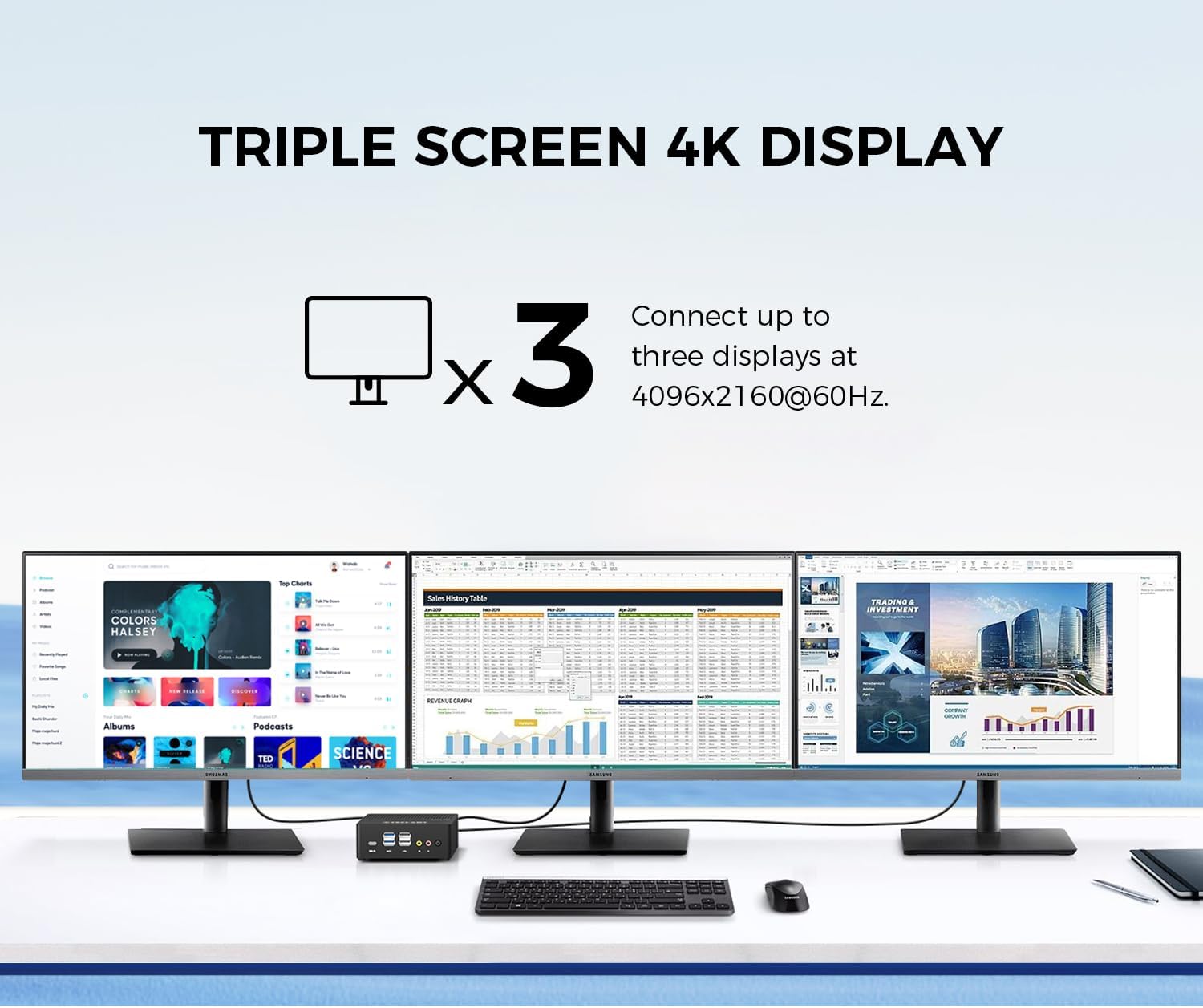
Image: Triple screen 4K display setup with the Mini PC.
- Connect your primary monitor via HDMI.
- Connect a second monitor via DisplayPort.
- Connect a third monitor via the Full-Function Type-C port (requires a compatible Type-C to DisplayPort/HDMI adapter or monitor).
- In Windows, right-click on the desktop and select "Display settings" to configure your multiple displays (extend, duplicate, or show only on one).
5.3. Bezdrátové připojení
The Mini PC supports 2.4G+5G ac Wi-Fi and Bluetooth 4.2 for wireless connections.
- Wi-Fi: Access Wi-Fi settings in Windows to connect to your preferred wireless network.
- Bluetooth: Pair Bluetooth devices like keyboards, mice, or headphones through Windows Bluetooth settings.
6. Údržba
Pravidelná údržba pomáhá zajistit dlouhou životnost a optimální výkon vašeho Mini PC.
- Čištění: K čištění vnějšího povrchu použijte měkký, suchý hadřík. V případě nahromaděného prachu ve větracích otvorech použijte stlačený vzduch. Před čištěním se ujistěte, že je zařízení vypnuté a odpojené od sítě.
- Aktualizace softwaru: Regularly check for and install Windows updates and driver updates to maintain system security and performance.
- Správa úložiště: Pravidelně uklízejte nepotřebné files and applications to free up storage space and improve system responsiveness.
- Větrání: Ensure the Mini PC is placed in a well-ventilated area and that its vents are not obstructed to prevent overheating.
7. Řešení problémů
If you encounter issues with your TECLAST N15 Mini PC, refer to the following common troubleshooting steps:
| Problém | Možné řešení |
|---|---|
| Žádné zobrazení na monitoru | Check all cable connections (HDMI, DisplayPort, Type-C). Ensure the monitor is powered on and set to the correct input source. Try a different cable or monitor if possible. |
| Mini PC se nezapne | Verify the power adapter is securely connected to both the Mini PC and a working power outlet. Try a different power outlet. |
| Žádné připojení k internetu (Wi-Fi) | Check if Wi-Fi is enabled in Windows settings. Ensure you are connected to the correct network and have entered the password correctly. Restart your router/modem. |
| No internet connection (Wired) | Ensure the Ethernet cable is securely connected to both the Mini PC and your router/modem. Check the network status in Windows. Restart your router/modem. |
| Pomalý výkon | Close unnecessary applications. Check for background processes consuming resources. Ensure sufficient free storage space. Run a system scan for malware. |
| Peripheral devices not recognized | Try connecting the device to a different USB port. Ensure device drivers are installed. Restart the Mini PC. |
If the issue persists after trying these steps, please contact TECLAST customer support for further assistance.
8. Specifikace
Detailed technical specifications for the TECLAST N15 Mini PC:
| Funkce | Specifikace |
|---|---|
| Značka | TECLAST |
| Číslo modelu | N15 |
| Model CPU | Intel Celeron N5095 |
| Rychlost CPU | Up to 2.9 GHz (Turbo Frequency) |
| Počet procesorů | 4 |
| Nainstalovaná paměť RAM | 16 GB DDR4 |
| Maximální velikost paměti RAM | 16 GB |
| Kapacita paměti | 512 GB PCI-e 3.0 SSD |
| Grafický koprocesor | Grafika Intel UHD |
| Maximální rozlišení displeje | 3840 x 2160 pixelů (4K) |
| Výstupní rozhraní videa | HDMI, DisplayPort, Type-C |
| Technologie připojení | Ethernet (Dual RJ45 2.5GbE), HDMI, LAN, Wi-Fi (802.11ac), Bluetooth 4.2 |
| Celkový počet portů USB | 6 (2x USB 3.2, 4x USB 2.0) |
| Hmotnost položky | 400 gramů |
| Spotřeba energie | 15 wattů |
| Způsob chlazení | Air (with Turbo Fan and Nickel-Plated Heat Pipe) |
| Barva | Černý |
9. Záruka a podpora
TECLAST products are designed for quality and reliability. For any product-related inquiries, technical support, or warranty claims, please contact TECLAST customer service. Most questions are answered within 24 hours.
Pro další pomoc navštivte oficiální webové stránky TECLAST webwebu nebo se přímo obraťte na jejich kanály podpory.
10. Produktové video
Pro lepší představu se podívejte na toto oficiální video o produktuview of the TECLAST N15 Mini PC's features and connectivity.
Video: Konecview of the TECLAST N15 Mini PC, showcasing its design, ports, and internal components.