
1. Úvod
This manual provides detailed instructions for the setup, operation, maintenance, and troubleshooting of your Vontar X3 S905X3/4GB/32GB Android TV Box. Please read this manual thoroughly before using the device to ensure proper functionality and to maximize your user experience. Keep this manual for future reference.
2. Konec produktuview
The Vontar X3 S905X3/4GB/32GB is an Android TV Box designed to transform your television into a smart entertainment hub. It runs on Android 9.0 and features a powerful S905X3 processor, 4GB of RAM, and 32GB of internal storage, providing a smooth and responsive user experience for streaming, gaming, and app usage.
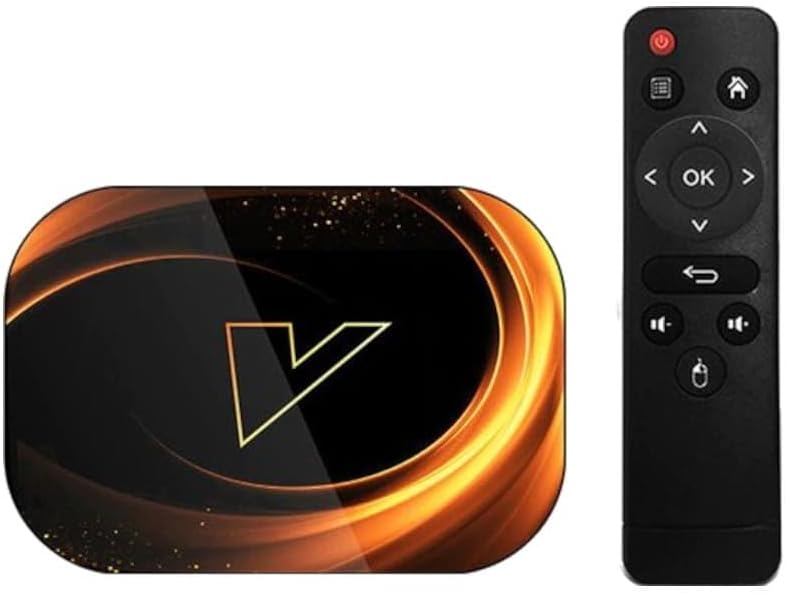
Obrázek 2.1: The Vontar X3 Android TV Box shown alongside its included remote control. The TV box features a sleek, dark design with a prominent 'V' logo on top, while the remote is a standard black infrared type with navigation and media control buttons.
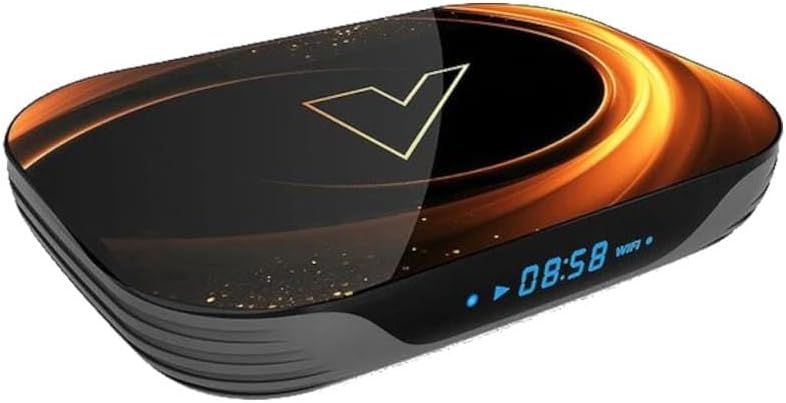
Obrázek 2.2: Přední úhel view of the Vontar X3 Android TV Box, highlighting its digital display which shows the current time (08:58) and Wi-Fi status. The device has a dark, glossy finish with an illuminated 'V' logo and subtle golden accents.
Obsah balení:
- Vontar X3 S905X3/4GB/32GB Android TV Box
- Dálkové ovládání
- Napájecí adaptér
- HDMI kabel
- Uživatelská příručka
3. Průvodce nastavením
3.1 Připojení zařízení
- Připojení k televizi: Insert one end of the HDMI cable into the HDMI port on the Vontar X3 TV Box and the other end into an available HDMI input on your television.
- Připojení k napájení: Plug the power adapter into the DC IN port on the TV Box, then plug the adapter into a wall outlet. The device should power on automatically or can be turned on using the power button on the remote.
- Připojení k síti (volitelné):
- Wi-Fi: Once the device is powered on, navigate to the 'Settings' menu, select 'Network & Internet', and choose your Wi-Fi network. Enter the password if prompted.
- Ethernet: For a wired connection, connect an Ethernet cable from your router to the LAN port on the TV Box. The device will automatically detect the wired connection.
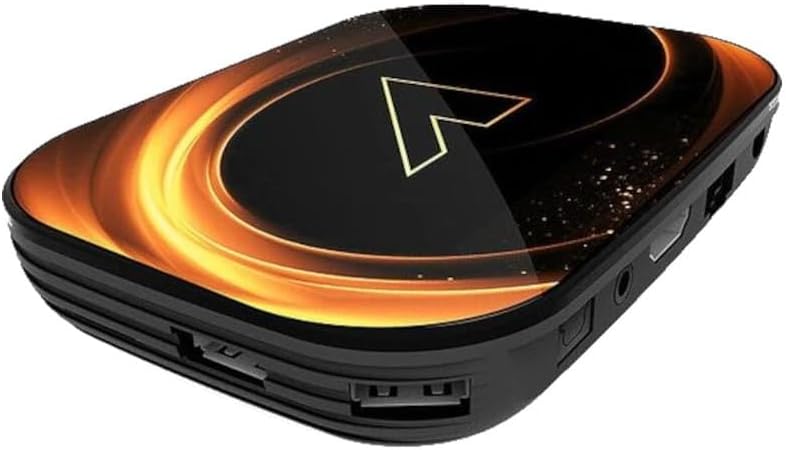
Obrázek 3.1: Zadní view of the Vontar X3 Android TV Box, showing various ports including HDMI, Ethernet (LAN), and DC power input. These ports are essential for connecting the device to a television and power source.

Obrázek 3.2: Strana view of the Vontar X3 Android TV Box, displaying additional connectivity options such as USB ports (one USB 3.0, one USB 2.0) and a MicroSD card slot for expandable storage.
3.2 Počáteční spuštění
After connecting all necessary cables, switch your TV's input source to the corresponding HDMI port. The Vontar X3 TV Box will display the boot-up screen. Follow any on-screen prompts for initial setup, such as language selection and Google account login.
4. Návod k obsluze
4.1 Funkce dálkového ovládání
The included remote control allows you to navigate the Android TV interface and control media playback. Familiarize yourself with the main buttons:
- Vypínač: Zapíná nebo vypíná zařízení.
- Navigační tlačítko (nahoru/dolů/vlevo/vpravo): Přesouvá kurzor nebo výběr.
- Tlačítko OK: Potvrzuje výběr nebo otevře položku.
- Tlačítko Zpět: Vrátí se na předchozí obrazovku.
- Tlačítko Domů: Návrat na hlavní domovskou obrazovku.
- Tlačítka hlasitosti: Nastavuje hlasitost zvuku.
- Tlačítko nabídky: Zpřístupňuje kontextové nabídky.
4.2 Navigace v rozhraní systému Android 9.0
The Vontar X3 runs on Android 9.0, offering a user-friendly interface. Use the remote's navigation pad to browse through apps, settings, and content. The home screen typically displays frequently used apps, recommended content, and quick access to settings.
4.3 Instalace a odinstalace aplikací
- Instalace aplikací: Access the Google Play Store from the home screen. Hledat desired applications and select 'Install'.
- Odinstalace aplikací: Go to 'Settings' > 'Apps'. Select the app you wish to uninstall and choose 'Uninstall'.
4.4 Přehrávání médií
The device supports various media formats. You can play media from:
- Streamovací služby: Install apps like Netflix, YouTube, Hulu, etc., from the Google Play Store.
- Místní úložiště: Connect a USB drive or MicroSD card to play media files directly. Use a file manager or media player app.
- Síťové úložiště: Přístup k médiím filez úložiště připojeného k síti (NAS) nebo sdílených složek ve vaší místní síti.
5. Údržba
5.1 Čištění zařízení
To clean the Vontar X3 TV Box, use a soft, dry cloth. Do not use liquid cleaners or abrasive materials, as they may damage the device's finish or internal components.
5.2 Aktualizace softwaru
Periodically check for software updates to ensure optimal performance and access to the latest features. Go to 'Settings' > 'Device Preferences' > 'About' > 'System update'.
5.3 Obnovení továrního nastavení
Pokud se potýkáte s přetrvávajícími problémy, může je vyřešit obnovení továrního nastavení. Varování: A factory reset will erase all data, settings, and installed applications. Go to 'Settings' > 'Device Preferences' > 'Reset'. Confirm your choice when prompted.
6. Řešení problémů
This section addresses common issues you might encounter with your Vontar X3 TV Box.
| Problém | Možná příčina | Řešení |
|---|---|---|
| Žádná síla | Power adapter not connected; Power outlet not working; Device faulty. | Ujistěte se, že je napájecí adaptér bezpečně připojen k zařízení a k funkční zásuvce. Zkuste jinou zásuvku. |
| Žádný signál na televizi | Incorrect HDMI input selected; HDMI cable loose or faulty; TV Box not powered on. | Select the correct HDMI input on your TV. Check HDMI cable connections. Ensure the TV Box is powered on. |
| Wi-Fi se nepřipojuje | Incorrect Wi-Fi password; Router issues; Device too far from router. | Verify Wi-Fi password. Restart your router. Move the TV Box closer to the router or use an Ethernet cable. |
| Dálkové ovládání nefunguje | Batteries drained; Obstruction between remote and device; Remote not paired (if Bluetooth). | Replace batteries. Ensure no obstructions. If it's a Bluetooth remote, re-pair it via settings. |
| Aplikace padá nebo zamrzávají | Insufficient memory; App specific issue; Software glitch. | Close background apps. Clear app cache/data (Settings > Apps). Restart the device. Perform a factory reset if issues persist. |
7. Specifikace
The following are the technical specifications for the Vontar X3 S905X3/4GB/32GB Android TV Box:
- Model: X3 S905X3/4GB/32GB
- Operační systém: Android 9.0
- Procesor: Amlogic S905X3
- BERAN: 4 GB
- Interní úložiště: 32 GB
- Konektivita: Wi-Fi, Ethernet, HDMI, USB 3.0, USB 2.0, MicroSD Card Slot
- Rozměry: 13.78 x 9.45 x 6.3 palce (rozměry balení)
- Hmotnost položky: 1.76 libry (800 gramů)
- Barva: Colourful (Device exterior design)
- Výrobce: Vontar
- Číslo modelu položky: 62353
- ASIN: B0CPPPXYKP
8. Záruka a podpora
For warranty information and technical support, please refer to the documentation provided with your purchase or contact Vontar customer service directly. Keep your proof of purchase for any warranty claims.