
1. Konec produktuview
The HOU Slim Bluetooth Keyboard Case is designed to enhance the functionality and protection of your iPad. It features a minimalist, ultra-thin, and lightweight design, making it ideal for portability. The case is constructed from silicon-containing tech leather, offering wear-resistant and stain-resistant properties. Its magnetic stand provides two ergonomic tilt angles for comfortable typing and viewIng.

Image 1.1: HOU Slim Bluetooth Keyboard Case with iPad in open position, showcasinklávesnici a obrazovku.
Klíčové vlastnosti:
- Ultra-Slim & Lightweight: Weighing approximately 434 grams and 0.6 cm thin, designed for easy transport.
- Odolný materiál: Made from PU (with silicon) + synthetic leather for enhanced durability and easy cleaning.
- Magnetický stojan: Offers 115° for typing and 125° for viewing, providing stable support.
- Magnetic Separation: Keyboard and iPad can be easily separated due to dual magnetic points.
- Baterie s dlouhou životností: Poskytuje prodlouženou dobu používání.
- Přesné uchycení: Specifically designed for iPad 10th and 11th Generation models.
2. Co je v krabici
Po obdržení zkontrolujte prosím obsah balíčku:
- HOU Slim Bluetooth Keyboard Case
- Magnetický nabíjecí kabel
- Uživatelská příručka (tento dokument)
3. Kompatibilita
This HOU Slim Bluetooth Keyboard Case is compatible with the following iPad models:
- iPad 10th Generation 10.9 inch (2022 models: A2696/A2757/A2777/A3162)
- iPad 11th Generation 11 inch A16 (2025 models: A3354/A3355/A3356)

Image 3.1: Diagram illustrating the compatible iPad models for the HOU keyboard case.
4. Pokyny k nastavení
4.1 Attaching Your iPad to the Case
- Align your compatible iPad with the backplate of the keyboard case.
- The iPad will securely attach to the case via strong magnets. No force or snapping is required.

Image 4.1: A user attaching an iPad to the HOU keyboard case using magnetic attraction.
4.2 Párování Bluetooth
- Ujistěte se, že máte na iPadu zapnutý Bluetooth.
- Turn on the HOU keyboard case. The Bluetooth indicator light on the keyboard will begin to flash.
- Na iPadu přejděte na Nastavení > Bluetooth.
- Select the HOU keyboard from the list of available devices.
- Once paired, the indicator light will stop flashing, and your iPad will show the keyboard as connected.

Image 4.2: An iPad screen displaying the Bluetooth connection status and battery level of the connected keyboard.
4.3 Nabíjení klávesnice
Use the provided magnetic charging cable to charge the keyboard. Connect the magnetic end to the keyboard's charging port and the other end to a USB power source. The iPad can display the keyboard's battery level in real-time.

Obrázek 4.3: Detailní záběr view of the magnetic charging port on the HOU keyboard case.
5. Návod k obsluze
5.1 Nastavení Viewúhel
The magnetic stand allows for two primary ergonomic tilt angles:
- Úhel 115°: Suitable for typing and productivity tasks.
- Úhel 125°: Ideal for media consumption, such as watching videos or reading.

Image 5.1: Illustration of the two adjustable viewing angles (115° and 125°) provided by the magnetic stand.
5.2 Používání klávesových zkratek
The keyboard features dedicated shortcut keys for quick access to various iPad functions, including:
- Ovládání hlasitosti
- Nastavení jasu
- Funkce vyhledávání
- Přístup na domovskou obrazovku
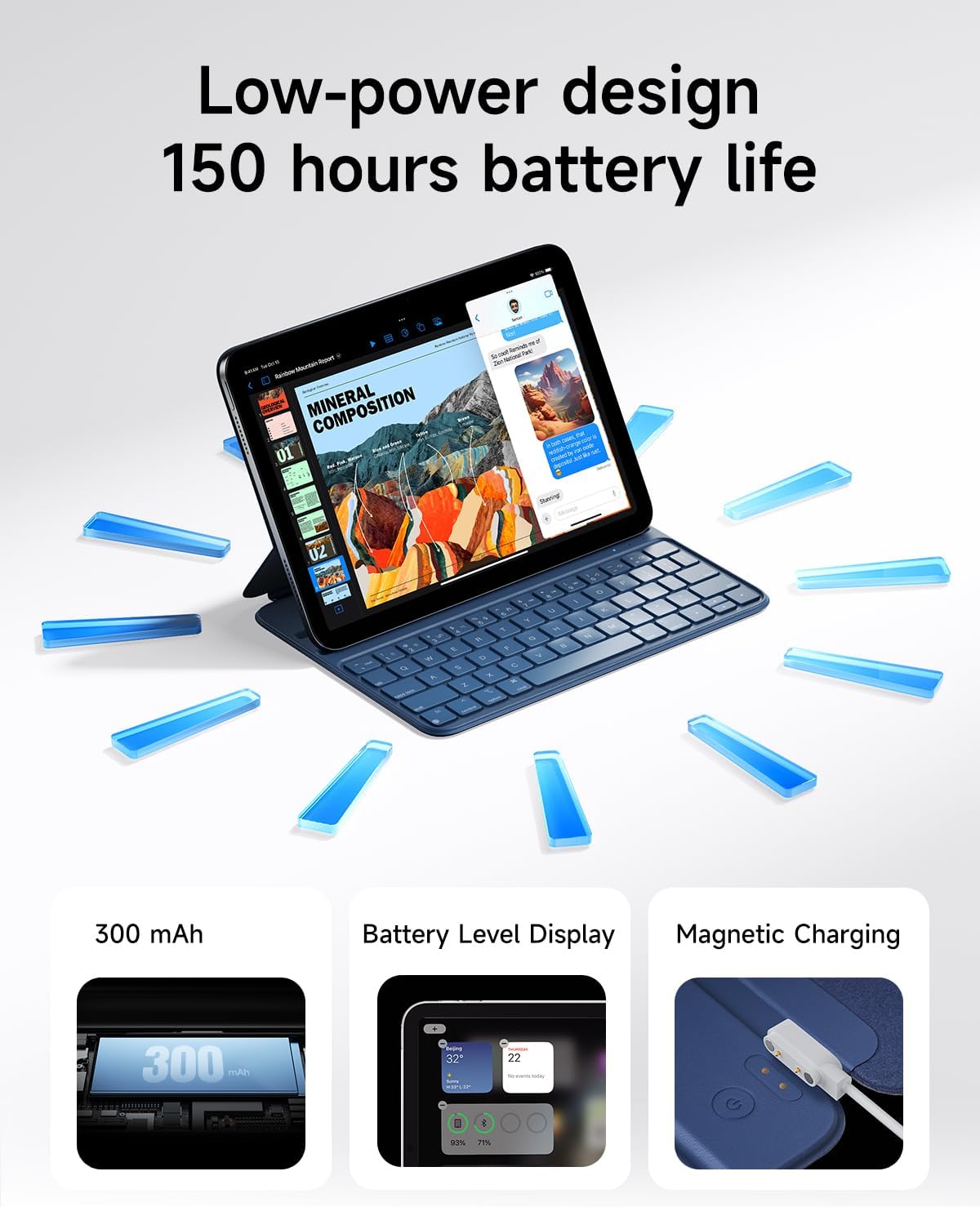
Image 5.2: A close-up of the HOU keyboard highlighting the layout and various shortcut keys.
5.3 Zkušenosti s psaním
The keyboard is designed with flat keycaps and a scissor-switch structure to provide smooth input, quiet operation, and responsive feedback, reducing fatigue during extended typing sessions.
Video 5.3: This video demonstrates the HOU Keyboard Case for iPad, showing its magnetic attachment, comfortable typing experience, and shortcut key functionality.
6. Údržba
6.1 Čištění pouzdra
The silicon-containing tech leather material is designed to be wear-resistant and stain-resistant. To clean, gently wipe the surface with a soft, damp cloth. For stubborn stains like coffee or ink, a mild soap solution can be used, followed by wiping with a clean, damp hadříkem a sušením na vzduchu.
6.2 Péče o baterii
To prolong battery life, avoid fully discharging the keyboard frequently. Charge the keyboard regularly, especially if it will be stored for an extended period.
7. Řešení problémů
7.1 Klávesnice se nepřipojuje přes Bluetooth
- Zkontrolujte napájení: Ujistěte se, že je klávesnice zapnutá a má dostatečně nabitou baterii.
- Oprava párování zařízení: On your iPad, forget the device in Bluetooth settings and attempt to pair again.
- Restartujte zařízení: Turn off and restart both your iPad and the keyboard.
- Blízkost: Ensure the keyboard and iPad are within close range during pairing.
7.2 Typing Delay or Unresponsive Keys
- Připojení Bluetooth: Verify a stable Bluetooth connection. Disconnect and reconnect if necessary.
- Úroveň baterie: A low battery can affect performance. Charge the keyboard fully.
- Rušení: Přesuňte se dále od jiných bezdrátových zařízení, která mohou způsobovat rušení.
8. Specifikace
| Funkce | Detail |
|---|---|
| Rozměry produktu | 9.8 x 3.3 x 0.3 palce |
| Hmotnost položky | 1.59 libry (přibližně 721 gramů) |
| Výrobce | HOU |
| Číslo modelu položky | A2696/A2777/A2757 |
| Baterie | 1 lithium-polymerová baterie (součástí balení) |
| Kompatibilní zařízení | iPad 10th Generation 10.9 inch 2022 & iPad 11th Generation 11 inch A16 2025 |
| Technologie připojení | Bluetooth |
| Speciální funkce | Ergonomic, Hotkeys and Media Keys, Lightweight, PU+ABS, Rechargeable |
| Barva | Modrý |
| Materiál | Akrylonitrilbutadienstyren (ABS) |
9. Záruka a podpora
HOU provides a 12-month extended after-sales service for this product. For any inquiries or support needs, please contact HOU Store Customer Service. 24/7 online support is available.

Image 9.1: HOU Customer Service information, highlighting 24/7 online support and a 12-month extended after-sales service.
Additionally, a 30-day refund/replacement return policy is available through the retailer.