
1. Úvod
Thank you for choosing the TECKNET Wireless Doorbell. This manual provides detailed instructions for the installation, operation, and maintenance of your new doorbell system. Please read this manual thoroughly before use to ensure proper function and longevity of the product.
2. Obsah balení
Please check the package contents carefully. If any items are missing or damaged, please contact TECKNET customer support.
- 1 x Bezdrátový přijímač zvonku
- 1 x Bezdrátový vysílač zvonku (tlačítko)
- Mounting Hardware (Screws, Wall Anchors, Adhesive Tape)
- 1 x Uživatelská příručka (Tento dokument)
3. Vlastnosti produktu
The TECKNET Wireless Doorbell offers a range of features designed for convenience and reliability:
- 60 Selectable Melodies: Choose from a wide variety of chimes.
- 5 nastavitelných úrovní hlasitosti: Ranging from 0dB (silent with LED flash) to 90dB.
- Vodotěsný vysílač IP65: Navrženo tak, aby odolalo různým venkovním povětrnostním podmínkám.
- 400M (1300ft) Operating Range: Ensures reliable signal transmission across large homes or properties.
- Indikátor LED blesku: Visual alert for visitors, especially useful in noisy environments or for hearing-impaired individuals.

Image: Features of the TECKNET Wireless Doorbell receiver, highlighting melody and volume options.
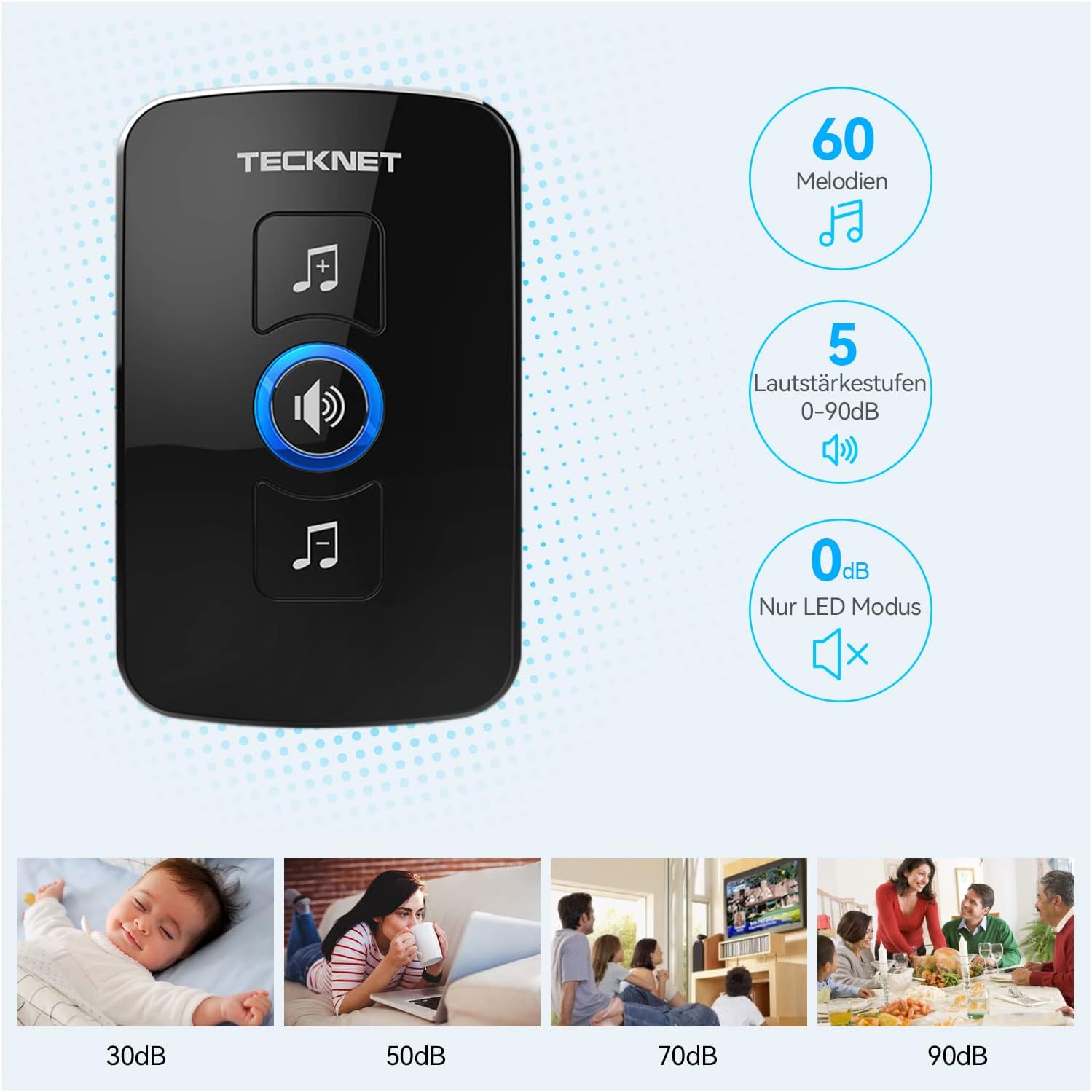
Image: The doorbell transmitter's IP65 waterproof rating and wide operating temperature range.
4. Nastavení a instalace
Follow these steps to set up your TECKNET Wireless Doorbell system.
4.1 Instalace baterie vysílače
- Locate the small notch on the side or bottom of the transmitter.
- Use a small flat-head screwdriver to gently pry open the back cover of the transmitter.
- Insert the CR2032 lithium coin cell battery (included or purchased separately) into the battery compartment, ensuring the positive (+) side faces up.
- Bezpečně zavřete zadní kryt.
Poznámka: The transmitter typically uses a CR2032 battery. Please refer to the packaging for specific battery requirements.
4.2 Umístění přijímače
Plug the receiver into a standard electrical outlet in a central location within your home. Ensure it is within the operating range of the transmitter and not obstructed by large metal objects or thick walls, which can reduce signal strength.
4.3 Montáž vysílače
There are two primary methods for mounting the transmitter:

Image: Steps for battery installation and two mounting methods for the transmitter.
Metoda 1: Montáž šrouby
- Mark the desired mounting location on your wall or door frame.
- Na vyznačených místech vyvrtejte dva malé otvory.
- Insert the wall anchors (if necessary for your surface).
- Align the transmitter's back plate with the holes and secure it with the provided screws.
- Attach the transmitter unit to the back plate.
Method 2: Adhesive Mounting
- Důkladně očistěte montážní povrch, aby byl suchý a bez prachu nebo mastnoty.
- Peel off one side of the protective film from the adhesive tape.
- Attach the adhesive tape to the back of the transmitter.
- Sloupněte druhou stranu ochranné fólie.
- Firmly press the transmitter onto the desired mounting surface for at least 30 seconds.
Doporučení: For best results and long-term stability, screw mounting is recommended, especially for outdoor use.
5. Návod k obsluze
5.1 Změna melodií
To change the melody on your receiver:
- Press the "Melody Selection" button (often indicated by a music note icon) on the receiver.
- Each press will cycle through the available 60 melodies.
- Stop pressing when you hear your desired melody. The receiver will automatically save the selection.
5.2 Nastavení hlasitosti
Chcete-li upravit úroveň hlasitosti:
- Press the "Volume Control" button (often indicated by a speaker icon) on the receiver.
- Each press will cycle through the 5 available volume levels (including silent mode).
- Select the volume level that suits your preference.
5.3 Párování (pokud je potřeba)
Your doorbell system usually comes pre-paired. If the transmitter and receiver lose connection or if you add additional transmitters/receivers, follow these steps to pair them:
- Zapojte přijímač.
- Press and hold the "Volume Control" button on the receiver for approximately 5 seconds until you hear a "ding" sound or the LED indicator flashes rapidly. This indicates pairing mode.
- Immediately press the transmitter (push button) once.
- You should hear the selected melody, confirming successful pairing.
- If pairing fails, unplug the receiver and repeat the process.
6. Údržba
- Čištění: Otřete zvonkové jednotky měkkým, suchým hadříkem. Nepoužívejte abrazivní čisticí prostředky ani rozpouštědla.
- Výměna baterie: When the transmitter's LED indicator no longer lights up or the range decreases significantly, it's time to replace the CR2032 battery. Follow the battery installation steps in Section 4.1.
- Podmínky prostředí: While the transmitter is IP65 waterproof, extreme temperatures or prolonged direct exposure to harsh weather conditions may affect its lifespan.
7. Řešení problémů
| Problém | Možná příčina | Řešení |
|---|---|---|
| Zvonek nezvoní. |
|
|
| Krátký provozní dosah. |
|
|
| LED dioda přijímače bliká, ale žádný zvuk. | Volume is set to 0dB (silent mode). | Increase the volume using the "Volume Control" button (see Section 5.2). |
8. Specifikace
| Funkce | Detail |
|---|---|
| Značka | TECNET |
| Číslo modelu | B0BZVDJHCS |
| Výrobce | TECNET |
| Hmotnost položky | 3.87 unce (cca 110 gramů) |
| Rozměry produktu | 2.36 x 2.32 x 3.62 palce (přijímač) |
| Zdroj napájení (přijímač) | Elektrický kabel |
| Zdroj energie (vysílač) | Battery (CR2032, typically not included as per specifications, but required for operation) |
| Vodotěsnost (vysílač) | IP65 |
| Provozní rozsah | Až 400 metrů (1300 stop) ve volném prostoru |
| Melodie | 60 volitelných |
| Úrovně hlasitosti | 5 (0 dB až 90 dB) |
| Zahrnuté komponenty | Manual (and doorbell units, mounting hardware) |
| Datum první dostupnosti | 18. května 2024 |
9. Záruka a podpora
TECKNET products come with a standard warranty. For specific warranty details, please refer to the warranty card included with your product or visit the official TECKNET website. If you encounter any issues or have questions regarding your doorbell, please contact TECKNET customer support:
- Webmísto: www.tecknet.co.uk (nebo příslušné regionální webweb)
- E-mail: Viz obal vašeho produktu nebo webstránky pro kontaktní e-mail.
Please have your model number (B0BZVDJHCS) and purchase date ready when contacting support.


