
1. Úvod
The MageGee V650 Wireless Keyboard and Mouse Combo is designed for efficient and comfortable use with your computer. This combo features a full-size 104-key keyboard with a number pad and multimedia shortcuts, paired with a sensitive and quiet mouse. Both devices connect wirelessly via a single 2.4G USB receiver, offering a stable connection within a 10-meter range.

Image 1.1: MageGee V650 Wireless Keyboard and Mouse Combo.

Image 1.2: Key features of the MageGee V650 combo.
2. Obsah balení
Zkontrolujte prosím balení, zda neobsahuje následující položky:
- 1 x bezdrátová klávesnice
- 1 x bezdrátová myš
- 1 x USB Receiver (stored inside the keyboard)
- 1 x AA baterie (pro myš)
- 2 x AAA baterie (pro klávesnici)
- 1 x Uživatelská příručka
3. Pokyny k nastavení
3.1. Instalace baterie
- Pro klávesnici: Vyhledejte přihrádku na baterie na spodní straně klávesnice. Vložte dvě baterie typu AAA a dbejte na správnou polaritu (+/-).
- Pro myš: Locate the battery compartment on the underside of the mouse. Insert one AA battery, ensuring correct polarity (+/-).

Image 3.1: Keyboard battery compartment and USB receiver storage.
3.2. Připojení USB přijímače
- Locate the USB receiver. It is typically stored in a dedicated slot on the underside of the keyboard for safekeeping.
- Plug the USB receiver into an available USB port on your computer (PC, desktop, laptop, or notebook).
- The system should automatically detect and install the necessary drivers. No additional software download is required.
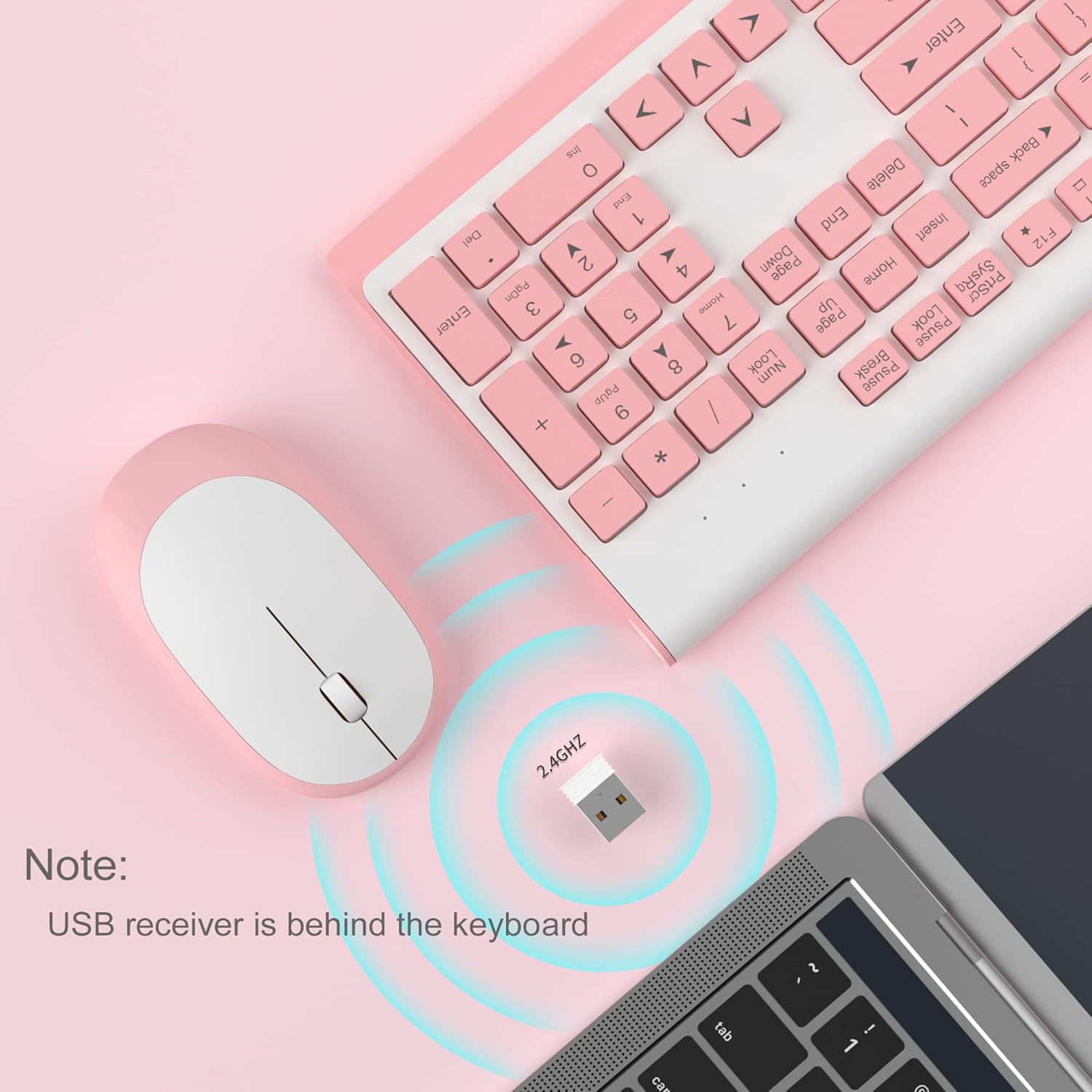
Image 3.2: USB receiver connection and storage location.

Image 3.3: 2.4G wireless connection diagram.
3.3. Zapnout
Ensure the power switches on both the keyboard and mouse are in the 'ON' position. The devices should now be ready for use.
4. Návod k obsluze
4.1. Funkce klávesnice
The V650 keyboard features a standard 104-key layout, including a full number pad for data entry and dedicated arrow keys. The keys are designed for quiet and responsive typing.
Multimediální zkratky
The keyboard includes 12 multimedia shortcuts accessible by pressing the Fn key in combination with the F1-F12 function keys. These shortcuts allow quick access to common functions such as volume control, media playback, and more.

Image 4.1: Keyboard multimedia function key combinations.
| Kombinace | Funkce |
|---|---|
| Fn + F1 | Multimédia |
| Fn + F2 | Hlasitost - |
| Fn + F3 | Hlasitost + |
| Fn + F4 | Ztlumit |
| Fn + F5 | Předchozí stopa |
| Fn + F6 | Další stopa |
| Fn + F7 | Přehrát/Pozastavit |
| Fn + F8 | Zastávka |
| Fn + F9 | domovská stránka |
| Fn + F10 | |
| Fn + F11 | Můj počítač |
| Fn + F12 | Oblíbené |
4.2. Funkce myši
The wireless mouse offers precise 1200 DPI tracking and quiet clicks. It features standard left and right click buttons and a scroll wheel for navigation.

Image 4.2: Mouse features: 1200 DPI and quiet operation.
4.3. Automatický režim spánku
To conserve battery life, both the keyboard and mouse will enter an automatic sleep mode after a period of inactivity. To wake them up, simply press any key on the keyboard or move the mouse.
5. Údržba a péče
- Čištění: K čištění povrchů klávesnice a myši používejte měkký, suchý hadřík. V případě odolných nečistot použijte lehceamp cloth can be used, but ensure no liquid enters the devices. Avoid harsh chemicals or abrasive cleaners.
- Výměna baterie: Replace batteries when performance degrades or devices stop responding. Always use new batteries of the specified type (AAA for keyboard, AA for mouse) and dispose of old batteries responsibly.
- Skladování: When not in use for extended periods, turn off the devices to save battery life. Store the USB receiver in its dedicated slot on the keyboard to prevent loss.
- Prostředí: Avoid exposing the devices to extreme temperatures, direct sunlight, or excessive moisture.
6. Řešení problémů
If you encounter issues with your MageGee V650 combo, please refer to the following common solutions:
- No Connection / Lag:
- Ensure both the keyboard and mouse are powered on and have fresh batteries.
- Ověřte, zda je USB přijímač bezpečně zapojený do funkčního USB portu v počítači.
- Zkuste zapojit USB přijímač do jiného USB portu.
- Move the keyboard and mouse closer to the USB receiver to ensure they are within the 10-meter operating range.
- Neumisťujte přijímač do blízkosti jiných bezdrátových zařízení nebo velkých kovových předmětů, které by mohly způsobovat rušení.
- Keys Not Responding / Stuck Keys:
- Zkontrolujte stav baterie a v případě potřeby ji vyměňte.
- Gently clean around the affected keys to remove any debris that might be causing them to stick.
- Re-establish the connection by unplugging and re-plugging the USB receiver.
- Mouse Not Working / Cursor Jumps:
- Ensure the mouse has a fresh AA battery and is powered on.
- Vyčistěte optický senzor na spodní straně myši.
- Use the mouse on a suitable surface (not highly reflective or transparent).
- Re-establish the connection by unplugging and re-plugging the USB receiver.
- Letters Fading on Keys:
- This is typically a result of prolonged use and wear. While not a functional defect, it can affect visibility.
7. Specifikace produktu
| Funkce | Detail |
|---|---|
| Model | V650 |
| Technologie připojení | 2.4G Wireless (Radio Frequency), USB Receiver |
| Rozložení klávesnice | Full Size, 104 Keys with Number Pad and 12 Multimedia Shortcuts |
| Typ klávesnice | Scissor-cross low profile, Quiet Keys |
| DPI myši | 1200 DPI |
| Kompatibilní zařízení | PC, Desktop, Laptop, Notebook |
| Operační systémy | Windows XP / Vista / 7/8/10 |
| Rozměry klávesnice | 16.06 x 6.6 x 1.3 palců (přibližně 40.8 x 16.8 x 3.3 cm) |
| Rozměry myši | 4.25 x 2.4 x 1.18 palců (přibližně 10.8 x 6.1 x 3 cm) |
| Hmotnost položky | 1.63 libry (přibližně 0.74 kg) |
| Baterie klávesnice | 2 x AAA baterie |
| Baterie do myši | 1 x AA baterie |
| Speciální funkce | Round Keycaps, Ultra-Thin Design, Automatic Sleep Mode |

Obrázek 7.1: Rozměry produktu.
8. Záruka a zákaznická podpora
MageGee products are designed for reliability and performance. For any warranty inquiries, technical support, or assistance with your product, please contact MageGee customer support through the retailer where you purchased the item or visit the official MageGee store online.
Více informací a kontaktní údaje naleznete na Obchod MageGee na Amazonu.


