
SKYLOONG SK96
Návod k obsluze herní klávesnice SKYLOONG SK96 v plné velikosti
Model: SK96 | Brand: SKYLOONG
Zavedení
This manual provides detailed instructions for the SKYLOONG SK96 Full Size Gaming Keyboard. Designed for enhanced productivity and an immersive gaming experience, this keyboard features a 96% compact layout, hot-swappable switches, customizable RGB lighting, and a unique Lite Gasket design for noise and vibration damping. Please read this manual thoroughly to ensure proper setup, operation, and maintenance of your keyboard.
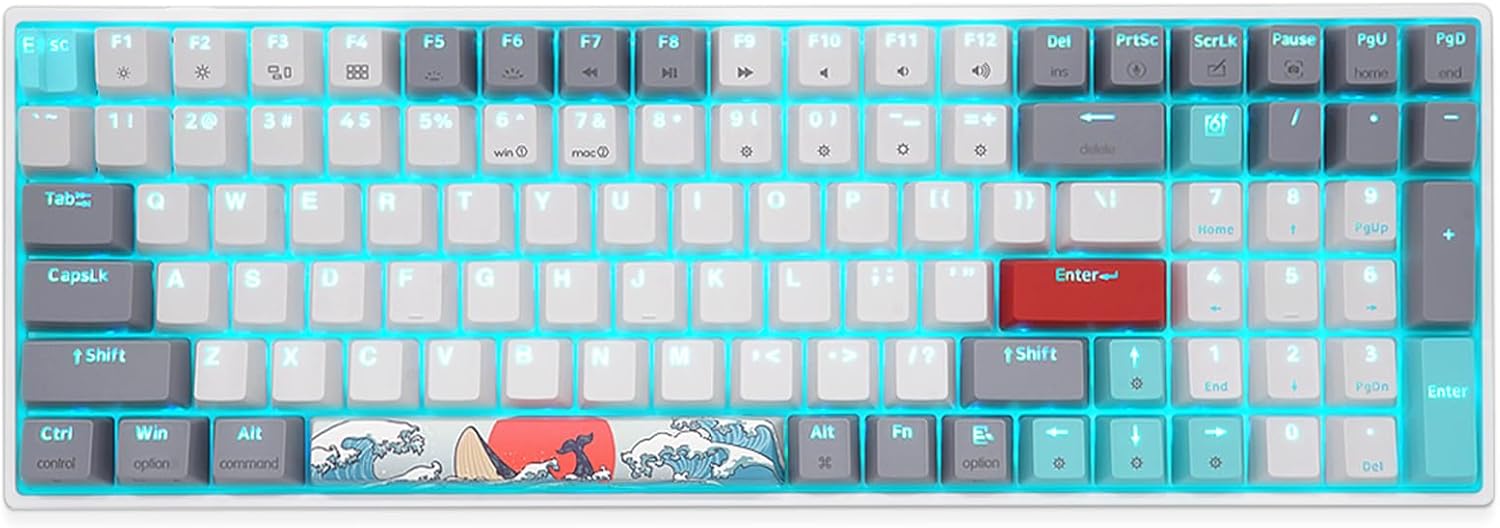
Obrázek 1: Přesview of the SKYLOONG SK96 Full Size Gaming Keyboard.
Nastavení
1. Obsah balení
Než budete pokračovat, ujistěte se, že balení obsahuje všechny položky:
- SKYLOONG SK96 Gaming Keyboard
- USB kabel
- Stahovač klíčů
- Stahovák spínačů
- Supplementary keycap/experience Switch (6 pieces)

Figure 2: Included accessories: USB-C cable, keycap puller, and switch puller.
2. Připojení klávesnice
The SKYLOONG SK96 keyboard connects via a USB-C cable, ensuring a stable and reliable connection to your computer.
- Locate the USB-C port on the keyboard, typically at the top edge.
- Připojte jeden konec dodaného kabelu USB-C ke klávesnici.
- Připojte druhý konec kabelu USB k volnému portu USB na vašem počítači (notebooku nebo PC).
- The keyboard should be automatically recognized by your operating system (Windows or Mac).

Figure 3: Connecting the keyboard using the USB-C cable.
3. Nastavení úhlu klávesnice
The keyboard features a three-stage leg brace design, allowing you to adjust the typing angle for optimal comfort.
- Flip the keyboard over to access the adjustable feet on the underside.
- Extend the feet to your preferred angle (approximately 4°, 8°, or 10°).

Figure 4: Adjustable feet for ergonomic typing angles.
Návod k obsluze
1. Rozložení a funkce klávesnice
The SK96 offers a 96% compact layout, retaining most of the functionality of a full-size keyboard while optimizing desk space. It includes a numeric keypad for enhanced productivity.

Figure 5: Key features of the SKYLOONG SK96 keyboard.
The keyboard is equipped with Gateron G Pro pre-lubricated 3-pin mechanical switches, ensuring a smooth and consistent typing experience. The unique Lite Gasket design incorporates a silicone integrated cushion to reduce noise and vibration from stabilizers and switches hitting the PCB.

Figure 6: Illustration of the Lite Gasket noise and vibration dampdesign.
A stepped ESC keycap is designed to prevent accidental touches during use.

Figure 7: The stepped ESC keycap for improved usability.
2. RGB Backlighting and Customization
The keyboard features immersive 16 million RGB lighting options. You can customize lighting effects using the dedicated driver software.
To activate the musical rhythm light effect mode, press FN + = four times. The lighting will then move with the music rhythm.

Figure 8: Musical rhythm effect demonstration.
For a visual demonstration of the RGB display, please watch the official product video below:
Video 1: Demonstration of the SKYLOONG SK96 RGB lighting effects.
3. Programmable Driver
The keyboard features a highly programmable driver that allows for extensive customization. This includes remapping keys, creating custom macros, and fine-tuning lighting effects to suit your specific needs and workflow.
Details on downloading and using the driver software can typically be found on the official SKYLOONG website or through the product's support page.

Figure 9: Illustration of the keyboard's internal hardware, supporting advanced customization.
Údržba
1. Čištění klávesnice
Pravidelné čištění pomáhá udržovat vzhled a funkčnost klávesnice.
- Před čištěním odpojte klávesnici od počítače.
- Použijte měkký hadřík, který nepouští vlákna dampKlávesy a rámeček otřete vodou nebo jemným čisticím roztokem.
- Pro odstranění prachu a nečistot mezi klávesami použijte stlačený vzduch.
- Nestříkejte tekutiny přímo na klávesnici.
2. Spínače a klávesy vyměnitelné za provozu
The SKYLOONG SK96 features hot-swappable sockets, allowing you to easily change mechanical switches without soldering. It also comes with extra PBT keycaps for customization.

Obrázek 10: Ukázka funkce přepínače vyměnitelného za provozu.

Figure 11: Customize your keyboard with included extra PBT keycaps.
To replace switches or keycaps:
- Pomocí dodaného stahováku na klávesy jemně vyjměte požadovanou klávesu.
- Use the provided switch puller to carefully extract the switch from its socket.
- Zarovnejte piny nového spínače s otvory na desce plošných spojů a pevně zatlačte, dokud nezacvakne na místo.
- Place the new keycap onto the switch stem and press down gently.
Note: Some larger keys may come with pre-installed "Chocolate Rose" switches for a different tactile feel. Extra Gateron switches are provided if you prefer uniformity.

Figure 12: Locations of pre-installed Chocolate Rose switches on larger keys.
Odstraňování problémů
| Problém | Možná příčina | Řešení |
|---|---|---|
| Klávesnice nereaguje | Volné USB připojení, vadný kabel, problém s ovladačem. | Ensure USB-C cable is securely connected to both keyboard and computer. Try a different USB port or cable. Restart your computer. Check device manager for driver issues. |
| RGB osvětlení nefunguje nebo je nekonzistentní | Software settings, power issue, specific keycap/switch interference. | Ensure the keyboard is receiving sufficient power. Check the RGB settings in the SKYLOONG driver software. Try resetting RGB effects using keyboard shortcuts (refer to driver manual). Ensure keycaps are fully seated and switches are properly installed. |
| Klávesy se neregistrují nebo se píší dvakrát | Faulty switch, debris under keycap, software conflict. | Remove the keycap and switch, inspect for debris, and reinsert. If the issue persists, replace the switch with one of the spares provided. Ensure no conflicting software is running. |
| Custom macros or keybindings not working | Driver software not running, incorrect configuration. | Ensure the SKYLOONG driver software is installed and running in the background. Verify your macro and keybinding configurations within the software. Save and apply changes. |
Specifikace
| Funkce | Detail |
|---|---|
| Rozměry produktu | 14.55 x 4.84 x 1.48 palce |
| Hmotnost položky | 2.21 libry |
| Výrobce | SKYLOONG |
| Číslo modelu | 96 SK |
| Kompatibilní zařízení | Notebook, PC |
| Technologie připojení | USB-C |
| Popis klávesnice | Mechanické |
| Doporučená použití | Každodenní použití |
| Speciální funkce | Podsvícený |
| Color (Switches) | Gateron G Pro Brown Switches - Tactile |
| Počet klíčů | 100 |
| Podsvícení klávesnice | RGB (16 milionů barev) |
| Styl | Klasický |
| První dostupný termín | 6. ledna 2022 |
Podpora a záruka
For any questions, technical assistance, or warranty inquiries regarding your SKYLOONG SK96 keyboard, please contact SKYLOONG customer support.
You can reach out to the manufacturer directly via the contact information provided on their official webwebu nebo prostřednictvím platformy, kde byl produkt zakoupen.

Figure 13: SKYLOONG After-sales service contact information.
For the most up-to-date support resources, including driver downloads and FAQs, please visit the official SKYLOONG webmísto.