
1. Úvod
This manual provides essential information for setting up, operating, and maintaining your TECLAST X11 2-in-1 Laptop/Tablet. The TECLAST X11 is a versatile device designed to function as both a portable tablet and a compact laptop, running on Windows 10 Home. It features a 10.1-inch Full HD display, an Intel N4020 processor, 6GB RAM, and 128GB of internal storage.
2. Co je v krabici
- TECLAST X11 Tablet
- Napájecí adaptér
- USB kabel
- Uživatelská příručka (tento dokument)
Note: The keyboard and stylus pen are sold separately and are not included in the standard package.
3. Konec produktuview
3.1 Klíčové vlastnosti
- Design 2 v 1: Seamlessly switch between tablet and laptop modes.
- Zobrazit: 10.1-inch IPS Full HD (1920x1200) touchscreen.
- Procesor: Intel Gemini Lake Reflash N4020 CPU (up to 2.8GHz).
- Paměť a úložiště: 6GB RAM, 128GB eMMC ROM (expandable up to 256GB via TF card).
- Operační systém: Předinstalovaný systém Windows 10 Home.
- Konektivita: Dual-band 2.4G/5G WiFi, Bluetooth 4.2.
- Kamery: 5MP zadní fotoaparát, 2MP přední fotoaparát.
- Porty: USB 3.0, Mini-HDMI, Headphone Jack, DC Port.
- Stojan: Adjustable U-shaped kickstand (0° to 145°).
3.2 Rozložení zařízení
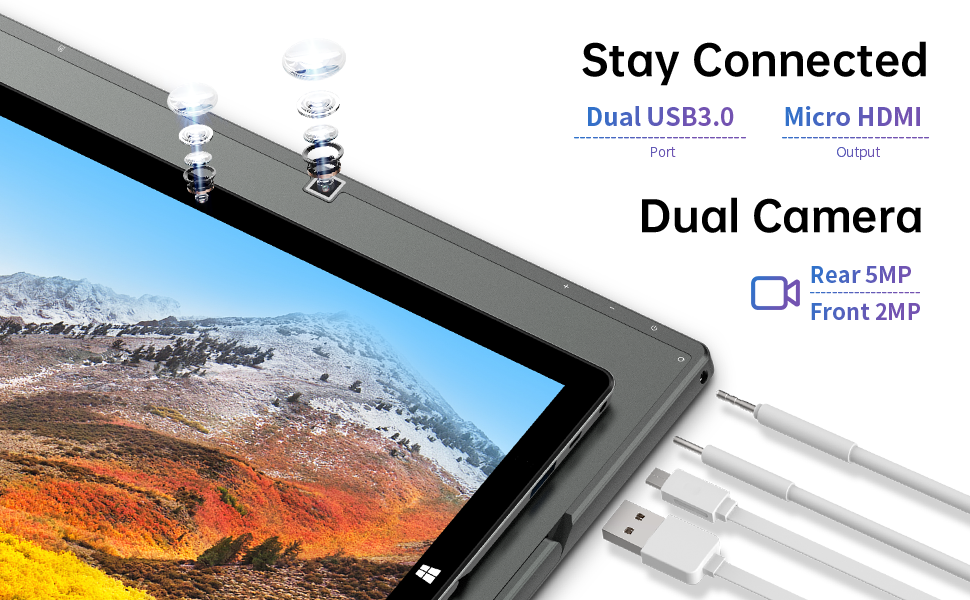
Obrázek: Boční view of the TECLAST X11 tablet highlighting the USB 3.0 port, Micro HDMI output, and front/rear cameras.

Obrázek: Podrobný view of the TECLAST X11's side ports, including USB 3.0, Mini-HDMI, DC power input, and headphone jack.
4. Nastavení
4.1 Počáteční nabíjení
Before first use, fully charge your TECLAST X11 tablet. Connect the provided power adapter to the DC port on the device and plug it into a power outlet. The charging indicator will illuminate.
4.2 Zapnutí/vypnutí
- Zapnutí: Stiskněte a podržte tlačítko Napájení, dokud se nerozsvítí obrazovka.
- Vypnutí: Stiskněte a podržte tlačítko Napájení a poté z možností na obrazovce vyberte možnost „Vypnout“. Případně přejděte do nabídky Start > Napájení > Vypnout.
- Režim spánku: Briefly press the Power button to put the device into sleep mode or wake it up.
4.3 Počáteční nastavení systému Windows
Upon first power-on, follow the on-screen instructions to complete the Windows 10 setup process. This includes selecting your region, language, connecting to a Wi-Fi network, and creating a user account.
5. Návod k obsluze
5.1 Přepínání mezi režimy
The TECLAST X11 is designed for flexibility, allowing you to switch between tablet and laptop modes.
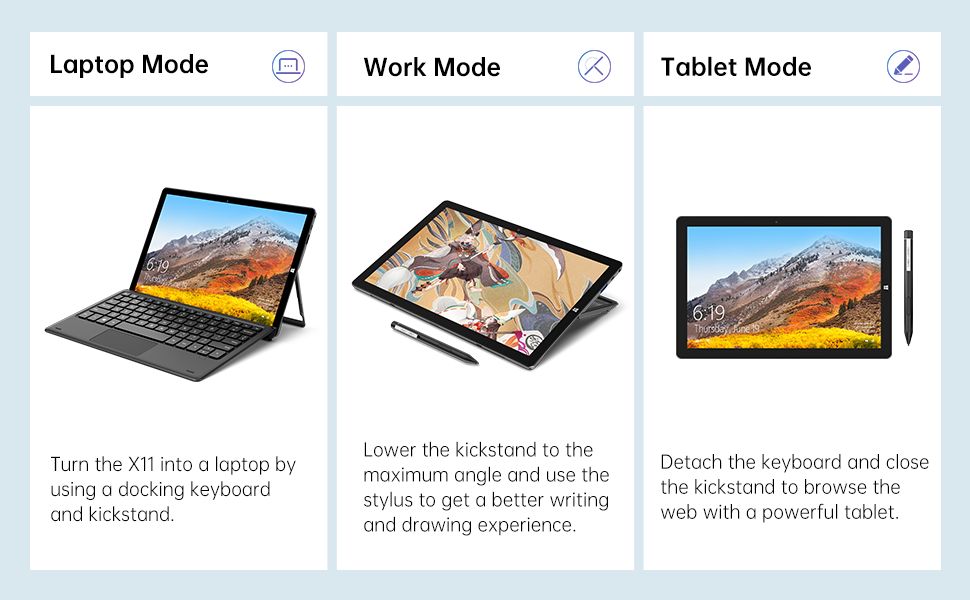
Image: The TECLAST X11 in laptop mode with the keyboard attached and kickstand deployed.
Režim notebooku: Attach the magnetic docking keyboard and deploy the integrated kickstand. The device will automatically detect the keyboard and switch to laptop interface.

Image: A user holding the TECLAST X11 in tablet mode, interacting with the touchscreen.
Režim tabletu: Detach the keyboard. The device will automatically switch to tablet mode, optimizing the interface for touch input.

Obrázek: Zadní view of the TECLAST X11 showing the adjustable kickstand extended.
Použití stojanu: The integrated U-shaped kickstand can be adjusted from 0° to 145° for comfortable viewzadávání nebo psaní úhlů.
5.2 Používání dotykové obrazovky
The 10.1-inch IPS display supports 10-point multi-touch. Use standard touch gestures for navigation, zooming, and interaction with applications.
5.3 Externí připojení
- USB 3.0: Connect external devices such as USB drives, mice, or printers.
- Mini-HDMI: Pro větší zobrazení připojte externí monitor nebo televizor.
- Bluetooth 4.2: Pair with Bluetooth-enabled accessories like headphones or speakers.
- Wi-Fi: Connect to wireless networks for internet access. Supports 2.4G and 5G bands.
5.4 Videoukázka
Video: An official TECLAST video demonstrating the features and versatility of the X11 Windows tablet with its detachable keyboard and various usage scenarios.
6. Údržba
6.1 Čištění zařízení
- K čištění obrazovky a vnějších povrchů používejte měkký hadřík, který nepouští vlákna.
- Pro odolné skvrny lehce otřeteamphadřík vodou nebo čisticím roztokem vhodným pro obrazovky.
- Vyhněte se používání agresivních chemikálií, abrazivních materiálů nebo nadměrné vlhkosti.
6.2 Péče o baterii
- Pro prodloužení životnosti baterie se vyhněte extrémním teplotám.
- Nenechávejte zařízení delší dobu plně nabité nebo zcela vybité.
- Používejte pouze originální nebo certifikovanou kompatibilní nabíječku.
6.3 Aktualizace softwaru
Regularly check for and install Windows updates to ensure optimal performance, security, and access to the latest features. Go to Start Menu > Settings > Update & Security > Windows Update.
7. Řešení problémů
| Problém | Možné řešení |
|---|---|
| Zařízení se nezapne | Ensure the device is charged. Connect the power adapter and try again. If unresponsive, press and hold the Power button for 10-15 seconds to perform a hard reset. |
| Problémy s připojením Wi-Fi | Check if Wi-Fi is enabled in Windows settings. Restart your router and the tablet. Ensure you are within range of the Wi-Fi signal. |
| Klávesnice nereaguje | Ensure the keyboard is securely attached to the magnetic docking port. Restart the tablet. Verify that the keyboard was purchased separately and is compatible. |
| Pomalý výkon | Close unnecessary applications. Check for Windows updates. Ensure sufficient free storage space. Run a disk cleanup. |
| Screen rotation not working | Check if auto-rotate is enabled in Windows Action Center (swipe in from the right edge of the screen or click the icon in the taskbar). |
8. Specifikace
| Funkce | Detail |
|---|---|
| Název modelu | X11 2-in-1 Tablet |
| Velikost obrazovky | 10.1 palce |
| Rozlišení obrazovky | 1920 x 1200 pixelů (FHD IPS) |
| Procesor | Intel Gemini Lake Reflash N4020 (1.1GHz - 2.8GHz) |
| BERAN | 6 GB DDR4 SDRAM |
| Pevný disk | 128 GB eMMC (expandable up to 256GB via TF card) |
| Grafická karta | Integrovaná grafika Intel UHD Graphics 600 |
| Operační systém | Windows 10 Home |
| Bezdrátový typ | Bluetooth 4.2, Dual-band WiFi (2.4G + 5G) |
| Zadní WebRozlišení vačky | 5 MP |
| Přední WebRozlišení vačky | 2 MP |
| Porty | USB 3.0, Mini-HDMI, Headphone Jack, DC Port |
| Hmotnost položky | 2.31 libry (přibližně 1.05 kg) |
| Baterie | 1 lithium-polymerová baterie (součástí balení) |
9. Záruka a podpora
TECLAST provides a 12měsíční záruční servis for the X11 2-in-1 Laptop/Tablet. If you encounter any issues or have questions regarding your device, please contact TECLAST customer support. Refer to the contact information provided with your product packaging or visit the official TECLAST webstránky pro podrobnosti o podpoře.