
D-Link DWR-M960
D-LINK 4G AC1200 LTE Router DWR-M960
Uživatelská příručka
1. Úvod
The D-Link DWR-M960 4G AC1200 LTE Router provides high-speed mobile broadband access, allowing users to connect to 3G/4G networks from virtually anywhere. This device enables sharing of your mobile internet connection through a secure wireless network or via its four Gigabit Ethernet ports. It is designed for fast, responsive internet access, suitable for web browsing, streaming media, and online activities.

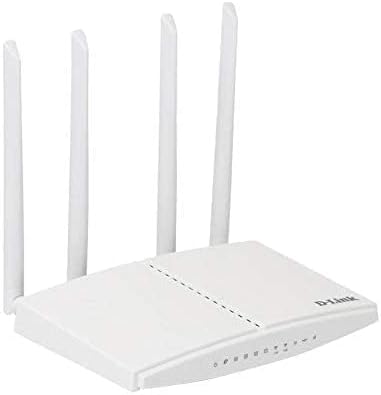
Obrázek 1.1: D-Link DWR-M960 4G AC1200 LTE Router. This image displays the router's front view, highlighting its four external antennas and the row of LED indicators for power, internet, Wi-Fi, and signal strength.
2. Obsah balení
Please verify that all items listed below are present in your package. If any item is missing or damaged, please contact your retailer.
- D-Link DWR-M960 4G AC1200 LTE Router
- Napájecí adaptér
- Ethernetový kabel
- Průvodce rychlou instalací

Obrázek 2.1: Package Contents. This image shows the DWR-M960 router, its power adapter, and the quick installation guide, all laid out next to the product box.
3. Vlastnosti produktu
The DWR-M960 router is equipped with advanced features to provide a robust and reliable internet connection:
- Fast Mobile Internet: Supports 3G/4G mobile connections with downlink speeds up to 150 Mbps and uplink speeds up to 50 Mbps.
- AC1200 Wi-Fi: Dual-band wireless connectivity (802.11ac) for high-speed Wi-Fi performance.
- Zabezpečená připojení: Features dual-active firewalls (SPI and NAT) and WPA/WPA2 wireless encryption to protect your network.
- Více gigabitových portů: Includes four Gigabit Ethernet LAN ports for high-speed wired connections.
- Snadné nastavení: Can be configured quickly through a web browser without special software.
- Slot pro SIM kartu: Allows direct insertion of a 3G/4G SIM/UICC card to share your mobile broadband.
4. Průvodce nastavením
4.1 Fyzická instalace
- Vložte SIM kartu: Locate the SIM card slot on the router. Gently insert your 3G/4G SIM/UICC card into the slot until it clicks into place. Ensure the card is oriented correctly as indicated by the diagram near the slot.
- Připojení antén: The DWR-M960 features internal antennas. No external antenna connection is required.
- Připojte napájení: Plug the provided power adapter into the router's power port and then into a wall outlet. The Power LED on the router should illuminate.
- Připojení zařízení (volitelné):
- Kabelové připojení: Connect one end of the Ethernet cable to any of the LAN ports (1-4) on the router and the other end to your computer's Ethernet port.
- Bezdrátové připojení: Note the Wi-Fi Network Name (SSID) and Wi-Fi Password (Key) printed on the label at the bottom of the router.
Obrázek 4.1: Router Ports and SIM Slot. This image provides a side view of the DWR-M960, illustrating the location of the SIM card slot and the various Ethernet ports for wired connections.
4.2 Počáteční konfigurace (Web Rozhraní)
Pro konfiguraci routeru budete potřebovat přístup k jeho web-rozhraní pro správu:
- Ensure your computer is connected to the router either via Ethernet or Wi-Fi.
- Otevřete a web prohlížeč (např. Chrome, Firefox, Edge).
- Do adresního řádku zadejte výchozí IP adresu routeru, obvykle
192.168.0.1or192.168.1.1, and press Enter. This information is typically found on the router's bottom label. - When prompted, enter the default username and password. For D-Link routers, the default username is often
adminand the password field may be left blank or alsoadmin. Refer to the label on your router for exact credentials. - Follow the on-screen setup wizard to configure your internet connection settings (APN, PIN for SIM if required) and customize your Wi-Fi network name (SSID) and password. It is highly recommended to change the default Wi-Fi password and the router's login password for security.
5. Návod k obsluze
5.1 LED indikátory
The LEDs on the front panel of the DWR-M960 provide information about the router's status:
- LED napájení:
- Solid Green: Router is powered on.
- Nesvítí: Router je vypnutý.
- Internet LED:
- Solid Green: Connected to the internet.
- Blinking Green: Data activity.
- Red: No internet connection or SIM card error.
- Wi-Fi LED:
- Solid Green: Wi-Fi is enabled.
- Blinking Green: Wi-Fi data activity.
- Vypnuto: Wi-Fi je zakázáno.
- Signal Strength LEDs (3-4 bars):
- Indicates the strength of the 3G/4G mobile signal. More bars mean a stronger signal.
5.2 Připojení zařízení
- Bezdrátová zařízení: On your smartphone, tablet, or laptop, search for available Wi-Fi networks. Select the SSID you configured (or the default one) and enter the Wi-Fi password.
- Drátová zařízení: Connect an Ethernet cable from the LAN port of your device (e.g., PC, game console) to any of the available LAN ports on the router.
6. Údržba
- Aktualizace firmwaru: Pravidelně kontrolujte podporu D-Link website for firmware updates for your DWR-M960. Firmware updates can improve performance, add new features, and fix security vulnerabilities. Follow the instructions provided by D-Link for safe firmware upgrades.
- Běžný restart: Rebooting your router every few weeks can help clear its memory and resolve minor network issues, improving overall performance and stability. Simply unplug the power adapter, wait 10-15 seconds, and plug it back in.
- Čištění: Keep the router in a clean, dust-free environment. Use a soft, dry cloth to gently wipe the exterior of the device. Do not use liquid cleaners or aerosols.
- Umístění: Place the router in a central location, away from obstructions and other electronic devices that may cause interference, to ensure optimal Wi-Fi coverage.
7. Řešení problémů
7.1 Žádné připojení k internetu
- Zkontrolujte SIM kartu: Ensure the SIM card is correctly inserted and active with your mobile carrier.
- Zkontrolujte LED diodu internetu: If the Internet LED is red, there might be an issue with the SIM card or mobile network. Verify your APN settings in the router's web rozhraní.
- Restartujte router: Vypněte a znovu zapněte router tak, že jej na 10 sekund odpojíte od zásuvky a znovu jej zapojíte.
- Zkontrolujte sílu signálu: Ensure you have adequate 3G/4G signal strength (check Signal Strength LEDs). If the signal is weak, try relocating the router.
- Kontaktujte dopravce: Verify with your mobile carrier if there are any network outages or issues with your SIM plan.
7.2 Pomalá rychlost internetu
- Síla signálu: A weak 3G/4G signal will result in slower speeds. Try to improve router placement.
- Přetížení sítě: Mobile networks can experience congestion during peak hours.
- Rušení Wi-Fi: Other wireless devices or networks can interfere with your Wi-Fi signal. Try changing your Wi-Fi channel in the router settings.
- Příliš mnoho zařízení: Too many devices connected simultaneously can reduce speeds for all users.
7.3 Nelze přistupovat k routeru Web Rozhraní
- IP adresa: Ujistěte se, že používáte správnou IP adresu (např.
192.168.0.1). - Kabelové připojení: Zkuste připojit počítač přímo k routeru pomocí ethernetového kabelu.
- Firewall/Antivirus: Dočasně deaktivujte veškerý firewall nebo antivirový software v počítači, který by mohl blokovat přístup.
- Reset routeru: As a last resort, perform a factory reset. Locate the reset button (usually a small pinhole) on the router. With the router powered on, use a paperclip to press and hold the reset button for 5-10 seconds until the LEDs flash. Varování: This will erase all your custom settings, and you will need to reconfigure the router from scratch.
8. Specifikace
| Funkce | Popis |
|---|---|
| Název značky | D-Link |
| Název modelu | DWR-M960 |
| Číslo modelu položky | DWR-M960 |
| Standard bezdrátové komunikace | 802.11ac |
| Třída frekvenčního pásma | Dvoupásmový |
| Technologie připojení | Bezdrátový |
| Typ antény | Vnitřní |
| Bezpečnostní protokol | WPA2 |
| Kompatibilní zařízení | Osobní počítač |
| Zahrnuté komponenty | router |
| Výrobce | Společnost D-Link Systems, Inc. |
| Rozměry balení | 33.6 x 22 x 5.8 cm |
| Hmotnost položky | 724 g |
| Datum první dostupnosti | 7. července 2021 |
9. Záruka a podpora
The D-Link DWR-M960 LTE Router is manufactured by D-Link Systems, Inc. For specific warranty information, please refer to the warranty card included with your product or visit the official D-Link support website for your region. Typically, D-Link products come with a limited warranty covering manufacturing defects from the date of purchase.
For technical support, driver downloads, firmware updates, and additional product information, please visit the D-Link support portal:
Navštivte podporu D-Link Webmísto
When contacting support, please have your product model number (DWR-M960) and serial number ready.
Ask a question about this manual
Ask about setup, troubleshooting, compatibility, parts, safety, or missing instructions. Manuals+ will review the question and use this page’s manual context to help answer it.