
Fral DD21LCD
Uživatelská příručka k odvlhčovači FRAL Dry Digit 21
Model: DD21LCD
1. Úvod
This manual provides comprehensive instructions for the safe and efficient operation, maintenance, and troubleshooting of your FRAL Dry Digit 21 Dehumidifier. Please read this manual thoroughly before operating the appliance and retain it for future reference.
The FRAL Dry Digit 21 is designed to effectively remove excess moisture from the air in residential environments, helping to prevent mold, mildew, and other humidity-related issues. This model replaces the previous Dry Digit 20.
2. Bezpečnostní informace
Vždy dodržujte následující bezpečnostní opatření, abyste snížili riziko požáru, úrazu elektrickým proudem nebo zranění:
- Ujistěte se, že napájecí zdroj odpovídá štítku s výkonem na jednotce.
- Neprovozujte odvlhčovač s poškozeným kabelem nebo zástrčkou.
- Neblokujte vstupy nebo výstupy vzduchu.
- Keep the unit on a stable, level surface.
- Před čištěním nebo prováděním jakékoli údržby odpojte jednotku ze zásuvky.
- Neponořujte jednotku do vody nebo jiných tekutin.
- Tento spotřebič není určen pro použití osobami (včetně dětí) se sníženými fyzickými, smyslovými nebo duševními schopnostmi nebo nedostatečnými zkušenostmi a znalostmi, pokud na ně nedohlíží osoba odpovědná za jejich bezpečnost nebo jim nebyla poskytnuta instrukce ohledně používání spotřebiče.
3. Konec produktuview
Familiarize yourself with the main components of your FRAL Dry Digit 21 Dehumidifier.

Obrázek 3.1: Přední strana view of the FRAL Dry Digit 21 Dehumidifier. Shows the compact, white casing with the control panel on top and air outlet grille.

Obrázek 3.2: Přední strana view of the FRAL Dry Digit 21 Dehumidifier with the water collection tank partially pulled out. This illustrates how to access the tank for emptying.
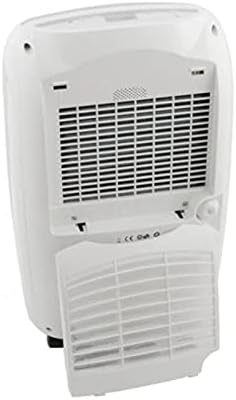
Obrázek 3.3: Zadní view of the FRAL Dry Digit 21 Dehumidifier, showing the air intake grille and the removable air filter cover. This is where the air filter is located for cleaning or replacement.
Klíčové komponenty:
- Ovládací panel: Located on the top of the unit, featuring a digital display and control buttons.
- Mřížka přívodu vzduchu: Located at the rear, where air is drawn into the unit.
- Mřížka výstupu vzduchu: Located at the top, where dehumidified air is expelled.
- Water Collection Tank: Removable tank at the front for collecting condensed water.
- Vzduchový filtr: Located behind the rear grille, filters dust and particles from the air.
- Průběžný odtok: A port for connecting a hose for continuous drainage.
4. Nastavení
- Rozbalení: Opatrně vyjměte odvlhčovač z obalu. Uschovejte si obalový materiál pro budoucí skladování nebo přepravu.
- Umístění: Place the unit on a firm, level surface in the desired location. Ensure there is at least 20 cm (8 inches) of clear space around all sides for proper air circulation. Do not place it near heat sources or in direct sunlight.
- Připojení napájení: Zapojte napájecí kabel do uzemněné elektrické zásuvky. Ujistěte se, že hlasitosttage odpovídá specifikacím jednotky.
- Počáteční provoz: Allow the unit to stand upright for at least 1 hour before plugging it in if it was transported on its side. This allows the refrigerant to settle.
- Instalace vodní nádrže: Ensure the water collection tank is correctly inserted into the unit. The unit will not operate if the tank is full or incorrectly positioned.
5. Návod k obsluze
Ovládací panel:
The FRAL Dry Digit 21 features a user-friendly digital control panel. Specific button functions may vary slightly, but generally include:
- Vypínač: Zapíná/vypíná jednotku.
- Tlačítka pro nastavení vlhkosti (šipky nahoru/dolů): Adjusts the desired humidity level (e.g., from 30% to 80% Relative Humidity).
- Tlačítko režimu: Selects operating modes (e.g., Continuous, Auto, Laundry Dry).
- Tlačítko časovače: Sets a timer for automatic ON/OFF operation.
- Tlačítko rychlosti ventilátoru: Adjusts fan speed (e.g., Low, High).
- Zobrazit: Zobrazuje aktuální vlhkost, nastavenou vlhkost nebo nastavení časovače.
Základní provoz:
- Zapnout: Press the Power button to switch on the dehumidifier. The display will show the current room humidity.
- Nastavení požadované vlhkosti: Use the Up/Down arrow buttons to set your desired humidity level. The unit will operate until the room humidity reaches this level, then cycle on and off to maintain it. A common comfortable range is 40-60% RH.
- Vyberte režim (volitelné): Stisknutím tlačítka Režim můžete procházet dostupné provozní režimy.
- Adjust Fan Speed (Optional): Press the Fan Speed button to select your preferred fan speed. Higher fan speed results in faster dehumidification but may produce more noise.
- Vypnout: Opětovným stisknutím tlačítka napájení přístroj vypnete.
Nepřetržité odvodňování:
For continuous operation without needing to empty the water tank, connect a suitable drain hose (not included) to the continuous drain outlet at the back of the unit. Ensure the hose is sloped downwards to allow gravity drainage into a floor drain or larger container.
6. Údržba
Pravidelná údržba zajišťuje optimální výkon a prodlužuje životnost vašeho odvlhčovače.
Vyprázdnění vodní nádrže:
When the water tank is full, the unit will automatically shut off and an indicator light (or message on display) will illuminate. Carefully pull out the water tank, empty the collected water, and reinsert the tank firmly until it clicks into place. The unit will resume operation.
Čištění vzduchového filtru:
The air filter should be cleaned every two weeks or more frequently depending on usage and air quality. A dirty filter reduces efficiency and can damage the unit.
- Vypněte a odpojte odvlhčovač.
- Remove the filter cover from the rear of the unit (refer to Figure 3.3).
- Jemně vytáhněte vzduchový filtr.
- Wash the filter with warm, soapy water, or use a vacuum cleaner to remove dust.
- Rinse thoroughly and allow the filter to air dry completely before reinserting.
- Reinstall the dry filter and close the filter cover.
Čištění vnějšího povrchu jednotky:
Otřete vnější část odvlhčovače měkkým, damp hadříkem. Nepoužívejte abrazivní čisticí prostředky ani rozpouštědla, protože by mohly poškodit povrch.
7. Řešení problémů
Než kontaktujete zákaznickou podporu, prostudujte si prosím následující běžné problémy a jejich řešení:
| Problém | Možná příčina | Řešení |
|---|---|---|
| Jednotka se nezapne. | No power; Water tank full or incorrectly inserted; Room temperature too low. | Check power connection; Empty and reinsert water tank correctly; Ensure room temperature is above 5°C (41°F). |
| Nebyla shromažďována žádná voda. | Humidity level already low; Air filter clogged; Unit in continuous drain mode. | Increase desired humidity setting; Clean air filter; Check continuous drain hose connection. |
| Jednotka je hlučná. | Jednotka není na rovném povrchu; Vzduchový filtr je ucpaný; Vnitřní součásti vibrují. | Place on a level surface; Clean air filter; Contact customer support if noise persists. |
| Dehumidification is slow. | Room size too large; Air filter clogged; Doors/windows open. | Ensure unit is appropriate for room size; Clean air filter; Close doors and windows. |
8. Specifikace
| Funkce | Specifikace |
|---|---|
| Model | DD21LCD |
| Značka | Fral |
| Odvlhčovací kapacita | 21 litrů/den |
| Rozměry (D x Š x V) | 50 x 50 x 28 cm |
| Hmotnost | 13 kg |
| Speciální funkce | Automatic humidity removal |
| Doporučené použití | Obytný |
| Provozní režim | Kontinuální |
9. Záruka a podpora
For warranty information and technical support, please refer to the warranty card included with your product or visit the official FRAL webUschovejte si účtenku jako doklad o koupi pro případné reklamace.
If you encounter issues not covered in the troubleshooting section, or require further assistance, please contact FRAL customer service.
Ask a question about this manual
Ask about setup, troubleshooting, compatibility, parts, safety, or missing instructions. Manuals+ will review the question and use this page’s manual context to help answer it.