
1. Úvod
This manual provides essential information for the safe and efficient use of your TECLAST F7 Plus3 14-inch Laptop. Please read this manual thoroughly before operating the device and retain it for future reference.

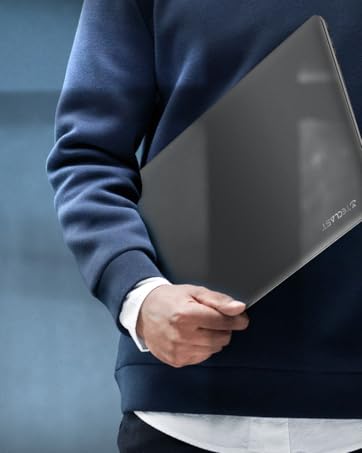
The TECLAST F7 Plus3 14-inch laptop in a closed position, showcasinjeho elegantní design.

Konecview of the TECLAST F7 Plus3 laptop's key features, including Intel N4120 processor, 2.4G+5G WiFi, 38000mWh battery, 14-inch FHD IPS display, full-size keyboard, 8GB RAM, and 256GB SSD.
2. Nastavení
2.1 Vybalení a počáteční nabití
Carefully remove the laptop and all accessories from the packaging. Before first use, connect the power adapter to the laptop and a power outlet. It is recommended to charge the device for at least 30 minutes before powering it on for the first time.
Součástí balení:
- TECLAST F7 Plus3 Laptop
- Napájecí adaptér
- Klávesnice
- Napájecí kabel
2.2 Powering On and Initial Windows Setup
- Press and hold the power button located on the top right of the keyboard until the screen illuminates.
- Follow the on-screen instructions to complete the Windows 10 (or Windows 11 if upgraded) initial setup. This includes selecting your region, language, and creating a user account.
- Connect to a Wi-Fi network when prompted to enable internet access and download necessary updates.
3. Návod k obsluze
3.1 Laptop Overview

The TECLAST F7 Plus3 14-inch laptop with its screen open, showing a high-resolution display.
3.2 Porty a konektory
The TECLAST F7 Plus3 laptop is equipped with various ports for connectivity. Refer to the image below for port locations.
This image illustrates the various ports on the TECLAST F7 Plus3 laptop, including Micro Card slot, Headphone Jack, USB 2.0, USB 3.0, DC Power input, and Mini-HDMI output.
- Micro Card Slot: Pro rozšíření úložiště pomocí karty MicroSD.
- Sluchátkový jack: Připojte sluchátka nebo externí reproduktory.
- Port USB 2.0: Pro připojení USB zařízení.
- Port USB 3.0: Pro připojení vysokorychlostních USB zařízení.
- Vstup DC napájení: Připojte napájecí adaptér pro nabíjení.
- Mini-HDMI Output: Připojte se k externímu displeji nebo projektoru.

The TECLAST F7 Plus3 laptop connected to multiple external monitors via its USB 3.0 and Mini-HDMI ports, demonstrating its expandability.
3.3 Klávesnice a touchpad
The laptop features a full-size keyboard and a large, sensitive touchpad for efficient input.

Detailní view of the full-size keyboard and large touchpad (97mm x 64mm), indicating 20mm key spacing and built-in stereo speakers.
- Klávesnice: Full-size layout with 20mm key spacing for comfortable typing.
- Touchpad: Large 97mm x 64mm sensitive touchpad for precise navigation.
3.4 Displej
The 14-inch Full HD (1920x1080) IPS display offers clear visuals and wide viewing angles with narrow 6mm bezels.

The laptop screen highlighting its narrow 6mm bezels and IPS display technology for wide viewing angles and 1920x1080 resolution.
3.5 Bezdrátové připojení
- Wi-Fi: Supports 2.4G and 5G dual-band Wi-Fi for stable and fast internet connections.
- Bluetooth 4.2: Pro připojení bezdrátových periferií, jako jsou sluchátka, myši a klávesnice.

An illustration highlighting the laptop's 2.4G+5G Wi-Fi, Bluetooth 4.2, 867Mbps maximum speed, and 45.6Wh battery for reliable wireless connections and long battery life.
3.6 Operační systém
The laptop comes with Windows 10 pre-installed and is upgradeable to Windows 11. Ensure your system is updated regularly for optimal performance and security.
4. Údržba
4.1 Čištění
- Obrazovka: Použijte měkký hadřík, který nepouští vlákna dampOpláchněte vodou nebo čističem obrazovek. Vyhněte se agresivním chemikáliím.
- Klávesnice a šasi: Use a soft, dry cloth. A can of compressed air can help remove dust from between keys.
4.2 Péče o baterii
The laptop is equipped with a 45600mWh battery. To prolong battery life:
- Vyhněte se extrémním teplotám.
- Nevybíjejte baterii často úplně.
- Pokud notebook skladujete delší dobu, nabijte jej na přibližně 50–60 %.

The TECLAST F7 Plus3 laptop is designed for a longer work-life balance, featuring Intel 9th UHD Graphics 600 for 4K video playback and a 45600mAh safe design battery.
4.3 Správa úložiště
The laptop includes a 256GB SSD and supports expansion up to 1TB via an SSD slot or TF Card slot. Regularly manage your files and uninstall unused applications to maintain performance.
5. Řešení problémů
This section addresses common issues you might encounter with your TECLAST F7 Plus3 laptop.
| Problém | Možné řešení |
|---|---|
| Notebook se nezapne. | Ensure the power adapter is securely connected and the laptop has been charged for at least 30 minutes. Try pressing and holding the power button for 10-15 seconds. |
| Charger is not charging the laptop. | Verify the power adapter and cable are not damaged. Ensure the power outlet is functional. Try a different outlet if available. |
| Problémy s připojením k Wi-Fi. | Restart your router and modem. Check if other devices can connect to the Wi-Fi. Ensure Wi-Fi is enabled on the laptop (often via a function key or Windows settings). |
| Pomalý výkon. | Close unnecessary applications. Check for background processes. Ensure sufficient free space on the SSD. Run a system scan for malware. |
Pokud tato řešení problém nevyřeší, kontaktujte prosím zákaznickou podporu.
6. Specifikace
Below are the technical specifications for the TECLAST F7 Plus3 14-inch Laptop:
| Funkce | Detail |
|---|---|
| Název modelu | F7 Plus3 |
| Velikost obrazovky | 14 palce |
| Rozlišení obrazovky | 1920 x 1080 pixelů (FHD IPS) |
| Procesor | Intel N4120 (až 2.6 GHz) |
| BERAN | 8 GB DDR4 SDRAM |
| Pevný disk | 256 GB SSD (1TB Extensible) |
| Grafická karta | Integrovaná grafika Intel UHD Graphics 600 |
| Operační systém | Windows 10 (Windows 11 Upgradeable) |
| Bezdrátový typ | 2.4G+5G WiFi, Bluetooth 4.2 |
| Porty | USB 3.0, USB 2.0, Mini-HDMI, Headphone Jack, Micro Card Slot, DC Power |
| Hmotnost položky | 2.86 libry (přibližně 1.3 kg) |
| Rozměry produktu | 12.6 x 8.6 x 0.8 palce |
| Baterie | 45600mWh Lithium Polymer |
7. Záruka a podpora
7.1 Záruka na produkt
Your TECLAST F7 Plus3 laptop is covered by a 1-letá záruka from the date of purchase. This warranty includes a 1-year unconditional replacement service for eligible issues.
7.2 Zákaznická podpora
For any questions, concerns, or technical assistance, please contact TECLAST customer service. Our professional staff will respond within 1 working day.

TECLAST offers reliable support before and after purchase, with professional staff available to assist with any issues.
7.3 Oficiální video produktu
Pro lepší představu se podívejte na oficiální video produktuview of the TECLAST F7 Plus3 laptop's features and design.
Oficiální video s produktemasing the TECLAST F7 Plus3 14-inch laptop's design, features, and connectivity options.