
ToolkitRC M8S
Návod k obsluze chytré nabíječky ToolkitRC M8S
Model: M8S
1. Úvod a konecview
The ToolkitRC M8S is a highly versatile and powerful smart charger and discharger designed for a wide range of battery types commonly used in remote-controlled (RC) applications, including drones, cars, and boats. Beyond its primary charging and discharging capabilities, the M8S integrates several essential tools such as a servo tester, cell tester, wattmeter, PWM/PPM/Sbus input/output generators, and a variable DC output control. Its intuitive interface, displayed on a vibrant 2.4-inch TFT color LCD screen, ensures ease of use for both hobbyists and professionals.

Obrázek 1.1: Přední strana view of the ToolkitRC M8S Smart Charger, showing its 2.4-inch TFT color LCD screen with main menu options for Charger, Measurer, Output, and Settings. A rotary knob and OK/Exit buttons are visible on the right.

Obrázek 1.2: Úhlové view of the ToolkitRC M8S Smart Charger, highlighting the screen interface and the output ports on the right side, including the main XT60 output and balance port.
2. Bezpečnostní informace
WARNING: Failure to follow these safety instructions can result in fire, property damage, or injury.
- Nabíječku vždy používejte v dobře větraném prostoru, mimo dosah hořlavých materiálů.
- Do not charge batteries that are damaged, swollen, or leaking. Dispose of such batteries properly.
- Ensure correct polarity when connecting batteries to the charger. Incorrect connections can cause damage to the charger or battery.
- Never leave the charger unattended while it is in operation.
- Chraňte nabíječku před vodou, vlhkostí a extrémními teplotami.
- This device is not a toy. Keep out of reach of children. Adult supervision is required during operation.
- Use only the recommended power supply for the charger.
- Vyhněte se zkratování výstupních svorek.
3. Obsah balení
Upon opening the package, please verify that all components are present and in good condition. If any items are missing or damaged, contact your retailer immediately.
- ToolkitRC M8S Smart Charger Unit
- Návod k použití (tento dokument)
- (Note: Power supply and charging cables are typically sold separately unless specified by your retailer.)

Image 3.1: The ToolkitRC M8S Smart Charger unit displayed alongside its retail packaging box, indicating the product's compact size.
4. Vlastnosti produktu
The ToolkitRC M8S is engineered with advanced features to provide comprehensive battery management and diagnostic capabilities:
- Široká kompatibilita baterií: Supports LiPo, LiHV, LiFe, Lion (1-8S), NiMh (1-20S), and Pb (1-12S) battery types.
- Vysoký výstupní výkon: Capable of charging and discharging at 0.1-18A with a maximum charge power of 400W.
- Multi-functional Tools:
- Balance Charge: Ensures even cell voltage for optimal battery health.
- Measurer: Functions as a cell voltage checker.
- Watt Meter: Measures power consumption and output.
- Servo Tester: Tests servo functionality.
- PWM/PPM/Sbus Input/Output Generators: For testing and generating control signals.
- DC Output Control: Provides a variable voltage and current DC power supply.
- Živý displej: Features a 2.4-inch TFT color LCD screen for clear and detailed information display.
- Intuitivní uživatelské rozhraní: All-new UI designed for simple interaction and easy navigation.
- Podpora více jazyků: System supports multiple languages for global users.
- Optimalizovaný chladicí systém: Efficient heat dissipation for reliable high-power operation.
- Kompaktní design: Portable dimensions of 98 x 68 x 35 mm.

Image 4.1: A visual representation of the ToolkitRC M8S's multifunctional capabilities, including Balance Charge, Measurer, Watt Meter, Annunciator, Drone Adapter, and Signal Tester.

Image 4.2: The ToolkitRC M8S display showing various language options, indicating its multi-language support for users worldwide.

Image 4.3: An internal diagram of the ToolkitRC M8S, illustrating its optimized cooling system designed for efficient heat dissipation during high-power operation.
5. Nastavení
Follow these steps to set up your ToolkitRC M8S Smart Charger:
- Připojte napájecí zdroj: Connect a DC power supply (7-30V) to the input ports on the back of the charger. Ensure the polarity is correct (+ to + and - to -).
- Zapnutí: Once the power supply is connected, the charger will automatically power on and display the main menu.
- Připojte baterii: For charging or discharging, connect your battery to the appropriate output ports on the side of the charger. For LiPo/LiHV/LiFe/Lion batteries, connect both the main discharge lead (XT60) and the balance lead to the corresponding ports.
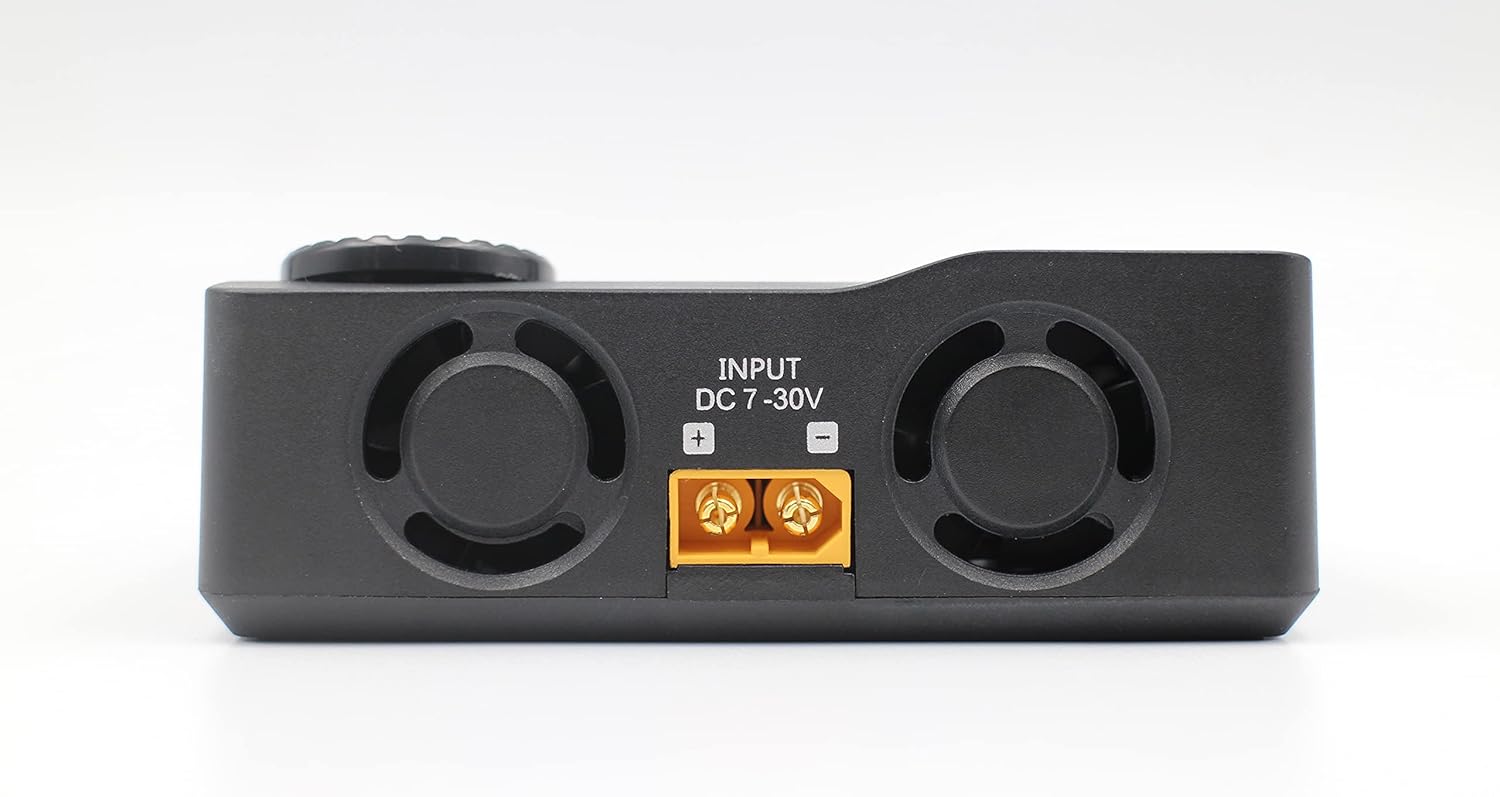
Obrázek 5.1: Zadní strana view of the ToolkitRC M8S Smart Charger, clearly showing the DC 7-30V input ports with positive and negative terminals for power connection.

Obrázek 5.2: Boční strana view of the ToolkitRC M8S Smart Charger, displaying the main XT60 output port and the 2-8S balance port for connecting batteries.
6. Návod k obsluze
The M8S features a user-friendly interface controlled by a rotary knob and two buttons (OK and EXIT).

Image 6.1: A close-up of the ToolkitRC M8S screen, showing the main menu with the 'Charge' option highlighted, indicating readiness for battery charging operations.
6.1. Navigace
- Otočný knoflík: Rotate to scroll through menu options or adjust values.
- Tlačítko OK: Press to confirm a selection or enter a submenu.
- Tlačítko EXIT: Press to go back to the previous menu or cancel an operation.
6.2. Nabíjení baterie
- Z hlavní nabídky vyberte "Charger" a stiskněte OK.
- Select the battery type (e.g., LiPo, LiHV, NiMh) and the number of cells (S).
- Adjust the desired charge current (Amps) a svtage (pokud existuje).
- Confirm settings and start the charging process. The screen will display real-time charging data.
6.3. Using Other Functions
- Measurer: Vybrat "Measurer" pro kontrolu objemu jednotlivých buněktages, celkový objtage, and internal resistance of your battery.
- výstup: Vybrat "Output" to use the M8S as a variable DC power supply or to test PWM/PPM/Sbus signals.
- Nastavení: Vybrat „Nastavení“ to configure system parameters such as language, backlight, and sound.

Image 6.2: A composite image showcasing the ToolkitRC M8S's new user interface, displaying various screens including the main menu, a charging progress screen, and a PWM/PPM/Sbus signal testing screen.
7. Údržba
Proper maintenance ensures the longevity and optimal performance of your ToolkitRC M8S charger.
- Čištění: Use a soft, dry cloth to clean the charger's exterior. Do not use liquid cleaners or solvents.
- Skladování: Pokud nabíječku nepoužíváte, skladujte ji na chladném a suchém místě mimo dosah přímého slunečního záření a extrémních teplot.
- Větrání: Ensure the ventilation openings are clear of dust and debris to maintain efficient cooling.
- Aktualizace firmwaru: Pravidelně kontrolujte oficiální stránky ToolkitRC. website for any available firmware updates to ensure your charger has the latest features and bug fixes.
8. Řešení problémů
If you encounter issues with your M8S charger, refer to the following common problems and solutions:
| Problém | Možná příčina | Řešení |
|---|---|---|
| Nabíječka se nezapne. | No power supply, incorrect power supply voltage, volné spojení. | Zkontrolujte připojení napájení a hlasitosttage (7-30V DC). Ensure connections are secure. |
| Baterie nebyla detekována. | Incorrect battery connection, damaged battery, wrong battery type selected. | Verify main and balance lead connections. Check battery health. Ensure correct battery type and cell count are selected in settings. |
| Charging error message. | Baterie voltage too low/high, internal resistance too high, short circuit. | Zkontrolujte objem baterietage. Inspect battery and cables for damage. Reduce charge current if battery is old or has high internal resistance. |
| Obrazovka nereaguje nebo zamrzá. | Dočasná softwarová závada. | Disconnect power, wait a few seconds, then reconnect to restart the charger. |
If the problem persists after attempting these solutions, please contact ToolkitRC customer support or your retailer for further assistance.
9. Specifikace
| Funkce | Detail |
|---|---|
| Model | M8S |
| Vstupní objemtage | DC 7-30V |
| Nabíjecí proud | 0.1-18A |
| Vybíjecí proud | 0.1-5A (Max 20W) |
| Maximální nabíjecí výkon | 400W |
| Podporované typy baterií | LiPo/LiHV/LiFe/Lion (1-8S), NiMh (1-20S), Pb (1-12S) |
| Bilanční proud | Max 1A |
| Zobrazit | 2.4palcový TFT barevný LCD |
| Rozměry | 98 x 68 x 35 mm |
| Hmotnost | 255 g |
| UPC | 729974629191 |

Image 9.1: A detailed specifications table for the ToolkitRC M8S, outlining input, charge/discharge parameters, supported battery types, and other technical data.
10. Záruka a podpora
ToolkitRC products are manufactured to high quality standards. For warranty information, please refer to the warranty card included with your product or visit the official ToolkitRC webUschovejte si účtenku jako doklad o koupi pro případ reklamace.
For technical support, troubleshooting assistance beyond this manual, or inquiries about spare parts, please contact your authorized ToolkitRC dealer or the manufacturer directly through their official support channels.
Oficiální Webmísto: www.toolkitrc.com (Poznámka: Toto je zástupný symbol URL. Refer to your product packaging or official documentation for the correct webmísto.)
Ask a question about this manual
Ask about setup, troubleshooting, compatibility, parts, safety, or missing instructions. Manuals+ will review the question and use this page’s manual context to help answer it.