Zavedení
The SAMSUNG Jet Bot+ Robot Vacuum Cleaner with Clean Station is designed to provide efficient and intelligent automated cleaning for your home. Featuring advanced LiDAR sensors for precise navigation and mapping, it adapts to various floor surfaces with intelligent power control. The included Clean Station offers a hygienic, touchless solution for dustbin emptying, and a comprehensive 5-layer HEPA filtration system ensures cleaner air. Control your Jet Bot+ via the SmartThings App for customized cleaning preferences, real-time tracking, and voice command compatibility.

Image: The SAMSUNG Jet Bot+ robot vacuum docked with its Clean Station, showcasing jeho elegantním bílým designem.
Průvodce nastavením
1. Rozbalení a umístění
- Carefully remove all components from the packaging: the Jet Bot+ robot vacuum, Clean Station, power cable, and any accessories.
- Choose a suitable location for the Clean Station. Ensure it is placed against a wall, on a hard, flat surface, with at least 1.5 feet (0.5 meters) of clear space on either side and 3 feet (1 meter) in front for the robot to dock properly. Avoid areas with direct sunlight or high traffic.
2. Počáteční nabíjení
- Connect the power cable to the Clean Station and plug it into a wall outlet.
- Place the Jet Bot+ onto the Clean Station. Ensure the charging contacts align. The robot will begin charging automatically. Allow for a full charge before first use (approximately 4 hours).
3. SmartThings App Connection & Mapping
- Download the Samsung SmartThings App from your mobile device's app store (available on Android and iOS).
- Open the app and follow the on-screen instructions to add your Jet Bot+ device. A Wi-Fi connection and a Samsung account are required.
- Once connected, initiate the initial mapping process. The Jet Bot+ uses LiDAR sensors to create a detailed map of your home, which will be displayed in the app. This map is crucial for efficient navigation and allows you to define specific cleaning areas.
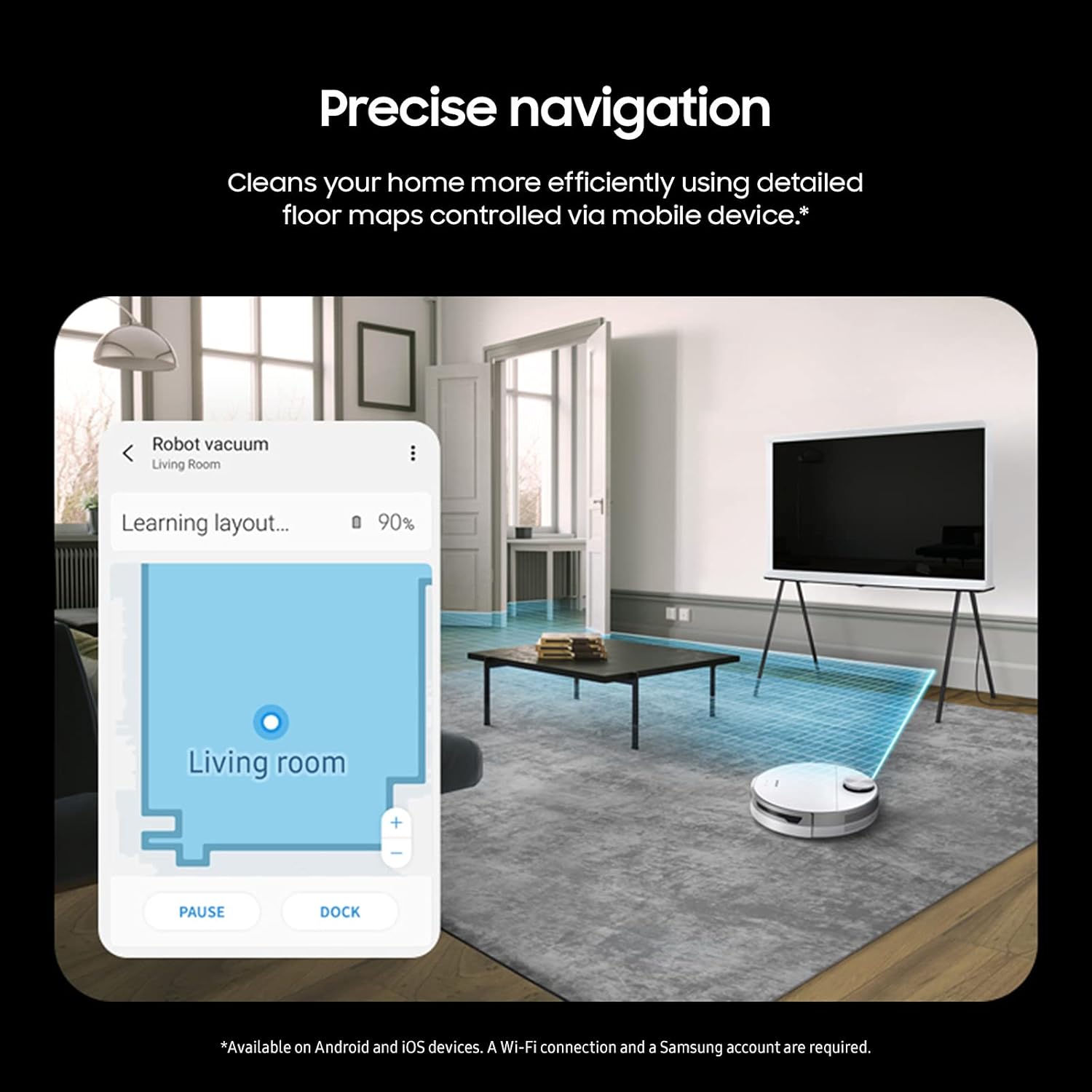
Image: The Jet Bot+ robot vacuum actively mapping a living room, with the corresponding floor plan displayed on a smartphone screen, demonstrating its precise navigation capabilities.
Návod k obsluze
1. Zahájení úklidu
- Prostřednictvím robota: Press the Start/Stop button on the top of the Jet Bot+. It will begin cleaning in Auto mode.
- Prostřednictvím aplikace SmartThings: Open the app, select your Jet Bot+, and choose a cleaning mode (e.g., Auto, Spot, Manual). You can also select specific rooms or areas to clean using the "Select & Go" feature.
- Hlasové ovládání: Use compatible voice assistants (Bixby, Google Assistant, Amazon Alexa) to start or stop cleaning with voice commands.
2. Intelligent Power Control
The Jet Bot+ automatically identifies the type of floor surface (e.g., hardwood, carpet) and the amount of dust present. It adjusts its suction power accordingly to ensure a thorough clean, increasing power for carpets and rugs to deep clean fibers.

Image: The Jet Bot+ positioned between a hardwood floor and a carpet, with visual indicators showing how its suction power intelligently adjusts for each surface type.
3. Customizing Cleaning Areas
- Select & Go: In the SmartThings App, use the generated map to select specific rooms or zones you want the Jet Bot+ to clean.
- Zóny se zákazem vstupu: Define virtual boundaries on the map within the app to prevent the robot from entering certain areas (e.g., pet bowls, delicate furniture).

Image: The Jet Bot+ robot vacuum approaching a red-highlighted "No-go Zone" on a wooden floor, illustrating its ability to avoid restricted areas defined by the user.
4. Sledování v reálném čase
Monitor the Jet Bot+'s cleaning progress in real-time through the SmartThings App. You can view its current location on the map, see areas it has already cleaned, and instruct it to pause or stop. The app also provides a cleaning history.

Obrázek: Uživatel viewing the Jet Bot+'s cleaning report on a smartphone, showing a detailed map of cleaned areas and cleaning history within the SmartThings App.
Údržba
Regular maintenance ensures optimal performance and longevity of your SAMSUNG Jet Bot+.
1. Clean Station Automatic Emptying
The Clean Station automatically empties the robot's dustbin after each cleaning cycle, or when instructed. This touchless system uses Air Pulse technology to transfer dust into a disposable bag within the Clean Station, trapping up to 99.99% of fine dust with its multi-layered filtration system.

Image: An illustration showing the internal mechanism of the Clean Station as it automatically empties the dust from the robot vacuum's dustbin into a sealed bag.
2. Washable Dustbin
The 0.3-liter dustbin inside the Jet Bot+ is fully washable. To clean:
- Vyjměte z robota nádobu na prach.
- Empty its contents into a trash can.
- Rinse the dustbin under running water.
- Allow it to air dry completely before reinserting it into the robot.
3. High-Efficiency Brush Cleaning
The high-efficiency brush features fine, anti-static fibers and self-cleaning extractors designed to prevent hair tangles. Periodically inspect and clean the brush:
- Turn the robot over and locate the brushroll.
- Remove any tangled hair or debris from the brush and its ends.
- Reinstall the brush securely.

Image: A close-up diagram illustrating the high-efficiency brush of the Jet Bot+, highlighting its anti-static fibers and self-cleaning extractors designed to prevent hair tangles.
4. Čištění senzoru
Wipe the sensors (LiDAR, cliff sensors, bumper sensors) with a soft, dry cloth to ensure they remain free of dust and debris, which can affect navigation.
Odstraňování problémů
If you encounter issues with your Jet Bot+, refer to the following common troubleshooting steps:
| Problém | Možná příčina | Řešení |
|---|---|---|
| Robot se nespouští ani nereaguje. | Low battery; Power switch off; Obstruction. | Ensure robot is fully charged on Clean Station. Check if the main power switch on the robot is ON. Remove any obstructions around the robot. |
| Robot se často zasekává. | Cables, small objects, or thick rugs. | Clear the cleaning area of loose cables, small toys, or lightweight rugs. Define "No-go Zones" in the SmartThings App for problematic areas. |
| Špatný čisticí výkon. | Full dustbin; Clogged brush; Dirty sensors. | Empty and wash the dustbin. Clean the high-efficiency brush. Wipe all sensors with a dry cloth. |
| Cannot connect to Wi-Fi/SmartThings App. | Incorrect Wi-Fi password; Router issues; App glitch. | Ensure correct Wi-Fi password. Restart your router and mobile device. Try re-pairing the robot with the SmartThings App. Ensure your Wi-Fi is 2.4GHz. |
| Čisticí stanice nevyprazdňuje nádobu na prach. | Dust bag full; Obstruction in Clean Station. | Check and replace the dust bag in the Clean Station. Inspect the Clean Station's suction path for any blockages. |
Specifikace
| Funkce | Detail |
|---|---|
| Značka | SAMSUNG |
| Název modelu | Jet Bot + |
| Číslo modelu položky | VR30T85513W/AA |
| Speciální funkce | Automatic Dust Collection, Cordless, LiDAR Navigation, Self-Emptying |
| Barva | Bílý |
| Rozměry produktu (D x Š x V) | 15.8 cm x 13.8 cm x 20.7 cm |
| Hmotnost položky | 17.9 libry |
| Zahrnuté komponenty | Robot Vacuum, Clean Station |
| Životnost baterie | 60 minut (přibližně) |
| Kapacita popelnice | 0.3 Liters (Robot), Clean Station capacity varies by bag. |
| Kontrolní metoda | Voice, App (SmartThings) |
| Kompatibilní zařízení | Bixby, Google Assistant, Amazon Alexa |
| Filtrační systém | 5-layer HEPA filtration (traps up to 99.99% of dust) |
Záruka a podpora
For detailed warranty information, please refer to the warranty card included with your product packaging or visit the official SAMSUNG webZáruční podmínky se mohou lišit v závislosti na regionu a datu nákupu.
If you require technical support, have questions about your product, or need to arrange a service, please contact SAMSUNG customer support through their official webwebu nebo kontaktních informací uvedených v dokumentaci k produktu.
Online zdroje: