
1. Úvod
This user manual provides essential information for the safe and efficient installation, operation, and maintenance of your Victron Energy BlueSolar MPPT 100V 20A 48V Solar Charge Controller. This device is designed to maximize the energy harvest from your solar panels and intelligently charge your battery bank, ensuring optimal performance and longevity of your solar power system.
Please read this manual thoroughly before installation and keep it for future reference. Proper installation and adherence to safety guidelines are crucial for the reliable operation of the controller and the safety of the system.
2. Bezpečnostní informace
Improper installation can be dangerous. Please consult a licensed professional and follow all applicable electrical codes during installation.
Always ensure the battery bank is disconnected before connecting or disconnecting the solar array or load. High voltages can be present from the solar array, even in low light conditions. Use appropriate personal protective equipment (PPE) during installation.

Obraz: The BlueSolar MPPT controller highlighting its SafetyShield+ protection features, including temperature compensation, overheat protection, and short-circuit protection for the load output.
- Teplotní kompenzace: Ensures optimal charging across varying temperatures.
- Ochrana proti přehřátí: Prevents damage due to excessive heat.
- Ochrana proti zkratu: Safeguards the load output from short circuits.
3. Klíčové vlastnosti
- Maximized Solar Yield: The BlueSolar MPPT charge controller ensures every ray of sunlight is converted into usable energy, optimizing battery longevity.
- Fast and Efficient MPPT: Features ultra-fast Maximum Power Point Tracking and intelligent charging algorithms to ensure maximum power harvest, even when solar panels are partially shaded.
- VE.Direct Connectivity: The integrated VE.Direct port offers extensive connectivity options. An optional VE.Direct Bluetooth Smart dongle (sold separately) unlocks full functionality with the VictronConnect app, enabling remote monitoring, configuration, and management via VRM Remote Management.
- Inteligentní výstup zátěže: Power your devices directly and safely from your solar charger. Configure the voltage at which a load should disconnect, and the MPPT charge controller will automatically disconnect loads if the battery voltage klesá příliš nízko.
- SafetyShield+ Protection: Battery longevity is a top priority. The BlueSolar MPPT charge controller includes SafetyShield+ functions to protect your battery from various threats and can even revive completely discharged batteries.

Obraz: The BlueSolar MPPT controller integrated into a solar power system, demonstrating its role in maximizing energy harvest from solar panels.
4. Nastavení a instalace
Before beginning installation, ensure you have all necessary components: the BlueSolar MPPT controller, solar panels, a battery bank, and any loads you intend to power. Always disconnect the battery bank before making any connections.
4.1 Montáž
Mount the controller vertically on a non-flammable surface, ensuring adequate airflow around the unit for cooling. Avoid direct sunlight exposure to prevent overheating. The dimensions are approximately 11.3 cm (L) x 10 cm (W) x 6 cm (H).
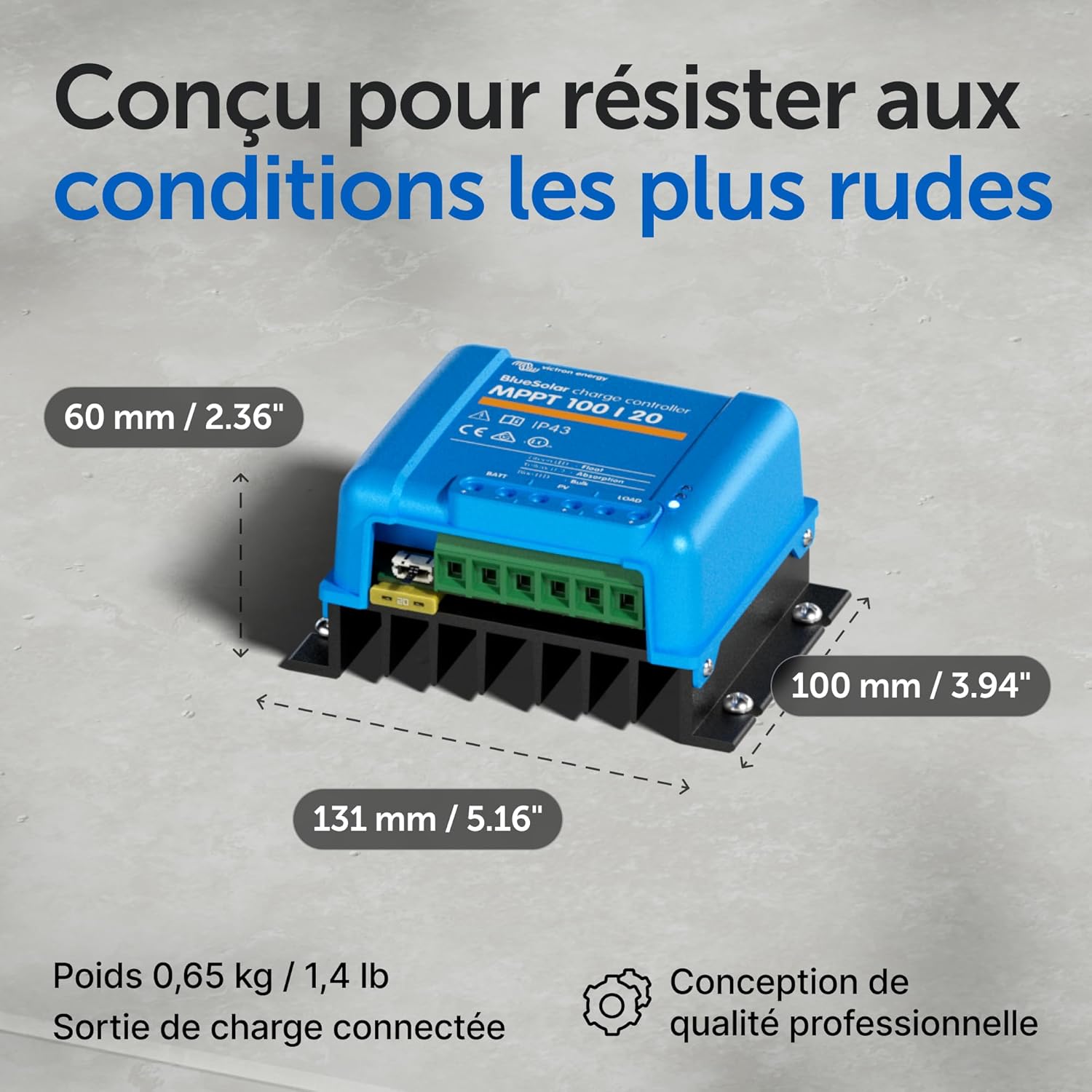
Obraz: Detailed dimensions of the BlueSolar MPPT controller, showing its compact size for easy integration into various setups.
4.2 Zapojení kabeláže
Follow the connection order carefully to prevent damage to the controller or other components. The controller features terminals for Battery (BATT), Solar Panel (PV), and Load (LOAD).
- Připojte baterii: Connect the positive and negative terminals of your battery bank to the BATT+ and BATT- terminals on the controller. Ensure correct polarity.
- Připojení solárních panelů: Connect the positive and negative leads from your solar array to the PV+ and PV- terminals. Verify correct polarity and ensure the solar panel voltagnepřekračuje maximální vstupní hlasitost regulátorutage (100 V).
- Připojení zátěže (volitelné): If using the load output, connect your DC loads to the LOAD+ and LOAD- terminals. The load output is protected against short circuits and can be configured for low voltage odpojit.

Obraz: The front panel of the BlueSolar MPPT controller, clearly showing the Battery (BATT), Solar Panel (PV), and Load (LOAD) connection terminals, along with LED indicators.
Always double-check all connections for tightness and correct polarity before applying power.
5. Provoz
Once properly installed, the BlueSolar MPPT controller will automatically begin optimizing power transfer from your solar panels to your battery bank. The controller uses Maximum Power Point Tracking (MPPT) technology to extract the maximum available power from your PV array, which can be up to 30% more efficient than PWM controllers, especially in varying light conditions.

Obraz: A visual representation of the solar energy harvesting process, illustrating how the MPPT controller efficiently converts solar power to charge the battery.
5.1 LED indikátory
The controller features three LED indicators on the front panel to show its operational status:
- Zelená LED: Indicates "Float" charge stage. The battery is fully charged and maintained.
- Žlutá LED: Indicates "Absorption" charge stage. The battery is being charged to its full voltage při stálém objtage.
- Modrá LED: Indicates "Bulk" charge stage. The battery is being charged at its maximum current.
5.2 VictronConnect App and VE.Direct
For advanced monitoring and configuration, connect an optional VE.Direct Bluetooth Smart dongle (sold separately) to the VE.Direct port. This allows you to use the VictronConnect app on your smartphone or tablet.

Obraz: A smartphone displaying the VictronConnect app interface, showcasing its capabilities for local Bluetooth connection, 30-day performance logging, simple configuration, and instant solar energy information.
The VictronConnect app provides:
- Local Bluetooth connection for real-time data.
- 30-day performance history.
- Simple configuration of charge parameters.
- Instantaneous solar energy information (voltage, proud, výkon).
For remote management and advanced analytics, the VE.Direct port can also connect to a Victron communication center, enabling VRM Remote Management from anywhere in the world.
6. Údržba
The Victron Energy BlueSolar MPPT controller is designed for reliable, long-term operation with minimal maintenance. However, periodic checks are recommended to ensure optimal performance and system longevity.
- Vizuální kontrola: Periodically inspect the controller and all wiring for any signs of damage, corrosion, or loose connections.
- Čistota: Ensure the controller's cooling fins are free from dust and debris to maintain proper heat dissipation. Use a soft, dry cloth for cleaning. Do not use abrasive cleaners or solvents.
- Těsnost svorek: Check all terminal connections (battery, solar, load) for tightness at least once a year. Loose connections can lead to overheating and poor performance.
- Stav baterie: Monitor your battery bank's health regularly. The controller optimizes charging, but battery maintenance (e.g., checking electrolyte levels for flooded batteries) is still important.
7. Řešení problémů
If you encounter issues with your BlueSolar MPPT controller, refer to the following common troubleshooting steps:
| Problém | Možná příčina | Řešení |
|---|---|---|
| Žádné LED diody nesvítí | No power from battery or solar panels. | Zkontrolujte připojení baterie a objtage. Ensure solar panels are receiving sunlight and connected correctly. |
| Baterie se nenabíjí | Incorrect wiring, low solar input, battery fault. | Verify all wiring connections. Check solar panel output. Test battery voltage. Ensure no shading on panels. |
| Výstupní zátěž nefunguje | Přetížení, zkrat, nízký stav baterietage. | Reduce load. Check for short circuits in load wiring. Allow battery to charge. Check load output settings via VictronConnect. |
| Controller is hot | Normální provoz při velkém zatížení, nedostatečné větrání. | Ensure adequate airflow around the unit. If excessively hot and not under heavy load, contact support. |
For more detailed troubleshooting or persistent issues, please refer to the comprehensive manual available on the Victron Energy webnebo kontaktujte podporu společnosti Victron Energy.
8. Specifikace
| Atribut | Hodnota |
|---|---|
| Rozměry produktu (D x Š x V) | 11.28 x 9.98 x 5.99 cm (4.44 x 3.93 x 2.36 palce) |
| Hmotnost položky | 490 gramů (1.08 lb) |
| Výrobce | Energie Victron |
| Číslo modelu | NT-1230 |
| Vstupní objemtage (Solar) | Až 100V |
| Maximální nabíjecí proud | 20 Amperes |
| Baterie Voltage | 48 V (DC) |
| Typ zobrazení | LED indikátory |
| Charge Port Type | MC4 and Anderson SB50 (Note: Actual terminals are screw terminals as per product image) |
| Typ materiálu | Několik |
| Zdroj napájení | Solární energie |
| Barva | Modrý |
| První dostupný termín | 19. října 2020 |
9. Záruka a podpora
Victron Energy products are known for their quality and reliability. For specific warranty information, please refer to the warranty card included with your product or visit the official Victron Energy webUschovejte si doklad o koupi pro případné reklamace.
For technical support, product inquiries, or assistance with troubleshooting beyond this manual, please contact Victron Energy customer service or an authorized Victron Energy dealer. You can find contact information and a network of professionals on the official Victron Energy webmísto.