
1. Úvod
Thank you for choosing the AUNA Pro Amp-Pro1 BT PA Amplifikátor. Tento amplifier is designed to deliver professional-level sound for various events, including karaoke nights, parties, and general audio amplification. It features a robust 2 x 50W RMS output, Bluetooth connectivity, multiple microphone inputs, USB/SD media playback, and a 7-band equalizer for precise sound control. This manual provides essential information for safe operation, setup, and maintenance of your device.
2. Bezpečnostní pokyny
Please read these safety instructions carefully before operating the device and keep them for future reference. Failure to follow these instructions may result in electric shock, fire, or other hazards.
- Napájení: Connect the device only to a 230 V, 50 Hz AC power outlet. Ensure the power cord is not damaged or pinched.
- Větrání: Do not block any ventilation openings. Ensure adequate airflow around the unit to prevent overheating. Do not place the amplifier on soft surfaces that may block vents.
- Voda a vlhkost: Do not expose the device to rain or moisture. Do not place objects filled with liquids, such as vases, on or near the ampživější.
- Zdroje tepla: Udržujte amplifier away from heat sources such as radiators, heat registers, stoves, or other heat-producing appliances.
- Čištění: Unplug the device from the power outlet before cleaning. Use a dry, soft cloth. Do not use liquid cleaners or aerosol cleaners.
- Servis: Nepokoušejte se tento výrobek opravovat sami. Veškerý servis svěřte kvalifikovanému servisnímu personálu. Otevření jednotky vás může vystavit nebezpečnému teplu.tages nebo jiná nebezpečí.
- Vstup objektu a kapaliny: Nikdy nestrkejte do tohoto výrobku otvory jakéhokoli druhu, protože by se mohly dotknout nebezpečného objemutage body nebo zkratované části, které by mohly způsobit požár nebo úraz elektrickým proudem.
- Umístění: Place the unit on a stable, level surface. Avoid placing it in direct sunlight or in areas with high humidity or dust.
3. Konec produktuview
The AUNA Pro Amp-Pro1 BT is a versatile PA amplifier designed for powerful audio output and flexible connectivity. It can be used as a standalone unit or installed in a 19-inch Hi-Fi rack.
Klíčové vlastnosti:
- Výkonný výstup: 2 x 50 W RMS power at 4 ohms.
- Funkce Bluetooth: For wireless audio streaming from smartphones, tablets, or laptops.
- Více mikrofonních vstupů: Three fully adjustable 6.3 mm jack microphone inputs for karaoke and vocal performances.
- Přehrávání médií: USB port and SD/MMC card slot for direct playback of digital audio files.
- 7pásmový ekvalizér: Two-channel, 7-band equalizer for precise adjustment of treble, bass, and mid-range frequencies.
- Rozsáhlá konektivita: 2 x stereo RCA inputs, 1 x antenna input, 1 x 3.5 mm AUX input, and 2 x stereo speaker outputs.
- Montáž do racku: Suitable for installation in a 19-inch Hi-Fi rack.
Ovládací prvky a připojení na předním panelu:
The front panel provides access to power, microphone inputs, media playback controls, and sound adjustments.

Připojení zadního panelu:
The rear panel houses the main audio inputs and speaker outputs.

4. Nastavení a připojení
Follow these steps to set up your AUNA Pro Amp-Pro1 BT ampživější.
4.1 Připojení reproduktorů
- Zajistěte ampje zářič vypnutý a odpojený od elektrické zásuvky.
- Connect your passive speakers to the stereo speaker outputs on the rear panel. Use appropriate speaker cables.
- For a single set of speakers, ensure their impedance is between 4 and 16 ohms.
- If connecting two sets of speakers simultaneously, ensure their combined impedance is between 8 and 16 ohms.
4.2 Připojení zdrojů zvuku
The amplifier offers various input options:
- RCA vstupy: Connect external audio devices like CD players, DVD players, or mixers to the 2 x stereo RCA inputs on the rear panel.
- Vstup AUX: For portable devices, use the 3.5 mm AUX input on the front panel.
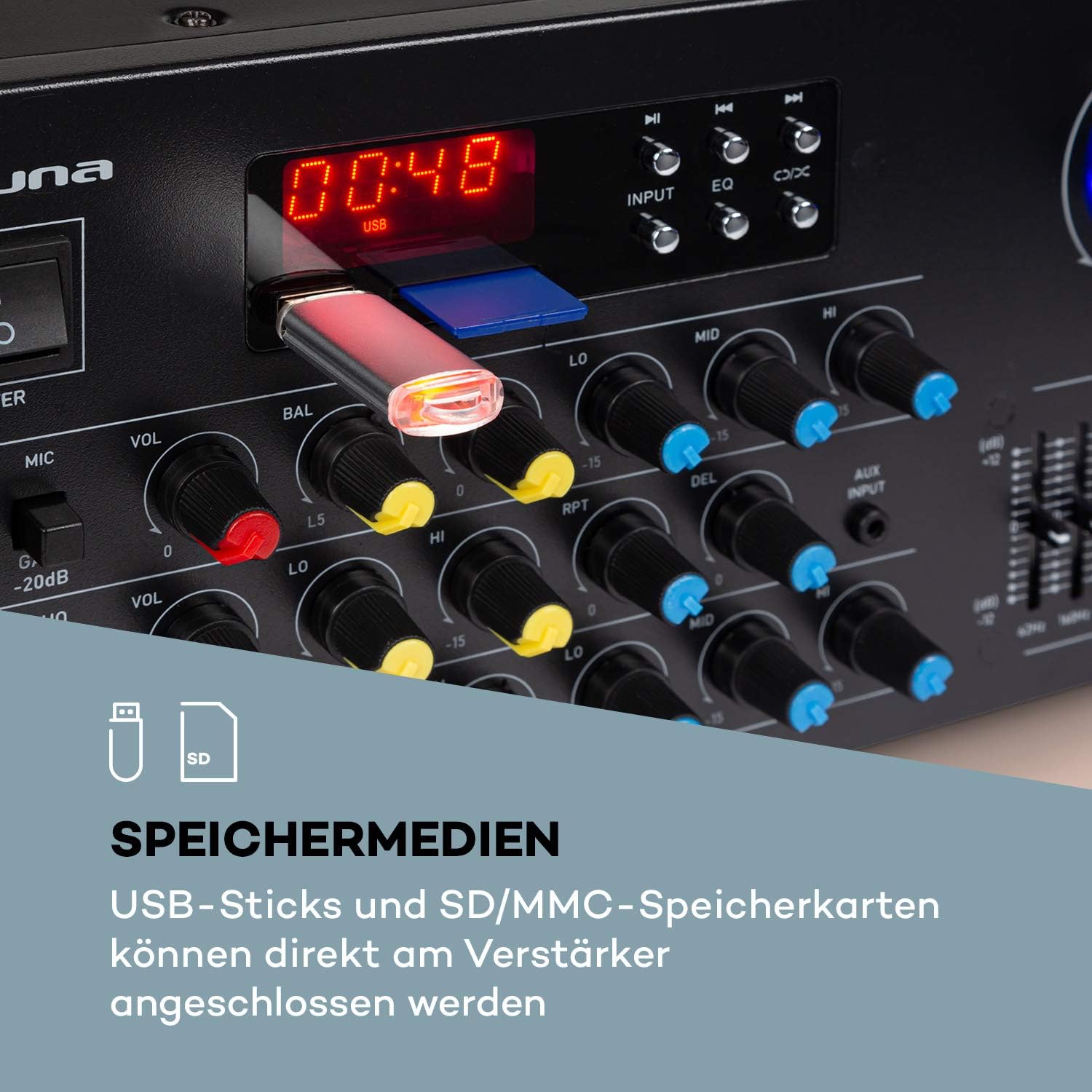
- USB/SD: Insert a USB stick or SD/MMC card into the respective slots on the front panel for direct media playback.
- Bluetooth: Pro bezdrátové streamování zvuku z kompatibilních zařízení.
4.3 Připojení mikrofonů
Connect up to three 6.3 mm jack microphones to the dedicated inputs on the front panel.

4.4 Připojení napájení
Jakmile jsou všechna audio a reproduktorová připojení provedena, zapojte amplifier's power cord into a suitable 230 V, 50 Hz AC power outlet.
5. Návod k obsluze
5.1 Zapnutí/vypnutí
Stiskněte tlačítko MOC tlačítko na předním panelu pro zapnutí amplifier on or off. The display will illuminate when the unit is powered on.
5.2 Výběr zdroje
Použijte VSTUP selector button on the front panel to cycle through available audio sources: Bluetooth, USB, SD, AUX, and RCA inputs.
5.3 Provoz Bluetooth
- Select the Bluetooth input source using the VSTUP button. The display will show 'BLUE' or a similar indicator.
- Povolte Bluetooth na svém smartphonu, tabletu nebo notebooku.
- Hledat available devices and select 'AUNA Amp-Pro1 BT' (or similar) from the list.
- Po spárování můžete bezdrátově streamovat zvuk do ampživější.

5.4 Přehrávání z USB/SD karty
- Insert a USB stick or SD/MMC card into the corresponding slot on the front panel.
- Select the USB or SD input source using the VSTUP tlačítko. The amplifier will automatically detect and begin playing compatible audio files.
- Use the playback controls (Play/Pause, Next, Previous) on the front panel to manage your music.
5.5 Ovládání mikrofonu
Each microphone input has individual volume, 3-band equalizer (treble, mid, bass), balance, and echo effect controls. The echo effect also has 2-band equalizer, repeat, delay, and volume controls.
- Upravte MIC VOL knob for the overall microphone volume.
- Use the individual VOL knobs for each microphone input.
- Upravte LO, STŘEDNÍ, HI knobs for microphone equalization.
- Control the echo effect using the ECHO, RPT (Repeat), and DEL (Delay) knobs.
5.6 Nastavení ekvalizéru
The amplifier features a 2-channel, 7-band equalizer to fine-tune your audio output. Adjust the sliders for each frequency band (62Hz, 160Hz, 400Hz, 1KHz, 3KHz, 8KHz, 16KHz) to shape your sound.

5.7 Hlavní ovládání hlasitosti
Upravte velké HLAVNÍ HLASITOST knob to control the overall output level of the ampživější.
6. Údržba
6.1 Čištění
Vždy odpojte amplifier before cleaning. Use a soft, dry cloth to wipe the exterior surfaces. Do not use abrasive cleaners, waxes, or solvents, as they may damage the finish.
6.2 Skladování
Pokud amplifier will not be used for an extended period, unplug it from the power outlet and store it in a cool, dry place, away from direct sunlight and extreme temperatures.
6.3 Výměna pojistky
The amplifier is equipped with a 2A fuse. If the unit fails to power on, the fuse may need replacement. This should only be performed by qualified service personnel to ensure safety and proper operation.
7. Řešení problémů
Pokud máte problémy s vaším amplifier, viz následující běžné problémy a jejich řešení:
| Problém | Možná příčina | Řešení |
|---|---|---|
| Žádná síla | Power cord unplugged; Power outlet faulty; Fuse blown | Zkontrolujte připojení napájecího kabelu; Zkuste jinou zásuvku; Kontaktujte servis ohledně výměny pojistky. |
| Žádný zvukový výstup | Incorrect input selected; Volume too low; Speakers not connected or faulty; Mute function active | Select correct input source; Increase Master Volume; Check speaker connections; Ensure no mute is active. |
| Bluetooth se nepřipojuje | Amplifier not in Bluetooth mode; Device not discoverable; Interference | Select Bluetooth input; Ensure Bluetooth is enabled on your device and in pairing mode; Move devices closer; Restart both devices. |
| Mikrofon nefunguje | Microphone not connected; Microphone volume too low; Microphone faulty | Check microphone connection; Increase individual MIC VOL; Test with another microphone. |
| Zkreslený zvuk | Volume too high; Input signal too strong; Speaker impedance mismatch | Reduce Master Volume or input source volume; Check speaker impedance. |
Pokud problém přetrvává i po vyzkoušení těchto řešení, kontaktujte zákaznickou podporu.
8. Technické specifikace
Below are the technical specifications for the AUNA Pro Amp-Pro1 BT PA Ampživější:
| Funkce | Specifikace |
|---|---|
| Výstupní výkon | 2 x 50 W RMS at 4 ohms |
| Frekvenční odezva | 20 Hz - 20 kHz |
| Odstup signálu od šumu | > 76 dB |
| Speaker Impedance (1 set) | 4 16 - XNUMX ohmy |
| Speaker Impedance (2 sets synchronized) | 8 16 - XNUMX ohmy |
| Mikrofonní vstupy | 3 x 6.3 mm jack (front) |
| Audio vstupy | 2 x stereo RCA, 1 x 3.5 mm AUX, USB, SD/MMC |
| Anténní vstup | 1 x antenna input |
| Výstupy pro reproduktory | 2 x stereo (screw terminals/banana connector) |
| Napájení | 230 V, 50 Hz |
| Pojistka | 2 A |
| Rozměry (Š x V x H) | Cca. 43 x 16.3 x 32.5 cm |
| Hmotnost | Přibl. 3.0 kg |
| Technologie připojení | AUX, Bluetooth, USB |
| Kompatibilní zařízení | Notebook, Smartphone |

9. Informace o likvidaci
Do not dispose of this product with normal household waste. This product should be handed over to an applicable collection point for the recycling of electrical and electronic equipment. By ensuring this product is disposed of correctly, you will help prevent potential negative consequences for the environment and human health, which could otherwise be caused by inappropriate waste handling of this product. For more detailed information about recycling of this product, please contact your local city office, your household waste disposal service or the shop where you purchased the product.
10. Záruka a podpora
For warranty information, technical support, or service inquiries, please refer to the documentation provided with your purchase or contact your retailer. You can also visit the official AUNA webstránky pro další pomoc.


