
Homtime C1
Homtime C1 Digital Alarm Clock User Manual
Model: C1
1. Úvod
Děkuji za nákupasing the Homtime C1 Digital Alarm Clock. This device combines a digital alarm clock with dual USB charging ports, offering convenience and functionality for your bedside or office. Its user-friendly design, featuring a rotary button and dimmable LCD screen, ensures ease of use for all ages. Please read this manual thoroughly before operation to ensure proper use and maintenance.

Image: The Homtime C1 Digital Alarm Clock, turquoise in color, displayed on a wooden surface with a succulent plant in the background. The clock shows the time 20:08 and an alarm set for 15:00.
2. Bezpečnostní informace
Pro zajištění bezpečného provozu a prevenci poškození dodržujte prosím následující bezpečnostní opatření:
- Nevystavujte zařízení vodě ani nadměrné vlhkosti.
- Neumísťujte zařízení do blízkosti zdrojů tepla, jako jsou radiátory, topná tělesa, kamna nebo jiná zařízení (včetně amplifikátory), které produkují teplo.
- Use only the power adapter and charging cable provided or recommended by Homtime.
- Do not attempt to disassemble, repair, or modify the device yourself. Refer all servicing to qualified service personnel.
- Udržujte zařízení mimo dosah silných magnetických polí.
- Čistěte pouze suchým hadříkem.
3. Obsah balení
Zkontrolujte prosím balení, zda neobsahuje následující položky:
- Homtime C1 Digital Alarm Clock
- Napájecí adaptér
- Charging Cable (Multi-connector for various mobile phones)
- Uživatelská příručka

Image: A gold-colored multi-connector charging cable with USB-A, Micro USB, Lightning, and USB-C connectors, indicating its versatility for various mobile devices.
4. Konec produktuview
Familiarize yourself with the different parts of your Homtime C1 alarm clock:
- Přední: Large LCD display for time and alarm.
- Nahoře: Rotary button for setting time/alarm, snooze/dimmer button, alarm ON/OFF button.
- Zadní: Port napájení.
- Side (Right): Dva USB nabíjecí porty.

Image: A composite image showing various angles of the Homtime C1 Digital Alarm Clock, including front, top, side, and bottom views, highlighting its compact design and port locations.
5. Nastavení
- Připojte napájení: Plug the provided power adapter into the DC input port on the back of the alarm clock, then plug the adapter into a standard wall outlet. The display will light up.
- Počáteční nastavení času: The clock will typically display a default time. To set the correct time, proceed to the 'Setting Time' section under Operating Instructions.
6. Návod k obsluze
6.1 Čas nastavení
- Press and hold the rotary button on top of the clock until the hour digits start blinking.
- Rotate the button clockwise or counter-clockwise to adjust the hour.
- Press the rotary button once to switch to minute adjustment.
- Rotate the button to adjust the minutes.
- Press the rotary button again to confirm the time and exit time setting mode.
6.2 Nastavení budíku
- Press and hold the alarm setting button (bell icon) on top of the clock until the alarm hour digits start blinking.
- Rotate the rotary button to adjust the alarm hour.
- Press the alarm setting button once to switch to alarm minute adjustment.
- Rotate the rotary button to adjust the alarm minutes.
- Press the alarm setting button again to confirm the alarm time.
- To activate or deactivate the alarm, press the alarm ON/OFF button (next to the rotary button). An alarm icon will appear on the display when activated.

Image: A person's hand with green nail polish is shown pressing the large circular button on top of a white Homtime C1 alarm clock, demonstrating the interaction for setting time or alarm.
6.3 Funkce odložení
When the alarm sounds, press the large rotary button on top of the clock to activate the snooze function. The alarm will pause for a few minutes (default snooze time is typically 9 minutes) and then sound again. To turn off the alarm completely, press the alarm ON/OFF button.
6.4 Display Brightness (Dimmable)
The Homtime C1 features an auto-dimmable display. The brightness adjusts automatically based on ambient light conditions. You can also manually adjust the brightness by briefly pressing the snooze/dimmer button (usually the large rotary button or a dedicated button next to it) to cycle through different brightness levels.
6.5 nabíjecí porty USB
The Homtime C1 is equipped with dual USB charging ports (5V/2.1A) on its side, allowing you to charge your mobile devices directly from the clock. Simply connect your device's USB charging cable to one of the ports. These ports are compatible with most smartphones and tablets, including iPhone and Android devices.
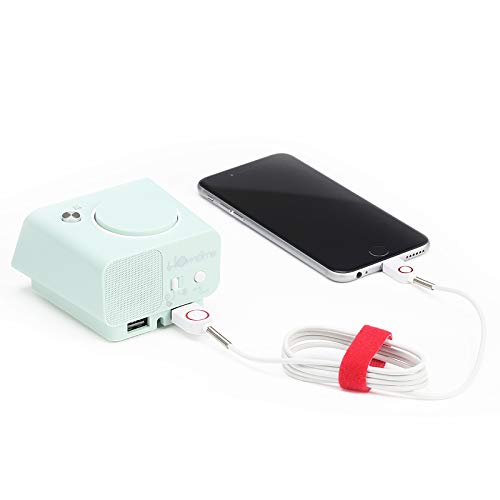
Image: The Homtime C1 alarm clock, turquoise in color, with a white charging cable connected to its side USB port, actively charging a black smartphone. This illustrates the dual USB charging capability.
7. Údržba
- Čištění: Use a soft, dry cloth to clean the surface of the clock. Do not use liquid cleaners or aerosol sprays.
- Skladování: Pokud zařízení skladujete delší dobu, odpojte jej ze zásuvky a uložte jej na chladném a suchém místě.
- Vyhněte se dopadu: Do not drop or subject the clock to strong impacts, as this may damage internal components.
8. Řešení problémů
| Problém | Možná příčina | Řešení |
|---|---|---|
| Zobrazení hodin je vypnuté. | Žádné připojení k napájení. | Ujistěte se, že je napájecí adaptér bezpečně zapojený do hodin a do zásuvky. |
| Alarm se nespustí. | Budík není aktivovaný nebo je nesprávně nastavený. | Check if the alarm icon is displayed. Re-set the alarm time. |
| Nabíjení přes USB nefunguje. | Problém s kabelem nebo nekompatibilita zařízení. | Zkuste jiný USB kabel. Ujistěte se, že vaše zařízení je kompatibilní s nabíjením 5V/2.1A. |
| Display too dim/bright. | Auto-dimming or manual setting. | Briefly press the snooze/dimmer button to cycle through brightness levels. |
9. Specifikace
- Značka: Homtime
- Model: C1
- Barva: Turquoise (Green)
- Typ displeje: Digitální LCD
- Speciální vlastnosti: Alarm, Auto Dimmable, Snooze, Dual USB Charging Ports
- Zdroj napájení: Elektrický kabel
- Materiál: Akrylonitrilbutadienstyren, plast
- Typ montáže: Stolní deska
- USB výstup: 5V/2.1A (Total for both ports)
- Rozměry: (Přesné rozměry naleznete na obalu produktu)
- Země původu: Čína
10. Záruka a podpora
Homtime products are designed and manufactured to the highest quality standards. For information regarding warranty coverage, please refer to the warranty card included with your product or visit the official Homtime website. For technical support or service inquiries, please contact Homtime customer service through the contact information provided on the product packaging or webmísto.
Uschovejte si prosím účtenku jako doklad o koupi pro účely záruky.
Související dokumentyC1


Ask a question about this manual
Ask about setup, troubleshooting, compatibility, parts, safety, or missing instructions. Manuals+ will review the question and use this page’s manual context to help answer it.