
1. Úvod
The JDIAG JD101 is a universal On-Board Diagnostics II (OBD2) car code reader designed to diagnose engine-related issues in vehicles. It provides essential information such as Diagnostic Trouble Codes (DTCs), live data streams, and vehicle information, helping users identify and resolve common car problems. This device also includes a battery test function to assess the vehicle's battery status. It is compatible with most OBDII compliant vehicles manufactured in the USA (1996 and newer), Europe (EOBD, 2000 and newer), and Asia (2000 and newer), as well as newer OBDII and CAN protocol vehicles.

Obrázek 1.1: The JDIAG JD101 scanner helps identify various vehicle issues.
2. Obsah balení
Po otevření balíku se prosím ujistěte, že jsou všechny položky přítomny a v dobrém stavu:
- 1 x JDIAG JD101 OBD2 Scanner Unit
- 1 x Vícejazyčná uživatelská příručka

Obrázek 2.1: Contents of the JDIAG JD101 package.
3. Konec produktuview
The JDIAG JD101 features a compact design with a 2.4-inch LCD display and a user-friendly 4-button keypad for navigation. It connects directly to your vehicle's OBD2 port for power and data transfer.

Obrázek 3.1: JDIAG JD101 Product Components.
Klíčové vlastnosti:
- Univerzální kompatibilita: Supports most US OBDII (1996+), European EOBD (2000+), Asian (2000+) vehicles, and newer OBDII/CAN protocols.
- Připravenost k I/M jedním kliknutím: Quickly checks emission system status.
- DTC Retrieval: Reads generic (P0, P2, P3, U0) and manufacturer-specific (P1, P3, U1) codes, including pending, stored, and permanent codes.
- Ovládání MIL: Determines the reason for the Malfunction Indicator Lamp (MIL) illumination and allows for its deactivation.
- Zobrazit: 2.4-inch LCD with DTC definitions directly on screen.
- Zobrazení dat: Shows freeze frame data and live data streams (over 130 PIDs).
- Vyhledávání DTC: Built-in DTC library for quick reference.
- Informace o vozidle: Získá identifikační číslo vozidla (VIN), kalibrační ID (CIN) a ověřovací číslo kalibrace (CVN).
- Funkce testu baterie: Assesses the vehicle's battery status.
- Vícejazyčná podpora: English, Spanish, French, Russian, German, Italian, etc.
- Aktualizace firmwaru: Free online firmware updates via USB cable.

Obrázek 3.2: Klíčová výhodatages of the JDIAG JD101 scanner.
4. Nastavení a připojení
The JDIAG JD101 does not require batteries. It is powered directly by your vehicle's OBD2 port.
- Vyhledejte port OBD2: The OBD2 port is typically located under the dashboard on the driver's side, often near the steering column. Refer to your vehicle's owner's manual if you cannot find it.
- Vypněte zapalování: Ensure your vehicle's ignition is in the OFF position before connecting the scanner.
- Připojení skeneru: Plug the OBD2 connector of the JD101 scanner firmly into your vehicle's OBD2 port.
- Zapněte zapalování: Turn the vehicle's ignition to the ON position (do not start the engine unless instructed by a specific test procedure). The scanner will automatically power on and display the main menu.
5. Návod k obsluze
Použijte Up a Dolů buttons to navigate through menu options, the Vstupte button to select an option, and the Výstup tlačítko pro návrat do předchozí nabídky nebo ukončení funkce.
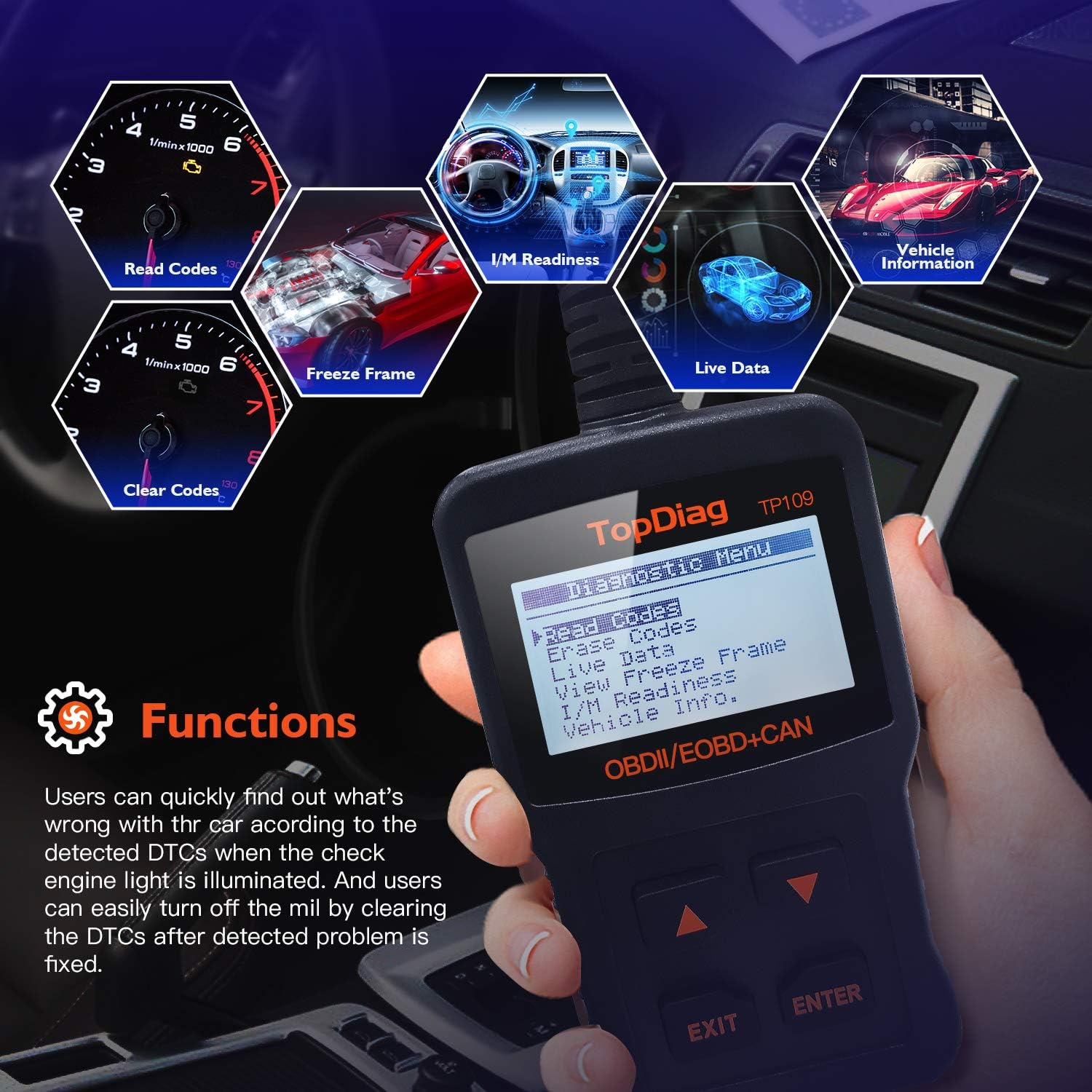
Obrázek 5.1: Main functions of the JDIAG JD101 scanner.
5.1. Číst kódy
This function retrieves Diagnostic Trouble Codes (DTCs) from the vehicle's computer. These codes indicate specific issues detected by the vehicle's self-diagnostic system.
- Z hlavní nabídky vyberte Číst kódy a stiskněte Vstupte.
- The scanner will display any detected DTCs, along with their definitions on the 2.4-inch LCD.
- Použijte Up a Dolů buttons to scroll through multiple codes if present.
5.2. Vymazat kódy
This function clears all Diagnostic Trouble Codes (DTCs) from the vehicle's computer and turns off the Malfunction Indicator Lamp (MIL). Ensure the underlying issue has been resolved before clearing codes.
- Z hlavní nabídky vyberte Vymazat kódy a stiskněte Vstupte.
- Po zobrazení výzvy potvrďte svou volbu.
- The scanner will clear the codes and turn off the MIL.
5.3. Živý datový tok
This function displays real-time operational parameters from the vehicle's sensors and components, such as engine RPM, vehicle speed, oxygen sensor readings, and more. The JD101 supports over 130 PIDs (Parameter IDs).
- Z hlavní nabídky vyberte Živá data a stiskněte Vstupte.
- The scanner will display a list of available PIDs. Select the desired parameters to view.
- The data will be displayed in real-time. Use the Up a Dolů buttons to scroll through the data.
5.4. Připravenost I/M
I/M Readiness (Inspection/Maintenance Readiness) indicates whether the various emissions-related systems on the vehicle are operating correctly and have completed their diagnostic tests. This is useful for emissions testing.
- Z hlavní nabídky vyberte Připravenost I/M a stiskněte Vstupte.
- The scanner will display the status of various monitors (e.g., Catalyst Monitor, O2 Sensor Monitor). A 'PASS' or 'OK' status indicates the monitor has completed its test.
5.5. Zmrazení dat
When an emission-related fault occurs, the vehicle's computer stores a snapshot of operating conditions at the moment the fault was detected. This is called Freeze Frame Data and can help in diagnosing intermittent problems.
- Z hlavní nabídky vyberte View Zmrazit rám a stiskněte Vstupte.
- Skener zobrazí zaznamenané parametry.
5.6. Vehicle Information (VIN, CIN, CVN)
This function allows you to retrieve important vehicle identification information.
- VIN (Vehicle Identification Number): A unique 17-character code for the vehicle.
- CIN (Calibration Identification Number): Identifies the software version of the vehicle's Engine Control Unit (ECU).
- CVN (Calibration Verification Number): A checksum value used to verify the integrity of the ECU software.
- Z hlavní nabídky vyberte Informace o vozidle a stiskněte Vstupte.
- Skener zobrazí dostupné informace o vozidle.

Obrázek 5.2: Retrieving vehicle identification information.
5.7. Funkce testu baterie
The JD101 includes a function to determine the vehicle's battery status, providing a quick assessment of its health.
- Z hlavní nabídky vyberte Test baterie (or similar option) and press Vstupte.
- Follow the on-screen prompts to perform the test. The scanner will display the battery voltage a stav.
6. Údržba
6.1. Aktualizace firmwaru
The JDIAG JD101 supports free online firmware updates to ensure compatibility with newer vehicles and to add new features. This process requires a computer running Windows and a Mini USB cable (not included).
- Stáhnout software: Visit the official JDiag webweb (www.jdiag.com) and navigate to the 'Downloads' section. Download the latest firmware update tool (e.g., 'JD setup toolkit') and the firmware file for the JD101.
- Nainstalujte ovladač: Install the provided USB driver (e.g., STMicroelectronics driver) on your Windows PC.
- Připojení skeneru: Connect the JD101 scanner to your PC using a Mini USB cable.
- Spusťte nástroj pro aktualizaci: Launch the appropriate upgrade tool (e.g., 'JD Series upgrade tool', ne 'Elite II upgrade tool').
- Postupujte podle pokynů: Follow the on-screen instructions to select the firmware file and initiate the update process. The update may take several minutes. Do not disconnect the device during this time.
- Ověření: Once complete, the tool will display a success message, including the new firmware version and device serial number.
Poznámka: The update software is compatible with Windows operating systems, including Windows XP as specified in product details. Ensure your PC meets the minimum system requirements for the update tool.
7. Řešení problémů
- Zařízení se nezapne: Ensure the scanner is correctly plugged into the vehicle's OBD2 port and the vehicle's ignition is in the ON position. The device draws power directly from the OBD2 port.
- Žádná komunikace s vozidlem: Verify that your vehicle is OBDII compliant (most US vehicles 1996+, European EOBD 2000+, Asian 2000+). Check the connection to the OBD2 port. If issues persist, try the scanner on another compatible vehicle to rule out a vehicle-specific problem.
- Scanner Not Working Properly: If the device exhibits unexpected behavior, try performing a firmware update as described in Section 6.1. If the problem persists, contact JDIAG technical support.
- Cannot Read ABS/Airbag Codes: The JDIAG JD101 is designed to work exclusively with engine-related codes (OBDII/EOBD). It does not support diagnostic functions for ABS (Anti-lock Braking System) or Airbag systems.
8. Specifikace
| Funkce | Specifikace |
|---|---|
| Značka | JDIAG |
| Číslo modelu | JD101 (also referred to as 'code reader') |
| Zdroj napájení | Vehicle OBD2 Port Powered (No internal batteries required for operation) |
| Velikost obrazovky | 2.4 palce |
| Podporované protokoly | SAE J1850 PWM, SAE J1850 VPW, ISO 9141-2, ISO 14230-4 KWP, ISO 15765-4 CAN |
| Operating System (for updates) | Windows XP and newer (for firmware update software) |
| Hmotnost položky | 220 gramů |
| Výrobce | JDiag Electronics Technology Co.,Ltd |
| UPC | 780614143477, 791280490895 |
9. Záruka a podpora
The JDIAG JD101 OBD2 scanner comes with a dvouletá záruka od data nákupu, která se vztahuje na výrobní vady a poruchy při běžném používání.
For technical assistance, troubleshooting, or warranty claims, please contact JDIAG customer support or visit the official JDIAG website for further resources and contact information:
Oficiální Webmísto: www.jdiag.com