
1. Úvod
Thank you for choosing the Gembird MUS-6B-01 Optical USB Mouse. This manual provides essential information for setting up, operating, maintaining, and troubleshooting your new mouse. Please read these instructions carefully to ensure optimal performance and longevity of your device.

Image: The official Gembird brand logo, featuring the company name in a stylized font with a geometric design.
2. Konec produktuview
The Gembird MUS-6B-01 is a reliable 6-button optical USB mouse designed for comfortable and precise navigation. Its ambidextrous design makes it suitable for both left and right-handed users.
Klíčové vlastnosti:
- Optické sledování: Provides smooth and accurate cursor control.
- 6 Tlačítka: Includes standard left/right click, scroll wheel, DPI adjustment, and two side buttons for enhanced functionality.
- USB připojení: Simple plug-and-play connection to your computer.
- Oboustranný design: Pohodlné pro leváky i praváky.
Komponenty:
- Levé tlačítko
- Tlačítko pravého tlačítka
- Rolovací kolečko (funguje také jako prostřední tlačítko myši)
- Tlačítko pro úpravu DPI
- Tlačítko vpřed (boční)
- Tlačítko Zpět (Boční)
- Optical Sensor (underside)
- USB Connector (at the end of the cable)
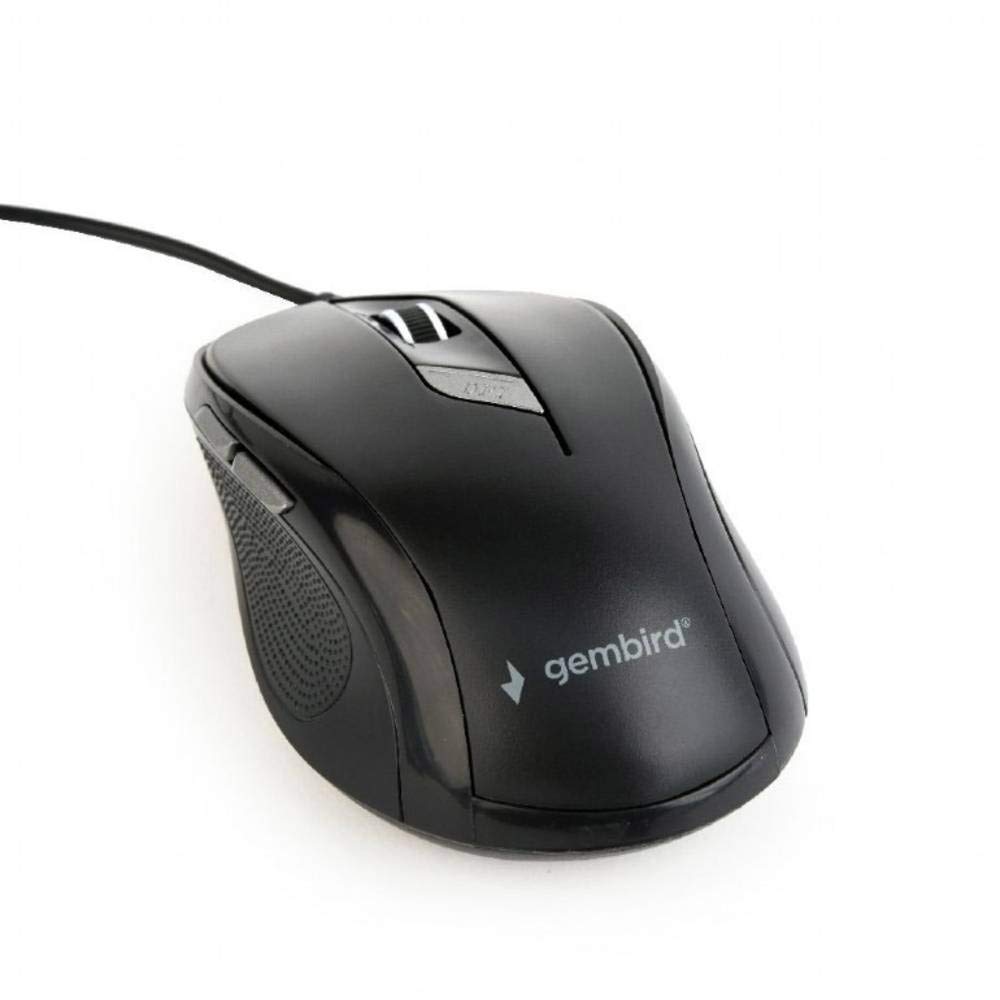
Obrázek: Pohled shora dolů view of the Gembird MUS-6B-01 optical USB mouse. The mouse is black with a matte finish, featuring a scroll wheel, left and right click buttons, a DPI button, and two side buttons. A black USB cable extends from the front of the mouse.
3. Nastavení
Setting up your Gembird MUS-6B-01 mouse is a simple plug-and-play process.
Kroky instalace:
- Vyhledejte v počítači volný port USB.
- Plug the USB connector of the Gembird MUS-6B-01 mouse firmly into the USB port.
- Your operating system (Windows, Linux) will automatically detect and install the necessary drivers. This process may take a few moments.
- Po instalaci ovladačů je myš připravena k použití.
Pro základní funkce obvykle není nutná instalace žádného dalšího softwaru.
4. Návod k obsluze
Familiarize yourself with the functions of each button on your Gembird MUS-6B-01 mouse.
Základní funkce:
- Levé kliknutí: Primary action, selecting items, opening files.
- Klikněte pravým tlačítkem myši: Opens context menus, provides additional options.
- Rolovací kolečko: Procházejte dokumenty nahoru nebo dolů a web stránky.
- Kliknutí prostředním tlačítkem (stisknutí kolečka): Often used to open links in new tabs or for specific application functions.
Pokročilé funkce:
- Tlačítko pro nastavení DPI: Located behind the scroll wheel, this button allows you to cycle through different sensitivity (DPI) settings. Press it to change the cursor speed to suit your preference.
- Tlačítko vpřed (boční): Typically navigates forward in web prohlížeče popř file průzkumníci.
- Tlačítko Zpět (Boční): Typically navigates backward in web prohlížeče popř file průzkumníci.
The functionality of the side buttons may vary depending on the application or operating system settings. Some operating systems allow customization of these buttons.
5. Údržba
Proper care will help extend the life of your Gembird MUS-6B-01 mouse.
Čištění:
- Před čištěním odpojte myš od počítače.
- Použijte měkký, mírně damp, lint-free cloth to wipe the surface of the mouse.
- For stubborn dirt, a small amount of mild soap solution can be applied to the cloth (not directly to the mouse).
- K čištění okolí rolovacího kolečka a mezi tlačítky použijte vatový tampon nebo stlačený vzduch.
- Ensure the optical sensor on the underside is clean and free of dust or debris.
- Do not use harsh chemicals, abrasive cleaners, or immerse the mouse in water.
Skladování:
When not in use for extended periods, store the mouse in a clean, dry environment away from extreme temperatures and direct sunlight.
6. Řešení problémů
If you encounter issues with your Gembird MUS-6B-01 mouse, try the following troubleshooting steps:
| Problém | Možné řešení |
|---|---|
| Myš neodpovídá |
|
| Erratic or jumpy cursor movement |
|
| Tlačítka nefungují |
|
7. Specifikace
Detailed technical specifications for the Gembird MUS-6B-01 Optical USB Mouse:
| Funkce | Specifikace |
|---|---|
| Značka | Gembird |
| Název modelu | MUS-6B-01 |
| Technologie připojení | Kabelové (USB) |
| Technologie detekce pohybu | Optický |
| Množství tlačítek | 6 |
| Orientace rukou | Obouruký |
| Kompatibilní operační systémy | Linux, Windows 7, Windows XP (a novější verze) |
| Hardwarová platforma | Osobní počítač |
| Délka kabelu | 5.0 metrů |
| Hmotnost položky | 74 gramů |
| Materiál | Plast |
| Barva | Černý |
| Jsou vyžadovány baterie | Žádný |
8. Bezpečnostní informace
Dodržujte prosím následující bezpečnostní pokyny:
- Nevystavujte myš vodě ani nadměrné vlhkosti.
- Vyhněte se pádu myši nebo jejímu vystavení silným nárazům.
- Nepokoušejte se myš rozebírat ani opravovat sami. Obraťte se na kvalifikovaný servisní personál.
- Chraňte zařízení před extrémními teplotami a přímým slunečním zářením.
- Elektronický odpad zlikvidujte zodpovědně v souladu s místními předpisy.
9. Záruka a podpora
Gembird products are designed for reliability and performance. For specific warranty terms and conditions, please refer to the warranty card included with your product or visit the official Gembird website. For technical support or further assistance, please contact your retailer or the Gembird customer service department.