
1. Úvod
The Orbit 94886 Pocket Star Ultima is a digital irrigation controller designed for indoor use, capable of managing up to 6 watering stations. This manual provides comprehensive instructions for the installation, programming, and operation of your new irrigation timer, ensuring efficient and effective watering for your landscape. Its user-friendly interface, featuring a large LCD display and intuitive buttons, simplifies the programming process.
2. Bezpečnostní informace
- This controller is designed for indoor use only. Do not install it outdoors or in areas exposed to direct weather conditions.
- Před zahájením jakékoli kabeláže nebo údržby se ujistěte, že je odpojeno napájení.
- Používejte pouze určený 24V AC napájecí adaptér. Použití nesprávného napájecího zdroje může poškodit zařízení a vést ke ztrátě záruky.
- Keep the controller away from water sources and high humidity to prevent electrical hazards.
- Do not attempt to open or repair the controller yourself. Refer all servicing to qualified personnel.
3. Obsah balení
Your Orbit 94886 Pocket Star Ultima package should contain the following item:
- One (1) Orbit 94886 Pocket Star Ultima 6-Station Indoor Irrigation Controller.
4. Konec produktuview
The Orbit Pocket Star Ultima controller features a clear LCD display, intuitive navigation buttons, and a rotary dial for easy program selection. The terminal block for wiring is located at the bottom of the unit, protected by a removable cover.

Obrázek 4.1: Přední strana view of the Orbit 94886 Pocket Star Ultima controller, showing the LCD screen, control buttons, and rotary dial.

Figure 4.2: The controller with its bottom cover attached, illustrating its compact design.
5. Nastavení
5.1. Instalace
The Orbit 94886 controller is designed for indoor installation. Choose a clean, dry location away from direct sunlight and extreme temperatures. Mount the unit securely to a wall using appropriate screws and anchors.

Obrázek 5.1: Přample installation diagram, showing the indoor controller connected to an outdoor irrigation valve.
5.2. Zapojení
Before wiring, ensure the power supply to the controller is disconnected. The terminal block is located at the bottom of the unit. Use simple tool-less "push-in" terminals for easy wire connections.
- Common Wire (COM): Connect the common wire from your irrigation valves to the terminal labeled "COM". This is typically a white wire.
- Station Wires (1-6): Connect each individual valve wire to its corresponding station terminal (1 through 6).
- Rain Sensor (SENSOR): If using a rain sensor (sold separately), connect its wires to the "SENSOR" terminals. The controller supports a normally closed rain sensor.
- Pump Start Relay (PUMP): If you have a pump start relay or master valve, connect its wires to the "PUMP" terminals.
- 24V AC Power (24VAC): Connect the 24V AC power adapter wires to the "24VAC" terminals.
Obrázek 5.2: Detailní view of the wiring terminal block, showing connections for 24VAC, SENSOR, COM, stations 1-6, and PUMP.
Important Power Limitation Warning:
The controller's power supply has specific current limitations. Each valve connected should not exceed 150mA (milliampere) at 24V. The total current drawn by all simultaneously active valves must not exceed 500mA. For example, if your valves draw 150mA each, you can operate a maximum of 3 valves simultaneously. If your valves draw 220mA each, you can operate a maximum of 2 valves simultaneously. Exceeding these limits can damage the controller.
6. Návod k obsluze
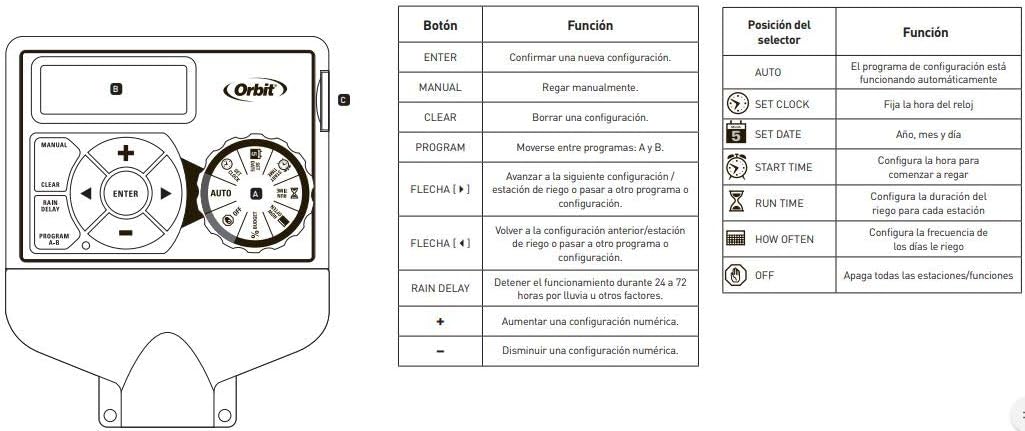
The controller features a rotary dial to select different functions and buttons for navigation and setting values.

Figure 6.1: Controller interface with a guide to button and dial functions.
6.1. Rotary Dial Functions
- NASTAVIT HODINY: Používá se k nastavení aktuálního času a dne.
- NASTAVIT DATUM: Used to set the current year, month, and day.
- DOBA SPUŠTĚNÍ: Used to set the start times for your watering programs.
- DOBA PROVOZU: Used to set the duration for each watering station (1 to 99 minutes).
- JAK ČASTO: Used to set the watering frequency (e.g., specific days of the week, odd/even days).
- AUTO: The default operating mode where programmed schedules run automatically.
- OFF: Disables all watering programs and functions.
6.2. Funkce tlačítek
- ZADEJTE: Confirms a setting or moves to the next step.
- MANUÁL: Initiates manual watering.
- JASNÝ: Clears a setting or program.
- Zpoždění deště: Activates the rain delay function (24, 48, or 72 hours).
- PROGRAM A-B: Switches between independent programs (A, B, C). The controller supports 3 independent programs.
- +/- tlačítka: Adjust numerical values up or down.
- Tlačítka se šipkami (doleva/doprava): Navigate through settings or stations.
6.3. Programming Your Controller
- Set Current Time and Date: Otočte voličem na NASTAVIT HODINY a NASTAVIT DATUM. Use the +/- buttons to adjust values and ENTER to confirm.
- Vyberte program: Stiskněte tlačítko PROGRAM AB button to select Program A, B, or C. Each program can have up to 4 start times.
- Nastavit časy zahájení: Otočte voličem na ČAS STARTU. Use the +/- buttons to set up to four start times for the selected program. Press ENTER after each time.
- Nastavte doby běhu: Otočte voličem na DOBA PROVOZU. Use the arrow buttons to select each station (1-6) and the +/- buttons to set the watering duration (1-99 minutes) for that station. Press ENTER after each.
- Nastavení frekvence zavlažování: Otočte voličem na JAK ČASTO. Select specific days of the week, or choose odd/even day watering. Use the arrow and +/- buttons to make your selections.
- Aktivace programu: Otočte voličem na AUTO to enable the programmed schedule.
6.4. Ruční provoz
To water manually, turn the dial to AUTOa poté stiskněte tlačítko MANUÁL button. Use the arrow buttons to select the desired station and the +/- buttons to set the run time. Press ENTER to start manual watering. The controller will return to automatic mode after the manual cycle is complete.
6.5. Funkce zpoždění deště
If rain is expected or has occurred, you can temporarily suspend watering. Turn the dial to AUTOa poté stiskněte tlačítko ZPOŽDĚNÍ DEŠTĚ button. Use the +/- buttons to select a delay of 24, 48, or 72 hours. The controller will automatically resume the programmed schedule after the delay period.
7. Údržba
- Udržujte ovladač čistý a bez prachu a nečistot. K čištění používejte měkký, suchý hadřík.
- Ensure the installation area remains dry and protected from moisture.
- Pravidelně kontrolujte, zda jsou kabeláž bezpečně upevněna.
- During winter months in cold climates, it is recommended to disconnect the controller and store it indoors to prevent damage from freezing temperatures.
8. Řešení problémů
| Problém | Možná příčina | Řešení |
|---|---|---|
| Displej ovladače je prázdný. | No power or faulty power adapter. | Check power outlet and power adapter connection. Ensure the 24VAC terminals are correctly wired. |
| Stations are not watering. | Controller is in OFF mode; incorrect programming; faulty wiring; rain sensor activated. | Turn dial to AUTO. Verify program settings (start times, run times, frequency). Check wiring to valves. Check if rain sensor is wet or activated. |
| Only some stations are watering. | Faulty valve; wiring issue to specific station; power limitation exceeded. | Check wiring for the non-watering stations. Test the valve manually. Ensure total current draw does not exceed 500mA (max 150mA per valve). |
| Controller resets or behaves erratically. | Power fluctuations; internal fault; excessive current draw. | Zajistěte stabilní napájení. Verify that the total current draw from active valves does not exceed 500mA. If problems persist, contact support. |
9. Specifikace
- Značka: Obíhat
- Model: 94886
- Počet stanic: 6
- Instalace: Krytý
- Příkon: 24 voltů AC
- Max Current per Valve: 150 mA (0.15A)
- Max Total Current: 500 mA (0.5A)
- Rozměry produktu (DxŠxV): 14.6 cm x 6.2 cm x 23.5 cm
- Materiál: Plast
- Typ displeje: LCD
- Provozní teplota: 10 Degrees Celsius (minimum, typical operating range is wider)
- Kompatibilita chytré domácnosti: Není kompatibilní
- UPC: 046878941267
10. Záruka
The Orbit 94886 Pocket Star Ultima 6-Station Indoor Irrigation Controller comes with a 3letá omezená záruka from the date of purchase. This warranty covers defects in materials and workmanship under normal use. Please retain your proof of purchase for warranty claims. The warranty does not cover damage caused by improper installation, misuse, accidents, unauthorized repairs, or exceeding the specified electrical current limits.
11. Podpora
For technical assistance, troubleshooting beyond this manual, or warranty inquiries, please contact Orbit customer support. You can typically find contact information on the Orbit webmístě nebo na obalu produktu.
Orbit Worldwide Webmísto: www.orbitonline.com